
Squirm is a two-player snake-style game in which each player steers a growing worm (“O” and “X”) around a bordered play area using joystick controllers. The program uses the STICK function to read two separate joystick ports simultaneously, tracking each worm’s position with circular buffer arrays (r/c for player 1, q/b for player 2) of up to 250 segments. Numbered food tokens appear randomly on screen; when a worm reaches one, it grows by that value and the opposing worm shrinks, with scores adjusted by a configurable winning total/margin entered at startup. Collision detection is performed entirely by reading character codes from SCREEN$ rather than maintaining a separate collision map, branching into one of eight subroutines (clear-clear, clear-food, clear-body, food-clear, food-body, body-clear, body-food, body-body) depending on what each worm’s new head position contains.
Program Analysis
Program Structure
The program is organized as a BASIC main loop with subroutines addressed by pre-computed line-number variables defined at lines 80–174. This pattern lets the code branch with GO SUB clrclr, GO SUB frdisp, etc., which reads more like structured programming than typical BASIC, even though the targets are plain line numbers stored in variables.
Execution flow is:
- Lines 80–174: Define subroutine address constants.
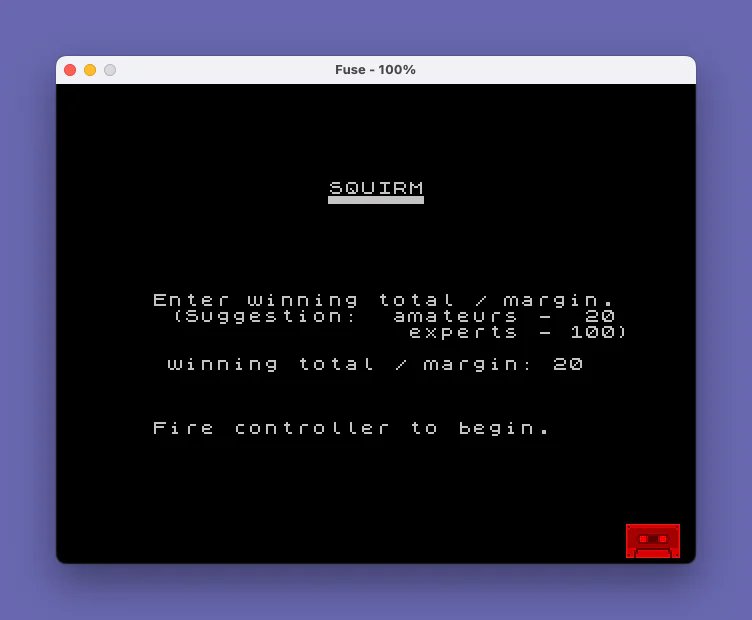
- Lines 185–195: Title screen, prompt for winning margin, wait for joystick fire.
- Lines 208–240: Draw the border using block-graphic characters.
- Lines 260–470: Initialize circular-buffer arrays; randomly place both worms, ensuring no overlap.
- Lines 480–510: Initialize head/tail pointers, food timer, and growth counters.
- Lines 540–860: Main game loop — read sticks, move heads, sample
SCREEN$, dispatch to one of eight collision subroutines. - Lines 890–959: Scoreboard display and win/replay sequence.
- Lines 980–2480: Subroutines for all movement and collision cases.
Joystick Handling
The | keyword (mapped to STICK) reads the joystick at lines 540–550: LET s=|(1,1) and LET s2=|(1,2) for players 1 and 2 respectively. Directions are encoded as bit values (1=right, 2=down, 4=left, 8=up), which are tested with a chain of IF comparisons at lines 560–630 and 640–710. Line 195 uses |(2,1) and |(2,2) (fire buttons on both ports) to wait for either player to start the game.
Circular Buffer for Worm Bodies
Each worm’s body is stored as a pair of circular arrays of length nseg=250. Player 1 uses r() (rows) and c() (columns); player 2 uses q() and b(). Head pointers hp/hp2 advance on each step and wrap at 250; tail pointers tp/tp2 advance only when the worm is not growing (i.e., g/g2 growth counters are zero). This is an efficient ring-buffer approach that avoids shifting arrays.
Screen$-Based Collision Detection
Rather than maintaining a separate collision map, the program reads character codes directly from the display at lines 720–730 using CODE SCREEN$ (y,x) and CODE SCREEN$ (y2,x2). The results are classified as:
- Code 32 — empty space
- Codes 49–57 — food token (digits ‘1’–’9′)
- Anything else — worm body segment
The combination of both worms’ head-cell contents determines which of eight subroutines is called:
| Player O cell | Player X cell | Subroutine variable |
|---|---|---|
| Clear | Clear | clrclr (970) |
| Clear | Food | clrfr (1190) |
| Clear | Body | clrbl (1450) |
| Food | Clear | frclr (1330) |
| Food | Body | frbl (1630) |
| Body | Clear | blclr (1540) |
| Body | Food | blfr (1710) |
| Body | Body | blbl (1790) |
A special head-on collision check (collision, line 1860) fires first at line 760 when both worms occupy the same cell on the same tick.
Food System
Food appearance is governed by two counters: fv (a visibility/countdown timer) and fp (a presence timer). When fv counts down to 1, a random screen position is chosen (rejecting occupied cells), a random digit 1–9 is printed as the food token, and fp is set to a random duration (line 1120: sum of two uniform 0–24 values, giving a rough triangular distribution around 25). When fp counts down to 1, the food is erased and a new fv is drawn. The frdisp subroutine (line 2210) plays an animated countdown beep sequence when food is consumed.
Scoring Logic
Eating food adds the food token’s digit value to the eating worm’s growth counter (g or g2). The growths subroutine (line 1930) converts growth into score increments each game tick: while g>0, scr increases by 1 per tick and the worm’s tail is held. Hitting a body segment costs the offending worm 10 points (scr=scr-10 or scr2=scr2-10) and gives the other worm +1 if it has any growth stored. Mutual head-on collisions (lines 1820–1840) deduct 10 from both players.
Win Condition
Lines 930–934 implement a three-part end-game check after each round: if scores are equal the game continues; if the absolute difference exceeds wtm (the player-entered margin) the winner is declared; if either score reaches 100 or the winning total the game also ends. This allows both a margin-of-victory mode and an absolute target mode depending on input.
Win Fanfare
Lines 944–959 use SOUND statements to produce a victory melody with a sweeping frequency loop (lines 946–950) and a decaying noise channel (line 951). A scrolling “Fire to play again!” ticker is implemented at line 953 by printing a 32-character window into a repeated string a$, advancing the offset each iteration — a classic BASIC marquee technique. Pressing fire on either joystick at line 957 restarts with RUN.
Anomalies and Notes
- Line 880 references
GO TO 520but line 520 does not exist in the listing; the nearest preceding line is 510. On this system, aGO TOtargeting a missing line jumps to the next line after the target, so execution would resume at line 540 — which is exactly the top of the main sense/move loop. This is an intentional technique. - Line 200 (referenced by
GO TO 200at line 935 for replay) is not shown in the listing but would be expected to restart worm placement; the program likely falls through from line 195 to 208 on initial run, and line 200 is between 195 and 208, so replays correctly re-enter worm initialization. - Line 2100 contains
STOPas an apparent guard for an impossible state (neither worm growing, both growth counters nonzero simultaneously). In normal play this branch is not reachable. - The delay loop at lines 870–880 (
FOR i=1 TO 20: NEXT i) provides a speed governor in the clear-clear and food-clear cases to prevent the worm from moving too fast when no collision processing is needed.
Image Gallery
Source Code
   80 LET clrclr=970
   90 LET clrfr=1190
  100 LET clrbl=1450
  110 LET frclr=1330
  120 LET frbl=1630
  130 LET blclr=1540
  140 LET blfr=1710
  150 LET blbl=1790
  160 LET collision=1860
  170 LET growths=1930
  172 LET frdisp=2210
  174 LET bl1=2310: LET bl2=2410
  185 LET scr=0: LET scr2=0
  190 CLS : PRINT AT 3,13;"SQUIRM";AT 4,13;"\..\..\..\..\..\..";: PAUSE 50
  191 PRINT AT 10,2;"Enter winning total / margin."
  192 PRINT AT 11,3;"(Suggestion:  amateurs -  20";AT 12,18;"experts - 100)";
  193 PRINT AT 14,3;"winning total / margin: ";: INPUT wtm: PRINT wtm
  194 PRINT AT 18,2;"Fire controller to begin."
  195 IF |(2,1)=0 AND |(2,2)=0 THEN GO TO 195
  208 CLS : PRINT AT 0,0;"\:'";
  209 FOR i=1 TO 30: PRINT "\..";: NEXT i
  210 PRINT AT 0,31;"\. "
  220 FOR i=1 TO 20: PRINT AT i,31;"\: ";: NEXT i: PRINT AT 21,31;"\.:"
  230 FOR i=30 TO 1 STEP -1: PRINT AT 21,i;"\..";: NEXT i: PRINT AT 21,0;"\:."
  240 FOR i=20 TO 1 STEP -1: PRINT AT i,0;"\: ";: NEXT i
  260 LET nseg=250
  270 DIM r(nseg): DIM c(nseg)
  280 DIM q(nseg): DIM b(nseg)
  290 LET d=1+INT (4*RND): LET x=5+INT (22*RND): LET y=5+INT (12*RND)
  300 LET r(3)=y: LET c(3)=x
  310 IF d=1 THEN LET r(1)=y: LET r(2)=y: LET c(1)=x-2: LET c(2)=x-1
  320 IF d=4 THEN LET r(1)=y+2: LET r(2)=y+1: LET c(1)=x: LET c(2)=x
  330 IF d=3 THEN LET r(1)=y: LET r(2)=y: LET c(1)=x+2: LET c(2)=x+1
  340 IF d=2 THEN LET r(1)=y-2: LET r(2)=y-1: LET c(1)=x: LET c(2)=x
  350 LET d2=1+INT (4*RND): LET x2=5+INT (22*RND): LET y2=5+INT (12*RND)
  360 LET q(3)=y2: LET b(3)=x2
  370 IF d2=1 THEN LET q(1)=y2: LET q(2)=y2: LET b(1)=x2-2: LET b(2)=x2-1
  380 IF d2=4 THEN LET q(1)=y2+2: LET q(2)=y2+1: LET b(1)=x2: LET b(2)=x2
  390 IF d2=3 THEN LET q(1)=y2: LET q(2)=y2: LET b(1)=x2+2: LET b(2)=x2+1
  400 IF d2=2 THEN LET q(1)=y2-2: LET q(2)=y2-1: LET b(1)=x2: LET b(2)=x2
  420 LET i=1
  430 LET j=1
  440 IF q(i)=r(j) AND b(i)=c(j) THEN GO TO 350
  450 LET j=j+1: IF j<=3 THEN GO TO 440
  460 LET i=i+1: IF i<=3 THEN GO TO 440
  470 FOR i=3 TO 1 STEP -1: PRINT AT r(i),c(i);"O";AT q(i),b(i);"X";: NEXT i
  480 LET hp=4: LET tp=1
  490 LET hp2=4: LET tp2=1
  500 LET fv=INT (10*RND)+1: LET fp=0
  510 LET g=0: LET g2=0
  540 LET s=|(1,1)
  550 LET s2=|(1,2)
  560 IF s=1 THEN LET d=4
  570 IF s=2 THEN LET d=2
  580 IF s=4 THEN LET d=3
  590 IF s=8 THEN LET d=1
  600 IF d=1 THEN LET x=x+1
  610 IF d=2 THEN LET y=y+1
  620 IF d=3 THEN LET x=x-1
  630 IF d=4 THEN LET y=y-1
  640 IF s2=1 THEN LET d2=4
  650 IF s2=2 THEN LET d2=2
  660 IF s2=4 THEN LET d2=3
  670 IF s2=8 THEN LET d2=1
  680 IF d2=1 THEN LET x2=x2+1
  690 IF d2=2 THEN LET y2=y2+1
  700 IF d2=3 THEN LET x2=x2-1
  710 IF d2=4 THEN LET y2=y2-1
  720 LET cs=CODE SCREEN$ (y,x)
  730 LET cs2=CODE SCREEN$ (y2,x2)
  760 IF y2=y AND x2=x THEN GO SUB collision: GO TO 890
  770 IF cs<>32 THEN GO TO 810
  780 IF cs2=32 THEN GO SUB clrclr: GO TO 870
  790 IF cs2>=49 AND cs2<=57 THEN GO SUB clrfr: GO TO 870
  800 GO SUB clrbl: GO TO 890
  810 IF cs<49 OR cs>57 THEN GO TO 840
  820 IF cs2=32 THEN GO SUB frclr: GO TO 870
  830 GO SUB frbl: GO TO 890
  840 IF cs2=32 THEN GO SUB blclr: GO TO 890
  850 IF cs2>=49 AND cs2<=57 THEN GO SUB blfr: GO TO 890
  860 GO SUB blbl: GO TO 890
  870 FOR i=1 TO 20: NEXT i
  880 GO TO 520
  890 PAUSE 100: CLS
  891 FOR i=2 TO 30: PRINT AT 3,i;"\.'";: NEXT i
  892 FOR i=4 TO 15: PRINT AT i,30;"\.'";: NEXT i
  893 FOR i=29 TO 2 STEP -1: PRINT AT 15,i;"\.'": NEXT i
  894 FOR i=14 TO 4 STEP -1: PRINT AT i,2;"\.'";: NEXT i
  900 PRINT AT 5,6;"SCOREBOARD"
  910 PRINT AT 10,11;"player O"
  920 PRINT AT 12,11;"player X"
  922 PRINT AT 10,25;scr
  928 PRINT AT 12,25;scr2
  930 IF scr=scr2 THEN GO TO 935
  932 IF ABS (scr-scr2)>=wtm THEN GO TO 940
  934 IF scr>=100 OR scr2>=wtm THEN GO TO 940
  935 PAUSE 200: CLS : GO TO 200
  940 LET w$="X"
  941 IF scr>scr2 THEN LET w$="O"
  943 FLASH 1: PRINT AT 18,10;"** ";w$;" wins **";: FLASH 0
  944 SOUND 7,62;8,15
  945 FOR j=1 TO 3
  946 FOR i=100 TO 80 STEP -1
  947 SOUND 0,i: PAUSE 3: NEXT i
  948 FOR i=80 TO 100
  949 SOUND 0,i: PAUSE 3: NEXT i
  950 NEXT j
  951 FOR i=15 TO 0 STEP -1: SOUND 8,i: PAUSE 10: NEXT i: SOUND 7,63
  952 FOR i=31 TO 0 STEP -1: PRINT AT 21,i;".";: PAUSE 12: NEXT i: LET a$="................................ Fire to play again ! ": LET a$=a$+a$
  953 FOR i=1 TO 54: PRINT AT 21,0;a$(i TO i+31): PAUSE 10
  957 IF |(2,1)<>0 OR |(2,2)<>0 THEN RUN
  958 NEXT i
  959 GO TO 953
  980 PRINT AT y,x;"O";AT y2,x2;"X"
  985 LET r(hp)=y: LET c(hp)=x
  986 LET q(hp2)=y2: LET b(hp2)=x2
  990 LET hp=hp+1: LET hp2=hp2+1
 1000 IF hp>nseg THEN LET hp=1
 1010 IF hp2>nseg THEN LET hp2=1
 1020 GO SUB Growths
 1030 IF fp>1 THEN LET fp=fp+1: GO TO 1170
 1040 IF fp<>1 THEN GO TO 1090
 1050 LET fp=0
 1060 PRINT AT fy,fx;" ";
 1070 LET fv=INT (8*RND)+2
 1080 GO TO 1170
 1090 IF fv>1 THEN LET fv=fv-1: GO TO 1170
 1100 IF fv<>1 THEN GO TO 1170
 1110 LET fv=0
 1120 LET fp=INT (25*RND)+INT (25*RND)
 1130 LET fy=1+INT (20*RND): LET fx=1+INT (30*RND)
 1140 IF CODE SCREEN$ (fy,fx)<>32 THEN GO TO 1130
 1150 LET f=1+INT (RND*9)
 1160 PRINT AT fy,fx;f
 1170 RETURN
 1200 PRINT AT y,x;"O";
 1210 LET r(hp)=y: LET c(hp)=x
 1230 LET hp=hp+1
 1240 IF hp>nseg THEN LET hp=1
 1250 GO SUB frdisp
 1260 PRINT AT y2,x2;"X";
 1262 LET q(hp2)=y2: LET b(hp2)=x2
 1266 LET hp2=hp2+1
 1268 IF hp2>nseg THEN LET hp2=1
 1270 LET g2=g2+f
 1280 GO SUB growths
 1290 LET fv=INT (8*RND)+2
 1300 LET fp=0
 1310 RETURN
 1340 PRINT AT y2,x2;"X";
 1345 LET q(hp2)=y2: LET b(hp2)=x2
 1350 LET hp2=hp2+1
 1360 IF hp2>nseg THEN LET hp2=1
 1370 GO SUB frdisp
 1380 PRINT AT y,x;"O";
 1382 LET r(hp)=y: LET c(hp)=x
 1386 LET hp=hp+1
 1388 IF hp>nseg THEN LET hp=1
 1390 LET g=g+f
 1400 GO SUB growths
 1410 LET fv=INT (8*RND)+2
 1420 LET fp=0
 1430 RETURN
 1460 PRINT AT y,x;"O";
 1465 LET r(hp)=y: LET c(hp)=x
 1470 LET hp=hp+1: IF hp>nseg THEN LET hp=1
 1480 GO SUB bl2
 1500 IF g>0 THEN LET scr=scr+1
 1510 LET scr2=scr2-10
 1520 RETURN
 1550 PRINT AT y2,x2;"X";
 1555 LET q(hp2)=y2: LET b(hp2)=x2
 1560 LET hp2=hp2+1: IF hp2>nseg THEN LET hp2=1
 1580 GO SUB bl1
 1590 IF g2>0 THEN LET scr2=scr2+1
 1600 LET scr=scr-10
 1610 RETURN
 1640 GO SUB frdisp
 1660 GO SUB bl2
 1670 IF g>0 THEN LET scr=scr+1
 1680 LET scr2=scr2-10
 1690 RETURN
 1720 GO SUB frdisp
 1740 GO SUB bl1
 1750 IF g2>0 THEN LET scr2=scr2+1
 1760 LET scr=scr-10
 1770 RETURN
 1811 LET w$=CHR$ cs: LET z$=CHR$ cs2
 1812 FOR i=1 TO 4
 1813 PRINT AT y,x;"O";: BEEP .5,-15
 1814 PRINT AT y,x;w$
 1815 PRINT AT y2,x2;"X";: BEEP .5,-20
 1816 PRINT AT y2,x2;z$
 1817 NEXT i
 1818 PRINT AT y,x;"O";
 1819 PRINT AT y2,x2;"X";
 1820 LET scr=scr-10
 1830 LET scr2=scr2-10
 1840 RETURN
 1882 FOR i=1 TO 4
 1883 PRINT AT y,x;"O";: BEEP .5,-15
 1885 PRINT AT y2,x2;"X";: BEEP .5,-20
 1887 NEXT i
 1890 LET scr=scr-10
 1900 LET scr2=scr2-10
 1910 RETURN
 1940 IF g<=0 OR g2<=0 THEN GO TO 1980
 1950 LET g=g-1: LET scr=scr+1
 1960 LET g2=g2-1: LET scr2=scr2+1
 1970 GO TO 2150
 1980 IF g<>0 OR g2<>0 THEN GO TO 2040
 1990 PRINT AT r(tp),c(tp);" ";AT q(tp2),b(tp2);" ";
 2000 LET tp=tp+1: LET tp2=tp2+1
 2010 IF tp>nseg THEN LET tp=1
 2020 IF tp2>nseg THEN LET tp2=1
 2030 GO TO 2150
 2040 IF g<=0 OR g2<>0 THEN GO TO 2100
 2050 LET g=g-1: LET scr=scr+1
 2060 PRINT AT q(tp2),b(tp2);" ";
 2070 LET tp2=tp2+1
 2080 IF tp2>nseg THEN LET tp2=1
 2090 GO TO 2150
 2100 IF g<>0 OR g2<=0 THEN STOP
 2110 LET g2=g2-1: LET scr2=scr2+1
 2120 PRINT AT r(tp),c(tp);" ";
 2130 LET tp=tp+1
 2140 IF tp>nseg THEN LET tp=1
 2150 RETURN
 2220 FOR i=f TO 1 STEP -1
 2230 PRINT AT fy,fx;" ";
 2240 PRINT AT fy,fx;i;
 2250 BEEP .5,5+i*5
 2260 PRINT AT fy,fx;" ";
 2270 NEXT i
 2280 RETURN
 2315 LET z$=CHR$ cs
 2320 FOR i=1 TO 4
 2330 PRINT AT y,x;"O";
 2340 BEEP .5,-15
 2350 PRINT AT y,x;z$
 2360 NEXT i
 2370 PRINT AT y,x;"O";
 2380 RETURN
 2415 LET z$=CHR$ cs2
 2420 FOR i=1 TO 4
 2430 PRINT AT y2,x2;"X";
 2440 BEEP .5,-20
 2450 PRINT AT y2,x2;z$
 2460 NEXT i
 2470 PRINT AT y2,x2;"X";
 2480 RETURN
Note: Type-in program listings on this website use ZMAKEBAS notation for graphics characters.