
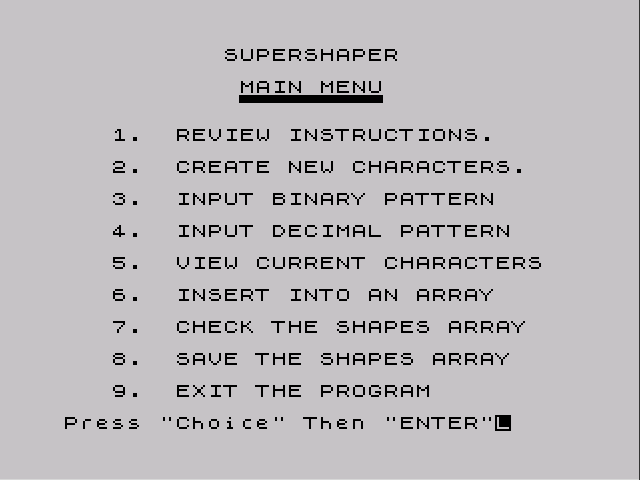
A set of tools for designing user-defined graphics. The main program, shaper, gives a menu-driven 8×8 editor in which squares are painted by moving a cursor with a joystick and holding the fire button. Patterns can also be typed in as eight binary rows or eight decimal values. Each finished shape is shown with its binary and decimal values for every row and POKEd into the chosen UDG from A to U. The program can display the current UDG area in binary, decimal and address form, collect all 21 characters into a string array, and save that array to tape. It also has several pages of instructions.
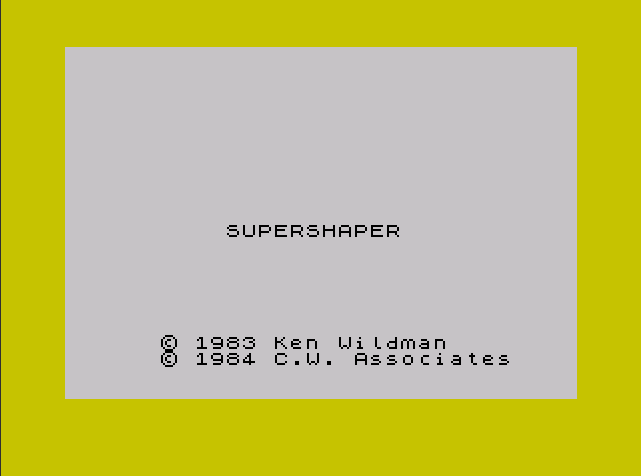
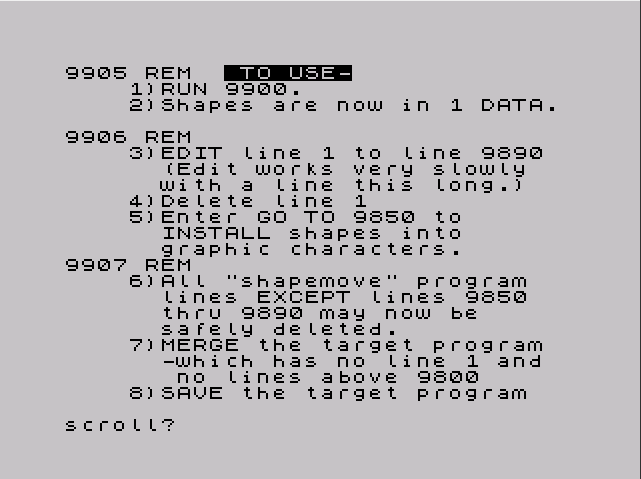
A second program, shapemove, loads a saved shape array and writes it into a single DATA statement. Following the step-by-step instructions in its REM lines, the user then moves that statement, together with a short loader routine, into a target program. Two shape files, library1 and library2, follow on the tape, and a short demonstration, dancer, animates four UDGs at random positions once the library2 shapes have been installed. The title screen reads “Supershaper, © 1983 Ken Wildman, © 1984 C.W. Associates”, and the instructions refer to an instruction sheet packed with the tape.
Program Analysis
Program Structure
- Menu (lines 1–18): nine options, dispatched with a single computed
GO TOthat adds together terms such as(7000 AND CH=1). - Editor (lines 1000–1310): draws the 8×8 grid with
PLOTandDRAW, then loops readingSTICK (1,2)for direction andSTICK (2,2)for the fire button. Pressingafinishes the shape. - Conversions (lines 2000–4050): decimal-to-binary and binary-string input into the grid array
f(), and a routine that prints each row’s binary and decimal values. - Assignment (lines 5000–5310): asks for a letter and POKEs the eight row values into
USR l$, then draws lines from the grid to a small box holding the new graphic, labelled with its letter. - Array and save (lines 9500–9890): reads the 168 bytes at 65368 into
p$(21,24)as 3-digit strings and saves them withSAVE s$ DATA p$().
Shapemove and Dancer
shapemove loads the array with LOAD n$ DATA p$() and then writes the digits straight into the body of its own line 1, a DATA statement that starts out filled with zeros, beginning at the fixed address 26714. After each three digits it adds a comma, the number marker CHR$ 14 and five zero bytes. Those hidden binary values stay zero until the line is edited and entered again, and step 3 of the instructions, which changes line 1 into line 9890, is what makes BASIC rebuild them. Lines 9850–9875 then READ the 168 values into USR "a" to USR "u"+7.
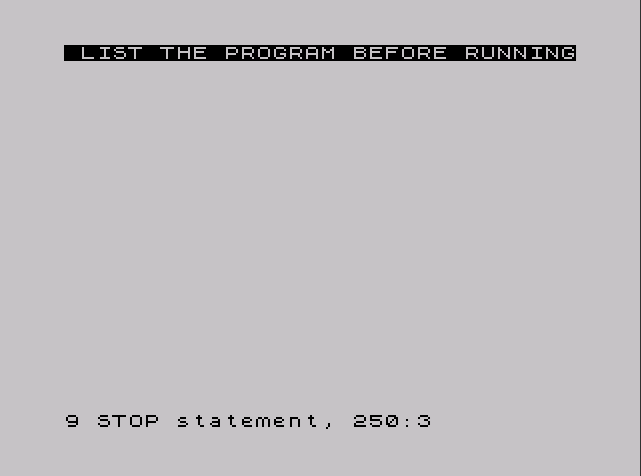
dancer starts at line 250, which only prints “LIST THE PROGRAM BEFORE RUNNING”. Its line 100 tells the user to add the graphics from library2 first. The animation then cycles through UDGs a–d forward and back three times at one spot and moves to a random new position.
Potential Issues
- Line 3 calls
GO SUB 600, but there is no line 600. It works because execution continues from line 640, the next line. - The paint routine at line 2230 prints a space, not a block, for each 1 bit, so patterns entered in binary or decimal do not show up on the grid.
- Menu option 7 lists the arrays
r(),t()andp$(), which only exist after option 6 has been run. Choosing 7 first stops with an error. - The instructions describe a blinking
*cursor, but the editor prints it withFLASH 0. shapemoveassumes its line 1 is the first line in memory, at the standard TS2068 program start. Any change to where the program is loaded would make it overwrite the wrong bytes.- In
dancerthe backward half of each cycle has noPAUSE, so it runs much faster than the forward half.
Image Gallery
Source Code
    1 BORDER 6: PAPER 7: INK 0: CLS
    2 PRINT AT 11,10;"SUPERSHAPER ";AT 18,6;"* 1983 Ken Wildman";AT 19,6;"* 1984 C.W. Associates"
    3 PAUSE 180: GO SUB 600: BORDER 7
    4 LET f=65535: CLS : REM flag for number of letters decoded
   10 CLS : PRINT AT 0,10;"SUPERSHAPER";AT 2,11;"MAIN MENU";AT 3,11;".................."
   11 PRINT AT 5,3;"1.  REVIEW INSTRUCTIONS.";AT 7,3;"2.  CREATE NEW CHARACTERS."
   12 PRINT AT 9,3;"3.  INPUT BINARY PATTERN";AT 11,3;"4.  INPUT DECIMAL PATTERN";AT 13,3;"5.  VIEW CURRENT CHARACTERS";AT 15,3;"6.  INSERT INTO AN ARRAY"
   13 PRINT AT 17,3;"7.  CHECK THE SHAPES ARRAY";AT 19,3;"8.  SAVE THE SHAPES ARRAY";AT 21,3;"9.  EXIT THE PROGRAM"
   15 INPUT "Press ""Choice"" Then ""ENTER""";CH
   17 GO TO (7000 AND CH=1)+(700 AND CH=2)+(760 AND CH=3)+(830 AND CH=4)+(330 AND CH=5)+(9500 AND CH=6)+(9800 AND CH=7)+(9810 AND CH=8)+(18 AND CH=9)
   18 STOP
  330 LET t5=0: REM  bit decoder
  340 LET p=65368: INK 9
  350 CLS
  360 PRINT : PRINT "Binary  / Dec./ Address"
  370 FOR i=0 TO 7
  380 PRINT
  390 LET x=PEEK (p+i)
  400 LET bd=128
  410 DIM b(8)
  420 FOR j=1 TO 8
  430 LET b(j)=INT (x/bd)
  440 LET x=x-b(j)*bd
  450 LET bd=bd/2
  460 IF b(j)=1 THEN PAPER 0
  470 PRINT b(j);
  480 PAPER 7
  490 NEXT j
  500 PRINT "  ";PEEK (p+i);" ",p+i;"           ";
  510 NEXT i
  520 PRINT : PRINT : PRINT
  530 LET p=p+8
  540 REM last p=65536
  550 IF t5=1 AND p=65400 THEN PAPER 7: INK 0: RETURN
  560 IF p<65536 THEN GO TO 370
  570 INPUT "Press any key to continue ";d$
  580 GO TO 10
  640 REM  SET UP SUBROUTINE               LINE NUMBERS
  650 LET mainscr=1000
  652 LET edstik=1200
  654 LET patrn=4000
  656 LET charasgn=5000
  660 LET decbin=2000
  662 LET binstr=3500
  664 LET paint=2200
  670 RETURN
  700 REM  CREATE SHAPE
  710 GO SUB mainscr
  720 GO SUB edstik
  730 GO SUB patrn
  740 GO SUB charasgn
  745 INPUT "Do you wish to change this?";e$
  750 IF e$="y" THEN GO TO 720
  755 GO TO 10
  760 REM  BINARY INPUT
  770 GO SUB mainscr
  780 GO SUB binstr
  790 GO SUB paint
  795 INPUT "Do you wish to change this?";e$
  800 IF e$="y" THEN GO SUB edstik
  805 GO SUB patrn
  810 GO SUB charasgn
  820 GO TO 10
  825 REM
  830 REM  DECIMAL INPUT
  840 GO SUB mainscr
  850 GO SUB decbin
  860 GO SUB paint
  870 GO SUB patrn
  875 INPUT "Do you wish to change this?";e$
  880 IF e$="y" THEN GO SUB edstik
  890 GO SUB patrn
  900 GO SUB charasgn
  910 GO TO 10
  990 STOP
 1000 REM  BUILD MAIN SCREEN
 1020 CLS : PRINT AT 11,0;"Set CAPS LOCK to off - L Cursor"
 1030 PRINT AT 21,0;: INPUT "Press any key to continue";d$
 1038 CLS
 1040 PRINT AT 0,1;"COLUMNS"
 1050 FOR c=1 TO 8: PRINT AT 1,c;c: NEXT c
 1060 FOR l=2 TO 9: PRINT AT l,9;l-1: NEXT l
 1070 DIM r$(10)
 1080 DATA "L","I","N","E","S"
 1090 FOR r=3 TO 7: READ r$(r): PRINT AT r+1,11;r$(r): NEXT r
 1095 RESTORE
 1100 FOR c=8 TO 72 STEP 8
 1110 PLOT c,160
 1120 DRAW 0,-64
 1130 NEXT c
 1140 FOR l=160 TO 96 STEP -8
 1150 PLOT 8,l
 1160 DRAW 64,0
 1170 NEXT l
 1180 DIM f(10,10)
 1190 FOR l=2 TO 9: FOR c=1 TO 8: LET f(l,c)=0: NEXT c: NEXT l
 1195 RETURN
 1200 REM  EDit with STIKs
 1205 LET l=2: LET c=1
 1210 FLASH 0: PRINT AT l,c;"*"
 1220 PRINT AT 2,15;"Column="; FLASH 1;c; FLASH 0;"  Line="; FLASH 1;l-1; FLASH 0;
 1230 IF |(2,2)=1 THEN PRINT AT l,c;"::": LET f(l,c)=1
 1240 IF |(2,2)=0 THEN PRINT AT l,c;" ": LET f(l,c)=0
 1250 PAUSE 35
 1260 IF |(1,2)=1 AND l>2 THEN LET l=l-1
 1270 IF |(1,2)=2 AND l<9 THEN LET l=l+1
 1280 IF |(1,2)=4 AND c>1 THEN LET c=c-1
 1290 IF |(1,2)=8 AND c<8 THEN LET c=c+1
 1300 IF INKEY$="a" OR INKEY$="A" THEN RETURN
 1310 GO TO 1210
 2000 REM  DECBIN / decimal to              binary conversion
 2010 FOR i=2 TO 9
 2020 INPUT " Enter decimal value for line  ";(i-1);x
 2030 LET bd=128
 2040 DIM b(8)
 2050 FOR j=1 TO 8
 2060 LET b(j)=INT (x/bd)
 2070 LET x=x-b(j)*bd
 2080 LET bd=bd/2
 2090 LET f(i,j)=b(j)
 2100 NEXT j
 2110 NEXT i
 2120 RETURN
 2200 REM  PAINT / fill grid
 2210 FOR i=2 TO 9
 2220 FOR j=1 TO 8
 2230 IF f(i,j)=1 THEN PRINT AT i,j;" "
 2240 NEXT j
 2250 NEXT i
 2260 RETURN
 3500 REM  BINSTR / puts binary            into string
 3510 FOR i=0 TO 7
 3520 INPUT "Enter binary pattern for line  ";(i+1);b$
 3530 FOR j=1 TO 8
 3540 LET f(i+2,j)=VAL b$(j)
 3550 NEXT j
 3560 NEXT i
 3570 RETURN
 4000 REM  PATRN / prints binary           and decimal equivalnts
 4001 PRINT AT 2,15;"                ";AT 11,0;" BINary   Decimal";
 4002 DIM v(10)
 4005 PRINT AT 12,1;: FOR l=2 TO 9: PRINT TAB 1;: FOR c=1 TO 8:
 4010 PRINT f(l,c);
 4012 LET v(c)=f(l,c)
 4020 NEXT c
 4025 LET vt=v(1)*128+v(2)*64+v(3)*32+v(4)*16+v(5)*8+v(6)*4+v(7)*2+v(8)
 4030 PRINT TAB 11;"=";vt
 4040 NEXT l
 4050 RETURN
 5000 REM  CHARASGN
 5001 REM  REDEFINED CHARACTERS
 5003 LET n$=""
 5004 REM q=chars(1-21) r=code            t=st. add    p$=dec.eq.
 5005 PRINT : PRINT "Character being redefined? "
 5007 INPUT l$
 5008 PRINT AT 21,0;"                              "
 5010 FOR l=2 TO 9
 5020 FOR c=1 TO 8
 5030 LET v(c)=f(l,c)
 5040 NEXT c
 5075 LET vt=v(1)*128+v(2)*64+v(3)*32+v(4)*16+v(5)*8+v(6)*4+v(7)*2+v(8)
 5100 POKE USR l$+(l-2),vt
 5110 NEXT l
 5112 PLOT 75,159
 5114 DRAW 65,-28
 5120 PLOT 75,95
 5130 DRAW 65,20
 5140 DRAW 0,15: DRAW 15,0: DRAW 0,-15: DRAW -15,0
 5160 PRINT AT 6,18;CHR$ (47+CODE l$)
 5170 PRINT AT 6,20;"=Graphic """;l$;""""
 5300 INPUT "Press any key to continue";d$
 5310 RETURN
 6999 STOP
 7000 REM  Instructions
 7005 CLS
 7010 PRINT AT 0,10;"SUPERSHAPER": OVER 1: PRINT AT 0,9;" ___________": OVER 0
 7015 PRINT AT 3,5;"___________"
 7020 OVER 1: PRINT AT 3,5;"SUPERSHAPER is a program   ";"designed to assist in producing ";"User-Defined-Characters.": OVER 0
 7030 PRINT : PRINT TAB 5;"User-Defined-Characters are";"those which have been programmed"
 7040 PRINT "to assume a variety of shapes to";"satisfy the needs of a specific "
 7050 PRINT "program."
 7060 PRINT : PRINT TAB 5;"When the TS 2068 is first  ";"turned on,  the user-definable  ";"area of RAM (from 65368d) is "
 7070 PRINT "initialized with the letters A-U"
 7080 PRINT "loaded as a pattern of binary   ";"digits (1's and 0's) as shown on";"the following screens..."
 7085 PRINT : PRINT "   (Press any key to continue)"
 7090 IF INKEY$="" THEN GO TO 7090
 7100 LET t5=1: CLS : GO SUB 340
 7110 PAUSE 60: CLS
 7120 PRINT TAB 5;"We have emphasized the 1's"'"by printing them in inverse form";"so that you can more clearly"'"discern the patterns."
 7130 PRINT : PRINT TAB 5;"The TS 2068 uses these bits";"to form each character. We could"
 7140 PRINT "form our own characters by using";"the method shown in the Manual,"'
 7150 PRINT "a rather complicated procedure"'"which requires POKEing each of"
 7160 PRINT "the eight lines which make up "'"the character."
 7170 PRINT : PRINT TAB 5;"Before the character can"'"be POKEd, it must be laid out on"'"graph paper.";
 7180 PRINT TAB 14;"___________"
 7190 OVER 1: PRINT AT 16,14;"SUPERSHAPER allows";: OVER 0
 7200 PRINT "you to lay out your character on";"the screen, using an Atari-type joystick."
 7210 INPUT "Press any key to continue";d$
 7230 CLS : PRINT TAB 5;"The basic format that you"'"will be working with consists of";
 7240 PRINT "an 8 by 8 grid pattern with a"'"blinking ""*"".  The ""*"" can be "'"moved by pushing the joystick in"'"the desired direction."
 7250 PRINT : PRINT TAB 5;"To ""paint"" a grid square"'" you must";
 7260 PRINT " press the joystick"'"button.";
 7270 PRINT : PRINT TAB 5;"If you release the button"'"the square will return to white "'"(binary zero)."''"     To keep a square black "'"(binary 1) you must hold the"'"button down while moving ";
 7280 PRINT "to the next square.  You can return to"'"any square to make changes. "'"When satisfied with the shape,"
 7290 PRINT "just press the ""a"" key ( STOP )."
 7300 INPUT "Press any key to continue";d$
 7310 CLS : PRINT AT 0,11;"___________"
 7315 OVER 1: PRINT AT 0,5;"Next ""SUPERSHAPER"" will ask"'"you to select ";: OVER 0
 7320 PRINT "a character to be redefined.  You may select any"'"key from ""A"" to ""U"".  Just press"'"the selected key and the program"'"will do the rest."
 7330 PRINT : PRINT TAB 5;"As the display indicates,"'"the new shape can be accessed byusing the graphics form of the  ";
 7340 PRINT "letter, i.e.,CAPS SHIFT / 9 then"'"the letter."''"     Or you can PRINT the CHS$ "'"of the character.";
 7350 PRINT "  These CHR$'s"'"start at code 144 for ""graphics"""'"""A"" and go up by one for each"'"letter, thereafter."
 7355 INPUT "Press any key to continue";d$
 7360 CLS : PRINT TAB 5;"Thus: ""PRINT CHR$ 146"" ="
 7370 PRINT "the shape that you've stored on "'"the ""C"" key."
 7380 PRINT : PRINT : PRINT TAB 5;"___________";AT 5,5; OVER 1;"SUPERSHAPER"; OVER 0;" also provides a"'"method for saving your designs"'"and incorporating them into "'"other programs."
 7390 PRINT : PRINT TAB 5;"This method is explained "'"in the instruction sheet packed"'"with the tape."
 7500 PRINT : PRINT TAB 5;"You may also incorporate   shapes that you have designed   on graph paper, or shapes from  other programs for the TS 2068."'"If you are working from graph"'"paper";
 7510 PRINT " read across each row from"'"left to right, counting each"'"black box as a 1 and each white"
 7520 INPUT "Press any key to continue";d$
 7530 CLS : PRINT "box as a ""0"".  You will thus "'"have eight lines of eight "'"characters (0's & 1's)."''"     To enter these lines of "'"characters just select ""3. INPUT";"BINARY..""  choice from the MAIN ";"MENU.  Follow the prompts and "'"input each line of characters "'"as requested."
 7540 PRINT : PRINT TAB 5;"When adding shapes from "'"other programs you must first "'"determine whether you have "'"BINARY or DECIMAL numbers. "'"Both types will be found in DATA"'"statements at the program's end."
 7550 PRINT : PRINT TAB 5;"For BINARY numbers, the "'"DATA statement will contain only";"1's & 0's.  For DECIMAL numbers"'"the DATA statement will be "
 7560 INPUT "Press any key to continue";d$
 7570 CLS : PRINT "filled with numbers ranging "'"from 0 to 255."''"     Select the appropriate"'"Input choice (3 or 4) from the"'"MAIN MENU.  The prompts will "'"direct you to enter each line"'"of eight numbers for the BINARY"'"input, or a single DECIMAL"'"number for each line.  In either"'"case do not enter comma's (,)"'"from the DATA statemnt."
 7580 PRINT : PRINT TAB 5;"You're now ready to start"'"building a tape ""library"" of"'"shapes."''"         GOOD LUCK!!!"
 7790 INPUT "Press any key to continue";d$
 7800 GO TO 10
 7990 STOP
 9500 REM  INITIALIZE STORAGE              ARRAY
 9505 DIM q(21): DIM r(21): DIM t(21): DIM p$(21,24)
 9510 FOR i=1 TO 21
 9520 LET q(i)=i: LET r(i)=i+143: LET t(i)=65360+i*8
 9530 NEXT i
 9600 REM      STORE                    NEW CHARACTER SHAPES
 9604 CLS : FLASH 1: PRINT AT 11,11;"WORKING..."
 9605 LET n$=""
 9700 LET ct=0: LET p=65368
 9710 LET ct=ct+1: FOR j=0 TO 7
 9720 LET m$=STR$ (PEEK (p+j))
 9730 IF LEN m$=3 THEN GO TO 9760
 9740 IF LEN m$=2 THEN LET m$="0"+m$: GO TO 9760
 9750 LET m$="00"+m$
 9760 LET n$=n$+m$
 9770 NEXT j
 9775 LET p$(ct)=n$: LET n$=""
 9780 IF p=65528 THEN FLASH 0: GO TO 10
 9790 LET p=p+8: GO TO 9710
 9800 CLS : FOR i=1 TO 21: PRINT CHR$ (i+64);" ";r(i);" ";t(i);" ";p$(i): NEXT I
 9805 INPUT "Press any key to continue";d$: GO TO 10
 9810 REM  SAVE THE ARRAY OF                  NEW SHAPES
 9820 CLS : PRINT TAB 5;"You must name the character"'"array containing your shapes,"'"that will be saved.  The name"'"must be less than 10 characters"'"long."
 9830 PRINT : PRINT TAB 5;"Enter the selected name"'"and then press ENTER."
 9840 INPUT s$
 9850 CLS : PRINT AT 10,5;"Now prepare to record the"'"array.  Position the tape in"'"the recorder and set to RECORD."
 9870 SAVE s$ DATA p$()
 9880 CLS : PRINT AT 11,8;"SAVE COMPLETE"
 9890 INPUT "Press any key to continue";d$: GO TO 10
    1 BORDER 6: PAPER 7: INK 0: CLS
    2 PRINT AT 11,10;"SUPERSHAPER ";AT 18,6;"* 1983 Ken Wildman";AT 19,6;"* 1984 C.W. Associates"
    3 PAUSE 180: GO SUB 600: BORDER 7
    4 LET f=65535: CLS : REM flag for number of letters decoded
   10 CLS : PRINT AT 0,10;"SUPERSHAPER";AT 2,11;"MAIN MENU";AT 3,11;".................."
   11 PRINT AT 5,3;"1.  REVIEW INSTRUCTIONS.";AT 7,3;"2.  CREATE NEW CHARACTERS."
   12 PRINT AT 9,3;"3.  INPUT BINARY PATTERN";AT 11,3;"4.  INPUT DECIMAL PATTERN";AT 13,3;"5.  VIEW CURRENT CHARACTERS";AT 15,3;"6.  INSERT INTO AN ARRAY"
   13 PRINT AT 17,3;"7.  CHECK THE SHAPES ARRAY";AT 19,3;"8.  SAVE THE SHAPES ARRAY";AT 21,3;"9.  EXIT THE PROGRAM"
   15 INPUT "Press ""Choice"" Then ""ENTER""";CH
   17 GO TO (7000 AND CH=1)+(700 AND CH=2)+(760 AND CH=3)+(830 AND CH=4)+(330 AND CH=5)+(9500 AND CH=6)+(9800 AND CH=7)+(9810 AND CH=8)+(18 AND CH=9)
   18 STOP
  330 LET t5=0: REM  bit decoder
  340 LET p=65368: INK 9
  350 CLS
  360 PRINT : PRINT "Binary  / Dec./ Address"
  370 FOR i=0 TO 7
  380 PRINT
  390 LET x=PEEK (p+i)
  400 LET bd=128
  410 DIM b(8)
  420 FOR j=1 TO 8
  430 LET b(j)=INT (x/bd)
  440 LET x=x-b(j)*bd
  450 LET bd=bd/2
  460 IF b(j)=1 THEN PAPER 0
  470 PRINT b(j);
  480 PAPER 7
  490 NEXT j
  500 PRINT "  ";PEEK (p+i);" ",p+i;"           ";
  510 NEXT i
  520 PRINT : PRINT : PRINT
  530 LET p=p+8
  540 REM last p=65536
  550 IF t5=1 AND p=65400 THEN PAPER 7: INK 0: RETURN
  560 IF p<65536 THEN GO TO 370
  570 INPUT "Press any key to continue ";d$
  580 GO TO 10
  640 REM  SET UP SUBROUTINE               LINE NUMBERS
  650 LET mainscr=1000
  652 LET edstik=1200
  654 LET patrn=4000
  656 LET charasgn=5000
  660 LET decbin=2000
  662 LET binstr=3500
  664 LET paint=2200
  670 RETURN
  700 REM  CREATE SHAPE
  710 GO SUB mainscr
  720 GO SUB edstik
  730 GO SUB patrn
  740 GO SUB charasgn
  745 INPUT "Do you wish to change this?";e$
  750 IF e$="y" THEN GO TO 720
  755 GO TO 10
  760 REM  BINARY INPUT
  770 GO SUB mainscr
  780 GO SUB binstr
  790 GO SUB paint
  795 INPUT "Do you wish to change this?";e$
  800 IF e$="y" THEN GO SUB edstik
  805 GO SUB patrn
  810 GO SUB charasgn
  820 GO TO 10
  825 REM
  830 REM  DECIMAL INPUT
  840 GO SUB mainscr
  850 GO SUB decbin
  860 GO SUB paint
  870 GO SUB patrn
  875 INPUT "Do you wish to change this?";e$
  880 IF e$="y" THEN GO SUB edstik
  890 GO SUB patrn
  900 GO SUB charasgn
  910 GO TO 10
  990 STOP
 1000 REM  BUILD MAIN SCREEN
 1020 CLS : PRINT AT 11,0;"Set CAPS LOCK to off - L Cursor"
 1030 PRINT AT 21,0;: INPUT "Press any key to continue";d$
 1038 CLS
 1040 PRINT AT 0,1;"COLUMNS"
 1050 FOR c=1 TO 8: PRINT AT 1,c;c: NEXT c
 1060 FOR l=2 TO 9: PRINT AT l,9;l-1: NEXT l
 1070 DIM r$(10)
 1080 DATA "L","I","N","E","S"
 1090 FOR r=3 TO 7: READ r$(r): PRINT AT r+1,11;r$(r): NEXT r
 1095 RESTORE
 1100 FOR c=8 TO 72 STEP 8
 1110 PLOT c,160
 1120 DRAW 0,-64
 1130 NEXT c
 1140 FOR l=160 TO 96 STEP -8
 1150 PLOT 8,l
 1160 DRAW 64,0
 1170 NEXT l
 1180 DIM f(10,10)
 1190 FOR l=2 TO 9: FOR c=1 TO 8: LET f(l,c)=0: NEXT c: NEXT l
 1195 RETURN
 1200 REM  EDit with STIKs
 1205 LET l=2: LET c=1
 1210 FLASH 0: PRINT AT l,c;"*"
 1220 PRINT AT 2,15;"Column="; FLASH 1;c; FLASH 0;"  Line="; FLASH 1;l-1; FLASH 0;
 1230 IF |(2,2)=1 THEN PRINT AT l,c;"::": LET f(l,c)=1
 1240 IF |(2,2)=0 THEN PRINT AT l,c;" ": LET f(l,c)=0
 1250 PAUSE 35
 1260 IF |(1,2)=1 AND l>2 THEN LET l=l-1
 1270 IF |(1,2)=2 AND l<9 THEN LET l=l+1
 1280 IF |(1,2)=4 AND c>1 THEN LET c=c-1
 1290 IF |(1,2)=8 AND c<8 THEN LET c=c+1
 1300 IF INKEY$="a" OR INKEY$="A" THEN RETURN
 1310 GO TO 1210
 2000 REM  DECBIN / decimal to              binary conversion
    1 BORDER 6: PAPER 7: INK 0: CLS
    2 PRINT AT 11,10;"SUPERSHAPER ";AT 18,6;"* 1983 Ken Wildman";AT 19,6;"* 1984 C.W. Associates"
    3 PAUSE 180: GO SUB 600: BORDER 7
    4 LET f=65535: CLS : REM flag for number of letters decoded
   10 CLS : PRINT AT 0,10;"SUPERSHAPER";AT 2,11;"MAIN MENU";AT 3,11;".................."
   11 PRINT AT 5,3;"1.  REVIEW INSTRUCTIONS.";AT 7,3;"2.  CREATE NEW CHARACTERS."
   12 PRINT AT 9,3;"3.  INPUT BINARY PATTERN";AT 11,3;"4.  INPUT DECIMAL PATTERN";AT 13,3;"5.  VIEW CURRENT CHARACTERS";AT 15,3;"6.  INSERT INTO AN ARRAY"
   13 PRINT AT 17,3;"7.  CHECK THE SHAPES ARRAY";AT 19,3;"8.  SAVE THE SHAPES ARRAY";AT 21,3;"9.  EXIT THE PROGRAM"
   15 INPUT "Press ""Choice"" Then ""ENTER""";CH
   17 GO TO (7000 AND CH=1)+(700 AND CH=2)+(760 AND CH=3)+(830 AND CH=4)+(330 AND CH=5)+(9500 AND CH=6)+(9800 AND CH=7)+(9810 AND CH=8)+(18 AND CH=9)
   18 STOP
  330 LET t5=0: REM  bit decoder
  340 LET p=65368: INK 9
  350 CLS
  360 PRINT : PRINT "Binary  / Dec./ Address"
  370 FOR i=0 TO 7
  380 PRINT
  390 LET x=PEEK (p+i)
  400 LET bd=128
  410 DIM b(8)
  420 FOR j=1 TO 8
  430 LET b(j)=INT (x/bd)
  440 LET x=x-b(j)*bd
  450 LET bd=bd/2
  460 IF b(j)=1 THEN PAPER 0
  470 PRINT b(j);
  480 PAPER 7
  490 NEXT j
  500 PRINT "  ";PEEK (p+i);" ",p+i;"           ";
  510 NEXT i
  520 PRINT : PRINT : PRINT
  530 LET p=p+8
  540 REM last p=65536
  550 IF t5=1 AND p=65400 THEN PAPER 7: INK 0: RETURN
  560 IF p<65536 THEN GO TO 370
  570 INPUT "Press any key to continue ";d$
  580 GO TO 10
  640 REM  SET UP SUBROUTINE               LINE NUMBERS
  650 LET mainscr=1000
  652 LET edstik=1200
  654 LET patrn=4000
  656 LET charasgn=5000
  660 LET decbin=2000
  662 LET binstr=3500
  664 LET paint=2200
  670 RETURN
  700 REM  CREATE SHAPE
  710 GO SUB mainscr
  720 GO SUB edstik
  730 GO SUB patrn
  740 GO SUB charasgn
  745 INPUT "Do you wish to change this?";e$
  750 IF e$="y" THEN GO TO 720
  755 GO TO 10
  760 REM  BINARY INPUT
  770 GO SUB mainscr
  780 GO SUB binstr
  790 GO SUB paint
  795 INPUT "Do you wish to change this?";e$
  800 IF e$="y" THEN GO SUB edstik
  805 GO SUB patrn
  810 GO SUB charasgn
  820 GO TO 10
  825 REM
  830 REM  DECIMAL INPUT
  840 GO SUB mainscr
  850 GO SUB decbin
  860 GO SUB paint
  870 GO SUB patrn
  875 INPUT "Do you wish to change this?";e$
  880 IF e$="y" THEN GO SUB edstik
  890 GO SUB patrn
  900 GO SUB charasgn
  910 GO TO 10
  990 STOP
 1000 REM  BUILD MAIN SCREEN
 1020 CLS : PRINT AT 11,0;"Set CAPS LOCK to off - L Cursor"
 1030 PRINT AT 21,0;: INPUT "Press any key to continue";d$
 1038 CLS
 1040 PRINT AT 0,1;"COLUMNS"
 1050 FOR c=1 TO 8: PRINT AT 1,c;c: NEXT c
 1060 FOR l=2 TO 9: PRINT AT l,9;l-1: NEXT l
 1070 DIM r$(10)
 1080 DATA "L","I","N","E","S"
 1090 FOR r=3 TO 7: READ r$(r): PRINT AT r+1,11;r$(r): NEXT r
 1095 RESTORE
 1100 FOR c=8 TO 72 STEP 8
 1110 PLOT c,160
 1120 DRAW 0,-64
 1130 NEXT c
 1140 FOR l=160 TO 96 STEP -8
 1150 PLOT 8,l
 1160 DRAW 64,0
 1170 NEXT l
 1180 DIM f(10,10)
 1190 FOR l=2 TO 9: FOR c=1 TO 8: LET f(l,c)=0: NEXT c: NEXT l
 1195 RETURN
 1200 REM  EDit with STIKs
 1205 LET l=2: LET c=1
 1210 FLASH 0: PRINT AT l,c;"*"
 1220 PRINT AT 2,15;"Column="; FLASH 1;c; FLASH 0;"  Line="; FLASH 1;l-1; FLASH 0;
 1230 IF |(2,2)=1 THEN PRINT AT l,c;"::": LET f(l,c)=1
 1240 IF |(2,2)=0 THEN PRINT AT l,c;" ": LET f(l,c)=0
 1250 PAUSE 35
 1260 IF |(1,2)=1 AND l>2 THEN LET l=l-1
 1270 IF |(1,2)=2 AND l<9 THEN LET l=l+1
 1280 IF |(1,2)=4 AND c>1 THEN LET c=c-1
 1290 IF |(1,2)=8 AND c<8 THEN LET c=c+1
 1300 IF INKEY$="a" OR INKEY$="A" THEN RETURN
 1310 GO TO 1210
 2000 REM  DECBIN / decimal to              binary conversion
 2010 FOR i=2 TO 9
 2020 INPUT " Enter decimal value for line  ";(i-1);x
 2030 LET bd=128
 2040 DIM b(8)
 2050 FOR j=1 TO 8
 2060 LET b(j)=INT (x/bd)
 2070 LET x=x-b(j)*bd
 2080 LET bd=bd/2
 2090 LET f(i,j)=b(j)
 2100 NEXT j
 2110 NEXT i
 2120 RETURN
 2200 REM  PAINT / fill grid
 2210 FOR i=2 TO 9
 2220 FOR j=1 TO 8
 2230 IF f(i,j)=1 THEN PRINT AT i,j;" "
 2240 NEXT j
 2250 NEXT i
 2260 RETURN
 3500 REM  BINSTR / puts binary            into string
Note: Type-in program listings on this website use ZMAKEBAS notation for graphics characters.