
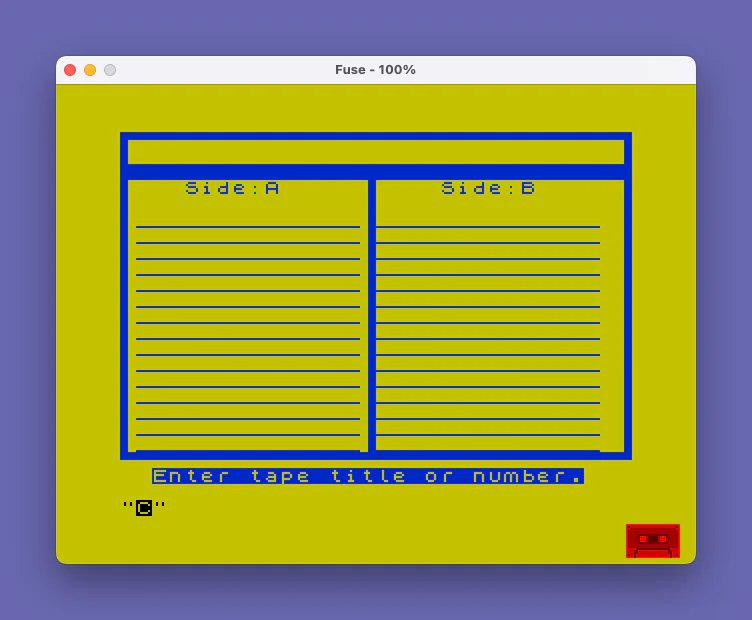
This program generates a formatted cassette tape label on a connected printer, allowing users to enter a tape title and up to 15 program names with index numbers for both Side A and Side B. The label is drawn entirely with Spectrum block graphics characters, creating a bordered two-column layout on screen before printing. The program uses OVER 1 mode to print text over the underline characters already drawn in the label cells. A POKE to address 23609 adjusts the printer line spacing, and the “STOP” detection at line 170 and 240 checks for a specific padded string that results from entering STOP (SYMBOL SHIFT + A) at an INPUT prompt.
Program Analysis
Program Structure
The program is divided into four logical phases:
- Setup (lines 10–17): Displays instructions, beeps, waits for ENTER, and POKEs the printer spacing system variable.
- Label frame drawing (lines 20–110): Clears the screen, draws the tape label border using block graphics, and fills each row with underline characters for both columns.
- Side A data entry (lines 120–200): Prompts for a tape title and up to 15 program entries with index numbers.
- Side B data entry (lines 210–290): Mirrors the Side A entry loop for the right-hand column.
Label Drawing Technique
The border is built entirely from Spectrum block graphics escape sequences. Line 35 draws the top edge using ▖▀▀▀...▀▗ characters, and line 40 draws a solid double-pixel row of █ characters at row 2 and a row of ▀ at row 20. Lines 50–70 draw vertical bars on the left edge (column 0), the center divider (column 15), and the right edge (column 31) using ▌ and ▐ characters. This gives the appearance of a clean box without any DRAW commands.
Lines 85–100 pre-fill each data row (rows 5–19) with 14 underscores in the Side A column and 15 underscores in the Side B column. These serve as visual baselines for entries.
OVER 1 Printing
Data entry output uses OVER 1 (line 178, 190, 245, 270), which XORs printed pixels with the existing screen content. This allows program titles to overwrite the underscore baseline without completely erasing it, though in practice the underscore characters are fully replaced by the text characters due to pixel overlap. This is a common label-formatting trick on the Spectrum.
STOP Key Detection
Lines 170 and 240 check whether the user entered " STOP " (a padded string). When SYMBOL SHIFT + A is pressed at an INPUT prompt, the Spectrum inserts the keyword STOP followed by spaces to fill the input buffer representation. The program uses this as a signal to skip to the next section rather than exiting with an error, which is a well-known idiom for graceful early exit from INPUT loops.
Confirmation / Redo Mechanic
After each entry, lines 192 and 272 ask “OK (ENT/N)”. If the user types N or n, the program re-prints the previous values using uppercase variable names (N$, I$) over the same screen positions before looping back to re-enter that row. Note that lowercase n$ and i$ are used for new input, while uppercase N$ and I$ implicitly refer to the same variables in Spectrum BASIC (variable names are case-insensitive for non-string variables, but string variable names are case-sensitive — see anomaly below).
Bugs and Anomalies
- Case-sensitive string variable name mismatch: The program stores input in
n$andi$(lowercase), but the redo branch at line 192 reprintsN$andI$(uppercase). In Spectrum BASIC,n$andN$are distinct variables, so the redo display would show whatever was previously stored in the uppercase versions (initially empty strings), not the most recently entered values. This is a genuine bug likely introduced during transcription of the incomplete listing. - DIM N$(10) unused: Line 30 dimensions an array
N$(10), but the program never uses it — all title data is stored in the simple string variablen$. This array declaration is dead code, possibly a remnant from an earlier version of the program. - No actual LPRINT/COPY output: Despite the setup message instructing the user to turn on the printer, the program contains no
LPRINT,LLIST, orCOPYcommand. The label is drawn to the screen only. The POKE to 23609 (printer line spacing) is therefore also inert for the program’s actual operation. - STOP at line 310: The program ends with a
STOPstatement rather than returning to a menu or offering a reprint option.
Key Variables
| Variable | Purpose |
|---|---|
a$ | Tape title, printed at row 1 |
n$ / N$ | Current program title entry (case mismatch bug) |
i$ / I$ | Current index number entry (case mismatch bug) |
o | Entry counter displayed in prompts (1–15) |
n | Loop variable for screen row (5–19) |
Z$ | General input holder for ENTER/confirmation prompts |
Complete Original Version
The listing above is the reprint that was “finished from incomplete listing” and stops before any printing. The download is James DuPuy’s complete original (“TAPE LABLE By James G. DuPuy 2-3-85 in April Ramtop”), from a SINCUS/SNUG Oliger disk. After you fill in up to 15 titles and index numbers for each side, it COPYs the finished label, then builds a double-height title strip for the cassette spine: it reads each character of the tape title from the ROM character set at 15616, stretches it into UDGs A and B and prints it, and COPYs that too. The same complete version is in the SINCUS Exchange Tape 102 download.
This copy already saved to tape, so it needed no changes. Tested in ZEsarUX. Typing STOP (Symbol Shift+A) at a title prompt is meant to skip to side B, but the check compares the 10-character n$ with a longer literal and appears never to match.
Image Gallery
Source Code
   10 REM TAPE LABEL by James G.          Dupuy 02-05-85   FROM           ZX-APPEAL Oct/Nov '87           Entered into library            and programming                 finished from                   incomplete listing by           Anthony Willing
   12 PRINT AT 10,0;" STOP TAPE AND TURN ON PRINTER!!"
   13 BEEP .5,30
   14 PRINT AT 14,0;" Press ENTER to Start."
   15 POKE 23609,20
   16 PRINT AT 16,0;"To skip to side B or to skip    side B, just enter ""STOP"" by    holding the Sym.Shift and press the ""A"" key at the program      title prompts."
   17 INPUT Z$
   20 BORDER 6: BRIGHT 1: CLS
   30 DIM N$(10)
   35 PRINT AT 0,0;"\ .\''\''\''\''\''\''\''\''\''\''\''\''\''\''\''\''\''\''\''\''\''\''\''\''\''\''\''\''\''\''\. ";AT 1,0;"\ :";TAB 31;"\ :"
   40 PRINT AT 2,0;"\::\::\::\::\::\::\::\::\::\::\::\::\::\::\::\::\::\::\::\::\::\::\::\::\::\::\::\::\::\::\::\::";AT 20,0;"\''\''\''\''\''\''\''\''\''\''\''\''\''\''\''\''\''\''\''\''\''\''\''\''\''\''\''\''\''\''\''\''"
   50 FOR N=3 TO 19
   60 PRINT AT N,0;"\: ";AT N,15;"\ :";AT N,31;"\ :"
   70 NEXT N
   80 PRINT AT 3,4;"Side:A";AT 3,20;"Side:B"
   85 FOR n=5 TO 19
   90 PRINT AT n,1;"______________";AT n,16;"_______________"
  100 NEXT n
  120 PRINT AT 21,2; FLASH 1;"Enter Tape Title or Number."
  130 INPUT a$: IF a$="" THEN GO TO 130
  135 PRINT AT 1,2;a$
  140 LET o=1
  150 FOR n=5 TO 19
  155 PRINT AT 21,0;"                                "
  160 PRINT AT 21,0; FLASH 1;"Enter Title for Side A #:";o
  170 INPUT n$: IF n$=" STOP          " THEN GO TO 210
  178 PRINT AT n,1; OVER 1;n$
  180 PRINT AT 21,0; FLASH 1;"Enter Index Number for #:";o
  185 INPUT i$
  190 PRINT AT n,11; OVER 1;">";i$
  192 INPUT "OK (ENT/N)  ";Z$: IF Z$="N" OR Z$="n" THEN PRINT AT N,1; OVER 1;N$;AT N,11; OVER 1;">";I$: GO TO 155
  195 LET o=o+1
  200 NEXT n
  210 LET o=1
  215 FOR n=5 TO 19
  220 PRINT AT 21,0;"                                "
  230 PRINT AT 21,0; FLASH 1;"Enter Title for Side B #:";o
  240 INPUT n$: IF n$=" STOP          " THEN GO TO 295
  245 PRINT AT n,16; OVER 1;n$
  250 PRINT AT 21,0; FLASH 1;"Enter Index Number for #:";o
  260 INPUT i$
  270 PRINT AT n,27; OVER 1;">";i$
  272 INPUT "OK (ENT/N)  ";Z$: IF Z$="N" OR Z$="n" THEN PRINT AT N,16; OVER 1;N$;AT N,27; OVER 1;">";I$: GO TO 220
  280 LET o=o+1
  290 NEXT n
  300 PRINT AT 21,0;"                                "
  310 STOP
  320 SAVE "TapeLabel" LINE 1
Note: Type-in program listings on this website use ZMAKEBAS notation for graphics characters.