
This program creates a weekly VCR or audio tape recording schedule, collecting day, start time, end time, channel number, and program name for multiple entries displayed in a formatted table on screen. It draws a decorative border using Spectrum block graphics characters at startup, then uses a row counter variable to position each new schedule entry correctly in the table. After all entries are recorded, the user is prompted to send the schedule to a printer via the COPY command. The program enforces a maximum of 12 characters for program names and 3 characters for day abbreviations using LEN checks. A SAVE with auto-run and a VERIFY sequence at lines 9998–9999 are included for distribution.
Program Analysis
Program Structure
The program is organized into three broad phases: initialization and title display (lines 100–240), the data-entry loop (lines 250–485), and the print/exit phase (lines 490–9000). A SAVE/VERIFY block at lines 9998–9999 handles distribution. There are no subroutines; all flow is managed with GO TO and a single loop counter variable C.
Screen Layout and Border Drawing
Lines 200–230 draw a decorative border across the top of the screen using Spectrum block-graphic escape sequences. Line 200 uses \:' (▙) and \''\ (▀) characters to form the top edge, line 210 draws the sides with \: (▌) and \ : (▐), and line 220 draws the bottom edge with \:. (▟) and \.. (▄) sequences. The title “WEEKLY TAPING SCHEDULE” is then overlaid at AT 1,3, sitting within the border region.
Data Entry Loop
The counter C starts at 1 and is incremented by 1 at line 480 for each entry. Each field is printed at row C+7, so the first record appears at row 8 (0-indexed). The columns are fixed for each field:
- Day (
D$): column 0 - Start time (
S$): column 5 - End time (
E$): column 12 - Channel (
X$): column 17 - Program name (
P$): column 20
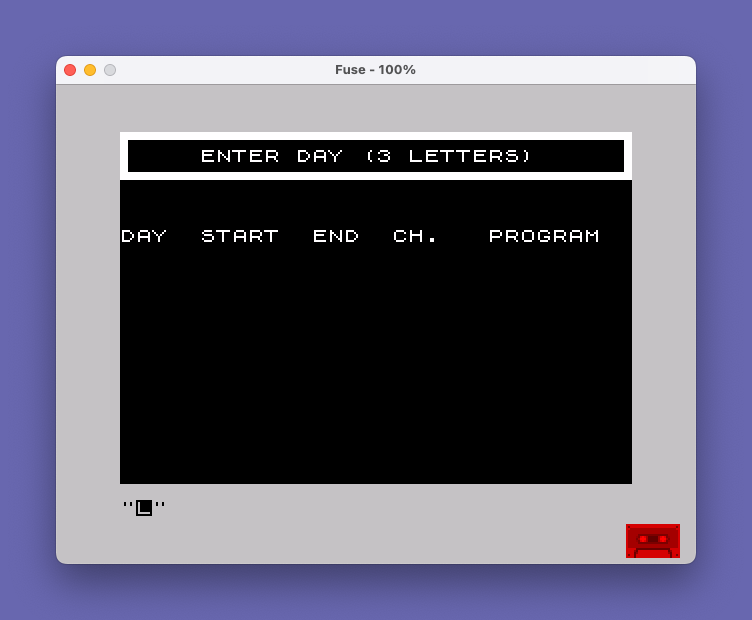
These columns align with the header printed at line 250: "DAY START END CH. PROGRAM ".
Input Validation
Two input fields have length checks. Line 285 re-prompts if LEN D$>3, enforcing three-letter day abbreviations. Line 410 silently truncates program names longer than 12 characters using a slice expression (P$(1 TO 12)), rather than re-prompting. No validation is applied to the time or channel fields, so they accept arbitrary strings.
Prompt Area Management
The program reserves row 1 as a prompt area. The string C$ (30 spaces, initialized at line 110) is printed at AT 1,1 before each new prompt to erase the previous message. This is a common Spectrum BASIC technique for in-place screen updates without a full CLS.
Copy and Exit
After all entries are complete, lines 490–540 ask whether the user wants a printed copy. If “Y”, a heading is printed at row 1 and COPY dumps the screen to a printer. If “N”, execution jumps directly to STOP at line 9000. No handling is provided for responses other than “Y” or “N”; the program falls through to COPY regardless if B$ is neither, since both conditions at lines 510 and 530 are independent IF tests rather than an IF/ELSE construct.
Notable Bugs and Anomalies
- Missing clear before channel prompt: Line 371 clears the prompt area before the channel prompt, but line 390 (program name prompt) does not clear it first — the channel prompt text remains visible while the program name is being entered.
- Counter incremented before loop test:
Cis incremented at line 480 before theIF A$="Y"check at line 485. If the user answers “N”, the counter is still incremented, which is harmless since no further entries are written, but wastes the last row position. - No row overflow guard: The screen has 22 rows; with the header at row 7 and entries starting at row 8, only 14 entries fit before
AT C+7,0would scroll or wrap. There is no check to prevent this. - Case-sensitive input: The comparisons at lines 485, 510, and 530 test only for uppercase “Y” and “N”. Lowercase responses are silently ignored or cause unexpected behavior.
Save and Verify Block
Line 9998 saves the program with LINE 1 so it auto-runs from line 100. Line 9999 performs a PAUSE 180 to allow tape rewind time, prints a reminder message, pauses again for 400 frames, then executes VERIFY "TAPE SCHED" to confirm the save was successful — a practical workflow commonly included in distributed Spectrum programs.
Image Gallery
Source Code
  100 LET C=1
  110 LET C$="                              "
  200 PRINT "\:'\''\''\''\''\''\''\''\''\''\''\''\''\''\''\''\''\''\''\''\''\''\''\''\''\''\''\''\''\''\''\':"
  210 PRINT "\:                               \ :"
  220 PRINT "\:.\..\..\..\..\..\..\..\..\..\..\..\..\..\..\..\..\..\..\..\..\..\..\..\..\..\..\..\..\..\..\.:"
  230 PRINT AT 1,3;" WEEKLY TAPING SCHEDULE"
  240 PAUSE 90
  250 PRINT AT 6,0;"DAY  START  END  CH.   PROGRAM "
  260 PRINT AT 1,1;C$
  270 PRINT AT 1,1;"    ENTER DAY (3 LETTERS)"
  280 INPUT D$
  285 IF LEN D$>3 THEN GO TO 270
  290 PRINT AT C+7,0;D$
  300 PRINT AT 1,1;C$
  310 PRINT AT 1,4;"  ENTER STARTING TIME"
  320 INPUT S$
  330 PRINT AT C+7,5;S$
  340 PRINT AT 1,1;C$
  350 PRINT AT 1,4;"  ENTER ENDING TIME"
  360 INPUT E$
  370 PRINT AT C+7,12;E$
  371 PRINT AT 1,1;C$
  375 PRINT AT 1,4;"    ENTER CHANNEL NO."
  377 INPUT X$
  380 PRINT AT C+7,17;X$
  390 PRINT AT 1,4;"  ENTER PROGRAM NAME"
  400 INPUT P$
  410 IF LEN P$>12 THEN LET P$=P$(1 TO 12)
  440 PRINT AT C+7,20;P$
  450 PRINT AT 1,1;C$
  460 PRINT AT 1,4;"ANOTHER PROGRAM?  Y/N"
  470 INPUT A$
  480 LET C=C+1
  485 IF A$="Y" THEN GO TO 270
  490 PRINT AT 1,4;"DO YOU WANT A COPY?  Y/N"
  495 INPUT B$
  500 PRINT AT 1,1;C$
  510 IF B$="N" THEN GO TO 9000
  530 IF B$="Y" THEN PRINT AT 1,4;"WEEKLY TAPING SCHEDULE     "
  540 COPY
 9000 STOP
 9998 SAVE "TAPE SCHED" LINE 1
 9999 CLS : PAUSE 180: PRINT AT 10,5;"REWIND TO VERIFY": PAUSE 400: VERIFY "TAPE SCHED"
Note: Type-in program listings on this website use ZMAKEBAS notation for graphics characters.