
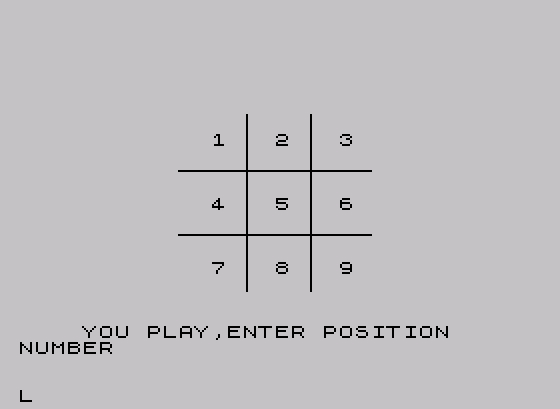
This program implements a two-player Tic-Tac-Toe game with a title screen, score tracking across multiple rounds, and a graphical board drawn using PLOT commands. The board grid lines are rendered pixel-by-pixel using PLOT in a FOR loop (lines 200–205), while X marks are drawn diagonally with PLOT offsets (subroutine at line 4000) and O marks use the built-in CIRCLE command (line 4054). Win detection works by storing player moves as values 1 (X) or 5 (O) in a 3×3 array s(), then checking whether any row, column, or diagonal sums to 3 or 15 respectively. A 10-element array t() tracks which cells are occupied to prevent overwriting, and cumulative scores in variables x and o are compared at the end of a session to declare an overall winner.
Program Analysis
Program Structure
The program divides into several clearly separated phases:
- Title screen (lines 15–70): draws a banner using block-graphic filled rectangles and a decorative pixel border via PLOT.
- Game initialization (lines 120–205): clears and sets up the game board, dimensions arrays, resets move counters.
- Turn selection & input loop (lines 220–279): prompts for who starts (X or O) and routes to the appropriate input handler.
- Move handlers (lines 1100–1960): one block per cell (1–9) for each player, setting array state, coordinates, and calling draw/win-check subroutines.
- Win/draw detection subroutines (lines 2900–2968): check all eight winning lines and the draw condition.
- Result screens (lines 2800–3130): announce X wins, O wins, or draw, update scores, and offer replay.
- Draw subroutines (lines 4000–4090): render X (diagonal PLOT), O (CIRCLE), and a victory fanfare (BEEP).
- Session summary (lines 5000–6010): compares cumulative scores and displays overall winner.
Board Representation
Two parallel data structures track game state. The array t(10) is a flat occupancy map: when a cell is taken, t(n) is set to 1, and any attempt to play there is rejected with a “TRY AGAIN” message (lines 3000–3028). The 2D array s(3,3) stores the player identity: X moves write 1, O moves write 5. This encoding is what makes the win-detection arithmetic work without needing separate checks per player.
Win Detection Technique
Rather than comparing values symbolically, the program exploits arithmetic sums. Three X’s in a line sum to 1+1+1 = 3; three O’s sum to 5+5+5 = 15. Subroutine 2900 checks all eight lines for a sum of 3 (X win) and subroutine 2950 checks for 15 (O win). This means both subroutines are structurally identical except for the target sum and the branch destination, allowing easy verification.
| Subroutine | Player | Cell value | Win sum | Calls on win |
|---|---|---|---|---|
2900 | X | 1 | 3 | GO TO 2800 |
2950 | O | 5 | 15 | GO TO 2850 |
The draw condition is checked in both subroutines at lines 2917 and 2967: q+z=9, where q counts X’s moves and z counts O’s moves.
Graphical Drawing Subroutines
The X marker (subroutine 4000) is drawn by plotting a center point then iterating j from 1 to 8, placing pixels at all four diagonal offsets (±j, ±j) relative to the coordinate pair (n, m). This produces two crossing diagonal lines of 8 pixels each. The O marker (subroutine 4050) simply calls CIRCLE n,m,10, making full use of the built-in graphics command. The grid itself is drawn by two nested PLOT loops at lines 200–205 that draw four lines of 161 pixels each at fixed pixel coordinates (52, 108 on each axis).
Move Handler Repetition
Lines 1100–1960 constitute the bulk of the listing. Each of the nine cells has two blocks — one for X (e.g., 1100–1110) and one for O (e.g., 1150–1160) — following an identical template:
- Check
t(n)=1; branch to occupied-cell handler if true. - Set
t(n)=1, sets(row,col)to 1 or 5. - Set pixel coordinates
nandm. GO SUB 4000(draw X) orGO SUB 4050(draw O).GO SUB 2900(check X win) orGO SUB 2950(check O win).- Branch to the other player’s input loop.
This highly repetitive pattern could have been condensed using a subroutine parameterized on the cell number, but the expanded form was common in BASIC programs of this era to avoid the overhead of additional subroutine calls and parameter-passing idioms.
Notable Techniques and Idioms
- INKEY$ polling without PAUSE: Input loops at lines 224–230, 244–259, and 264–279 use a bare
LET k$=INKEY$/LET w$=INKEY$followed by conditional branches, looping back on empty string. The singlePAUSE 0at line 70 (title screen) is a keypress wait rather than a polling loop. - Score persistence across games: Variables
xandoare initialized only at lines 20–25 (before the title screen) and are never reset during a “Play Again” restart (which returns to line 120, skipping lines 20–25). This correctly accumulates session totals. - Hidden debug/listing mode: Pressing
lat the end-of-game prompts (lines 2829, 2869, 3129) triggers aCLS/LIST/STOPsequence at lines 2880–2884, exposing the program listing for inspection without breaking out of the game loop directly. - Victory fanfare: Subroutine
4080plays a short ascending BEEP sequence (six notes) on any win; draws useINVERSE 1text only.
Bugs and Anomalies
- Stray
NEXT iat line 212: After the grid PLOT loop ends at line 205, line 212 contains an orphanedNEXT iwith no matching openFOR i. This will cause a “NEXT without FOR” error at runtime when the game board is first set up. The PLOT loop’s ownNEXT iis at line 205, so line 212 is clearly a leftover artifact. - Line 259 branches to 243, not 244: The fallback in the X input loop goes to line 243, which does not exist. The intent was clearly to branch back to line 244 (
LET w$=INKEY$). Because the target line does not exist, execution will fall through to line 244 anyway in most Sinclair BASIC implementations (which scan forward to the next available line), so this works accidentally. - Line 3129 branches to 1880: In the draw-game prompt, pressing
lbranches to line 1880, which is in the middle of the O move-handler for cell 8, rather than to the debug listing routine at line 2880. This appears to be a typo (missing leading digit). - Pixel coordinate system note: The TS2068 screen is 256×192 pixels, with the origin at the bottom-left. The cell center coordinates used (24, 80, 136 for x; 24, 80, 136 for y) place the grid in the lower portion of the display, consistent with the PLOT grid lines drawn at y=52 and y=108.
Image Gallery
Source Code
    5 REM tictactoe by R.W. Brown Adapted for 2068 by J. Colonna,                      SINCUS
   10 REM  Version 2.0
   15 BORDER 6: CLS
   20 LET x=0
   25 LET o=0
   45 PRINT AT 4,7;"\::\::\::\::\::\::\::\::\::\::\::\::\::"
   50 PRINT AT 5,7;"\::TIC TAC TOE\::"
   53 PRINT AT 6,7;"\::\::\::\::\::\::\::\::\::\::\::\::\::"
   54 PRINT AT 10,15;"By";AT 12,17;"R. W. BROWN"
   56 PRINT AT 14,22;"&"
   58 PRINT AT 16,17;"J. COLONNA"
   60 FOR i=1 TO 36
   61 PLOT i,12: PLOT i,28: PLOT 12,i: PLOT 28,i
   65 NEXT i
   70 PRINT AT 19,8; FLASH 1;"Press any key to play.": PAUSE 0
  120 CLS
  122 DIM s(3,3)
  124 DIM t(10)
  126 LET q=0
  128 LET z=0
  130 PRINT AT 4,3;"1"
  132 PRINT AT 4,10;"2"
  134 PRINT AT 4,17;"3"
  136 PRINT AT 11,3;"4"
  138 PRINT AT 11,10;"5"
  140 PRINT AT 11,17;"6"
  142 PRINT AT 18,3;"7"
  144 PRINT AT 18,10;"8"
  146 PRINT AT 18,17;"9"
  150 FOR l=1 TO 10
  152 LET t(l)=0
  154 NEXT l
  160 FOR l=1 TO 3
  161 FOR k=1 TO 3
  162 LET s(l,k)=0
  163 NEXT k
  164 NEXT l
  200 FOR i=0 TO 160
  202 PLOT i,52: PLOT i,108: PLOT 52,i: PLOT 108,i
  205 NEXT i
  209 PRINT AT 1,24;"Score:"
  212 NEXT i
  214 PRINT AT 4,24;"X    O"
  216 PRINT AT 5,23;"---- ----"
  218 PRINT AT 6,24;x;AT 6,29;o
  220 PRINT AT 0,2; FLASH 1;"Who starts?"; FLASH 0;" X/O"
  224 LET k$=INKEY$
  226 IF k$="x" OR k$="X" THEN GO TO 240
  228 IF k$="o" OR k$="O" THEN GO TO 260
  230 GO TO 222
  239 REM
  240 PRINT AT 0,0;"                        "
  242 PRINT AT 0,0;"X Where?";
  244 LET w$=INKEY$
  250 IF w$="1" THEN PRINT AT 4,3;" ": GO TO 1100
  251 IF w$="2" THEN PRINT AT 4,10;" ": GO TO 1200
  252 IF w$="3" THEN PRINT AT 4,17;" ": GO TO 1300
  253 IF w$="4" THEN PRINT AT 11,3;" ": GO TO 1400
  254 IF w$="5" THEN PRINT AT 11,10;" ": GO TO 1500
  255 IF w$="6" THEN PRINT AT 11,17;" ": GO TO 1600
  256 IF w$="7" THEN PRINT AT 18,3;" ": GO TO 1700
  257 IF w$="8" THEN PRINT AT 18,10;" ": GO TO 1800
  258 IF w$="9" THEN PRINT AT 18,17;" ": GO TO 1900
  259 GO TO 243
  260 PRINT AT 0,0;"                        "
  262 PRINT AT 0,0;"          O Where?";
  264 LET w$=INKEY$
  270 IF w$="1" THEN PRINT AT 4,3;" ": GO TO 1150
  271 IF w$="2" THEN PRINT AT 4,10;" ": GO TO 1250
  272 IF w$="3" THEN PRINT AT 4,17;" ": GO TO 1350
  273 IF w$="4" THEN PRINT AT 11,3;" ": GO TO 1450
  274 IF w$="5" THEN PRINT AT 11,10;" ": GO TO 1550
  275 IF w$="6" THEN PRINT AT 11,17;" ": GO TO 1650
  276 IF w$="7" THEN PRINT AT 18,3;" ": GO TO 1750
  277 IF w$="8" THEN PRINT AT 18,10;" ": GO TO 1850
  278 IF w$="9" THEN PRINT AT 18,17;" ": GO TO 1950
  279 GO TO 263
 1099 REM
 1100 IF t(1)=1 THEN GO TO 3000
 1102 LET t(1)=1
 1104 LET s(1,1)=1
 1105 LET n=24
 1106 LET m=136
 1107 GO SUB 4000
 1108 GO SUB 2900
 1110 GO TO 260
 1150 IF t(1)=1 THEN GO TO 3020
 1152 LET t(1)=1
 1154 LET s(1,1)=5
 1155 LET n=24
 1156 LET m=136
 1157 GO SUB 4050
 1158 GO SUB 2950
 1160 GO TO 240
 1200 IF t(2)=1 THEN GO TO 3000
 1202 LET t(2)=1
 1204 LET s(1,2)=1
 1205 LET n=80
 1206 LET m=136
 1207 GO SUB 4000
 1208 GO SUB 2900
 1210 GO TO 260
 1250 IF t(2)=1 THEN GO TO 3020
 1252 LET t(2)=1
 1254 LET s(1,2)=5
 1255 LET n=80
 1256 LET m=136
 1257 GO SUB 4050
 1258 GO SUB 2950
 1260 GO TO 240
 1300 IF t(3)=1 THEN GO TO 3000
 1302 LET t(3)=1
 1304 LET s(1,3)=1
 1305 LET n=136
 1306 LET m=136
 1307 GO SUB 4000
 1308 GO SUB 2900
 1310 GO TO 260
 1350 IF t(3)=1 THEN GO TO 3020
 1352 LET t(3)=1
 1354 LET s(1,3)=5
 1355 LET n=136
 1356 LET m=136
 1357 GO SUB 4050
 1358 GO SUB 2950
 1360 GO TO 240
 1400 IF t(4)=1 THEN GO TO 3000
 1402 LET t(4)=1
 1404 LET s(2,1)=1
 1405 LET n=24
 1406 LET m=80
 1407 GO SUB 4000
 1408 GO SUB 2900
 1410 GO TO 260
 1450 IF t(4)=1 THEN GO TO 3020
 1452 LET t(4)=1
 1454 LET s(2,1)=5
 1455 LET n=24
 1456 LET m=80
 1457 GO SUB 4050
 1458 GO SUB 2950
 1460 GO TO 240
 1500 IF t(5)=1 THEN GO TO 3000
 1502 LET t(5)=1
 1504 LET s(2,2)=1
 1505 LET n=80
 1506 LET m=80
 1507 GO SUB 4000
 1508 GO SUB 2900
 1510 GO TO 260
 1550 IF t(5)=1 THEN GO TO 3020
 1552 LET t(5)=1
 1554 LET s(2,2)=5
 1555 LET n=80
 1556 LET m=80
 1557 GO SUB 4050
 1558 GO SUB 2950
 1560 GO TO 240
 1600 IF t(6)=1 THEN GO TO 3000
 1602 LET t(6)=1
 1604 LET s(2,3)=1
 1605 LET n=136
 1606 LET m=80
 1607 GO SUB 4000
 1608 GO SUB 2900
 1610 GO TO 260
 1650 IF t(6)=1 THEN GO TO 3020
 1652 LET t(6)=1
 1654 LET s(2,3)=5
 1655 LET n=136
 1656 LET m=80
 1657 GO SUB 4050
 1658 GO SUB 2950
 1660 GO TO 240
 1700 IF t(7)=1 THEN GO TO 3000
 1702 LET t(7)=1
 1704 LET s(3,1)=1
 1705 LET n=24
 1706 LET m=24
 1707 GO SUB 4000
 1708 GO SUB 2900
 1710 GO TO 260
 1750 IF t(7)=1 THEN GO TO 3020
 1752 LET t(7)=1
 1754 LET s(3,1)=5
 1755 LET n=24
 1756 LET m=24
 1757 GO SUB 4050
 1758 GO SUB 2950
 1760 GO TO 240
 1800 IF t(8)=1 THEN GO TO 3000
 1802 LET t(8)=1
 1804 LET s(3,2)=1
 1805 LET n=80
 1806 LET m=24
 1807 GO SUB 4000
 1808 GO SUB 2900
 1810 GO TO 260
 1850 IF t(8)=1 THEN GO TO 3020
 1852 LET t(8)=1
 1854 LET s(3,2)=5
 1855 LET n=80
 1856 LET m=24
 1857 GO SUB 4050
 1858 GO SUB 2950
 1860 GO TO 240
 1900 IF t(9)=1 THEN GO TO 3000
 1902 LET t(9)=1
 1904 LET s(3,3)=1
 1905 LET n=136
 1906 LET m=24
 1907 GO SUB 4000
 1908 GO SUB 2900
 1910 GO TO 260
 1950 IF t(9)=1 THEN GO TO 3020
 1952 LET t(9)=1
 1954 LET s(3,3)=5
 1955 LET n=136
 1956 LET m=24
 1957 GO SUB 4050
 1958 GO SUB 2950
 1960 GO TO 240
 2800 PRINT AT 0,0;"                        "
 2801 LET x=x+1
 2802 PRINT AT 0,2; FLASH 1;"  X WINS...": GO SUB 4080
 2804 PRINT AT 1,0;"Play Again? Y/N"
 2805 PRINT AT 6,24;x;AT 6,29;o
 2808 LET s$=INKEY$
 2827 IF s$="n" OR s$="N" THEN GO TO 5000
 2828 IF s$="y" OR s$="Y" THEN GO TO 120
 2829 IF s$="l" THEN GO TO 2880
 2830 GO TO 2808
 2850 PRINT AT 0,0;"                        "
 2851 LET o=o+1
 2852 PRINT AT 0,2; FLASH 1;"  O WINS...": GO SUB 4080
 2854 PRINT AT 1,0;"Play Again? Y/N"
 2855 PRINT AT 6,24;x;AT 6,29;o
 2858 LET s$=INKEY$
 2867 IF s$="n" OR s$="N" THEN GO TO 5000
 2868 IF s$="y" OR s$="Y" THEN GO TO 120
 2869 IF s$="l" THEN GO TO 2880
 2870 GO TO 2858
 2880 CLS
 2882 LIST
 2884 STOP
 2889 REM
 2900 LET q=q+1
 2902 IF s(1,1)+s(1,2)+s(1,3)=3 THEN GO TO 2800
 2904 IF s(2,1)+s(2,2)+s(2,3)=3 THEN GO TO 2800
 2906 IF s(3,1)+s(3,2)+s(3,3)=3 THEN GO TO 2800
 2908 IF s(1,1)+s(2,1)+s(3,1)=3 THEN GO TO 2800
 2910 IF s(1,2)+s(2,2)+s(3,2)=3 THEN GO TO 2800
 2912 IF s(1,3)+s(2,3)+s(3,3)=3 THEN GO TO 2800
 2914 IF s(1,1)+s(2,2)+s(3,3)=3 THEN GO TO 2800
 2916 IF s(1,3)+s(2,2)+s(3,1)=3 THEN GO TO 2800
 2917 IF q+z=9 THEN GO TO 3100
 2918 RETURN
 2949 REM
 2950 LET z=z+1
 2952 IF s(1,1)+s(1,2)+s(1,3)=15 THEN GO TO 2850
 2954 IF s(2,1)+s(2,2)+s(2,3)=15 THEN GO TO 2850
 2956 IF s(3,1)+s(3,2)+s(3,3)=15 THEN GO TO 2850
 2958 IF s(1,1)+s(2,1)+s(3,1)=15 THEN GO TO 2850
 2960 IF s(1,2)+s(2,2)+s(3,2)=15 THEN GO TO 2850
 2962 IF s(1,3)+s(2,3)+s(3,3)=15 THEN GO TO 2850
 2964 IF s(1,1)+s(2,2)+s(3,3)=15 THEN GO TO 2850
 2966 IF s(1,3)+s(2,2)+s(3,1)=15 THEN GO TO 2850
 2967 IF q+z=9 THEN GO TO 3100
 2968 RETURN
 3000 PRINT AT 0,0;"          "
 3002 PRINT AT 0,0;"TRY AGAIN"
 3004 PAUSE 400
 3008 GO TO 240
 3020 PRINT AT 0,0;"          "
 3022 PRINT AT 0,0;"TRY AGAIN"
 3024 PAUSE 400
 3028 GO TO 260
 3100 PRINT AT 0,0;"                        "
 3102 PRINT AT 0,1; INVERSE 1;"No One Won,,,"
 3104 PRINT AT 1,0;"Play Again? Y/N"
 3108 LET s$=INKEY$
 3127 IF s$="n" OR s$="N" THEN GO TO 5000
 3128 IF s$="y" OR s$="Y" THEN GO TO 120
 3129 IF s$="l" THEN GO TO 1880
 3130 GO TO 3108
 4000 REM X
 4001 PLOT n,m
 4002 FOR j=1 TO 8
 4004 PLOT n+j,m+j
 4006 PLOT n+j,m-j
 4008 PLOT n-j,m+j
 4010 PLOT n-j,m-j
 4012 NEXT j
 4014 RETURN
 4050 REM circle
 4054 CIRCLE n,m,10
 4070 RETURN
 4080 BEEP .15,0: BEEP .15,4: BEEP .15,7: BEEP .25,12: BEEP .15,9: BEEP .3,12
 4090 RETURN
 5000 CLS
 5002 IF x>o THEN GO TO 5020
 5004 IF x<o THEN GO TO 5040
 5006 IF x=o THEN GO TO 5060
 5020 PRINT AT 5,10;"X WINS"
 5022 PRINT AT 6,9;"========="
 5024 PRINT AT 12,4;"X=";x
 5026 PRINT AT 14,4;"O=";o
 5028 GO TO 6000
 5040 PRINT AT 5,10;"O WINS"
 5042 PRINT AT 6,9;"========="
 5044 PRINT AT 12,4;"O=";o
 5046 PRINT AT 14,4;"X=";x
 5048 GO TO 6000
 5060 PRINT AT 5,10;"TIE  TIE  TIE"
 5062 PRINT AT 6,9;"==============="
 5064 PRINT AT 12,4;"X/O=";x
 5066 PRINT AT 16,2; INVERSE 1;"TRY HARDER NEXT TIME..."
 5068 GO TO 6000
 6000 PAUSE 1000
 6010 STOP
 9999 SAVE "tictactoe" LINE 1: BEEP 1,32
Note: Type-in program listings on this website use ZMAKEBAS notation for graphics characters.