
This program is a BASIC-driven front-end menu for a TS2068 machine code toolkit stored at addresses from around 63350 to 65195. It provides ten utilities—renumber, REM-kill, variable listing and value display, search-and-replace for characters and string names, variable line search, and two case-swap modes—all dispatched by computing a target address in line 9981 and invoking it with RANDOMIZE USR. The case-shift and swap functions work by POKEing comparison boundaries (e.g., ASCII 65 and 97) directly into the machine code before calling it. Output can be redirected between screen (channel 83) and printer (channel 80), with the printer restricted to options 3, 4, and 7. The toolkit saves itself as both a BASIC file with an auto-run LINE and a separate CODE block, then immediately verifies both to guard against tape errors.
Program Analysis
Program Structure
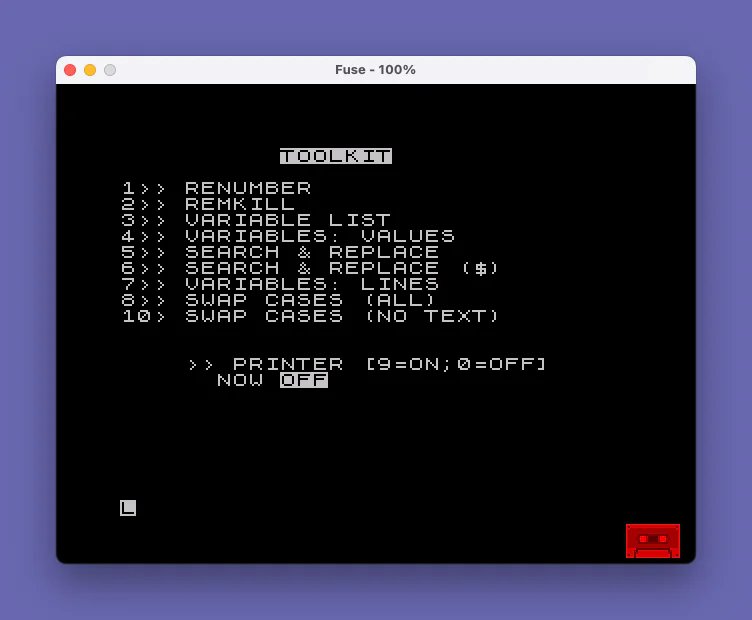
The program occupies lines 9970–9994 and is organized as a menu shell around a bank of machine code routines stored in RAM. Line 9975 draws the main menu and collects a choice into FFF. Lines 9976–9980 handle special meta-choices (redo shift, toggle printer, menu redraw). Line 9981 translates the choice into a machine code entry-point address stored in YYY. Lines 9982–9990 gather any parameters needed by the chosen routine, POKEing them into fixed locations inside the machine code before the call. Lines 9991–9992 execute via RANDOMIZE USR YYY and then pause for a keypress before returning to the menu. Lines 9993–9994 handle save/load of the combined BASIC + CODE package.
Machine Code Entry Points
Eight distinct machine code routines are selected by the arithmetic expression on line 9981. Each option number is tested with a Boolean multiply (e.g., 64048 AND FFF=1 evaluates to 64048 or 0), and the results are summed so that exactly one non-zero address lands in YYY. The guard IF NOT YYY THEN GO TO 9975 handles invalid input.
| Menu Option | Entry Address | Function |
|---|---|---|
| 1 | 64048 | Renumber |
| 2 | 64841 | REM-kill |
| 3 | 65017 | Variable list (printer-compatible) |
| 4 | 65195 | Variables: values (printer-compatible) |
| 5 | 64000 | Search & replace (character codes) |
| 6 | 63900 | Search & replace (string names) |
| 7 | 63600 | Variables: lines (printer-compatible) |
| 8 | 63450 | Swap cases (all) |
| 10 | — | Swap cases (no text) — redirects to line 9970 |
Parameter Passing via POKE
Rather than using subroutine arguments, the program passes parameters by POKEing values directly into the machine code at known offsets before invoking it. For the character search-and-replace (option 5), the source and replacement character codes are written to addresses 64001 and 64003. For the string-name replacement (option 6), codes go to 63901 and 63903. For renumber (option 1), the start line and step are split into low/high bytes using PEEK 23299–23302 (system variables area) on line 9990.
The case-swap routine (option 8) at address 63450 is configured by POKEing ASCII boundary values (65 = ‘A’, 97 = ‘a’, 90/’Z’ or 123/'{‘) into offsets 63467, 63469, and 63496, selecting either uppers-to-lowers or lowers-to-uppers mode before the RANDOMIZE USR call.
Shift Key Remapping (Lines 9973–9974)
Lines 9973–9974 repurpose a machine code routine at 63350 to remap the shift key behavior by POKEing ASCII comparison thresholds at addresses 63390, 63392, and 63419. Choosing SHIFT=1 puts 97, 65, and 123 at those locations; choosing SHIFT=0 reverses two of them and sets the third to 91. This effectively swaps which character range is treated as the shifted set inside the routine.
Channel/Printer Switching
CHAN holds 80 (printer, P) or 83 (screen, S) as ASCII codes suitable for use in OPEN #2,CHR$ CHAN. Options 3, 4, and 7 open channel 2 explicitly before calling the machine code and close it afterward, making them printer-aware. For all other options, if the printer is active, line 9980 resets CHAN to 83 and displays a flashing warning before aborting.
Option 7 (variable lines search) on line 9989 takes a string variable name via INPUT Z$ but then opens channel 2 and prints a header only from BASIC; the actual search is delegated to RANDOMIZE USR 63600 on line 9991, meaning Z$ must be located by the machine code through the system variables area rather than through any explicit POKE.
Save/Load Mechanism (Lines 9993–9994)
Line 9993 saves the BASIC program with SAVE "TOOLKIT" LINE 9994 so that loading it auto-runs from line 9994, which immediately loads the companion CODE block and sets up the channel before jumping to the menu. The CODE block (2019 bytes from address 63350) is saved separately as "T". Immediately after saving, both files are verified with VERIFY "" and VERIFY ""CODE to catch tape write errors.
Notable BASIC Idioms
- Boolean arithmetic for address dispatch:
(64048 AND FFF=1)+(64841 AND FFF=2)+…on line 9981 is a compact multi-branch select without IF chains. - Conditional string printing in the menu:
" NOW ON" AND CHAN=80and" NOW OFF" AND CHAN=83on line 9975 use the Spectrum’s string-AND idiom to show only the relevant printer status. - Two-byte integer split:
POKE 23300,INT(FFF/256): POKE 23299,FFF-256*PEEK 23300manually decomposes a 16-bit value into high and low bytes without bitwise operators. PRINT #1,AT 0,0;on line 9992 writes the prompt to the lower screen (channel 1) to avoid disturbing output already on the main display.
Potential Issues
- Option 10 (Swap Cases — No Text) is listed in the menu but line 9976 redirects it to line 9970 (the shift-configuration prompt) rather than to any machine code routine. It is unclear whether this is intentional or a bug.
- The
Z$variable collected on line 9989 is never explicitly passed to the machine code; the routine at 63600 must locate it by scanning the variables area, which means only single-character variable names work predictably. PAUSE 0on line 9992 waits for any key, butPRINT #1writes the prompt to channel 1 (lower screen/editor area); if a previous operation opened and closed channel 2 (printer), this should be safe, but no explicit channel-state check is made.
Image Gallery
Source Code
 9970 REM TOOLKIT
 9971 CLS :
 9972 INPUT "1=SHIFT UP;0=SHIFT DOWN"'SHIFT
 9973 IF SHIFT THEN POKE 63390,97: POKE 63392,65: POKE 63419,123: RANDOMIZE USR 63350
 9974 IF NOT SHIFT THEN POKE 63390,65: POKE 63392,97: POKE 63419,91: RANDOMIZE USR 63350
 9975 BORDER 0: PAPER 0: INK 7: CLS : PRINT AT 1,10;"TOOLKIT"''"1>> RENUMBER"'"2>> REMKILL"'"3>> VARIABLE LIST"'"4>> VARIABLES: VALUES"'"5>> SEARCH & REPLACE"'"6>> SEARCH & REPLACE ($)"'"7>> VARIABLES: LINES"'"8>> SWAP CASES (ALL)"'"10> SWAP CASES (NO TEXT)"'''"    >> PRINTER [9=ON;0=OFF]"'"      NOW ON" AND CHAN=80;"      NOW OFF" AND CHAN=83: INPUT FFF
 9976 IF FFF=10 THEN GO TO 9970
 9977 IF FFF=9 THEN LET CHAN=80: GO TO 9975
 9978 IF FFF=0 THEN LET CHAN=83: GO TO 9975
 9979 IF CHAN=83 THEN GO TO 9981
 9980 IF CHAN=80 AND (FFF<>3 AND FFF<>4 AND FFF<>7) THEN LET CHAN=83: CLS : PRINT AT 10,0; FLASH 1;"USE PRINTER ONLY WITH OPTIONS   3, 4 OR 7": GO TO 9992
 9981 LET YYY=(64048 AND FFF=1)+(64841 AND FFF=2)+(65017 AND FFF=3)+(65195 AND FFF=4)+(64000 AND FFF=5)+(63900 AND FFF=6)+(63600 AND FFF=7)+(63450 AND FFF=8): IF NOT YYY THEN GO TO 9975
 9982 CLS : LET TTT=100: LET FFF=TTT: IF YYY=64048 THEN INPUT "START ";FFF,"STEP ";TTT
 9983 IF YYY=63450 THEN CLS : INPUT "ENTER 1 TO GO UPPERS"'"2 TO GO LOWERS"'';FFF
 9984 IF YYY=63450 AND FFF=1 THEN POKE 63467,97: POKE 63469,65: POKE 63496,123: GO TO 9991
 9985 IF YYY=63450 AND FFF=2 THEN POKE 63467,65: POKE 63469,97: POKE 63496,90: GO TO 9991
 9986 IF YYY=64000 THEN INPUT "ENTER CODE OF CHARACTER TO BE   REPLACED ";FFF,"CODE OF REPLACEMENT CHARACTER ";TTT: POKE 64001,FFF: POKE 64003,TTT: GO TO 9991
 9987 IF YYY=65195 THEN OPEN #2,CHR$ CHAN: RANDOMIZE USR YYY: CLOSE #2: GO TO 9992
 9988 IF YYY=63900 THEN INPUT "ENTER CODE OF STRING NAME TO BE REPLACED ";FFF,"CODE OF REPLACEMENT STRING NAME ";TTT: POKE 63901,FFF: POKE 63903,TTT: GO TO 9991
 9989 IF YYY=63600 THEN CLS : INPUT "ENTER VARIABLE NAME";Z$: OPEN #2,CHR$ CHAN: PRINT : PRINT "LINES CONTAINING ";Z$: CLOSE #2: GO TO 9991
 9990 POKE 23300,INT (FFF/256): POKE 23299,FFF-256*PEEK 23300: POKE 23302,INT (TTT/256): POKE 23301,TTT-256*PEEK 23302: IF YYY=65017 THEN OPEN #2,CHR$ CHAN: PRINT USR YYY: CLOSE #2: GO TO 9992
 9991 RANDOMIZE USR YYY
 9992 PRINT #1,AT 0,0;"PRESS ENTER FOR MENU": PAUSE 0: GO TO 9975
 9993 CLS : SAVE "TOOLKIT" LINE 9994: SAVE "T"CODE 63350,2019: PRINT FLASH 1;"VERIFY NOW!": VERIFY "": VERIFY ""CODE : PRINT "OK!": PAUSE 120: GO TO 9975
 9994 LOAD ""CODE : LET CHAN=83: GO TO 9975
Note: Type-in program listings on this website use ZMAKEBAS notation for graphics characters.