
Toolkit is a BASIC program manager for the TS2068 that provides four machine code-driven utilities: RENUMBER (with GOTO/GOSUB chain updating), REMKILL (bulk deletion of REM statements), LIST VARIABLES, and COMPACTION (converting numeric literals to VAL “n” form to save 3 bytes each). The machine code, 1350 bytes loaded at address 64048, was originally written for the ZX Spectrum by John Charlesworth and published in Your Computer magazine (Vol. 4, No. 4), then adapted for the TS2068 by Jack Dohany. A two-part tape save routine handles the BASIC portion (saved with an auto-run LINE parameter) and the machine code block separately. The COMPACTION function uses the VAL “n” number-storage trick, and the documentation explicitly warns that RENUMBER must be run before COMPACTION, and that computed or evaluated line numbers (such as GO TO VAL “1000”) are not handled by the renumberer.
Program Analysis
Program Structure
The program divides into three logical regions. Lines 10–160 form the documentation browser, a paginated help system navigated by a lower-screen menu. Lines 800–940 contain the shared subroutine for the page-navigation prompt. Lines 9980–9999 are the Toolkit Menu and machine code handler, kept in the high line-number range so they survive a DELETE 1,1000 when a user wants to merge their own BASIC program with the toolkit.
| Line range | Role |
|---|---|
| 10–20 | REM credits and main documentation menu display |
| 50–68 | Documentation main menu: backup, read docs, go to toolkit, stop |
| 90 | Backup routine (from documentation menu) |
| 100–160 | Six-page documentation browser |
| 800 | Spare STOP (unused in normal flow) |
| 900–940 | Page-navigation subroutine (Copy / Menu / Last / Next) |
| 9980–9996 | Toolkit menu: INPUT selection, dispatch to machine code |
| 9998–9999 | Boot loader: sets RAMTOP, loads machine code block, jumps to line 1 |
Machine Code Interface
All four functional utilities are implemented as machine code routines residing at fixed addresses starting at 64048. The BASIC handler passes parameters via POKEs into system variables before calling RANDOMIZE USR.
- RENUMBER — entry point
USR 64048. New first line stored at addresses 23299–23300, step at 23301–23302, split across two bytes usingINT (n/256)for the high byte andn - 256 * PEEKfor the low byte. - REMKILL — entry point
USR 64841. No parameters needed. - LIST VARIABLES — unusual use of
PRINT USR 65184rather thanRANDOMIZE USR, suggesting this routine returns a printable value (likely 0) as a side effect after outputting to the screen. - COMPACTION — entry point
USR 65017. Converts numeric literals toVAL "n"form, saving 3 bytes per number.
The machine code block is 1350 bytes long. At load time (line 9998), CLEAR 64048 sets RAMTOP to protect this area before the block is loaded with LOAD ""CODE.
Two-Part Tape Save
Both the documentation menu (line 90) and the toolkit menu (line 9994) implement a two-part tape save. The BASIC program is saved with a LINE 9998 auto-run parameter (pointing to the boot loader), followed by a BEEP gap, then the machine code saved as a CODE block at 64048 for 1350 bytes. A VERIFY pass with empty filenames is used to confirm both parts. Lines 90 and 9994 are nearly identical save routines; line 90 names the BASIC file "TOOLKIT" while line 9994 names it "TK", suggesting the shorter name was adopted for tape efficiency or label convenience.
Page Navigation Subroutine (line 900)
The subroutine at line 900 is the documentation engine’s navigation layer. It displays a one-line menu in the lower screen (PRINT #1) offering Copy, Menu, Last page, or else next page. It then busy-waits with a polling loop at line 910 that waits until INKEY$ changes from its initial (empty) captured state, avoiding the stale-keypress problem. Line 925 normalizes lowercase to uppercase with CHR$ (CODE k$-32), enabling case-insensitive input.
Documentation Flow and Page Navigation
Each page ends with a GO SUB 900 call. On return, the caller checks K$: if "M" it runs from the start (RUN), if "L" it jumps back one page explicitly. The “next page” action falls through to the next line naturally. This gives a simple but effective forward/backward pager without a page-number array.
- Lines 108–109: Menu or back to page 1 (line 100)
- Lines 118–119: Menu or back to page 1 (line 100)
- Lines 128–129: Menu or back to page 2 (line 110)
- Lines 138–139: Menu or back to page 3 (line 120)
- Lines 148–149: Menu or back to page 4 (line 130)
- Line 152: Last page — always returns to menu on any key (no “Last” option)
Lines 158–160 appear after line 152 and are unreachable in normal flow, representing a dead code fragment likely left over from an earlier page-layout revision.
Toolkit Menu Input Method
Rather than using INKEY$, the toolkit menu at line 9980 uses INPUT FFF to read the function number as a numeric variable. This means the user must press Enter after typing their choice. Each option is dispatched by a sequential chain of IF FFF=n THEN ... checks on lines 9982–9995, with a fallthrough GO TO 9980 at line 9996 for invalid input. The variable name FFF (all-caps triple letter) is unusual but valid BASIC.
Notable Techniques
- High-byte/low-byte POKE pattern for 16-bit values:
POKE addr, INT (n/256)andPOKE addr-1, n - 256*PEEK addr— a standard approach for passing 16-bit integers via system memory. - Case normalization via
CHR$ (CODE k$-32)at line 925, only applied whenk$ > "Z"(i.e., when the character is lowercase ASCII). - PRINT USR for LIST VARIABLES (line 9990) rather than
RANDOMIZE USR; this is intentional since the routine presumably prints its own output and returns 0, and usingPRINTavoids leaving a floating-point result in the calculator stack. - CLEAR before LOAD CODE at line 9998 to protect the machine code area from BASIC’s memory manager.
Bugs and Anomalies
- Line 900 uses lowercase
k$while most of the documentation browser checks uppercaseK$. In Sinclair BASIC these are distinct variables. Line 108 checksk$="M"(lowercase) which matches the subroutine’s assignment, but lines 118, 128, 138, 148 checkK$="M"(uppercase), meaning the Menu option silently fails on pages 2–5 (only “Last page” or “next page” will work). This is a likely transcription bug introduced during adaptation. - Lines 158–160 are dead code unreachable from the normal documentation flow after line 152’s unconditional
GO SUB 900: RUN. - Line 9982 sets defaults
TTT=100andSSS=10withIF FFF=1 THEN INPUT ...on the same line, meaning the defaults are assigned even whenFFF<>1, though this is harmless since the branch to 9988 skips the renumber logic.
Image Gallery


Source Code
   10 REM TOOLKIT
   12 REM By John Charlesworth
   14 REM YOUR COMPUTER, APRIL 84
   16 REM adapted for 2068 by
   18 REM Jack Dohany
   20 REM (415)321-7684
   50 BORDER 0: PAPER 0: INK 7: CLS : PRINT " **TOOLKIT DOCUMENTATION MENU**"
   52 PRINT ''"1. BACKUP"''"2. READ DOCUMENTATION"''"3. GO TO TOOLKIT MENU"''"4. STOP"
   54 PRINT AT 20,5;"**PLEASE PRESS A KEY**"
   56 IF INKEY$="" THEN GO TO 56
   58 LET K$=INKEY$
   60 IF K$="1" THEN GO TO 90
   62 IF K$="2" THEN GO TO 100
   64 IF K$="3" THEN GO TO 9980
   66 IF K$="4" THEN PRINT AT 20,0;"        OK TO RUN           ": STOP
   68 GO TO 56
   90 CLS : PRINT AT 10,0;"TWO-PART SAVE": SAVE "TOOLKIT" LINE 9998: BEEP .1,25: SAVE "TKB"CODE 64048,1350: CLS : PRINT AT 10,0;"REWIND and PLAY to VERIFY": VERIFY "": VERIFY ""CODE : GO TO 1
  100 CLS : PRINT "** TOOLKIT DOCUMENTATION **"
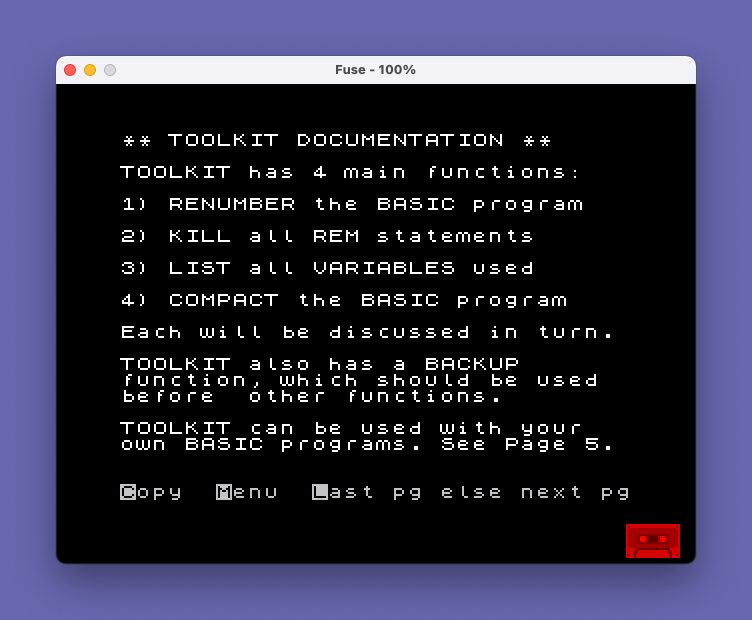
  102 PRINT '"TOOLKIT has 4 main functions:"''"1) RENUMBER the BASIC program"''"2) KILL all REM statements"''"3) LIST all VARIABLES used"''"4) COMPACT the BASIC program"''"Each will be discussed in turn."
  104 PRINT '"TOOLKIT also has a BACKUP"'"function, which should be used"'"before  other functions."
  106 PRINT '"TOOLKIT can be used with your"'"own BASIC programs. See Page 5."
  108 GO SUB 900: IF k$="M" THEN RUN
  109 IF k$="L" THEN GO TO 100
  110 PRINT TAB 10;"PAGE 2"''"RENUMBER renumbers all BASIC"'"lines, including TOOLKIT's Basic"'"Handler, lines 9980-9999."
  112 PRINT '"You get to specify the NEW FIRST"'"LINE(e.g.100) and STEP(e.g.10)."
  114 PRINT '"Line numbers following GOTO,"'"GOSUB, RUN, LIST, LLIST and"'"RESTORE are renumbered, with"'"the following limitations:"'"  1) No computed line numbers"'"  2) No nonexistent line numbers"
  116 PRINT '"Line numbers specified by other"'"kinds of statements are NOT"'"renumbered...such as"'"  SAVE ""TK"" LINE 9998."
  118 GO SUB 900: IF K$="M" THEN RUN
  119 IF K$="L" THEN GO TO 100
  120 PRINT TAB 10;"PAGE 3"''"Also, line numbers of the form"'"  GO TO VAL ""1000"""'"will NOT be renumbered."
  122 PRINT '"Any statements containing"'"computed or eVALuated line"'"numbers should be deleted prior"'"to renumbering. They can be re-"'"entered afterwards."
  124 PRINT '"Other kinds of statements"'"specifying line numbers will"'"be ignored, and should be"'"fixed after renumbering."
  126 PRINT '"NOTE: a NONSENSE IN BASIC"'"message following use of a TOOL-"'"KIT function is not abnormal."
  128 GO SUB 900: IF K$="M" THEN RUN
  129 IF K$="L" THEN GO TO 110
  130 PRINT TAB 10;"PAGE 4"''"REMKILL simply deletes all"'"statements beginning with a"'"REM statement."
  132 PRINT '"LIST VARIABLES does just that..."'"on the screen only. Use COPY to"'"get them on paper."
  134 PRINT '"COMPACTION changes all numbers"'"in the BASIC program to the form"'"VAL ""n"". This saves 3 bytes"'"per number.    NOTE:"'"RENUMBER BEFORE COMPACTING!!"
  136 PRINT ''"TOOLKIT's machine code is 1350"'"bytes long, starting at Location"'"64048. Entry points can be"'"discovered in the BASIC handler."
  138 GO SUB 900: IF K$="M" THEN RUN
  139 IF K$="L" THEN GO TO 120
  140 PRINT TAB 10;"PAGE 5"''"USING TOOLKIT WITH YOUR OWN"'"BASIC PROGRAM:"
  142 PRINT '"First, make sure your BASIC"'"program does not have any lines"'"numbered from 9980 to 9999."''"Then load TOOLKIT, STOP and"'"DELETE 1,1000 (documentation)."'"Then MERGE (or write) your BASIC"'"program. Then GO TO 9980."
  144 PRINT '"If your program itself uses"'"machine code that would occupy"'"the same area as TOOLKIT's"'"machine code, then do not load"'"your program's machine code"'"until you're done with TOOLKIT."
  148 GO SUB 900: IF K$="M" THEN RUN
  149 IF K$="L" THEN GO TO 130
  150 PRINT TAB 10;"PAGE 6"''"TOOLKIT's machine code was"'"written for SPECTRUM by John"'"Charlesworth. It appeared in"'"YOUR COMPUTER VOL 4, NO 4."''"TOOLKIT was adapted for 2068 by"'"Jack Dohany, (415)321-7684."''"TOOLKIT's machine code could"'"use some improvement, but at"'"least it works."'''TAB 10;"THE END"
  152 GO SUB 900: RUN
  158 GO SUB 900: IF K$="M" THEN RUN
  159 IF K$="L" THEN GO TO 140
  160 GO TO 100
  800 STOP
  900 LET k$="": PRINT #1;AT 0,0;"Copy  Menu  Last pg else next pg"
  910 IF k$=INKEY$ THEN GO TO 910
  920 LET k$=INKEY$
  925 IF k$>"Z" THEN LET k$=CHR$ (CODE k$-32)
  930 IF k$="C" THEN COPY
  940 CLS : RETURN
 9980 CLS : PRINT TAB 9;"** TOOLKIT **"'''"1: RENUMBER"''"2: KILL REMS"''"3: LIST VARIABLES"''"4: COMPACTION"''"5: MAKE BACKUP"''"6: STOP"''"OK TO RUN AFTER STOPPING"''"NOTE: TOOLKIT DOCUMENTATION IS A"'"SEPARATE PROGRAM, NEXT ON TAPE.": INPUT FFF: IF FFF<>1 THEN GO TO 9988
 9982 LET TTT=100: LET SSS=10: IF FFF=1 THEN INPUT "NEW FIRST LINE: ";TTT,"STEP: ";SSS
 9984 IF TTT>9999 OR TTT<1 OR SSS<1 OR SSS>TTT THEN GO TO 9980
 9986 POKE 23300,INT (TTT/256): POKE 23299,TTT-256*PEEK 23300: POKE 23302,INT (SSS/256): POKE 23301,SSS-256*PEEK 23302: RANDOMIZE USR 64048: PRINT AT 20,0;"RENUMBER DONE": PAUSE 200: GO TO 9980
 9988 IF FFF=2 THEN RANDOMIZE USR 64841: PRINT AT 20,0;"REMS KILLED": PAUSE 200: GO TO 9980
 9990 IF FFF=3 THEN PRINT USR 65184: STOP
 9992 IF FFF=4 THEN RANDOMIZE USR 65017: PRINT AT 20,0;"COMPACTION DONE.": PAUSE 200: GO TO 9980
 9994 IF FFF=5 THEN CLS : PRINT AT 10,0;"TWO-PART SAVE": SAVE "TK" LINE 9998: BEEP .01,25: SAVE "TKB"CODE 64048,1350: CLS : PRINT AT 20,0;"REWIND AND PLAY TO VERIFY": VERIFY "": VERIFY ""CODE : GO TO 1
 9995 IF FFF=6 THEN STOP
 9996 GO TO 9980
 9998 CLEAR 64048: BORDER 0: PAPER 0: INK 7: CLS : PRINT AT 10,0;"I'VE SET RAMTOP TO 64048"''"I'M LOADING THE 1350 BYTES"'"OF TOOLKIT CODE AT 64048": LOAD ""CODE
 9999 GO TO 1
Note: Type-in program listings on this website use ZMAKEBAS notation for graphics characters.