
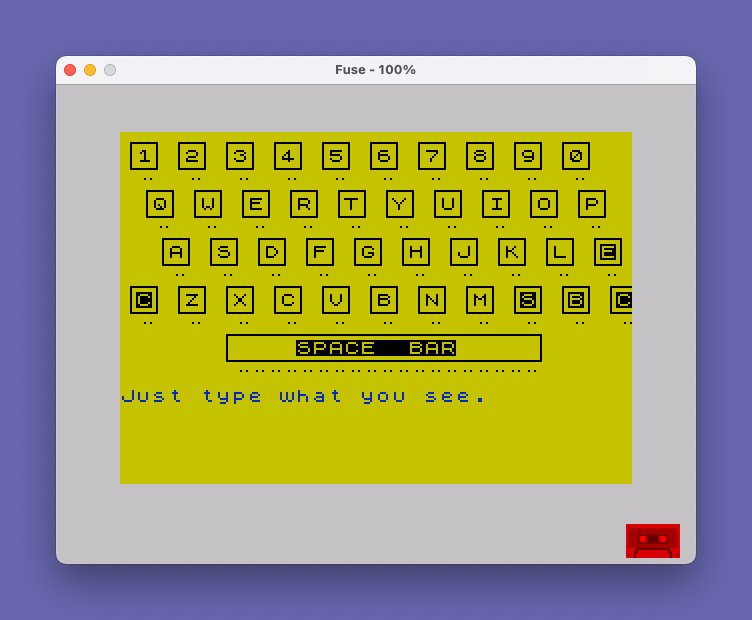
This program is a typing tutor that displays a graphical keyboard layout on screen and tests the user’s typing accuracy against a series of predefined phrases. User-defined graphics (UDGs “a” through “h”) are loaded from DATA statements at startup via POKE USR to draw the keyboard graphic, which is rendered across multiple PRINT statements using combinations of UDG tiles. As the user types, correct keystrokes are shown in BRIGHT mode while incorrect ones are temporarily highlighted with PAPER 5 coloring before the cursor backs up with CHR$ 8 for re-entry. A running accuracy percentage is calculated as INT (right/total*100) and displayed after each phrase, with RESTORE used to loop the DATA list back to the beginning when the sentinel value “STOP” is reached.
Program Analysis
Program Structure
The program is organized into three functional regions. Lines 1000–1115 handle drawing the on-screen keyboard graphic. Lines 1120–1260 implement the typing test loop, reading phrases from DATA, collecting keystrokes, and computing a running accuracy score. Lines 1270–1390 form a subroutine that loads UDG bitmaps into memory before the main routine starts. The typing phrase data lives at lines 1400–2000, with a sentinel "STOP" at line 2000 to signal the end of the list.
UDG Keyboard Rendering
Eight UDGs — \a through \h — are defined by 64 bytes of DATA at line 1310 and poked into memory by the subroutine at lines 1270–1390 using POKE USR "a"+i, byte. These tiles are assembled into a multi-row keyboard image across lines 1040–1115. Each row of the keyboard is printed as a long string of repeating UDG triplets (\a\b\c for key tops, \d \e for mid sections, \f\g\h for key bottoms), and then key labels (1–0, Q–P, A–L, Z–M rows) are overprinted using PRINT OVER 1; AT row, col; to place letters without disturbing the graphic tile background.
The spacebar at line 1115 is drawn as a single wide unit using a long run of \b and \g tiles flanked by corner UDGs, with the label “SPACE BAR” centered via a plain string printed over it.
Typing Test Loop
At line 1160, a phrase is read from DATA into a$. If a$ equals "STOP", a RESTORE 1430 rewinds to the first phrase and re-reads. Each phrase is displayed at row 16 using INK 1, padded with a blank string o$ (dimensioned to 32 characters at line 1030) for in-place clearing.
The character-by-character input loop at lines 1180–1230 uses a busy-wait on INKEY$ (lines 1190–1200) rather than INPUT, so each keystroke is captured individually. A correct keypress increments right and prints the character in BRIGHT 1. An incorrect keypress increments total only, prints the wrong character highlighted with PAPER 5, then issues CHR$ 8 (cursor-left) to back up, and loops to wait for the correct key. This means an incorrect key press does not advance the position but is counted against accuracy.
Accuracy Calculation
After each phrase, line 1240 prints INT (right/total*100) at a fixed screen position. Because total counts every keypress including wrong attempts while right counts only correct ones, the percentage reflects overall keystroke efficiency rather than simple character correctness. A prompt at line 1250 asks to continue; answering anything other than "n" resumes with a short PAUSE 25 before the next phrase.
Notable Techniques
DIM o$(32)at line 1030 creates a 32-space blank string used to erase the phrase line in-place without a fullCLS.RESTORE 1430at line 1160 allows the DATA list to be cycled indefinitely; the sentinel"STOP"at line 2000 triggers the rewind.BEEP .1,30at line 1210 gives immediate audible feedback on every keypress.- Using
CHR$ 8(backspace/cursor left) to visually undo a wrong character keeps the display tidy without redrawing the whole line. - The
RESTOREat line 1300 (bare, no line number) resets the DATA pointer to the very beginning of the program so that UDG bytes are always read from line 1310 regardless of prior DATA reads.
Bugs and Anomalies
- Line 1100 labels the rightmost key on the A-row as
"E"(should be"ENTER"or similar) and line 1110 labels the ends of the bottom row as"C","S","B","C", apparently abbreviations for CAPS SHIFT, SYMBOL SHIFT, BREAK, and CAPS LOCK — though not documented in the code. - The comment at line 1400 warns “no more than 32 characters per DATA statement,” matching the
DIM o$(32)blank-line buffer, but line 1440 ("This is a T/S2068 typing test.") is exactly 31 characters and line 1510 ("Give me liberty or give me death") is exactly 32 — right at the limit with no margin. - The
totalandrightcounters are not reset between phrases (only initialized once at line 1150), so the accuracy percentage is cumulative across all phrases in a session rather than per-phrase.
Save Routine
Line 9999 provides a combined save-and-verify routine with user feedback: it saves the program with LINE 1 auto-start, plays a beep, prints a save confirmation, prompts the user to rewind the tape, runs VERIFY "", then displays a flashing verified message. This line is only executed if explicitly run and is not part of the normal program flow.
Image Gallery
Source Code
    5 REM typist                          working 2068-Lawrence
   10 REM  Input data beginning  with line 1400
 1000 REM print keyboard
 1030 INK 0: PAPER 6: CLS : DIM o$(32): GO SUB 1270
 1040 CLS : PRINT "\a\b\c\a\b\c\a\b\c\a\b\c\a\b\c\a\b\c\a\b\c\a\b\c\a\b\c\a\b\c  \d \e\d \e\d \e\d \e\d \e\d \e\d \e\d \e\d \e\d \e  \f\g\h\f\g\h\f\g\h\f\g\h\f\g\h\f\g\h\f\g\h\f\g\h\f\g\h\f\g\h"
 1050 PRINT " \a\b\c\a\b\c\a\b\c\a\b\c\a\b\c\a\b\c\a\b\c\a\b\c\a\b\c\a\b\c  \d \e\d \e\d \e\d \e\d \e\d \e\d \e\d \e\d \e\d \e  \f\g\h\f\g\h\f\g\h\f\g\h\f\g\h\f\g\h\f\g\h\f\g\h\f\g\h\f\g\h"
 1060 PRINT "  \a\b\c\a\b\c\a\b\c\a\b\c\a\b\c\a\b\c\a\b\c\a\b\c\a\b\c\a\b\c  \d \e\d \e\d \e\d \e\d \e\d \e\d \e\d \e\d \e\d \e  \f\g\h\f\g\h\f\g\h\f\g\h\f\g\h\f\g\h\f\g\h\f\g\h\f\g\h\f\g\h"
 1070 PRINT "\a\b\c\a\b\c\a\b\c\a\b\c\a\b\c\a\b\c\a\b\c\a\b\c\a\b\c\a\b\c\a\b\d \e\d \e\d \e\d \e\d \e\d \e\d \e\d \e\d \e\d \e\d \f\g\h\f\g\h\f\g\h\f\g\h\f\g\h\f\g\h\f\g\h\f\g\h\f\g\h\f\g\h\f\g "
 1080 PRINT OVER 1;AT 1,0;" 1  2  3  4  5  6  7  8  9  0"
 1090 PRINT OVER 1;AT 4,0;"  Q  W  E  R  T  Y  U  I  O  P"
 1100 PRINT OVER 1;AT 7,0;"   A  S  D  F  G  H  J  K  L  E"
 1110 PRINT OVER 1;AT 10,0;" C  Z  X  C  V  B  N  M  S  B  C"
 1115 PRINT AT 12,6;"\a\b\b\b\b\b\b\b\b\b\b\b\b\b\b\b\b\b\b\b\c           \d    SPACE  BAR     \e           \f\g\g\g\g\g\g\g\g\g\g\g\g\g\g\g\g\g\g\g\h"
 1120 REM accept input
 1150 LET total=0: LET right=0
 1160 READ a$: IF a$="STOP" THEN RESTORE 1430: READ a$
 1170 PRINT INK 1;AT 16,0;o$;AT 16,0;a$'o$;o$: PRINT AT 17,0;
 1180 FOR i=1 TO LEN a$
 1190 LET t$=INKEY$: IF t$<>"" THEN GO TO 1210
 1200 GO TO 1190
 1210 LET total=total+1: BEEP .1,30: IF t$<>a$(i) THEN PRINT PAPER 5;t$;CHR$ 8;: GO TO 1190
 1220 LET right=right+1
 1230 PRINT BRIGHT 1;t$;
 1240 NEXT i: PRINT AT 21,25;INT (right/total*100);"%  "
 1250 INPUT "More? (y/n) ";q$: IF q$<>"n" THEN PAUSE 25: GO TO 1160
 1260 STOP
 1270 REM USR CHARACTERS
 1300 RESTORE : FOR i=0 TO 63: READ byte: POKE USR "a"+i,byte: NEXT i: RETURN
 1310 DATA 0,0,0,0,0,7,4,4,0,0,0,0,0,255,0,0,0,0,0,0,0,224,32,32,4,4,4,4,4,4,4,4,32,32,32,32,32,32,32,32,4,4,7,0,0,0,0,0,0,0,255,0,0,0,0,9,32,32,224,0,0,0,0,0
 1390 RETURN
 1400 REM data for tests - Put in no more than 32 characters per DATA statement.
 1430 DATA "Just type what you see."
 1440 DATA "This is a T/S2068 typing test."
 1450 DATA "Don't look at the keyboard."
 1470 DATA "asdfghjkl qwertyuiop"
 1480 DATA "zxcvbnm 1234567890"
 1490 DATA "Old MacDonald had a farm."
 1500 DATA "McDonald's has McNuggets."
 1510 DATA "Give me liberty or give me death"
 1520 DATA "The bear went over the mountain."
 1530 DATA "Never had it and never will."
 1540 DATA "The doctor is in his office."
 1550 DATA "May the force be with you."
 1560 DATA "The priest is on the altar."
 1570 DATA "A penny saved is a penny earned."
 1580 DATA "I've heard that before."
 2000 DATA "STOP"
 9999 SAVE "typist" LINE 1: BEEP 1,32: PRINT INVERSE 1;"Program Saved": PRINT : PRINT "Rewind tape to verify": VERIFY "": PRINT ' FLASH 1;"Program Verified.": BEEP .5,32
Note: Type-in program listings on this website use ZMAKEBAS notation for graphics characters.