
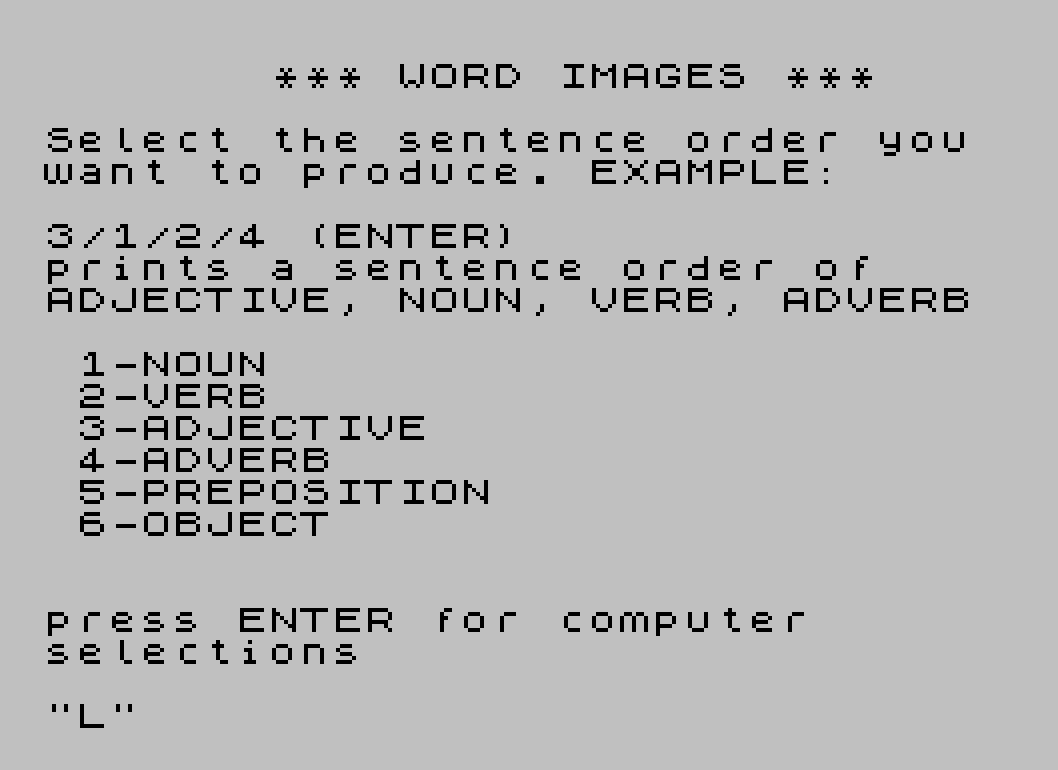
Word Images is a random sentence generator that constructs grammatically structured phrases from six word categories: nouns, verbs, adjectives, adverbs, prepositions, and objects. The user supplies a slash-separated sequence of category numbers (e.g., “3/1/2/4”) to define sentence order, or presses ENTER to cycle through seven preset templates stored at lines 8001–8007. Words are selected from DATA lists of 20 entries each using a probabilistic loop: each word has a 1-in-10 chance of being chosen per iteration, giving a non-uniform distribution biased toward later entries in the list. The program includes an automatic insertion of the object category (6) whenever a preposition (5) is selected, achieved by string manipulation at line 122. Generated sentences are displayed one character per PRINT statement, with spaces triggering newlines to produce a vertical word-stack visual effect.
Program Structure
The program divides into four logical regions:
- Initialisation and UI (lines 10–100): defines named line-number constants for each DATA block, displays instructions, and accepts the user’s sentence-order string.
- Sentence assembly (lines 105–145): iterates over characters in
A$, dispatching to word-selection subroutines at1000×VAL A$(X). - Display (lines 200–230): prints the assembled sentence vertically, one character per loop iteration, using spaces as line-break triggers.
- Word data (lines 9000–9050): six
DATAstatements of 20 words each, addressed viaRESTOREto named line-number variables.
Key BASIC Idioms
Several memory-efficiency and readability techniques appear throughout:
- Named line constants:
NOUN=9000,VERB=9010, etc. allowRESTORE NOUNinstead of bare line numbers, improving readability at no extra cost since the variables hold integers. GO SUB 1000*VAL A$(X): computes the subroutine address arithmetically from the digit character inA$, replacing a multi-branchIFchain with a single dispatch line (line 140).GO TO 1001*VAL A$(X)(line 1030): similarly recycles the current digit to generate a fallback jump address (1001,2002, etc.) when the random selection loop exhausts all 20 words — though see the bug note below.- Shared subroutine body: all six word-category subroutines share the loop at lines 1015–1025 by falling through with
GO TO 1015, keeping code compact.
Sentence Construction and the Preposition Auto-Insert
When a “5” (preposition) is encountered during the setup scan (lines 120–122), the program injects “/6” immediately after it in A$, ensuring an object always follows a preposition. The counter C is advanced past the newly inserted characters so the injection loop does not re-process them. Line 6000 additionally prepends ” THE” to the accumulated string before selecting the object word, producing constructs like “IN THE CAVE”.
Word Selection Algorithm
The selection loop (lines 1015–1025) reads each of the 20 words in a category and accepts it with probability 1/10 (INT(RND*10)=3). This means:
- Earlier words in a list are less likely to be chosen than later ones, since the loop can only stop at a word it reaches.
- There is a
(9/10)^20 ≈ 12%chance that no word is accepted on a full pass, triggering the fallback at line 1030. - A uniform selection would require
INT(RND*20)+1with direct array access, butDATA/RESTORErequires sequential reading, making this probabilistic approach a reasonable trade-off.
Vertical Display Effect
Lines 205–220 walk through S$ character by character. A space character triggers a bare PRINT (newline) rather than printing the space itself, so each word of the sentence appears on its own line. This gives the “word image” visual style referenced in the program title. Pressing SPACE at line 225 restarts the entire program via RUN.
Preset Sentence Templates
| Line | Template | Structure |
|---|---|---|
| 8001 | 1/2/1/5/6 | NOUN VERB NOUN PREP OBJECT |
| 8002 | 3/1/5/6/4/2/1/5/6 | ADJ NOUN PREP OBJ ADV VERB NOUN PREP OBJ |
| 8003 | 3/1/2/4 | ADJ NOUN VERB ADV |
| 8004 | 1/2 | NOUN VERB |
| 8005 | 1/5/6/2/1 | NOUN PREP OBJ VERB NOUN |
| 8006 | 1/5/6/2/4 | NOUN PREP OBJ VERB ADV |
| 8007 | 3/1/4/2/1/5/6 | ADJ NOUN ADV VERB NOUN PREP OBJ |
When P=1 (computer-selection mode), line 235 chooses a template randomly with GO TO 8001+INT(RND*7), cycling through all seven presets with equal probability.
Image Gallery
Source Code
   10 REM * WORD IMAGES *"
   15 LET S$=""
   18 LET NOUN=9000
   20 LET VERB=9010
   22 LET ADJECTIVE=9020
   24 LET ADVERB=9030
   26 LET PREP=9040
   28 LET OBJECT=9050
   30 LET P=0
   60 PRINT AT 3,7;"*** WORD IMAGES ***"
   70 PRINT : PRINT "Select the sentence order you   want to produce. EXAMPLE:"
   80 PRINT : PRINT "3/1/2/4 (ENTER)": PRINT "prints a sentence order of      ADJECTIVE, NOUN, VERB, ADVERB"
   90 PRINT : PRINT TAB 1;"1-NOUN";TAB 1;"2-VERB";TAB 1;"3-ADJECTIVE";TAB 1;"4-ADVERB";TAB 1;"5-PREPOSITION";TAB 1;"6-OBJECT"
   95 PRINT AT 20,0;"press ENTER for computer        selections"
  100 INPUT A$
  102 IF A$="" THEN GO TO 8000
  105 CLS
  110 REM Set-up
  115 RANDOMIZE
  117 LET C=1
  120 FOR X=C TO LEN A$: IF A$(X)<>"5" THEN NEXT X: GO TO 125
  122 LET A$=A$( TO X)+"/6"+A$(X+1 TO ): LET C=X+4: GO TO 120
  125 FOR X=1 TO LEN A$
  130 IF A$(X)="/" THEN NEXT X
  140 IF A$(X)="1" OR A$(X)="2" OR A$(X)="3" OR A$(X)="4" OR A$(X)="5" OR A$(X)="6" THEN GO SUB 1000*VAL A$(X)
  145 NEXT X
  200 REM print sentence
  202 PAUSE 500: CLS
  205 FOR X=1 TO LEN S$
  210 IF S$(X)=" " THEN PRINT
  215 PRINT S$(X);
  220 NEXT X
  225 IF INKEY$=" " THEN RUN
  230 LET S$="": IF p=0 THEN GO TO 125
  235 GO TO 8001+INT (RND*7)
 1000 REM noun
 1010 RESTORE NOUN
 1015 FOR Y=1 TO 20
 1020 READ W$: IF INT (RND*10)=3 THEN LET S$=S$+" "+W$: RETURN
 1025 NEXT Y
 1030 GO TO 1001*VAL A$(X)
 2000 REM verb
 2010 RESTORE VERB
 2020 GO TO 1015
 3000 REM adjective
 3010 RESTORE ADJECTIVE
 3020 GO TO 1015
 4000 REM adverb
 4010 RESTORE ADVERB
 4020 GO TO 1015
 5000 REM preposition
 5010 RESTORE PREP
 5020 GO TO 1015
 6000 LET S$=S$+" THE"
 6010 RESTORE OBJECT
 6020 GO TO 1015
 8000 LET P=1
 8001 LET A$="1/2/1/5/6": GO TO 125
 8002 LET A$="3/1/5/6/4/2/1/5/6": GO TO 125
 8003 LET A$="3/1/2/4": GO TO 125
 8004 LET A$="1/2": GO TO 125
 8005 LET A$="1/5/6/2/1": GO TO 125
 8006 LET A$="1/5/6/2/4": GO TO 125
 8007 LET A$="3/1/4/2/1/5/6": GO TO 125
 9000 DATA "CHILDREN","PEOPLE","WORKERS","WARRIORS","WITCHES","LOVERS","BOYS","GIRLS","DOCTORS","BUTCHERS","PROGRAMMERS","ZOMBIES","MAGICIANS","TRUCKERS","ACTORS","POLITICIANS","MANIACS","PRIESTS","SAGES","ANALYSTS"
 9010 DATA "ENCOURAGE","PLUNDER","ATTRACT","WOO","CARESS","TOUCH","WATCH","INSPIRE","BRAINWASH","AMUSE","EVADE","FIGHT","SEDUCE","INSULT","BITE","EAT","PECK","ATTACK","EMULATE","HONOR"
 9020 DATA "BIG","SMALL","SWEET","SOUR","PASSIONATE","SILENT","LOUD","INTIMATE","FAT","SKINNY","SAD","JOYOUS","HUNGRY","THIRSTY","SATISFIED","GREEDY","GENEROUS","PEACEFUL","RAGING","STUFFED"
 9030 DATA "QUESTIONINGLY","SELFISHLY","FEARSOMELY","BRAVELY","AUTHORITAVELY","CARELESSLY","CAREFULLY","CONFIDENTLY","HALFHEARTEDLY","ENTHUSIASTICALLY","STUPIDLY","COLDLY","WARMLY","THOUGHTFULLY","MADLY","BLISSFULLY","GRUDGINGLY","QUICKLY","SLOWLY","WISELY"
 9040 DATA "IN","ABOUT","AROUND","FROM","CLEANING","LEAVING","BENEATH","ABOVE","PACING","WATCHING","BESIDE","NEAR","AT","WRECKING","BEHIND","ABOUT","ACROSS","ALONG","WITHIN","CRITICIZING"
 9050 DATA "HOUSE","OFFICE","STREET","SEWER","YARD","TUNNEL","CASTLE","MAZE","DESERT","SWAMP","FORT","FOREST","HIDEOUT","CITY","BEDROOM","COFFIN","OUTHOUSE","PENTHOUSE","CAVE","GRAVEYARD"
 9998 SAVE "WORDS"
Note: Type-in program listings on this website use ZMAKEBAS notation for graphics characters.