
Word Pro is a screen-based word processor that stores up to 300 lines of 32-character text in a single two-dimensional string array, w$(300,32), supporting up to 15 pages of 20 lines each. Text entry uses a character-by-character input loop with PAUSE 0 and INKEY$, handling backspace (CHR$ 8), tab/cursor movement (CHR$ 9), delete (CHR$ 12), and carriage return (CHR$ 13). A justify routine (lines 5000–5300) right-justifies text by iteratively inserting spaces after existing spaces until the 32nd column is filled. Completed documents can be saved to or loaded from tape as a DATA array using SAVE/LOAD with the array name, and a COPY command sends the current page to the printer.
Program Analysis
Program Structure
The program is organized into several clearly separated functional blocks:
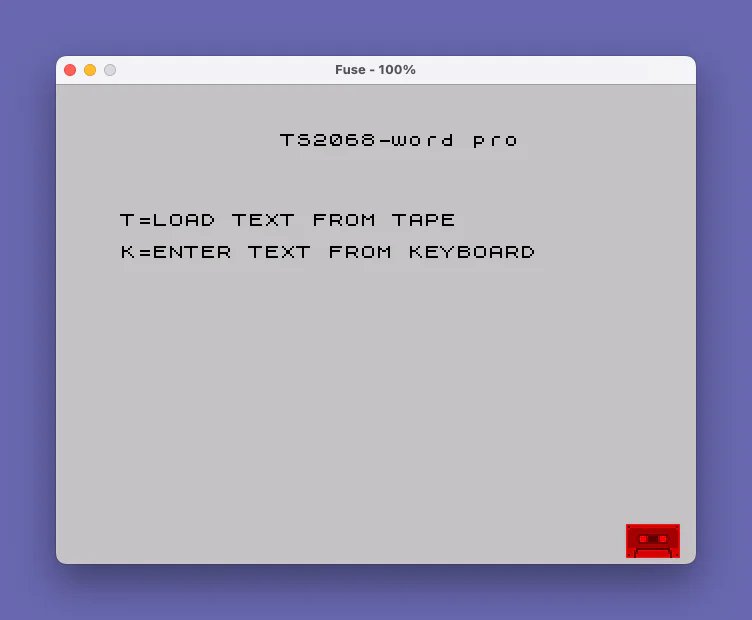
- Lines 1–25: Initialization and main menu (Load from tape or keyboard entry).
- Lines 100–600: Full-screen text editor for one 20-line page.
- Lines 1000–1210: Post-page menu: Print, Justify, Continue, or Save.
- Lines 5000–5300: Text justification subroutine.
- Lines 7000–7070: Load text array from tape and review it.
- Lines 8000–8050: Save text array to tape.
- Lines 9000, 9999: Program self-save and stop.
Data Storage
The entire document is stored in w$(300,32), a two-dimensional string array of 300 rows, each 32 characters wide. Pages are indexed by variable x (0–14), giving a maximum of 15 pages of 20 lines each (300 lines total). The current page’s row j maps to array index x*20+j+1. This layout allows the entire document to be saved and loaded as a single DATA array with SAVE n$ DATA w$() and LOAD n$ DATA w$().
Text Entry Loop
The editor (lines 200–600) uses nested FOR loops over rows (j, 0–19) and columns (l, 0–31). Each iteration calls PAUSE 0 followed by INKEY$ to wait for a keypress. The column variable l is manipulated directly within the loop body using GO TO 500 (to NEXT l) or GO TO 540 (to skip past NEXT l to NEXT j), effectively using the FOR loop counter as a cursor position that can be rewound or advanced.
Control Character Handling
| CHR$ code | Key | Action |
|---|---|---|
| 8 | Backspace | Moves cursor left; wraps to previous line at column 0 |
| 9 | Tab/Right | Moves cursor right; wraps to next line at column 31 |
| 12 | Delete | Clears current character and moves left; wraps to previous line |
| 13 | Enter/Return | Stores CHR$ 13 as a line-end marker and advances to next row |
Line 400 discards any remaining control characters below CHR$ 32. Line 360 detects a period entered in column 0 as a document-end sentinel, jumping to the post-page menu.
Right Margin and Word-Wrap Behavior
At column 26, a short beep warns the user they are approaching the right margin (line 520). If a space or hyphen is typed at columns 26–31 (line 530), l is set to 32, which causes NEXT l to terminate the inner loop and advance to the next row — a simple word-wrap trigger. If a non-space, non-return character is typed exactly at column 31 (line 410), it is silently replaced with a hyphen (CHR$ 45), forcing a hard line break.
Justification Subroutine (Lines 5000–5300)
The justification routine processes each line of the current page. For lines that do not already fill column 32, it repeatedly scans left-to-right for spaces and shifts all characters from that position rightward by one, inserting an extra space. The scan restarts from progressively later positions (d tracks offset) on each pass, distributing inserted spaces somewhat evenly. The loop continues until column 32 is non-space or all 32 characters are blank. Justified lines are written back to w$(j) and reprinted on screen.
Tape Load Review Mode
After loading from tape (lines 7000–7050), the program prints each block of 20 lines using LPRINT rather than PRINT, sending output to the printer. The user can stop or continue reviewing pages, then choose to repeat or exit. This appears to serve as a “print loaded document” path rather than a display-review path.
Notable Bugs and Anomalies
- Line 370 condition: The delete-left handler checks
1<>0(a literal1) instead ofl<>0, so this branch is always true regardless of column position. This is almost certainly a typo forl<>0, meaning the column-boundary check for delete is never applied. - Line 330 backspace wrap: When wrapping to the previous row, the column is set to 30 (via
l=30, which becomes 31 afterNEXT l), placing the cursor at the last character of the previous line rather than the last filled character. - Line 5030 loop termination: The
IF s=32 THEN GO TO 5200appears afterNEXT lon the same logical line, relying on the Spectrum BASIC behavior of executing theIFafter the loop completes. - Line 8030: The REM at line 4 instructs the user to type
GOTO 8030to return to the Print/Justify/Continue menu, but line 8030 actually begins the SAVE sequence rather than jumping to line 1000. This is misleading documentation. - Line 9000:
CLEAR : SAVE "WP" LINE 0attempts to auto-run from line 0, which does not exist; the program starts at line 1.
Key BASIC Idioms
- Using
FORloop variables as cursor coordinates, manipulated mid-loop withGO TO, is a common ZX Spectrum BASIC technique for screen editors. PAUSE 0immediately beforeINKEY$is the standard efficient keypress-wait idiom.- Two-dimensional string arrays are used for structured document storage, avoiding the need for string concatenation or parsing.
b$(a 32-space string fromDIM b$(32)) is used as a blank-line printer to clear status rows.
Image Gallery
Source Code
    1 REM "word pro"
    2 REM submittedto LIST by Peter Hoffmann
    3 REM to end letter or document type a .(period) at beginning of next line
    4 REM type GOTO 8030 to get back to Print/Justify/Continue menu
    5 DIM w$(300,32): DIM b$(32)
   10 CLS : PRINT TAB 10;"TS2068-word pro";AT 5,0;"T=LOAD TEXT FROM TAPE"''"K=ENTER TEXT FROM KEYBOARD"
   15 IF INKEY$="k" OR INKEY$="K" THEN GO TO 100
   20 IF INKEY$="t" OR INKEY$="T" THEN GO TO 7000
   25 GO TO 15
  100 LET x=0
  150 CLS
  200 FOR j=0 TO 19
  210 FOR l=0 TO 31
  300 PRINT AT j,l; FLASH 1; OVER 1;CHR$ 32
  310 PAUSE 0: LET i$=INKEY$
  320 IF i$=CHR$ 8 AND l<>0 THEN LET l=l-2: GO TO 500
  330 IF i$=CHR$ 8 AND j<>0 THEN PRINT AT j,0;w$(x*20+j+1,1): LET j=j-1: LET l=30: GO TO 500
  340 IF i$=CHR$ 9 AND l<>31 THEN GO TO 500
  350 IF i$=CHR$ 9 AND j<>19 THEN PRINT AT j,31;CHR$ (CODE (w$(x*20+j+1,32))+19*(w$(x*20+j+1,32)=CHR$ 13)): LET j=j+1: LET l=1: GO TO 500
  360 IF l=0 AND i$="." THEN LET l=31: LET j=19: GO TO 540
  370 IF i$=CHR$ 12 AND 1<>0 THEN LET w$(x*20+j+1,l)=CHR$ 32: LET l=l-2: GO TO 500
  380 IF i$=CHR$ 12 AND j<>0 THEN PRINT AT j,0;w$(x*20+j+1): LET j=j-1: LET l=31: LET w$(x*20+j+1,l)=CHR$ 32: LET l=l-2: GO TO 500
  390 IF i$=CHR$ 13 THEN LET l=31: GO TO 410
  400 IF i$<CHR$ 32 THEN GO TO 310
  410 IF l=31 AND i$<>CHR$ 32 AND i$<>CHR$ 13 THEN LET i$=CHR$ 45
  420 BEEP .01,20+20*(i$=CHR$ 32)
  430 LET w$(x*20+j+1,l+1)=i$
  500 PRINT AT j,0;w$(x*20+j+1)
  510 IF w$(x*20+j+1,32)=CHR$ 13 THEN PRINT AT j,31;CHR$ 32
  520 IF l=26 THEN BEEP .5,50
  530 IF l>25 AND (i$=CHR$ 32 OR i$=CHR$ 45) THEN LET l=32
  540 NEXT l: BEEP .5,20
  600 NEXT j
 1000 PRINT AT 21,0;"P=PRINT:J=JUSTIFY:C=CONT"
 1010 IF INKEY$="c" OR INKEY$="C" THEN GO TO 1100
 1020 IF INKEY$="P" OR INKEY$="p" THEN GO TO 1050
 1030 IF INKEY$="J" OR INKEY$="j" THEN GO SUB 5000: GO TO 1000
 1040 GO TO 1010
 1050 PRINT AT 21,0;b$: COPY : GO TO 1000
 1100 CLS : PRINT "M=More Text:S=Save"
 1110 IF INKEY$="M" OR INKEY$="m" THEN GO TO 1200
 1120 IF INKEY$="S" OR INKEY$="s" THEN GO TO 8000
 1130 GO TO 1110
 1200 IF x=14 THEN PRINT AT 21,0;"No More room:Choose Save option": PAUSE 0: GO TO 1100
 1210 LET x=x+1: GO TO 150
 5000 PRINT AT 21,0;b$
 5005 FOR j=x*20+1 TO x*20+20
 5010 LET a$=w$(j)
 5015 IF a$(32)<>CHR$ 32 THEN GO TO 5200
 5020 LET s=0: FOR l=32 TO 1 STEP -1
 5025 IF a$(l)<>CHR$ 32 THEN GO TO 5035
 5030 LET s=s+1: NEXT l: IF s=32 THEN GO TO 5200
 5035 LET d=2
 5040 FOR l=2 TO 32
 5045 IF a$(l)<>CHR$ 32 THEN GO TO 5090
 5050 FOR k=32 TO l+1 STEP -1: LET a$(k)=a$(k-1): NEXT k
 5055 LET l=l+d
 5060 IF a$(32)<>CHR$ 32 THEN GO TO 5100
 5090 NEXT l
 5100 PRINT AT j-x*20-1,0;a$
 5150 IF a$(32)=CHR$ 32 THEN LET d=d+1: GO TO 5040
 5170 LET w$(j)=a$
 5200 NEXT j
 5300 RETURN
 7000 INPUT "Filename?";n$
 7005 IF n$="" THEN GO TO 7000
 7010 PRINT AT 15,0;"LOAD TAPE";n$
 7015 LOAD n$ DATA w$()
 7020 LET x=0
 7025 FOR j=x+1 TO x+20: LPRINT w$(j): NEXT j
 7030 LET x=x+20: IF x=300 THEN GO TO 7055
 7035 CLS : PRINT "Press S to stop"''"or any other key to continue"
 7040 PAUSE 0
 7045 IF INKEY$="s" OR INKEY$="S" THEN GO TO 7055
 7050 GO TO 7025
 7055 CLS : PRINT "TEXT COMPLETE"''"PRESS R TO REPEAT"''"OR X TO STOP"
 7060 IF INKEY$="R" OR INKEY$="r" THEN GO TO 7020
 7065 IF INKEY$="X" OR INKEY$="x" THEN GO TO 9999
 7070 GO TO 7060
 8000 INPUT "Filename?";n$
 8010 IF n$="" THEN GO TO 8000
 8020 IF LEN n$>10 THEN LET n$=n$( TO 10)
 8030 PRINT "Saving as: ";n$
 8040 SAVE n$ DATA w$()
 8050 GO TO 9999
 9000 CLEAR : SAVE "WP" LINE 0
 9999 STOP
Note: Type-in program listings on this website use ZMAKEBAS notation for graphics characters.