
This little mod. helps clean up the picture and the computer runs cooler, especially if you have more than one peripheral attached.
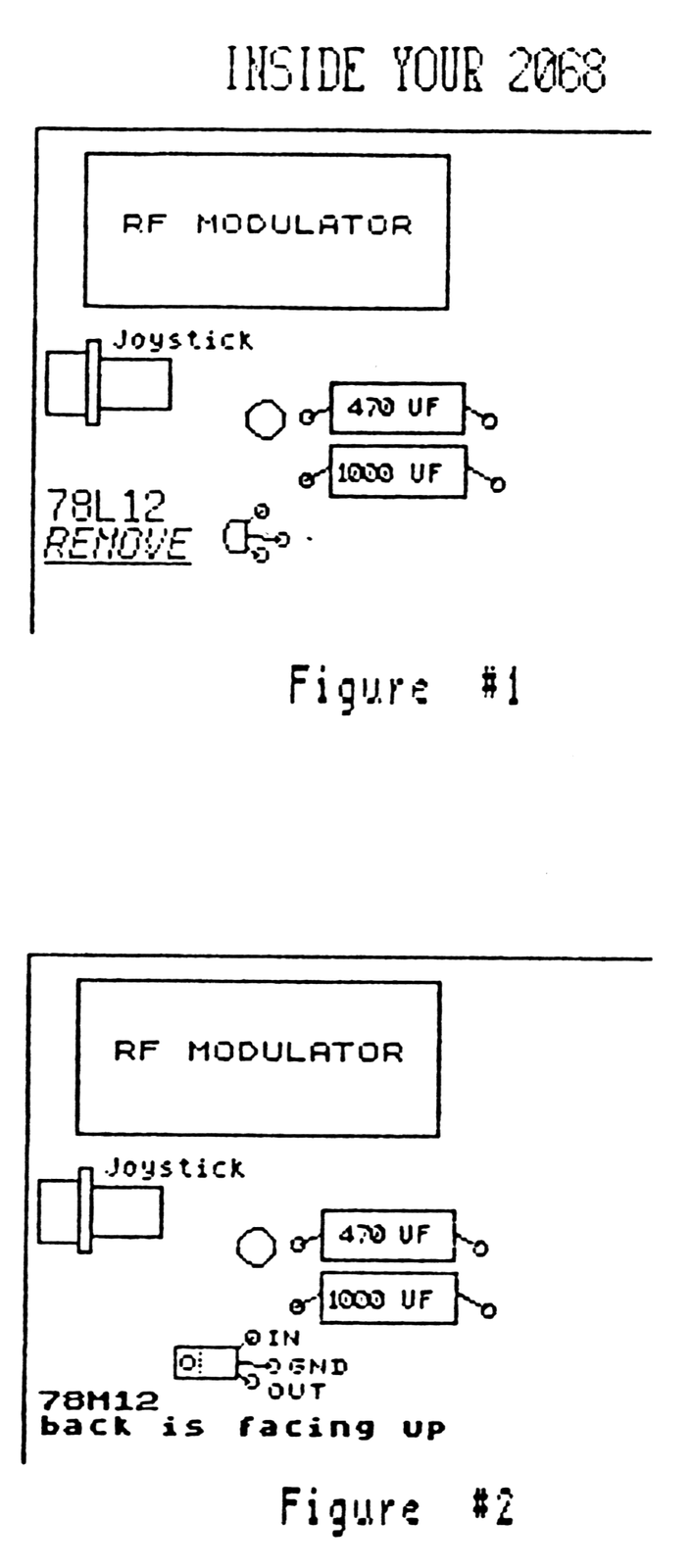
Using proper care open your beloved 2068. Using figure #1, find the 78L12 voltage regulator. It looks like an ordinary transister (only good for milliamps). Using great care remove it. Make sure the holes are cleaned out. Now install the 78M12 (larger for more current). Radio Shack part #276-1771 about $1.20. Use figure #2, note that it is the BACK of the regulator that should be facing up.
Now for the test. Move everything away from the circuit board, without the keyboard attached, power up. Your 2068 should display the copyright notice. If it does not, power off immediately!! Check the orientation of the 7812. If you have a volt meter check the input and output.
After all goes well put your 2068 back together and gaze into your nice clean picture.
Inspired by Tim Stoddard TIME DESIGNS Vol.3 No.5
Reprinted from the Jan/Feb 90 issue of the Indiana T/S Newsletter