
Created by Greg Dertz for Tandy Color Computer II and Modified by Bob Swoger for the SINCLAIR 2068 TASMAN B CPI, and the LEGEND 1080 Printer. A gift from the both of us to the MOTOROLA MICROCOMPUTER CLUB and the readers of SYNCWARE NEWS.
Merry Christmas to all! It may seem like I am jumping the gun a little by wishing you a Merry Christmas now. However, if you are anything like me it will probably take you until December to get this program entered into the old computer.
Around Christmas time, our postage bill gets very large. With all those Christmas cards, we send a lot of mail during the months of November and December. The cost of all that mail is one thing, but having to hand write our return address on all of that mail is too much. Sure, we could go out and get some ready-made return labels, or even a rubber stamp, but those do not show the Christmas spirit (or cause the old 2068 to get dusted off either). What we need is a Christmas return address label maker and thats what this program does.
This program will make any number of return address labels on 15/16 inch pressure sensitive labels. The labels must be “one-up,” meaning only one across the page. The label cannot be any longer than 3 1/2 inches. The text of the label is variable and entered when the program is run. In addition to the text of the label, the program also adds a small, graphically printed picture to the label. Currently, the program has four such pictures in its library, but the program may be easily modified to add additional pictures.
The picture is printed using a graphic area of 32 X 40 dots. The picture is placed into the program using READ – DATA statment pairs in lines 250 to 260. To add additional pictures, one must change line 40, MP=4, which tells the program the number of pictures to look for. One then adds additional DATA statements to the end of the program which contains the DATA for the new pictures.
At the top and bottom of the label is a graphic scroll which frames the label. This scroll is of a variable length and its length is calculated from the length of the text to be printed. The text itself is entered when the program is run. The text has a maximum of four lines, but blank lines may be entered if required. The first line is printed in the emphasized mode which calls attention to the line. The remaining three lines are printed compressed, which allows printing the greatest amount of information on the line. The program was written for the LEGEND 1080 printer but should run on any EPSON RX-80 with GRAPH TRAX compatible printer with only a slight modification to the scroll length formula do to the fact that LEGEND 1080 is a 142 column printer while most others can only do 132 columns.
In addition to return address labels, we have also used the program to print out Christmas gift tags. We enter the four lines as follows:
     A VERY MERRY CHRISTMAS
       TO:
       FROM:
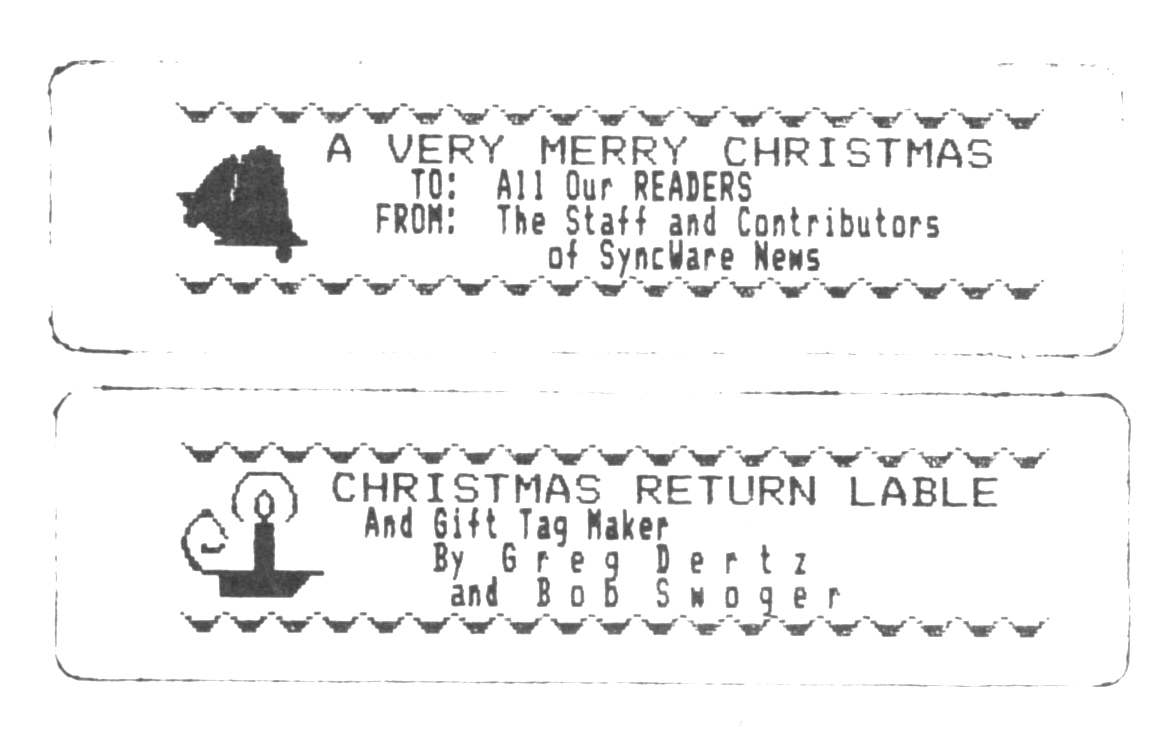
This way, we now have blank, stick-on labels that may be filled out later and attached to Christmas packages. With the use of some graph paper you can create any number of unique labels for any occasion. Then, just load your printer driver program followed by this program.
Happy label making.
EDITOR’S NOTE:
For those of you that have a modem and are using SMART II Software, Messrs. Dertz and Swoger invite you to call the Motorola Microcomputer Club’s computer and download this program to your TS2068. Set your modem for 7/E/1S and have SMART II’s buffer closed and empty, running in hex. Call the computer at (312) 576-7072. Hit the <ENTER> key a couple times until you get ->. At the prompt LOG:, hit the <ENTER> key again. The next prompt is ACCOUNT OR NAME:. Enter the word “account”. You will then be asked for a PASWORD:; enter the word “guest”. The program will automatically open the buffer, download, and then close the buffer. When GOODBYE appears on your screen, hang up. Remember that you are a guest in this system, conduct yourselves as such. ‘Nuff said.-jm
  10 REM CHRISTMAS LABEL GENERATOR
  20 REM  WRITTEN BY GREGORY A. DERTZ & ROBERT E. SWOGER      ©NOVEMBER 23,1985
  40 LET MP=4
  50 DIM A$(4,36): DIM S(12): DIM K(MP,4,40): DIM X(4)
  60 REM THIS IS THE DATA FOR THE UPPER AND LOWER SCROLL
  70 FOR I=1 TO 12
  80 READ S(I)
  90 NEXT I
 100 DATA 64,32,48,24,28,28,28,28,24,48,32,64
 110 LET LC=1
 120 CLS : PRINT "   WELCOME TO THE CHRISTMAS"
 130 PRINT " RETURN ADDRESS LABEL PROGRAM.",,,
 140 PRINT "I WILL FIRST ASK FOR YOUR NAME  AND ADDRESS(4 LINES MAX.), THEN "
 160 PRINT "PRINT OUT THE NUMBER OF RETURN "
 170 PRINT "ADDRESS LABELS REQUESTED.",,,
 180 PRINT "THE FIRST LINE OF THE LABEL WILL"
 190 PRINT "BE PRINTED EMPHASIZED, THE"
 200 PRINT "REMAINING THREE LINES WILL BE"
 210 PRINT "PRINTED COMPRESSED.",,,
 220 PRINT " TO USE ME YOU MUST HAVE LABELS"
 230 PRINT "THAT ARE 1 TO THE INCH AND ARE"
 240 PRINT "ONE UP ON THE SHEET."
 245 REM WHILE THE USER IS READING THE ABOVE STUFF, START READING THE DATA FOR THE PICTURES.
 250 FOR I=1 TO MP
 260 FOR J=1 TO 4
 270 FOR X=1 TO 40
 280 READ K(I,J,X)
 290 NEXT X: NEXT J: NEXT I
 300 GO SUB 900
 310 CLS : PRINT "EXAMPLE:",,,,"MERRY CHRISTMAS",,"John, Mary, Jim, & Spot","1234 Any Street": PRINT "This Town, IL  60000",,,
 320 REM NOW ASK FOR THE RETURN ADDRESS INFO
 330 FOR I=1 TO 4
 340 PRINT " LINE ";I;"? ";: INPUT G$
 350 IF G$="" THEN GO TO 365
 360 LET X(I)=LEN G$: LET A$(I)=G$
 365 PRINT A$(I,1 TO )
 370 NEXT I
 375 PAUSE 150
 380 CLS : REM NOW ECHO THE INPUT FOR CONFERMATION.
 390 FOR I=1 TO 4
 400 PRINT A$(I,1 TO )
 410 NEXT I
 420 PRINT : RANDOMIZE USR 64719
 430 INPUT "CORRECT? ";T$
 440 IF T$="y" OR T$="Y" OR T$="YES" THEN GO TO 470
 450 IF T$="n" OR T$="N" OR T$="NO" THEN GO TO 330
 460 GO TO 390
 465 REM THIS SECTION WILL NOW CALCULATE THE LENGTH OF THE SCROLL BASED ON THE LENGTH OF THE LONGEST INPUT TED LINE .
 470 LET H=X(1)
 480 FOR I=2 TO 4
 490 IF (15/27)*(X(I))>H THEN LET H=INT ((15/27)*(X(I)))
 500 NEXT I
 510 LET H=5+(INT ((2/3)*H))
 520 IF H>22 THEN LET H=22: REM CHECK FOR OVERFLOW
 525 REM NOW PRINT THE LABELS
 530 INPUT "NUMBER OF LABELS TO BE PRINTED? ";N
 540 PRINT "INSERT LABELS AND LINE UP THE"
 550 PRINT "FIRST LABEL.",,,,
 580 REM NOW CLEAR THE PRINT ER AND SET LINE SPACING TO 8/72 INCH SO THAT THERE WILL NOT BE SPACES BETWEEN THE LINE S OF THE PICTURE
 581 LPRINT CHR$ 27;CHR$ 27;"@";CHR$ 27;CHR$ 27;"A";CHR$ 27;CHR$ (8);
 585 REM NOW THEN PRINT ALL OF THE LABELS
 590 FOR Z=1 TO N
 600 PRINT "LABEL NO. ";Z,
 610 GO SUB 840: REM PRINT THE UPPER SCROLL
 620 FOR L=1 TO 4
 630 LPRINT CHR$ 27;CHR$ 27;"L";CHR$ (80);CHR$ 27;CHR$ (0);
 640 FOR C=1 TO 40: REM PRINT PICTURE LINE
 660 LPRINT CHR$ 27;CHR$ (K(LC,L,C));CHR$ 27;CHR$ (K(LC,L,C));
 670 NEXT C
 680 IF L=1 THEN LPRINT CHR$ 27;CHR$ 27;"E";: REM PRINT THE FIRST LINE EMPHASISED
 690 IF L=2 THEN LPRINT CHR$ 27;CHR$ 27;"F";CHR$ 27;CHR$ 15;CHR$ 27;CHR$ (27);"G";: REM PRINT ALL OTHER LINE S COMPRESSED
 700 LPRINT A$(L)
 710 NEXT L
 720 GO SUB 840: REM NOW PRINT THE LOWER SCROLL
 725 LET LC=LC+1: REM INCREMENT THE PICTURE
 726 IF LC=MP+1 THEN LET LC=1
 730 LPRINT : LPRINT : LPRINT
 740 LPRINT CHR$ 27;CHR$ 27;"H";: RESTORE : PRINT "PRINTED": NEXT Z
 790 LPRINT CHR$ 27;CHR$ 27;"@";: REM NOW DONE, SO RESET THE PRINTER
 800 INPUT "WOULD YOU LIKE MORE LABELS?";T$
 810 IF T$="y" OR T$="Y" OR T$="YES" THEN GO TO 380
 820 IF T$="n" OR T$="N" OR T$="NO" THEN PRINT "O.K. THANK YOU FOR USING ME.": STOP
 830 GO TO 800
 840 LPRINT CHR$ 27;CHR$ 27;"H";CHR$ 27;CHR$ 27;"K";CHR$ 27;CHR$ (12*H);CHR$ 27;CHR$ (0);
 850 FOR B=1 TO H
 860 FOR I=1 TO 12
 870 LPRINT CHR$ 27;CHR$ (S(I));
 880 NEXT I: NEXT B: LPRINT : RETURN
 900 PRINT AT 21,4;"HIT <ENTER> TO CONTINUE "
 910 LET T$=INKEY$: IF T$="" THEN GO TO 910
 920 RETURN
1000 REM TREE ARRAY   LC=1
1010 DATA 0,0,0,0,0,0,0,0,0,0,0,0,0,0,0,0,1,7,63,255
1020 DATA 255,63,7,1,0,0,0,0,0,0,0,0,0,0,0,0,0,0,0,0
1030 DATA 0,0,0,0,0,0,0,0,0,0,0,0,1,3,7,79,223,255,255,255
1040 DATA 255,255,255,223,79,7,3,1,0,0,0,0,0,0,0,0,0,0,0,0
1050 DATA 0,0,0,0,0,0,0,0,0,1,35,239,255,255,255,255,255,255,255,255
1060 DATA 255,255,255,255,255,255,255,255,239,35,1,0,0,0,0,0,0,0,0,0
1070 DATA 0,0,0,0,0,16,48,112,240,240,240,240,240,240,240,240,240,255,255,255
1080 DATA 255,255,255,240,240,240,240,240,240,240,240,240,112,48,16,0,0,0,0,0
1090 REM BELLS ARRAY  LC=2
1100 DATA 0,0,0,0,0,0,0,0,0,0,0,0,1,3,3,7,3,0,7,7
1110 DATA 15,15,31,31,15,15,7,7,0,0,0,0,0,0,0,0,0,0,0,0
1120 DATA 0,2,3,3,3,3,7,15,31,63,127,255,255,255,255,248,7,255,255,255
1130 DATA 255,255,255,255,255,255,255,255,255,7,0,0,0,0,0,0,0,0,0,0
1140 DATA 0,0,0,152,252,252,248,240,248,252,254,255,255,254,241,15,255,255,255,255
1150 DATA 255,255,255,255,255,255,255,255,255,255,15,1,0,0,0,0,0,0,0,0
1160 DATA 0,0,0,0,0,0,0,0,0,0,0,64,64,192,192,192,192,192,192,192
1170 DATA 192,192,192,192,192,192,192,216,252,252,216,192,192,64,64,0,0,0,0,0
1180 REM STOCKING ARRAY   LC=3
1190 DATA 0,7,2,1,7,0,0,0,0,0,0,0,0,0,0,0,0,0,0,0
1200 DATA 0,0,0,0,0,0,0,0,1,1,29,51,62,12,0,0,0,0,0,0
1210 DATA 0,128,0,0,128,0,60,36,36,60,0,1,1,1,1,0,0,0,0,0
1220 DATA 0,0,0,48,44,67,135,135,15,31,31,159,127,15,3,0,0,0,0,0
1230 DATA 0,0,0,0,0,0,0,0,0,0,0,240,80,16,16,0,15,1,1,1
1240 DATA 0,0,0,0,0,129,227,255,255,255,255,255,255,255,255,255,63,12,0,0
1250 DATA 0,0,0,0,0,0,0,0,0,0,0,0,0,0,0,0,0,0,0,0
1260 DATA 0,24,60,126,254,254,254,252,252,248,240,224,192,0,0,0,0,0,0,0
1270 REM CANDLE ARRAY    LC=4
1280 DATA 0,0,0,0,0,0,0,0,0,0,0,0,0,0,7,24,32,64,128,128
1290 DATA 131,132,136,132,131,128,128,64,32,24,7,0,0,0,0,0,0,0,0,0
1300 DATA 0,1,6,8,16,32,96,96,32,16,8,6,1,0,192,32,16,0,0,0
1310 DATA 207,47,31,47,207,0,0,0,16,32,192,0,0,0,0,0,0,0,0,0
1320 DATA 0,192,48,12,6,2,97,33,33,33,33,65,1,1,1,1,1,1,1,1
1330 DATA 255,255,255,255,255,1,1,1,1,1,1,1,1,1,1,1,1,1,0,0
1340 DATA 0,0,0,0,0,0,0,0,0,0,0,248,248,248,248,248,248,248,248,248
1350 DATA 248,248,248,248,248,248,248,248,248,248,240,224,192,128,0,0,0,0,0,0
9996 CLEAR
9997 SAVE "XMSLBLS" LINE 1
9998 VERIFY "XMSLBLS"

Note: Type-in program listings on this website use ZMAKEBAS notation for graphics characters.