
When I got my TS2068 I thought one of the marvellous things about it was a Header program by which one could get the name of a program displayed on-screen a few seconds after it started loading. ‘If only the ZX81 had that feature it would be marvellous’,I thought.
Where have I been all this time? I’ve only just discovered there is a program to do practically the same thing. It is to be found in Mike Lord‘s book ‘Explorers guide to the ZX81‘. How I never spotted it I’ll never know.
With the thought there must be many in the same position as myself, I would like to present this practical program.
It is a M/C routine that is placed in a REM statement at the beginning of a short Basic program. First create a REM statement of 66 spaces(or more) Then enter the lines as shown in Fig. 1. Put your computer in the FAST mode, RUN the program and enter the numbers in Fig. 2 starting with the top row ,left to right. When you are done check that the sum of the numbers is 7620. Then delete all lines except the line 1 containing the REM statement.
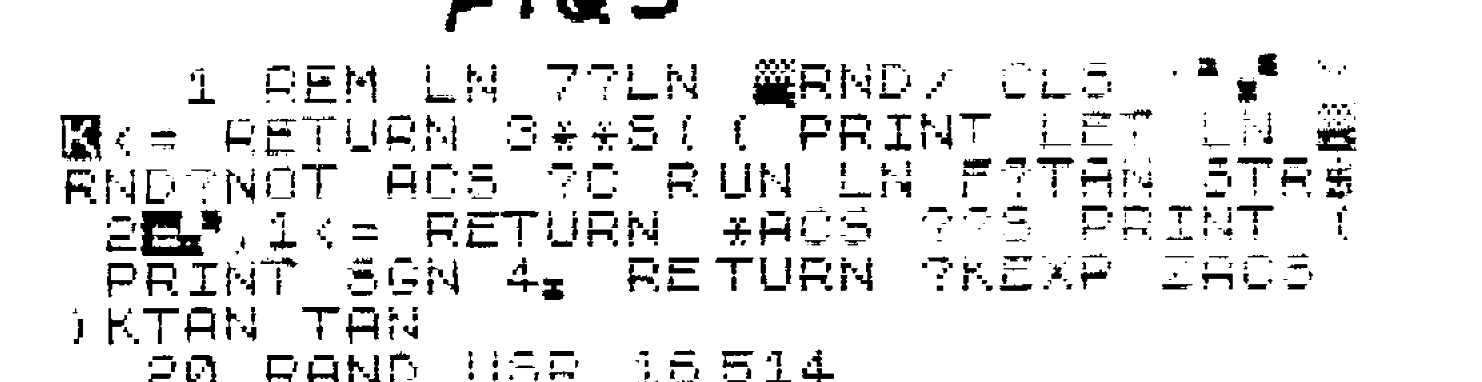
Enter the lines in Fig. 3. SAVE this program, since this is the program you will use to obtain HEADER information from your other program tapes.
When you RUN this program, it will prompt you to start playing the tape which you wish to identify. At the start of the LOADing of a tape the program name under which it was SAVEd will appear on the screen. Any other programs appearing on the tape will be similarly identified.
Fig. 1
   1 REM 123456789012345678901234567890123456789012345678901234567890123456
  10 FOR I=16514 TO 16579
  20 INPUT A
  30 POKE I,A
  40 SCROLL
  50 PRINT I;" ";A
  60 NEXT I
  70 PRINT "FINISHED"
 110 PRINT "PRESS A KEY TO CHECK
 120 IF INKEY$="" THEN GOTO 120
 130 LET TOTAL=0
 140 FOR I=16514 TO 16579
 150 LET X=PEEK I
 160 LET TOTAL=TOTAL+X
 170 NEXT I
 180 PRINT TOTAL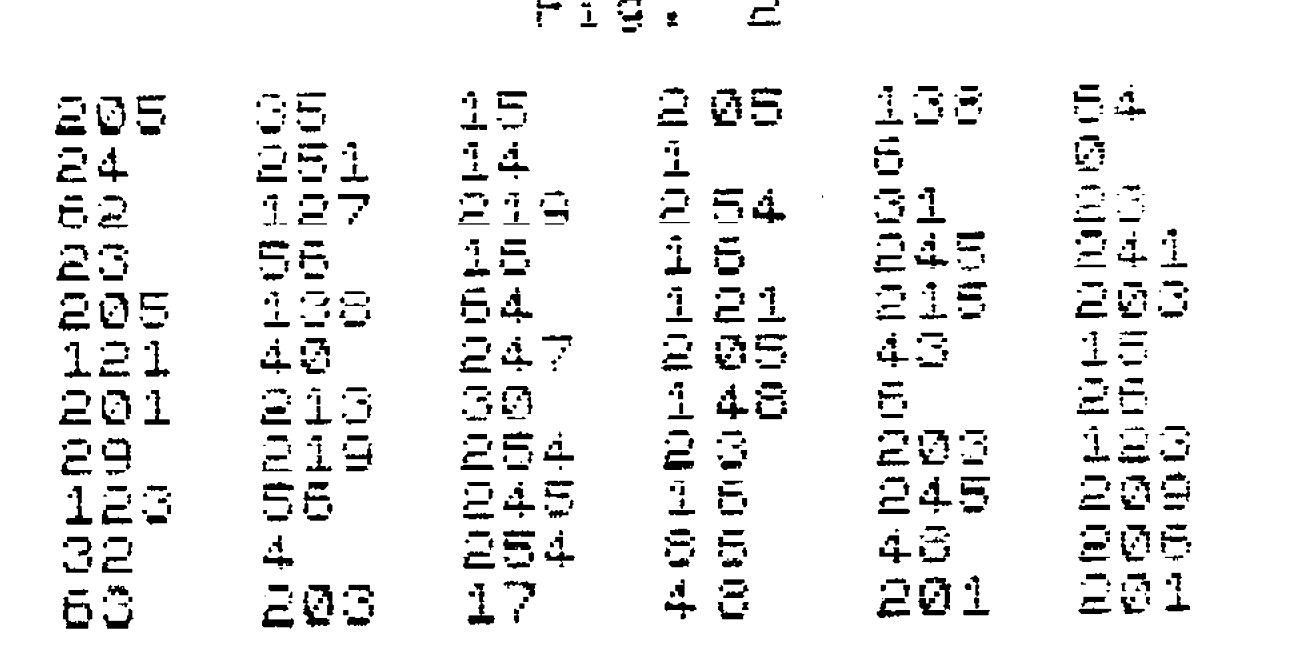
Fig. 3
  20 RAND USR 16514
  30 PRINT AT 20,0;"PRESS A KEY TO READ TAPE"
  40 IF INKEY$="" THEN GOTO 40
  50 CLS
  60 GOTO 20
 100 SAVE "HEADER READE[illegible]"
 110 GOTO 30
G.F. CHAMBERS
** ERROR ** ERROR ** ERROR ** SEARS RGB MONITOR
In the article on the Sears RGB monitor in the last issue of the newsletter there was a reference to replacing the 330 ohm resistor with a 10K variable resistor. While the article was correct, the accompanying sketch had an arrow pointing (incorrectly) to the 3300 ohm resistor. It should be the 330 ohm resistor that is replaced. Sorry about that!
Note: Type-in program listings on this website use ZMAKEBAS notation for graphics characters.