
Battleship was a game we used to play as kids (and later)—with pencil and paper before the toy manufacturers plasticized it. You remember—each of you placed some number of “ships” of various sizes in a coordinate grid “ocean” and then took “shots” at each other by calling out coordinate locations in turn. After each “salvo,” hits were reported and recorded. Loss of a certain one of your ships would penalize you, say, two shots off the next salvo. The object was to wipe out your opponent before he got you.
This Battleship Solitaire program allows you to play a similar game against the computer, but with the modification that you do all the shooting. Even though you have no ships to be sunk, you are still subject to penalties. Each time you fail to score at least one hit per salvo you lose one shot. The object of this game is to sink all enemy ships before you are out of shots.
As listed, the Battleship Solitaire program provides a 10 by 10 ocean with numerical coordinates. The “tens” digit appears on the vertical axis with the “units” digit on the horizontal axis. You will be seeking four ships of four boxes or segments each. They may be placed horizontally, vertically, or on either diagonal. Since both the bow of the ship and its orientation are determined by the ZX80 on a random basis, a new situation is added to the game: ships may abut, cross, or even share the same coordinate location! (What do you want from a 1K program?) If the concept of intersecting battleships offends you, let some be submarines at different depths on the same X-Y coordinate.
The program has three distinct phases. First, the four ships are randomly—and secretly—placed in the ocean. Second is your turn. You are advised of the number of shots per salvo (initially 5), which you take using coordinate designations. At the end of each salvo the ZX80 reports the accumulated number of “hits” on each of the four ships: A, B, C, and D. It also displays the number of remaining shots for your next salvo, taking into account your hits and misses. Eventually it will announce “YOU WIN” or “YOU LOSE”. During the third phase of the program, accessible on a GO TO basis after the battle is over, the ZX80 generates a display of the ocean complete with those elusive ships.
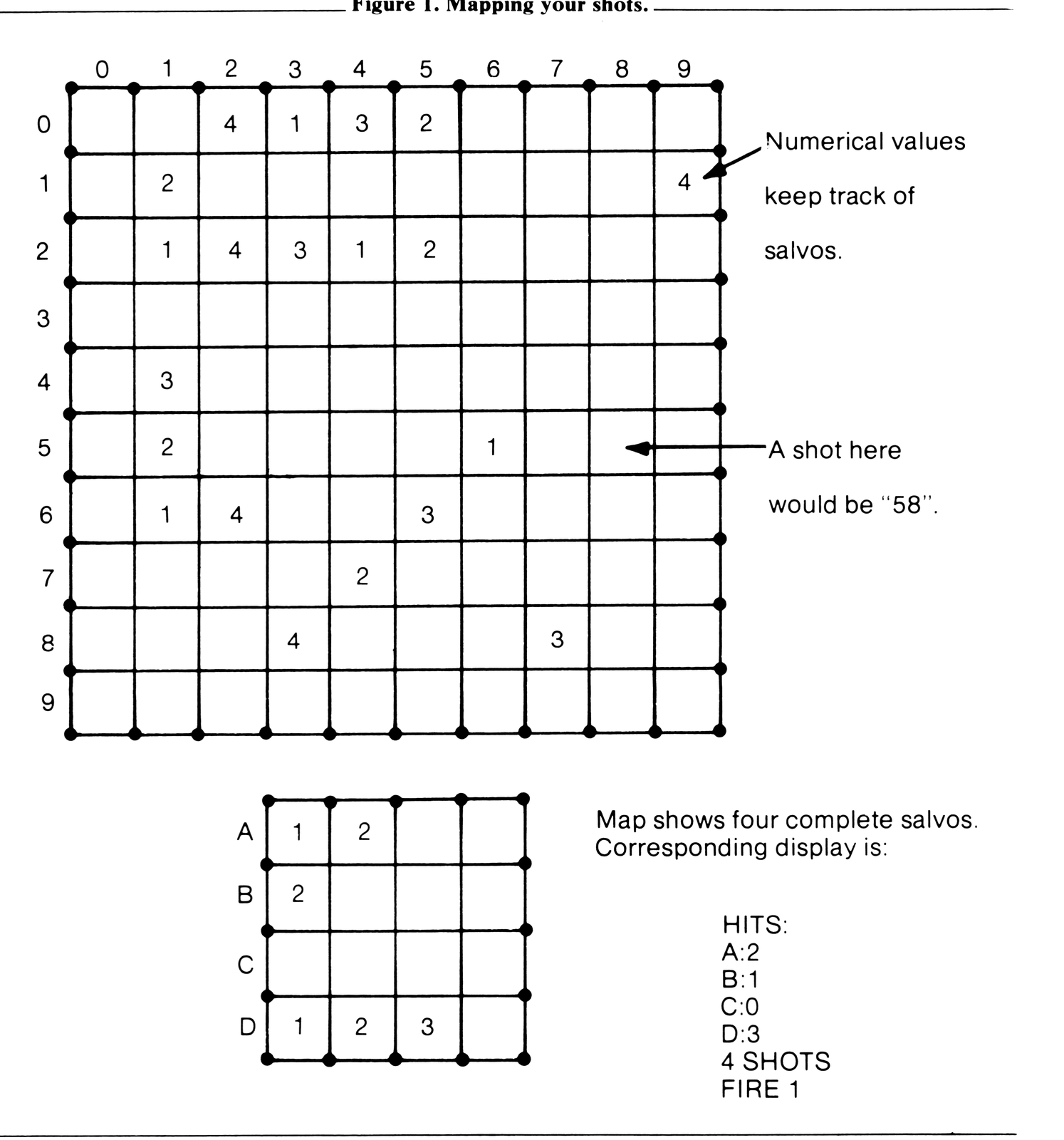
Before running the program it is recommended that pencil and paper be available for you to record your shots and hits. By drawing a 10 by 10 grid plus a separate set of four-box diagrams, one for each ship, you can keep track of shots you have taken and ships you have hit. Big hint: mark your shots and hits of the first salvo using 1’s, the second salvo using 2’s, etc. Figure 1 shows such a diagram as it might appear part way through a game.
Start in the usual way, pressing RUN and NEWLINE. After the computer deploys the ships, unseen by you, it will display:
5 SHOTS
FIRE 1
You respond by pressing a two digit number, YX, representing your chosen coordinate. (Y is the vertical coordinate, X is the horizontal.) Follow with NEWLINE. The display now shows:
5 SHOTS
FIRE 2
Continue firing the rest of the salvo in the same manner. After you “Fire 5” the display will show, say:
HITS:
A:0
B:0
C:1
D:0
5 SHOTS
FIRE 1
Note that ship C has been hit, as an example, and thus the next salvo is allowed to continue with 5 shots. If all ships had come up “0”, the display would show:
HITS:
A:0
B:0
C:0
D:0
4 SHOTS
FIRE 1
You have a one-shot penalty for your failure to hit anything on the first salvo. “Four” is now the maximum number of shots per salvo during this game.
Remember that the number of hits displayed is accumulative. Thus “C:4” would indicate that ship C has been sunk. If you should hit a coordinate shared by two overlapping ships, both ships will be scored as “hit”.
The game continues, with the number of hits increasing (hopefully) and the number of shots decreasing (woefully) until the display shows:
HITS:
A:4
B:4
C:4
D:4
YOU WIN
On the other hand, if you run out of shots first, it will show, say:
HITS:
A:3
B:2
C:4
D:3
YOU LOSE
The program run can be halted at any time before the end by entering “100” in place of a coordinate.
If, now that the game is over, you are curious about the ship deployment, press NEWLINE, GO TO 700, and NEWLINE to obtain a display of the ocean and the ship deployment. Be patient, it takes something over a half minute to perform this function. Figure 2 shows typical deployment displays.
Should you want to change the degree of difficulty of the game, the easiest way is to alter the initial number of shots per salvo. Fewer shots make it harder, more shots make it easier. Five shots, as programmed, seem about right, and one shot, more or less, will significantly change the difficulty. To make the change, simply edit line 300 of the program:
300 LET N=5
to include the desired value of N.
Other parameter variations were tried, such as the number of ships and ships of different sizes (e.g., five ships of 1, 2, 3, 4, and 5 segments). But in the end we returned to the four ships of four segments each.
It should be pointed out that, smart as it is, the program cannot tell if you shoot the same coordinate more than once. You are not supposed to do this, but if you happen to and score another hit on a coordinante, you will get credit for an extra “hit.” That could lead to a false “WIN.” Not to worry—no self-respecting solitaire player would cheat in this manner.
Figure 2. Typical ship deployment displays.
 0123456789
0 X
1 X
2 X   XXXX
3 X
4       X
5      X
6X    X
7 X  X
8  X
9   X

 0123456789
0
1    X    X
2     X  X
3  X   XX
4  X   XX
5  XX
6  X X
7     X
8
9
Figure 3. Battleship Solitaire Listing
 10 DIM B(16)                             Four-ship array.
 20 LET P = 1                             Preset array index.
 40 FOR J = 1 TO 4                        Deploy ships, per ship
 60 LET D = RND(4)                        Random orientation.
 70 LET X = RND(7)                        70,80 Random X loc., modify
 80 IF D = 4 THEN LET X = RND(10)              for vertical ship.
 90 LET Y = RND(7)                        90-100 Random Y loc., modify
100 IF D = 2 THEN LET Y = RND(10)              for horizontal ship.
110 IF D = 1 THEN LET Y = Y + 3           Shift Y if ship slants up.
120 LET W = 1                             120,130 Set horiz. increment
130 IF D = 4 THEN LET W = 0                    factor.
140 LET Z = 1                             140-160 Set vert. increment
150 IF D = 2 THEN LET Z = 0                    factor.
160 IF D = 1 THEN LET Z = -1
165 LET K = 0                             Preset segment index.
170 FOR I = P TO P + 3                    Deploy ship, per segment.
180 LET B(I) = (Y + K * Z) * 10 + X + K * W  Form coords; load array.
185 LET K = K + 1                         Increment segment index.
190 NEXT I
200 LET P = P + 4                         Increment array index.
210 NEXT J
300 LET N = 5                             Preset no. of shots per salvo.
310 LET C = 0                             310-340 Preset ship hits.
320 LET D = 0
330 LET E = 0
340 LET F = 0
343 LET G = 0                             Preset salvo hits.
345 FOR J = 1 TO N                        Salvo firing, per shot.
347 PRINT N; " SHOTS"                     347,350 Print salvo info.
350 PRINT "FIRE "; J
360 INPUT A                               Display; input shot coords.
370 IF A = 100 THEN STOP                  Optional run halt.
380 CLS
400 FOR I = 1 TO 16                       Hit check, per segment.
410 IF NOT A + 11 = B(I) THEN GO TO 460   Skip ship hits on miss.
420 IF I<5 THEN LET C = C + 1             420-450 Increment ship hits
430 IF I>4 AND I<9 THEN LET D = D + 1          as req'd.
440 IF I>8 AND I<13 THEN LET E = E + 1
450 IF I>12 THEN LET F = F + 1
455 LET G = 1                             Increment salvo hit.
460 NEXT I
470 NEXT J
475 PRINT "HITS:"                         475-570 Print salvo results.
480 PRINT "A:"; C
510 PRINT "B:"; D
540 PRINT "C:"; E
570 PRINT "D:"; F
600 IF C>3 AND D>3 AND E>3 AND F>3 THEN   All ships sunk, skip to end.
        GO TO 640
610 LET N = N - 1 + G                     Modify no. of shots per salvo.
620 IF N = 0 THEN GO TO 660               Out of shots, skip to end.
630 GO TO 343                             Recycle if not end.
640 PRINT, "YOU WIN"                      640-670 Print outcome & stop.
650 STOP
660 PRINT, "YOU LOSE"
670 STOP
700 PRINT " 0123456789"                   Print X coord. heading.
710 FOR K = 1 TO 10                       Form display, per Y coord.
720 PRINT K - 1;                          Print Y coord.
730 FOR L = 1 TO 10                       Form display, per X coord.
740 LET A$ = " "                          Preset character to blank.
760 FOR I = 1 TO 16                       Scan ship array, per segment.
770 IF B(I) = 10 * K + L THEN LET A$ = "X"  Set char. to X if coord match.
780 NEXT I
790 PRINT A$;                             Print character.
810 NEXT L
820 PRINT ""                              Terminate line.
830 NEXT K                                Display after last K.
Note: Type-in program listings on this website use ZMAKEBAS notation for graphics characters.