
Publication: Sinc-Link
Pub Details: Sinc-Link v7 n5 (Volume 7, Issue 5)
Date: September/October 1989
Pages: 3-5
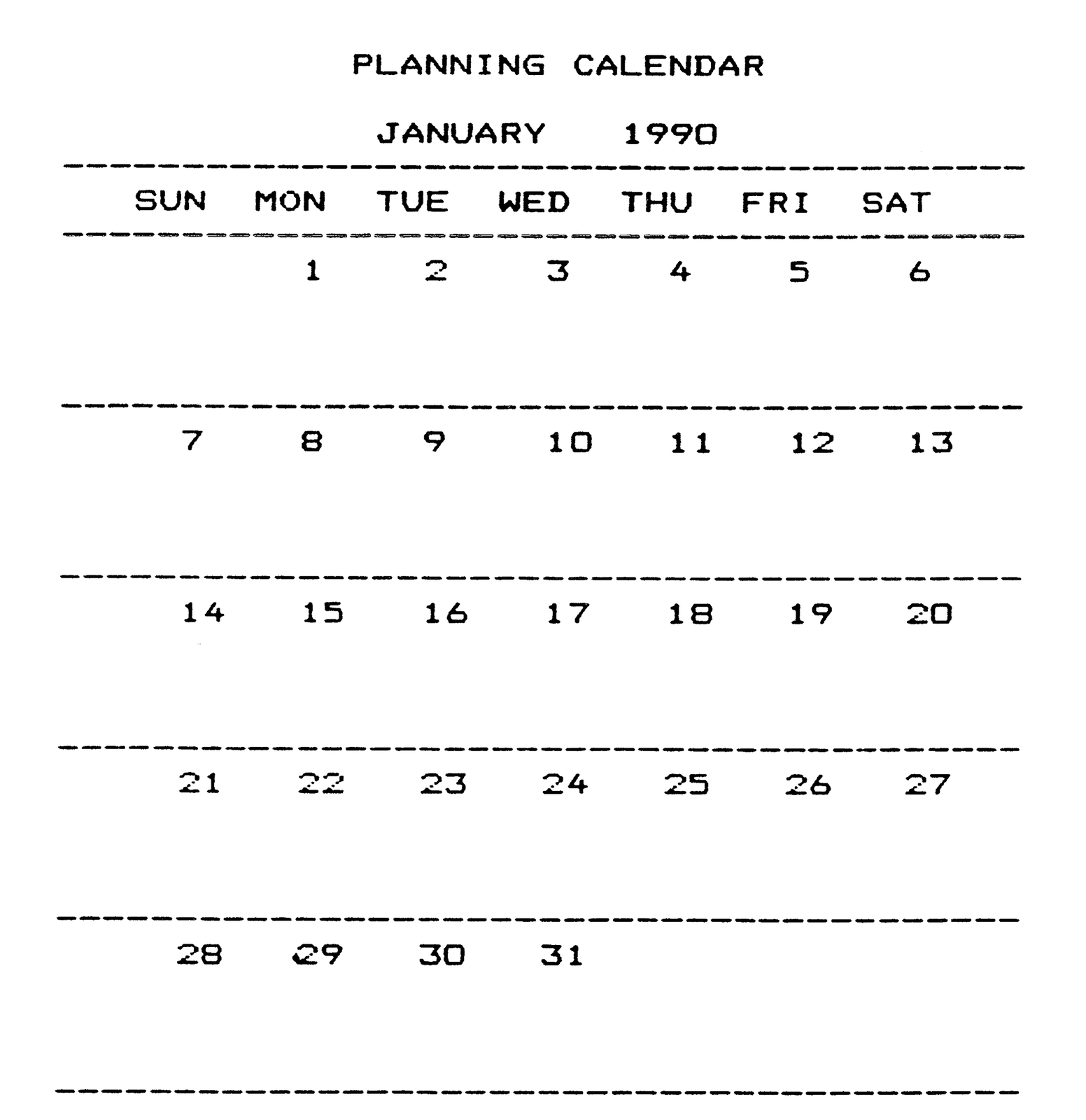
Have you priced those planning calendars you buy from your local stationer? Well, if you have a wide printer of the dot matrix type, you can make your own personalized calendar and save a bundle.
This program should be typed in carefully, watching the spacing of any stuff inside the quotation marks and DATA statements. Here are some explanatory notes for some of the lines:
  Lines                   Details
==========  ================================================
   180       As usual you may have to change 237 to suit
             your TS2068. Find your correct value by using
             a simple FOR ... NEXT loop to get the IN 127
             response from your computer.
                 FOR i = 1 TO 100
                 PRINT IN 127
                 NEXT i
  230        40 minus signs
  260        Enter the four digits of the year, eg, 1990
  320-530    Calculates each month's calendar.
  550        Sets the printer to print elongated characters.
             Check your manual for correct commands needed
             to carry out this function.
  720        Turns the elongated characters OFF.
  820-860    Handles the DATA for the names of the months.
             Substitute other languages here, too.
==============================================================
 100 REM  Bob Mitchell 1989
 110 REM ======================
 120 REM MAKE A CALENDAR ON THE
       W I D E   P R I N T E R
       GO TO 210 TO SET
       NEW YEAR.
 130 REM ======================
 140 REM CHANGE LINE 580 TO
       PERSONALIZE THE CALENDAR
 150 REM ======================
 160 BEEP .1,4: BEEP .1,0
 170 RETURN
 180 IF IN 127<>237 THEN GO TO 180
 190 RETURN
 200 GO TO 280
 210 REM initialize
 220 LET f=0
 230 LET l$="----------------------------------------"
 240 DIM a$(12,9)
 250 GO SUB 820
 260 INPUT "year? (yyyy) ";year
 270 LET g=280: DIM d(31): DIM d$(31,12,28)
 280 CLS
 285 LET y=year
 290 CLOSE #2
 300 PRINT AT 10,4;"Make a Calendar for  ";y
 310 GO SUB 160
 320 INPUT "Enter Month (1 TO 12)";m
 330 LET d=1: LET mon=m: LET year=y: LET f=1: DIM a(42)
 340 IF f=0 THEN GO TO 250
 350 LET end=30
 360 IF m=1 OR m=3 OR m=5 OR m=7 OR m=8 OR m=10 OR m=12 THEN LET end=31
 370 IF m=2 THEN LET end=28
 380 LET leap=0
 390 IF y/4=INT (y/4) AND y/100<>INT (y/100) THEN LET leap=1
 400 IF y/400=INT (y/400) THEN LET leap=1
 410 IF m=2 AND leap=1 THEN LET end=29
 420 IF m=1 OR m=2 THEN LET m=m+12
 430 IF m=13 OR m=14 THEN LET y=y-1
 440 LET r=d+2*m+2+INT ((3*m+3)/5)+INT (y/4)+y-INT (y/100)+INT (y/400)
 450 LET num=(r/7-INT (r/7))*7
 460 LET num=INT (num+.5)
 470 LET start=num
 480 IF num=0 THEN LET start=7
 490 LET day=1
 500 FOR p=start TO 42
 510 LET a(p)=day
 520 LET day=day+1
 530 NEXT p
 540 CLS
 550 GO SUB 180: OUT 127,27: GO SUB 180: OUT 127,87: GO SUB 180: OUT 127,49
 570 LPRINT " "
 580 LPRINT TAB 12;"PLANNING CALENDAR"
 590 LPRINT
 600 LPRINT TAB 13;a$(mon);" ";year
 610 LPRINT l$'"     SUN  MON  TUE  WED  THU  FRI  SAT"
 620 LPRINT l$
 630 FOR r=0 TO 5
 640 FOR c=1+r*7 TO 7+r*7
 650 LET cc=c-r*7
 660 IF a(c)=0 THEN PRINT TAB (5*cc);" ";: GO TO 690
 670 IF a(c)>end THEN PRINT TAB (5*cc);" ";: GO TO 690
 680 LPRINT TAB (5*cc);a(c);
 690 NEXT c
 700 LPRINT ''''l$
 710 NEXT r
 720 GO SUB 180: OUT 127,27: GO SUB 180: OUT 127,87: GO SUB 180: OUT 127,48
 760 PRINT #1;AT 0,0;"more? y/n"
 770 GO SUB 160
 780 IF INKEY$="" THEN PAUSE 0
 790 IF INKEY$="y" THEN GO TO 280
 800 IF INKEY$="n" THEN RANDOMIZE USR 100: NEW
 810 GO TO 780
 820 RESTORE
 830 FOR i=1 TO 12
 840 READ r$: LET a$(i)=r$: NEXT i
 850 RETURN
 860 DATA "JANUARY","FEBRUARY","MARCH","APRIL","MAY","JUNE","JULY","AUGUST","SEPTEMBER","OCTOBER","NOVEMBER","DECEMBER"
 870 RANDOMIZE USR 100: SAVE "calndr.B2" LINE 890
 880 STOP
 890 RANDOMIZE USR 100: OPEN #3,"lp"
 900 RANDOMIZE USR 100: POKE 16094,0
 910 GO TO 280
PS. Sorry. You’ll have to draw in your own vertical lines on the calendar.
Bob Mitchell [address omitted]
890815
Here is a miniature version made by entering OUT 127,15 before running the program.
Note: Type-in program listings on this website use ZMAKEBAS notation for graphics characters.