
This issue, I am presenting rewrites of two utilities which are mainly the work of Steven Gunhouse, our club member in Bowling Green, Ohio. These are the autoboot and graphics 24 utilities which I have used in the Omnibus collection but which can certainly be used in other applications.
Let me start by saying that he wrote to me explaining how I got an error report when trying to use PRINT #4: DATA 0 to access the NMI screen dump (or anything else). He was referring to this column in the May-Jun 91 issue. He explained it this way: “The routine (ie, PRINT #4: DATA 0) does not exit by the proper way and does not adjust the machine code variable CH ADD to point to the end of the current statement.” As an aside, I must add that RANDOMIZE USR 100: DATA 0 seems to work equally well, although I had trouble at first.
He then went on to correct the problem as follows (I quote in part): “…refer back to Sinc-Link vol 7 no 5 …memory map of the LKDOS cartridge….at 8194d (2002h) there is a flag which tells LKDOS whether it is executing a BASIC command like DATA, an NMI routine or something else. If the flag is 0 (zero) it’s a BASIC command; if a 1 (one) it’s either in start up or NMI; …if an 11 it is CODE.” Then he went on to write some machine code which included loading a 1 into this flag location. This code improved the autoboot file “autobt.Cx” as used in the Omnibus disk; that’s the one that returns action to the AUTOSTART file in the selected drive whenever it is triggered. Besides cutting the length to 56 bytes by taking out some redundant stuff, he put in an LDIR routine to transfer the code quickly from the 24495 area in 2068 RAM to the 16350 area (34 bytes only) in the LKDOS RAM. This eliminated my use of POKEs to accomplish this rather slowly in the earlier version. He went on to state that “if the address 2002h held a 1, everything after the LOAD was automatic”. I entered this code and when it was incorporated into my Omnibus disk, it did indeed work just fine.
Graphix 24, as originally conceived, was useful for copying all 24 lines of the screen to the wide printer. However, it had major drawbacks: It was necessary to check that the print head was located at the left before each use of the code; the printout was restricted to a left margin of five; all 24 lines would be printed including the bottom line which might have those pesky dots generated by an LKDOS NMI+S save.
Steven’s rewrite overcomes those deficiencies and gets over a few more. It handles the PRINT #4: DATA 0 command properly; it responds to LKDOS variables LFEED and MARG so that the line feed can be turned ON or OFF and the left margin can be anywhere. I have used this feature in Omnibus to switch from left column to right when printing screen dumps, thus saving paper or just helping get the proper layouts.
A word of caution: if you interrupt the normal sequence of events when using this utility, you should probably reset the printhead manually (turn the printer OFF then ON). Furthermore, in resetting the print-head to a different position, the utility generates an extra line feed which should be taken into account when positioning the paper in the printer.
The version presented here is intended for use with the Aerco printer i/f driver which is like the LKDOS one. It uses BIT 4,A at 3F5F hex to replace my old printer-ready check using <IF IN 127<>237> and thus making it work with newer Epson compatible printers including my Fastext 80. Some of the older Epsons and such did not use <CHR$ 27;”*”;CHR$5> to do the graphics but rather <CHR$ 27;”K”>, originally. If you need code for other drivers (A&J, TASMAN, TAS2), there is a separate file in the library that is available on request.
Moreover, the PRINT #4; DATA 0 command has been expanded to allow for one or two parameters, the first determining the start line of the screen dump and the second the number of lines to be copied to the printer. In both cases, if the number is out of range (or missing the second parameter), it presumes the default value (0) and prints the whole screen.
The code for both the autoboot and the graphix 24 routines is shown below. In both cases, the LDIR routines are NOT transferred to the LKDOS RAM.
I have not provided the disassemblies but these can be prepared using any good disassembler. The code is presented in different forms, both in HEX and DECIMAL, with and without addresses, with and without spacing. This does not matter and all that is necessary is that the code groups be entered via a convenient loader. I have presumed that the reader will have machine code loaders to use with these listings. If you need these, they can be obtained from the library; in fact a disk with all this material will be placed in the library.
autobt.Cx at 5FAF hex. Spaces required after each pair of characters.
F3CD620021C55F11 DE3FED5316200122 00EDB0C3BA003E80
32032021F63F1122 20010A00EDB03E01 320220C3C6004155
544F535441525420
Address 5FC6 holds value 80h (128d) which selects drive 4; if you want the autoboot to operate another drive, change this to the correct hex value (02=drv0; 04=drv1; 08=drv2; 10=drv3).
If you prefer to work in decimal:
autobt.Cx at 24495 dec
Only 34 bytes are moved to the LKDOS RAM (16350-16383).
243,205,98,0,33,197,95,17,222,63,237,83,22,32,1,34,
0,237,176,195,186,0,62,128,50,3,32,33,246,63,17,34,
32,1,10,0,237,176,62,1,50,2,32,195,198,0,65,85,
84,79,83,84,65,82,84,32
To alter the selected drive, change address 24518 (now 128 for drv4) to: 2=drv0; 4=drv1; 8=drv2; 16=drv3.
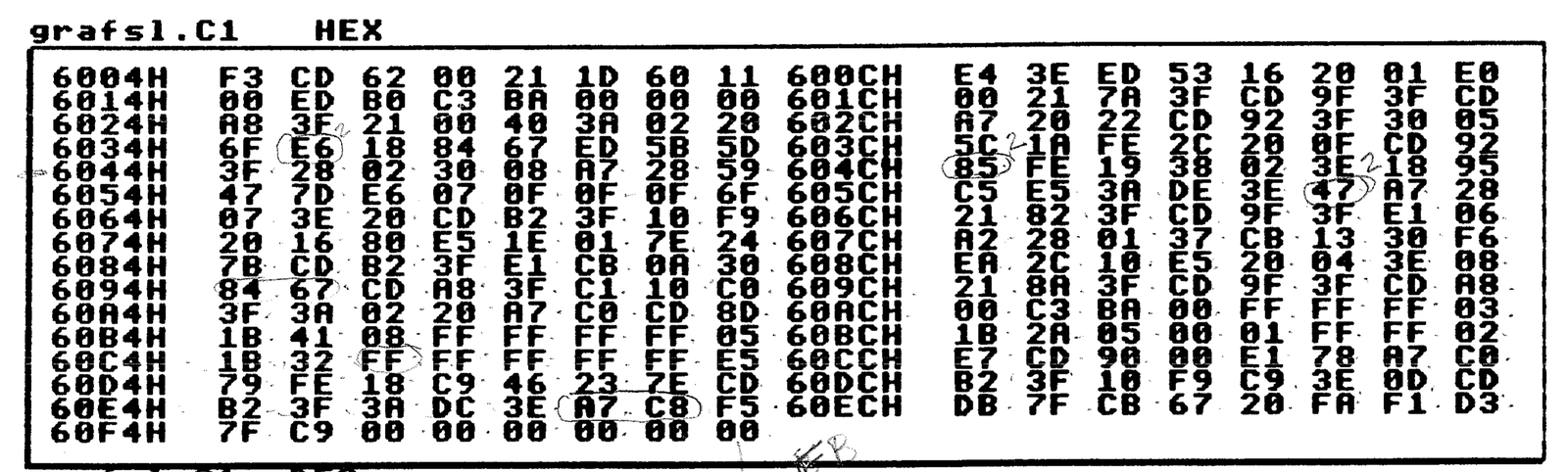
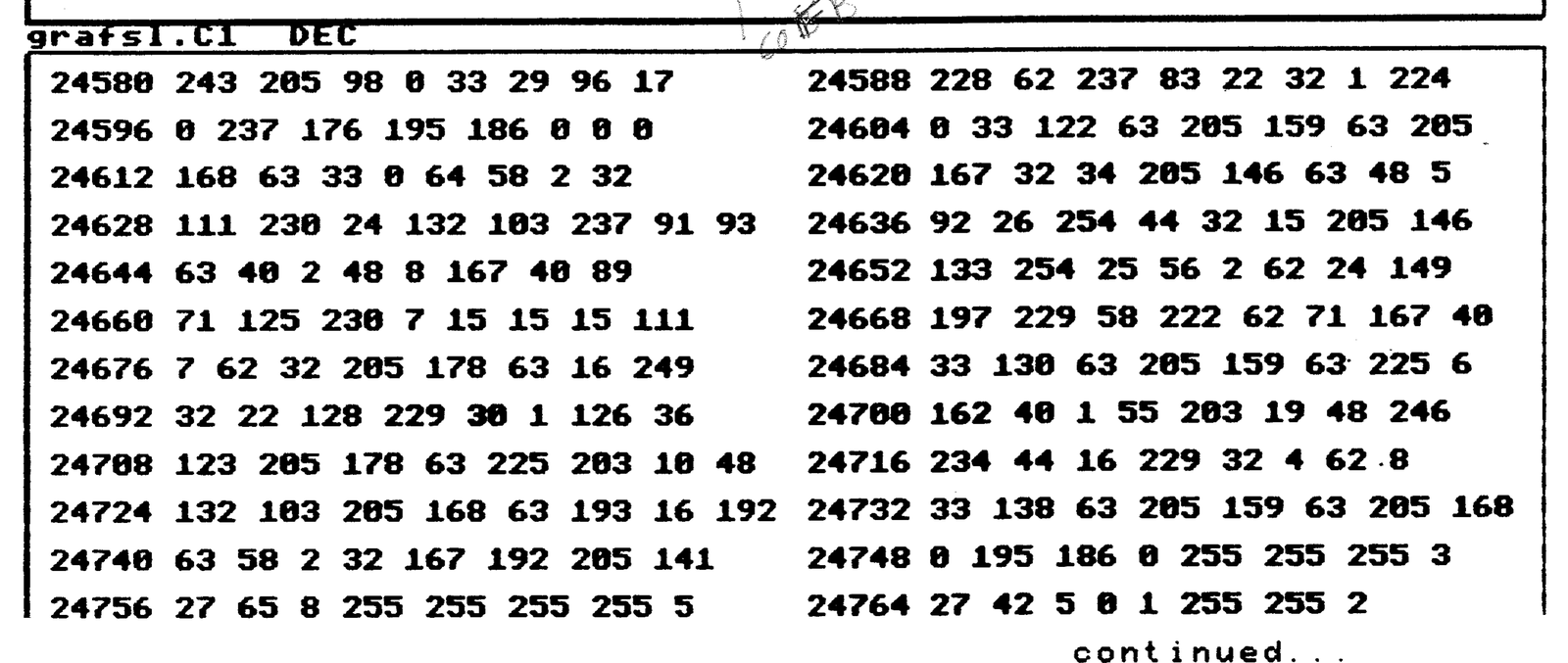
Here’s the code for the graphix 24 rewrite and which I call <grafsl.C1>, which stands for Graphics/Start/no. of Lines.
But first some notes:
The Printer control codes start at 60B3h/24755d and comprise:
27 65 8       for 8/72 inch line spacing;
27 42 5 0 1   for single density bit image graphics;
27 50         for normal line spacing.
Inverted printing of the screen dump can be obtained by changing the 28 to 20 h (40 to 32 d) at address 607Dh/24701d. It can also be obtained by doing the following double POKEs to the LKDOS RAM.
PRINT #4: POKE 16147,288 for INVERSE; 16147,296 for NORMAL.
grafsl.C1 HEX
grafsl.C1 DEC

CHANGES TO OMNIBUS
While autoboot and grafsl can be used in stand-alone situations, I make use of them in the Omnibus disk and so here is some help on adjusting the latter.
Assuming that you have Omnibus using the cmp3 code to compress the menus, the three code groups (autobt.Cx, cmp3.C1 and grafsl.C1) can be saved as one file, thus conserving track space. With the above changes made, save the three in one by RANDOMIZE USR 100: SAVE “ombMC.C1″CODE 24311,511.
Now make the following changes to your Omnibus BASIC listing. The line numbers may vary a bit depending on the version you have.
1060 change 16310 to 16350
1180 PRINT #4: LOAD "ombMC.C1"CODE 24311
1220 should end with RANDOMIZE USR 24495: REM autobt
1225 RANDOMIZE USR 24580: REM grafsl
2570 RANDOMIZE USR 24580
4010 PRINT #4: POKE 8214,16350
Save the Back-up from the main menu, then Save the Autostart version from the main menu. The Autostart has the advantage of saving all the system variables including the code groups located from 24311 up. Make two copies just to be safe.
Clear the computer and load the Autostart; hopefully all has gone well. If you have some trouble getting all this to work, you may have to get a disk copy from the club library.
Once again, many thanks to Steven for providing all this very useful code as well as a lot of insight into the inner workings of LKDOS, printers and machine code in general.
Bob Mitchell 910730
Note: Type-in program listings on this website use ZMAKEBAS notation for graphics characters.