
The term “Spreadsheet” applies to any technique where the user can view portions of a large sheet of records that normally cannot fit onto the screen. Quite often, inventory files require much longer columns than the display can produce and, rather than limit the need, we will simply move our screen like a magnifying glass across 100 columns of information. Likewise, we can scroll upwards or downwards until any 10 of 60 rows is displayed.
The machine language routine we will create is, above all, fast! With a minimum of keystrokes, the user can find any record in the file within seconds. Here, our records are to be stored into A$ only, and our headings for the columns in T$. This header allows us to distinguish each column of data in A$ at all times. Though the title string remains on the screen, it does move left or right with the records below. A$ is DIMensioned to 60,100 and occupies 6K of memory. We can make our file larger, but this is tricky and an explanation will be given later in this discussion. T$ is a single string, DIMensioned to 100 and its contents are defined by the user for his own program.
Arrow keys 5 to 8 move the screen records about the sheet to reveal information in the entire file. It would be nice to have 20 records printed onto the display, but, as you will see, the moving records can be distracting. So we will stick with 10 (you can easily alter this later). Since we have 4 directions of travel, we need to highlight the first printed record by inverting its video characters so that it is more distinguished than the others.
As the machine code loop is always busy finding and printing records to the screen, the only way to return to Basic is by pressing M for a return to the menu or C for a correction during the display period.
Less than 400 bytes are used to do all the work of producing a spreadsheet, and only simple requirements are mandatory:
A$=All File Records     A$=DIMensioned (60,100)
T$=Title String         T$=DIMensioned (100)
   (heading)
The user can alter portions of the program to:
1. Print up to 15 records (controlled by addresses 16731 and 16657)
2. Slow down/Speed Up movement of screen (delay address=16640)
3. Alter file size (described later).
4. Change routine escape keys from “M” or “C” to user’s choice.
5. Highlight any particular record in the display other than the first.
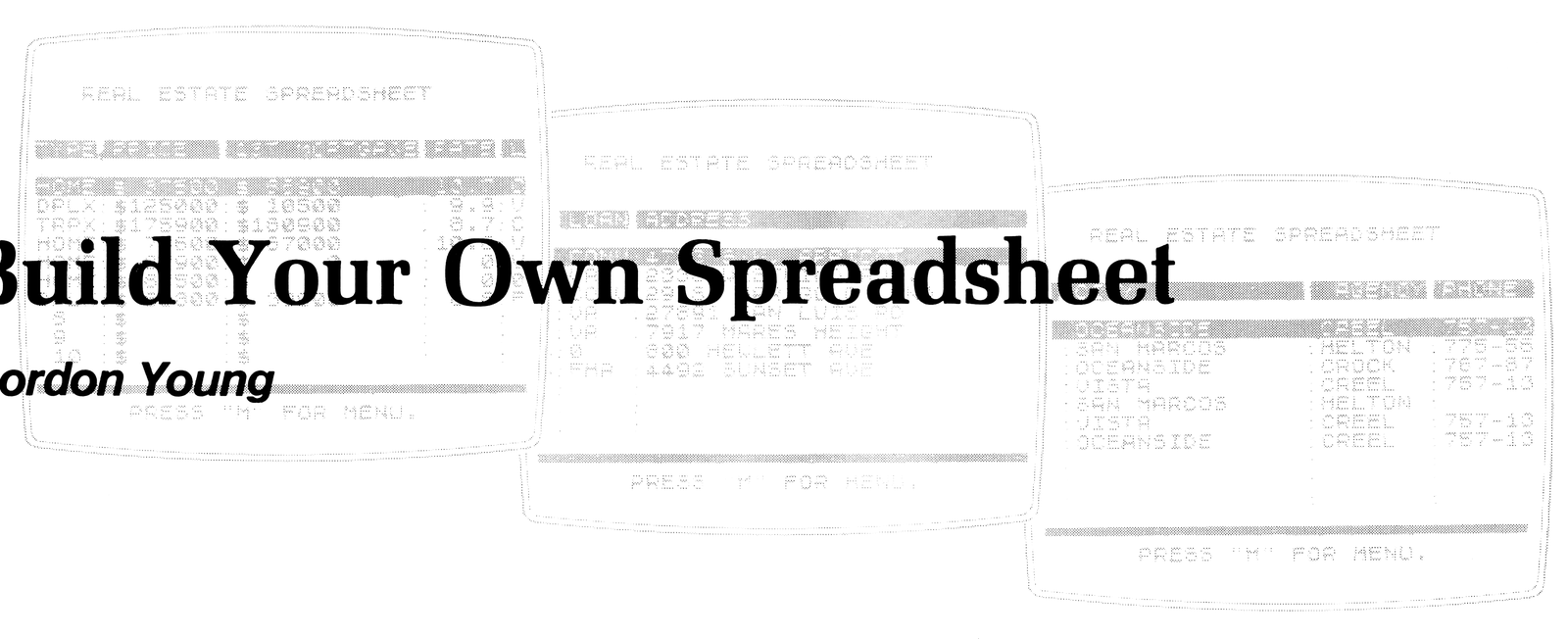
Begin by putting the computer in the FAST mode (the reason for this will become obvious). Enter line 1 REM (followed by 395 periods). As the computer runs your program and comes upon the word REM, all contents afterwards are not operated upon until it approaches the next line number. This is where our machine code is stored. Later, when we want to call upon the routine, we will force the machine to operate on it directly. After line 1 is entered, it should look like Figure 1 (each segment of 32 characters has been intentionally numbered for count reference here). SAVE what you have so far on tape, and return the computer to SLOW.
Figure 2. MC loader.
9900 LET N=16514
9905 LET M=0
9910 INPUT A
9915 IF A>300 THEN GOTO 9960
9920 POKE N,A
9925 PRINT AT 20,M;A
9930 LET N=N+1
9935 LET M=M+5
9940 IF M<26 THEN GOTO 9910
9945 LET M=0
9950 SCROLL
9955 GOTO 9910
9960 IF A>555 THEN GOTO 9999
9965 IF A=555 THEN GOTO 9990
9970 LET N=N-1
9975 IF M<26 THEN LET M=M-5
9980 PRINT AT 20,M;"  "
9985 GOTO 9910
9990 SAVE "ASSEMBLER"
9995 GOTO 9910
9999 STOP
At this point, you are ready to POKE the machine code listing data into the REM line by typing in the Basic assembler in Figure 2. Again, SAVE to tape. You may want to use an assembler of this type for any machine language program that begins at address 16514 (the first byte of data following a REM statement in line 1). If you fear that you may accidentally erase line 1, enter: POKE 16510,0.
This assembler will accept your machine language codes and automatically insert them into the REM line. With it, you can make corrections to wrong entries (enter 333), SAVE your data at any time during entry (enter 555) or stop the assembly process totally (enter 999). All codes in Figure 3 must be read from left to right, top to bottom. RUN the assembler and begin entering the listing codes. Occasionally SAVE your work by entering 555 (this is a number that cannot be POKED into any address). The screen display will correspond to the listing and aid in data reference. It prints 6 entries across the SCROLLs. Enter 999 to stop the assembler when finished.
If you have doubts about the 300+ codes you just entered, a simple checksum routine will verify your data. Eliminate the assembler and type in the checksum:
9995 LET M=0
9996 FOR N=16514 TO 16870
9997 LET M=M+PEEK N
9998 NEXT N
9999 PRINT M
Enter: RUN 9995. You should get a sum (the sum of all entries in the machine code program) of 29192. If not, you need to PEEK all addresses from 16514 to 16870 and check your data.
Figure 3. MC listing.
0     0     0     0     0     0
0     0     0     0     62    8
14    0     33    130   64    113
35    61    254   0     32    249
42    16    64    126   254   198
40    3     35    24    248   35
126   254   117   40    3     35
24    239   62    7     35    61
254   0     32    250   34    132
64    58    134   64    42    132
64    1     100   0     254   0
40    5     237   74    61    24
247   34    132   64    58    135
64    42    132   64    254   0
40    4     35    61    24    248
34    132   64    42    12    64
1     166   0     237   74    34
130   64    205   187   2     124
198   2     56    9     68    77
205   189   7     6     0     78
121   50    137   64    1     0
12    11    120   177   32    251
58    137   64    254   35    32
14    58    134   64    254   50
40    7     58    134   64    60
50    134   64    58    137   64
254   34    32    14    58    134
64    254   0     40    7     58
134   64    61    50    134   64
58    135   64    254   0     40
14    58    137   64    254   36
32    7     58    135   64    61
50    135   64    58    135   64
254   68    40    14    58    137
64    254   33    32    7     58
135   64    60    50    135   64
62    10    50    136   64    42
16    64    126   254   217   40
3     35    24    248   35    126
254   103   40    3     35    24
239   35    35    35    35    35
58    135   64    254   0     40
4     35    61    24    248   34
138   64    42    12    64    1
100   0     237   74    237   91
138   64    14    33    26    119
13    121   61    35    19    254
0     40    2     24    243   42
130   64    237   91    132   64
14    33    58    136   64    254
10    32    5     26    198   128
24    1     26    119   13    121
61    35    19    254   0     40
2     24    231   35    62    68
19    61    254   0     32    250
58    136   64    61    50    136
64    254   0     194   168   65
58    137   64    254   50    40
7     254   40    40    3     195
154   64    201   27    27    27
Our example program, a real estate listing, will need 100 columns with a heading (T$) for: TYPE/PRICE/1st MORTGAGE/RATE/LOAN (type)/ADDRESS/CITY/AGENCY, and PHONE number of agent. Figure 4 shows the initialization beginning at line 10 with the header string at line 30. T$ must be DIMensioned before A$. If not, it will incorporate an unnecessary delay in the file display movement.
Enter and RUN the Basic sample program. Insert a few fictitious records to fill the record file and return to the MENU. Now VIEW the file by pressing “2” in the MENU. The screen will almost instantly display 10 file records. Pressing the arrow keys will move the spreadsheet in the corresponding directions. Press M to return to the MENU.
Figure 4. Basic listing.
   5 LET A=1
  10 DIM T$(100)
  20 DIM A$(60,100)
  30 LET T$="[inv TYPE PRICE  1ST MORTGAGE RATE LOAN ADDRESS ... CITY ... AGENCY PHONE, padded with inverse spaces to 100 characters]"
  40 FOR N=1 TO 60
  50 FAST
  60 LET A$(N)="    :$      :$
         :    :    :
               .   :
   :       :"
  70 LET A$(N,2 TO 3)=STR$ N
  80 NEXT N
  90 SLOW
 105 CLS
 110 PRINT AT 5,11;"[inv M] [inv E] [inv N] [inv U]";AT
7,8;"(ENTER CHOICE)";AT 10,5;"1.
 ENTER A RECORD.";AT 12,5;"2. VI
EW SPREADSHEET."
 120 IF INKEY$="1" THEN GOTO 200
 130 IF INKEY$="2" THEN GOTO 150
 140 GOTO 120
 150 CLS
 160 PRINT "   REAL ESTATE SPREA
DSHEET";AT 16,0;"[inv space x15]
[inv space x17]";TAB 6;"PRESS
""M"" FOR MENU."
 170 RAND USR 16524
 180 GOTO 100
 200 CLS
 210 PRINT "ENTER RECORD INFORMA
TION."
 220 PRINT ,,"1. TYPE? (4 LETTER
S)"
 230 INPUT A$(A,1 TO 4)
 240 PRINT "2. PRICE?"
 250 INPUT X
 260 LET A$(A,13-LEN STR$ X TO 1
2)=STR$ X
 270 PRINT "3. FIRST MORTGAGE PR
ICE?"
 280 INPUT X
 290 LET A$(A,21-LEN STR$ X TO 2
0)=STR$ X
 300 PRINT "4. 1ST MTG. LOAN RAT
E?"
 310 INPUT X
 320 LET A$(A,31-LEN STR$ X TO 3
0)=STR$ X
 330 PRINT "5. TYPE OF LOAN (VA-
FHA-CONV.)?"
 340 INPUT A$(A,32 TO 35)
 350 PRINT "6. PROPERTY ADDRESS?
"
 360 INPUT A$(A,37 TO 67)
 370 PRINT "7. CITY?"
 380 INPUT A$(A,69 TO 83)
 390 PRINT "8. AGENCY OFFERING P
ROPERTY?"
 400 INPUT A$(A,85 TO 91)
 410 PRINT "9. AGENCIES PHONE NU
MBER?"
 420 INPUT A$(A,93 TO 100)
 430 LET A=A+1
 440 GOTO 100
To make corrections during the display period. “C” from the spreadsheet activity. This gives you the option of stopping the routine where it stands and making a correction. A correction at a column to the far right on the sheet requires you to reenter the routine without readjusting the display to position (column) #1. The reentry point is address 16607. Your program might go something like this (sample program):
180 IF PEEK 16521=50
    THEN GOTO 100
182 IF PEEK 16521=40
    THEN GOTO 186
184 GOTO 100
186 PRINT AT 18,4; ''ENTER
    CORRECTED ADDRESS''
188 INPUT A$ (PEEK 16518+1,37
    TO 67)
190 RAND USR 16607
192 GOTO 180
Adding 1 to the contents of address 16518 will give the number of the first record in the display. Address 16521 holds the character code of the key M (50) or C (40). The machine code is activated again in line 190.
If the spreadsheet moves too fast, you can increase the delay. 16640 presently has 12, but 24 will double the delay and can be POKEd until the movement is comfortable. Likewise, smaller numbers will increase the speed. If you need to use letters other than M or C to escape the routine, addresses 16860 and 16865 should be POKEd with the code of the appropriate characters (refer to the back of the user manual).
To change the number of records displayed is a little more involved. Address 16731 should be POKEd with the number of records you want printed (1 to 17). This means you have to POKE 16657 with the number of records in the file minus the number printed on the screen. To print 17 records then you need to POKE 16731,17 and POKE 16657, (60-17). This will disturb the highlighted record, and address 16814 should be POKEd with the number of records being printed (POKE 16814,17 for this example). This is also the address that affects the highlighted record. Normally, this would be 10 if 10 are being displayed. To move the highlighted record to the second one being displayed would require you to POKE 16814,9.
Now, if you need to store more information with larger files, some big changes must be made! Some alternative solutions along with the address changes are found in Figure 5.
Figure 5.
A$ DIMensioned:          (50,115)  (80,100)  (100,100)
T$ DIMensioned:          (115)     (100)     (100)
POKE address 16552:      123       69        21
POKE address 16576:      115       100       100
POKE address 16657:      40        70        90
POKE address 16713:      83        68        68
POKE address 16749:      118       103       103
POKE address 16837:      83        68        68
File Size:               5.75K     8K        10K
Approx. Memory Avail:    10.25K    8K        6K
Note: Type-in program listings on this website use ZMAKEBAS notation for graphics characters.