
The trouble with having been a working programmer in one’s youth is that you spend the rest of your life under the constant threat of getting readdicted to that particular form of obsessive-compulsive behavior.
(The trouble with being an ex-programmer who’s also a Published Author, by the way, is that you feel obligated to spend much more time describing programs than writing them. This can boggle a newsletter, unfortunately. So between my rewriting and his compressing, what you’re seeing is about 60% of what your Editor originally got. [In case anybody cares, The Book is The Elements of Networking Style, Prentice-Hall, 1985.] )
So when, for obscure reasons we needn’t bother with here, I decided the other week that I needed to be able to print a Quill document in Double Strike Condensed mode, in columns, I knew I had a problem. That meant I’d have to write a program to do it. And that meant I’d have to run the risk of getting rehooked, just as I had for several months last year, shortly after acquiring my QL. As a matter of self-protection, then, I consciously did the program in the simplest, laziest way I could think of, so as to re-expose myself for only an hour or two, and sat back to enjoy it.
There’s even trouble with sitting back and enjoying your columnifying program, though. Part of the enjoyment was bragging how nifty it was to Peter Hale, who’d been helpful in the planning stages and who’d expressed a desire for such a program to produce this very newsletter. Zap. Temptation again. He wanted it to be more “user friendly”; suggested all sorts of embellishments, indeed.
Having already produced my “Sweetened Condensed” columnized document (it’s lovely, thanks), I managed to hold firm, though, and convinced him–in part by promising to do the writeup myself: more trouble–to do his own version of the thing. So what follows is actually a collaborative effort. Peter assures me I’m entitled to take credit for the semi-elegant SuperBASIC gimmick, so I will; but anything you don’t like about the user interface, blame on him.
All I ever wanted was to run a 65 character wide Quill document off into a file named colify_lis, having forced it to have an even number of whole pages by blanking enough lines at the bottom to come out right, make it print out in columns, and just run off the end because I remembered from the Lost Months of a year ago that there was something funny about end-of-file detection with Quill.
USAGE
The first thing to do is to make a Quill document with an appropriately narrow line. The table at the end of the article gives maximum line lengths for anticipated type faces. In my short version (here for those who don’t want all the typing for Peter’s version) choose a non-0 margin. Its width will also be the width of the column separator.
How to end the file is important in Peter’s version. The last line has to consist of only a <CTRL-SHIFT-K> and an Enter. This makes life easier than coping with the imponderables of how Quill ends _lis files. For my version just pad the Quill file out with one or two Page Breaks, to end up with an even number of pages when you’re done. Close the channels by hand when it runs off the end of the file.
Now run the Quill document off to a _lis file. I.E. type colify over the “printer” prompt as the last step of the Print command; you don’t even need to specify the _lis part, it’s furnished by the Quill program automagically. (The version Peter will stick in lets you select any file name allowed by Quill.)
The next trick is to invoke the columnifier program by lrunning whatever name you saved it under. My version just gives two columns of Sweetened Condensed, provided the Quill document is no more than 66 columns wide. Fire up Peter’s and it’ll start asking you about various things like linewidth, typeface and so on. It will even let you alter the left margin and respecify the width of the column separator.
Most of the usage is as nearly self-explanatory as these things ever are. If things really seem fouled up, be of good cheer: you can always get out by hitting <CTRL><SPACE>, since it is, after all, a SuperBASIC program.
The one obscure point, in my humble but dogmatic opinion, is this business of “text frame”. (That’s the measured width of two columns of text, including the column separator, for a chosen type face without regard for left margin adjustments. The ‘out of range’ prompt takes into account margin adjustments.)
Not everyone will use the maximum width for a given type face. To avoid a cramped look, it may be necessary to widen the column separator. If the output is to be reduced, a full 8 inches of text frame may be excessive.
There are doubtless a number of fine points I’m overlooking here, but with any luck at all, that’s all you need to know about columnifying prior to using the program – except for the Limitations mentioned below, anyway. If it isn’t, the REMarks in the program listing might well help even if you’re not a programmer and would otherwise be totally disinclined to look at them.
Another point about my lazyman’s version might be in order: if you decide to use it rather than the full version and want to adapt it for other than Condensed, Peter’s code should help in deciphering what you have to send to the printer. The thing to be wary of is that you must diddle the typeface before you fiddle the tab setting. (It might seem obvious, but overlooking it doubled the time I spent writing the code.)
Oops. One more feature: Peter’s version has the option to run the output into a file (which will have same “first name” as your _lis file, with the suffix _col) if you want to copy a number of _col files to ser1 all at once.
LIMITATIONS
First and foremost: if the Preamble in your printer driver does a reset (i.e., has ESC,@), get rid of it!!! It took me hours of headscratching and a couple of lengthy conversations with Peter to figure out why the full-up program didn’t let my machine make a draft of this very article. Sigh.
The lack of page numbering is noted and won’t be apologized for; my psychic well being is at stake here. (Perhaps Peter will be shamed into doing it himself; check for notes after the listings.) [Why wait? You know that Editors have no shame! -Ed]
The main thing to realize is that this is a fairly dumb little program at heart. All it does is read 66 lines out of a _lis file, change the CRs at the end of each line to Tabs, then read the next 66 lines and concatenate them with the first 66 (one at a time, of course) before doing a SuperBASIC PRINT statement with them to the printer.
So if you’re doing a lot of boldfacing or underlining in your document, be aware that if you don’t turn them off at the end of each line, they’ll slop over into either the righthand column or the next lefthand line when printing. Similar considerations apply to meta-Quill fancies, like selective italicizing by having appropriate Translate entries in your printer driver.
Sorry about that, but it really would have become unacceptably hairy to have the program keep track of that sort of thing for you. If you don’t have a feel for the problem being described, don’t worry; if and when you get funny looking output, it’ll be clear how to deal with it whether or not the semi-explanation made sense just now.
There are also some limitations in the printers you’re likely to hook up to a QL, like the bizarre fact that Boldface temporarily disables Condensed, or the subtle point that if you do run the output into a file you can’t reimport the file into Quill for further fiddling in columnized form because one of the printer control codes ends in <NUL>, which makes Quill stop importing. But I won’t try to remember any others than those two since there isn’t anything we can do about them and I’ve probably gone on too long anyway.
THE LISTINGS
Here comes mine, in all its minimalist glory:
110 DIM lcol$(66,80)
120 DIM rcol$(66,80)
130 OPEN_IN #3,'flp2_colify_lis'
140 OPEN #4,'ser1'
150 PRINT #4,CHR$(27);'@';
    CHR$(27);'G';CHR$(15);
    CHR$(27);'D';'B';CHR$(0);
160 FOR i=1 TO 66
170  INPUT #3, lcol$(i)
175  j=CHR$(13) INSTR lcol$(i)
180  lcol$(i,j)=CHR$(9)
190 END FOR i
200 FOR i=1 TO 66: INPUT #3,
    rcol$(i)
210 FOR i=1 TO 66: PRINT #4,
    lcol$(i) & rcol$(i)
220 GO TO 160
If the ‘B’ in Line 150 puzzles you, it’s just the lazyman’s way of spelling chr$(66). And for any programmers watching, I do have Dykstra’s permission for 220.
More than enough of this foolishness. Over to Peter:
There really isn’t much to add to Mike’s prose. The three pages of listings are tedious to type in. If you do, save it as Bi_col_bas by starting with line 2000, a wee procedure to help you save the program by just typing s <ENTER>.
To get the listing and somewhat different instructions from those above, send a microcartridge and $3.00 handling to the Sinclair group at the BCS.
Remember: No header and no footer in the Quill document and no Reset in the printer_dat Preamble for when you create the _lis file. Terminate any enhancement where the line ends and reset it where the line begins below.
In the long version set the left margin to zero; Bi_col_bas lets you adjust margins and column separator widths later. And don’t forget how many columns you set the right margin for. Let the last two characters in the name of the _lis file be the number as a memory aid.
Here are the maximum number of columns per line:
                    Maximum
   Type face     characters/line

 Double-wide           18
 Standard (Pica)       38
 Elite                 46
 Condensed             66
If you anticipate proportional typeface, the limits can be increased by a factor of 1.1.
There’s nothing in Bi_col_bas that shouldn’t be feasible in another BASIC to Bi-columnify any ASCII-fied document and it should be most elegant on a T/S 2068.
1 REMark      BI-COLUMNIFIER
2 REMark    Prints a _lis file
3 REMark as two columns to a page
5 REMark    by  Mike Padlipsky
7 REMark       & Peter Hale
8 REMark Sinclair/Timex User Group
9 REMark  Boston Computer Society
10 REMark    One Center Plaza
11 REMark    Boston, MA 02108
13 REMark  Attribution requested
14 :
15 REMark Progam assumes Epson compatible printer codes
16 REMark See line 1500 & ff for codes needing changes
17 :
100 init: open_file: char_col_line: CHAR_wid: CHAR_2: verify
110 print_file: PRINT_col
120 CSIZE 3,0: AT 20,5: INK 0: PRINT "¡ FINIS !"
130 BEEP 0,50: PAUSE (150): BEEP: STOP
140 :
150 DEFine PROCedure gky
160  an$=INKEY$(-1): an=CODE(an$): PRINT!an$
170 END DEFine gky
180 :
200 DEFine PROCedure init
210  WINDOW 512,256,0,0: INK 6: PAPER 2: CLS: CSIZE 3,1
220  WINDOW 312,220,15,0: BORDER 2,6: CLS: AT 4,2
230  PRINT "BI-COLUMNIFIER": CSIZE 1,0
240  PRINT\"   by Mike Padlipsky & Peter Hale"
250  PRINT\\\,"Press <SPACE> to run": PAUSE: CLS
260  k=0: mar=0: tb=4: r=1: n$=CHR$(0): p$=n$: t$=n$: w$=n$
270  c_i=5: typ$="Standard ": nlq$="Draft": spc$=typ$
280 END DEFine init
290 :
300 DEFine PROCedure char_col_line
310  PRINT\"  Enter number of characters per"
320  INPUT "  line in original text:"!c_c_l$ : c_c_l=c_c_l$
330  IF c_c_l>66
340   PRINT\" "!c_c_l!"characters too wide to"
350   PRINT "  bi-columize the document."
360   PRINT "  66 is maximum for condensed type."
370   PRINT\"  Re-do your document.": STOP
380  END IF
390 END DEFine char_col_line
400 :
500 DEFine PROCedure CHAR_wid
510  PRINT\"  Select character width": PRINT
520  IF c_c_l<19 THEN PRINT,"<D> ouble wide"
530  IF c_c_l<39 THEN PRINT,"<S> tandard (Pica)"
540  IF c_c_l<47 THEN PRINT,"<E> lite"
550  IF c_c_l<67 THEN PRINT,"<C> ondensed"
560  PRINT\"  Enter choice (d/s/e/c)";: gky
570  SELect ON an
580   =68,100: w$=CHR$(27)&"W"&CHR$(1): wid$="Double Wide"
590   =80,112,83,115: wid$="Pica": c_i=10
600   =69,101: w$=CHR$(27)&"M": wid$="Elite": c_i=12
610   =67,99: w$=CHR$(15): wid$="Condensed": c_i=17
620   =REMAINDER : CLS: RUN
630  END SELect
640 END DEFine CHAR_wid
650 :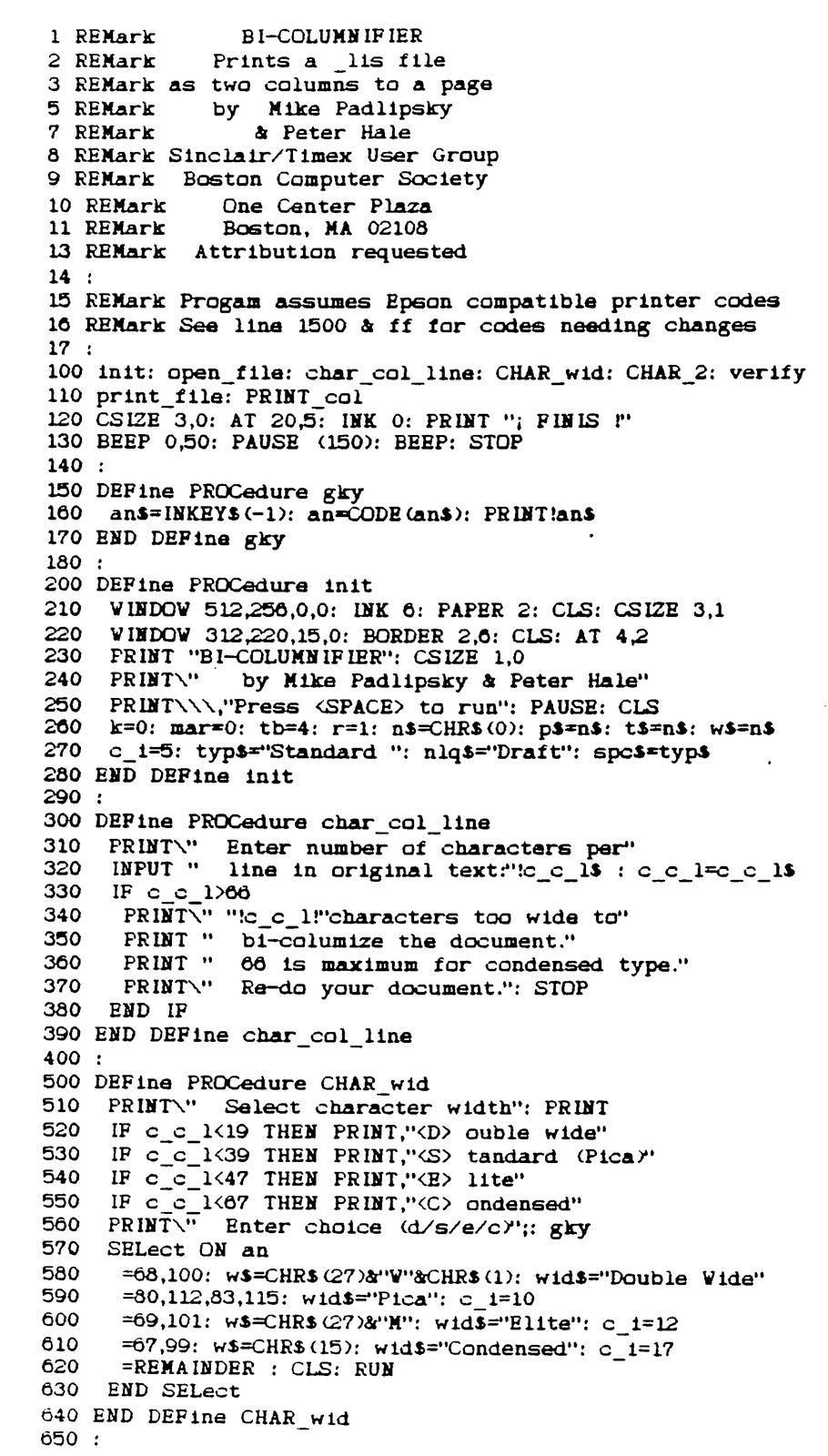
700 DEFine PROCedure CHAR_2
710  PRINT\"  Italic character type? (y/n)";: gky
720  IF an$=="y" THEN t$=CHR$(27)&"4": typ$="Italic"
730  IF c_i<12
740   PRINT\"  Proportional spacing? (y/n)";: gky
750   IF an$=="y"
760    p$=CHR$(27)&"p"&CHR$(1): spc$="Propor'l ": r=1.1
770   END IF : END IF
780  spc$=spc$&(c_i*r)&" char/inch"
790  PRINT\"  N.L.Q. Printing mode? (y/n)";: gky
800  IF an$=="y" THEN
810   REMark c_i<12 if your Epson can't do NLQ in elite
820   IF c_i<17
830    n$=CHR$(27)&"x"&CHR$(1): nlq$="Near Letter Quality"
840   ELSE
850    n$=CHR$(27)&"G": nlq$="Double Strike"
860   END IF : END IF : CLS
870  c_l=c_c_l/r: tab=INT(tb*r+c_l): d_f=INT(10*(tab+c_l)/c_i+.5)
880 END DEFine CHAR_2
890 :
900 DEFine PROCedure verify
910  PRINT,"  DOCUMENT FORMAT"
920  PRINT\"  Char fount",typ$
930  PRINT "  Char size",wid$
940  PRINT "  Spacing",spc$
950  PRINT "  Text frame",d_f/10!"inches"
960  PRINT "  Printing mode",nlq$
970  PRINT\"   Left  Char/ Column  Rel tab Text"
980  PRINT "  Margin line  Sep'tr position frame"
990  PRINT\"   ← →           ↑ ↓"
1000  PRINT\TO 7;"Press cursors to adjust"\TO 11;"<ENTER>  to set"
1010  REPeat loop
1030   AT 10,4: PRINT mar,!!c_c_l,!tb,!tab!!!!!d_f/10;""
1040   PAUSE: an=KEYROW(1)
1050   SELect ON an
1060    =2: mar=mar-1
1070    =16: mar=mar+1
1080    =4: tb=tb+1
1090    =128: tb=tb-1
1100    =1: EXIT loop
1110    =REMAINDER
1120   END SELect
1130   tab=INT(tb*r+c_l): d_f=INT(10*(tab+c_l)/c_i+.5)
1140   AT 12,6: PRINT FILL$(" ",25)
1150   IF mar<0 OR (mar*10/c_i+d_f)/10>8 OR tb<3
1160    AT 12,6: INK 0: PAPER 6
1170    PRINT " Out of range; try again ": INK 6: PAPER 2
1180   END IF
1190  END REPeat loop
1200  AT 16,7: PRINT "Is this correct?  (y/n)";: gky
1210  IF an$=="y" THEN RETurn verify
1220  PRINT "  Then you must rework your Quill doc"
1230  PRINT\"  Exit to rework Quill doc? (y/n)";: gky
1240  IF an$=="y" THEN CLS: STOP
1250  PRINT " Try another document format? (y/n)";: gky: CLS
1260  IF an$=="y" THEN GO TO 100: ELSE : STOP
1270 END DEFine verify
1280 :
1300 DEFine PROCedure open_file
1310  OPEN #5,con: WINDOW #5,120,256,330,0: BORDER #5,2,4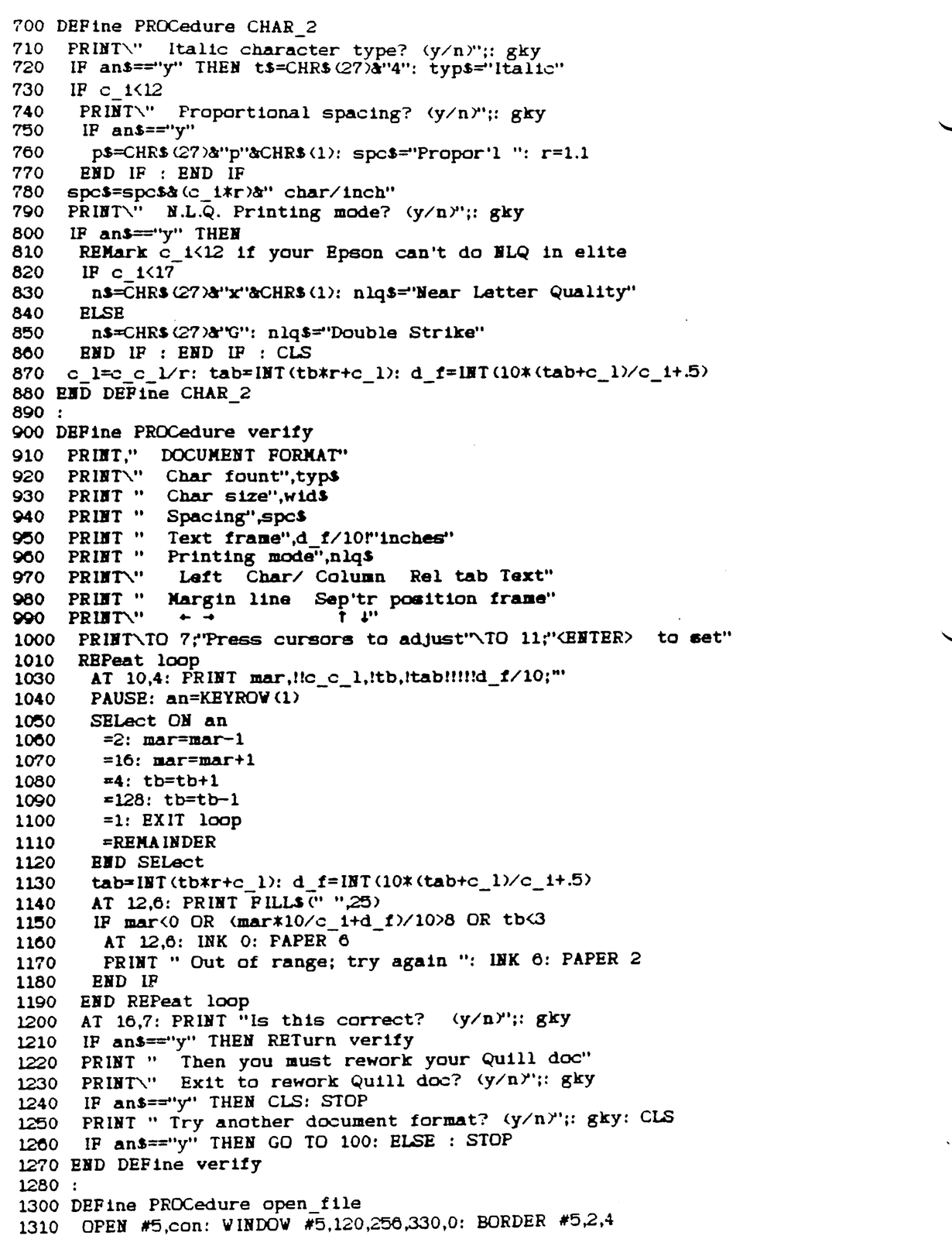
1320  INK #5,6: PAPER #5,0: CLS #5
1330  INPUT #5,\"   Document on"\\"   DRIVE?"!dv$
1340  IF LEN(dv$)=1 THEN dv$="flp"&dv$
1350  REMark Number of fields = 66 lines/page
1360  REMark Field length = 99 columns
1370  DIM lcol$(66,99): DIM rcol$(66,99)
1380  IF dv$(LEN (dv$))<>"_" THEN dv$=dv$&"_"
1390  DIR #5,dv$&"_lis": INPUT #5,\" Select _Lis"\\" FILE:"!file$
1400  REMark Line 1390 uses Toolkit II DIR ability display only files
1410  REMark that end in "_lis".  You may have to edit out &"_lis"
1420  IF NOT "_" INSTR file$ THEN file$=file$&"_lis"
1430  LET temp$=dv$&file$(1 TO ( "_" INSTR file$))&"col"
1440 END DEFine open_file
1450 :
1500 DEFine PROCedure PRINT_col
1510  REMark Printer control codes are for Epson printer
1520  REMark You may have to change for other printers
1530  PRINT #4,CHR$(27)&"@";: REMark printer reset
1540  IF n$<>CHR$(0) THEN PRINT #4,n$;: REMark See Lines 830/850
1550  IF p$<>CHR$(0) THEN PRINT #4,p$;: REMark See Line 760
1560  IF t$<>CHR$(0) THEN PRINT #4,t$;: REMark See Line 720
1570  IF w$<>CHR$(0) THEN PRINT #4,w$;: REMark See Lines 580 to 610
1580  REMark Following line sets left margin, then horizontal tab
1590  REMark "IF an$<>'f'" and 1610 to reimport file to Quill
1600  PRINT #4,CHR$(27)&"l"&CHR$(mar)&CHR$(27)&"D"&CHR$(tab)&CHR$(0);
1610  REMark END IF
1620  REPeat col_PRINT
1630   FOR i=1 TO 66
1640    INPUT #3,lcol$(i)
1650    j=CHR$(13) INSTR lcol$(i)
1660    lcol$(i,j)=CHR$(9)
1670    REMark Œ=CTRL SHIFT K
1680    IF "Œ" INSTR lcol$(i) THEN k=i: EXIT i
1690   END FOR i
1700   IF k: FOR i=k TO 66: lcol$(i)=CHR$(9)
1710   IF NOT k
1720    FOR i=1 TO 66
1730     INPUT #3,rcol$(i)
1740    IF "Œ" INSTR rcol$(i) THEN k=i: EXIT i
1750    END FOR i
1760   END IF
1770   IF k: FOR i=k TO 66: rcol$(i)=CHR$(13)
1780   FOR i=1 TO 66: PRINT #4,lcol$(i);rcol$(i)
1790   IF k THEN EXIT col_PRINT
1800  END REPeat col_PRINT
1810  CLOSE #3: PRINT #4,CHR$(27)&"@";: CLOSE #4: CLOSE #5
1820 END DEFine PRINT_col
1830 :
1900 DEFine PROCedure print_file
1910  PRINT\"  Print to Paper or File (p/f)";: gky
1920  IF an$=="p" THEN OPEN #4,ser1: ELSE an$="f"
1930  OPEN_IN #3,dv$&file$: PRINT #5,\dv$&file$\"  will be printed"
1940  IF an$='f' THEN PRINT #5,"  as:"!temp$: OPEN_NEW #4,temp$
1950  PRINT #5,\\"    PATIENCE!"
1960 END DEFine print_fila
1970:
2000 DEFine PROCedure s
2010  DELETE flp2_Bi_col_bas: SAVE flp2_Bi_col_bas
2020 END DEFine s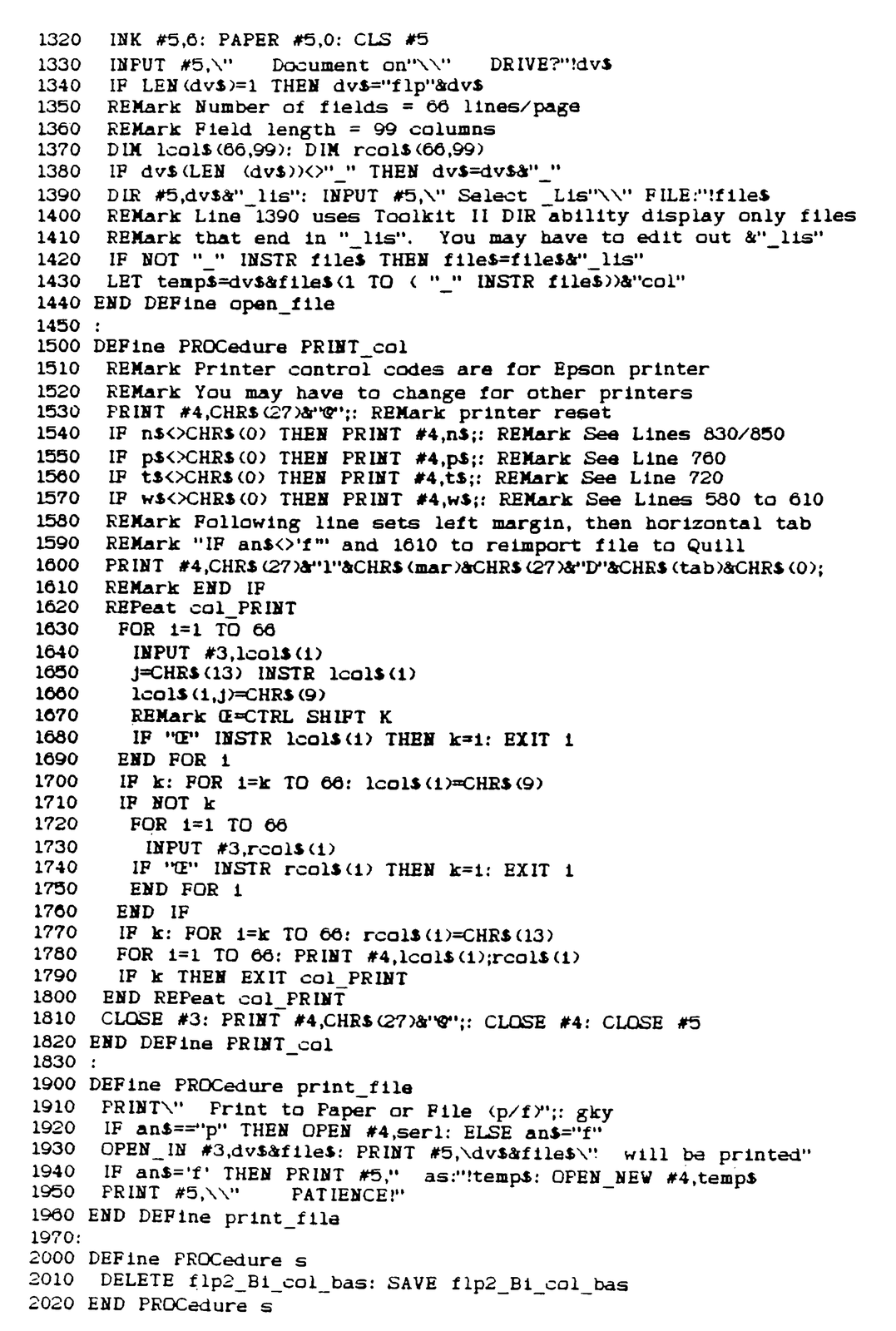
Transcription note: In this printer the digit 1 and the letter l look the same; each is typed by context (for example ser1 and c_l). The closing quote in line 1030 prints as three squeezed marks and could also be read as a double then a single quote; it is typed as two double quotes. Printed as is: Progam in line 15, bi-columize, print_fila, 1970: with no space, _Lis, and no line 1020.
Transcription note: line 2020 is printed END PROCedure s, which is not SuperBASIC; it is corrected to END DEFine s here.
Note: Type-in program listings on this website use ZMAKEBAS notation for graphics characters.