**** The New “D.Base-1” Software for Sinclair Computers
An Issue Disk Program
“Dbase-1” is a new software for Sinclair Computers. The programming is done in TS-2068 simple Basic, which challenges programmers of the Cambridge Z88 to clone the programming in BBC Basic. Actually, Dbase-1 will be very easy to apply to both the QL and the Z88, requiring only rudimentary changes in syntax for counter operation, string slicing, and display control. Then of course the coding of the short Machine Code routines will be different for the QL and Z88. But why would emulation be desirable for these two advanced computers? I believe that an examination of the power and flexibility of Dbase-1 will be convincing enough.
Update Magazine again teams up with Don Lamen, Sincus. This issue Update presents the whole D.Base-1 program in BASIC. Then in the next issue, the sorting routines will be given in Machine Code by Don. By presenting the programming in this fashion, this issue becomes a detailed tutorial on Basic and the next issue will be a tutorial on Cloning Basic in Machine code. Actually the Basic program as given here works just fine for me. I’m kinda patient and the short wait for sorting doesn’t upset me much and gives me time to THINK. This will be a lesson on “String and Character Array Management”. We will slice, concatenate, truncate, swap array fields, use counters, nested counters, and tripple nested counters. Sinclair Computers have the ROM capability to do these things, so why not?
SINCLAIR COMPUTERS DO IT BETTER! The ONE MOST SUPERIOR ability of Sinclair Computers is their built in management of Character Arrays. Most other computers limit “String Content” to 255 characters. The TS-2068 allows over 4000 characters to be contained in a string, while the QL allows 32000 characters. The Z88 has simillar capability. Moreover, Sinclair Computers are rich in “string management” abilities. The Computer’s ROM contains more management functions for character arrays than any other computer. To build a software that manages data “outside of the variable file” requires thousands of bytes of programming and error trapping. Dbase-1 takes advantage of the built in capabilities of Sinclair computers for string and character array management within the Variable File.
There exists many Data Base programs, each for special purpose. There are Mail Lists, Inventory Lists, Appointment calenders, Dairy herd milking records, Telephone lists, Daily Diary, etc. Some have print out capability and others do not. Some have Sorting and some do not. Why not “a Single Data Base Software” to use for all purposes? Dbase-1 is so very flexible that it can be used for any application that needs “multiple records”. The user needs to learn only one software and then can shape the data base to fit any need. Fourteen SORTING Methods are provided, which is un-precedented. Several Print-Out methods are provided, including special print out for Labels, and Outlines. You can use Dbase-1 for virtually ANY type of listing purpose that you can conceive of.
DBASE-1 CONCEPTS: We make maximum use of the Computer’s FREE MEMORY, and coordinate Disk Drive (Micodrive) to manage Data Base Files. The SORTING functions give the data base its flexibility for use for any purpose. The USER defines the Data Base Dimensions, thus allowing the RECORDS to be shaped for optimum use, by purpose. This allows the ONE software to create and manage files of many dimensions and applications. File dimensions (TS-2068) can vary from a set of 96 Mailing File records to 400 shorter Inventory records, to fewer LONG records for other purposes. The QL’s files in memory can be much larger, up to 2000 records of a mail list type of file (un-expanded QL), or 6000 or more smaller records.
MEMORY MANAGEMENT: The programming length of Dbase-1 is 12000 bytes, which leaves the TS-2068 having around 26000 bytes of FREE memory. We reserve a “buffer” in memory to perform disk file management, leaving 21000 bytes for data base generation. The QL and Z88 will have a much greater allocation for the data base. Now lets see how this 21000 bytes can be used “by menu elective”. The data base is created by selection of “<1> Create” at the menu. A series of prompts comes on that allow you to “Shape the Data Base”. The result of three inputs “Dimensions the character array “O$”. Prompts ask for: “Number of Records”, “Number of Lines”, and “Line Length”.
Suppose that you need a Mail File of four lines for the name and address, plus one line for the person’s first name, plus two other lines for information about the person. That would be 7 lines for each RECORD. How long should each line be?. Well, generally 31 characters is sufficient for the longest of address lines, so lets use 31. Now, how many records? Lets experiment and input 100. Then the three inputs would be: 100, 7, and 31. Line number 8614 would attempt to Dimension O$(100,7,31), for a file lenght of 100*7*31 bytes. But there is a trap there in line 8416 which catches inputs that are too large, thus reserving memory for the built in Buffer. The result would be the asking for new inputs. This is because 100*7*32 is too big.
Try 96 as the first input, then 7 and 31, and this set of inputs would be accepted. To continue with other examples: Suppose you want to create invoice records of 5 lines of 64 characters per line. Then 5*64=320 characters per record. You have 21000 available bytes, so you could create 21000/320=65 invoices. Suppose that you want to create an inventory file of records having 3 lines of 20 characters per line. Then each record would be only 60 characters. 21000/60=350 possible records. Yes, I know that you are thinking ahead and asking “What about the print out?”. Several print-out formats are available at menu. Dbase-1, as it is given here, does not initialize a Printer Port Code. Add your printer port code load and initialization in a line number above 6800. The Dbase-1 issue disk will contain the printer initialization for the type of disk system that the user specifies.
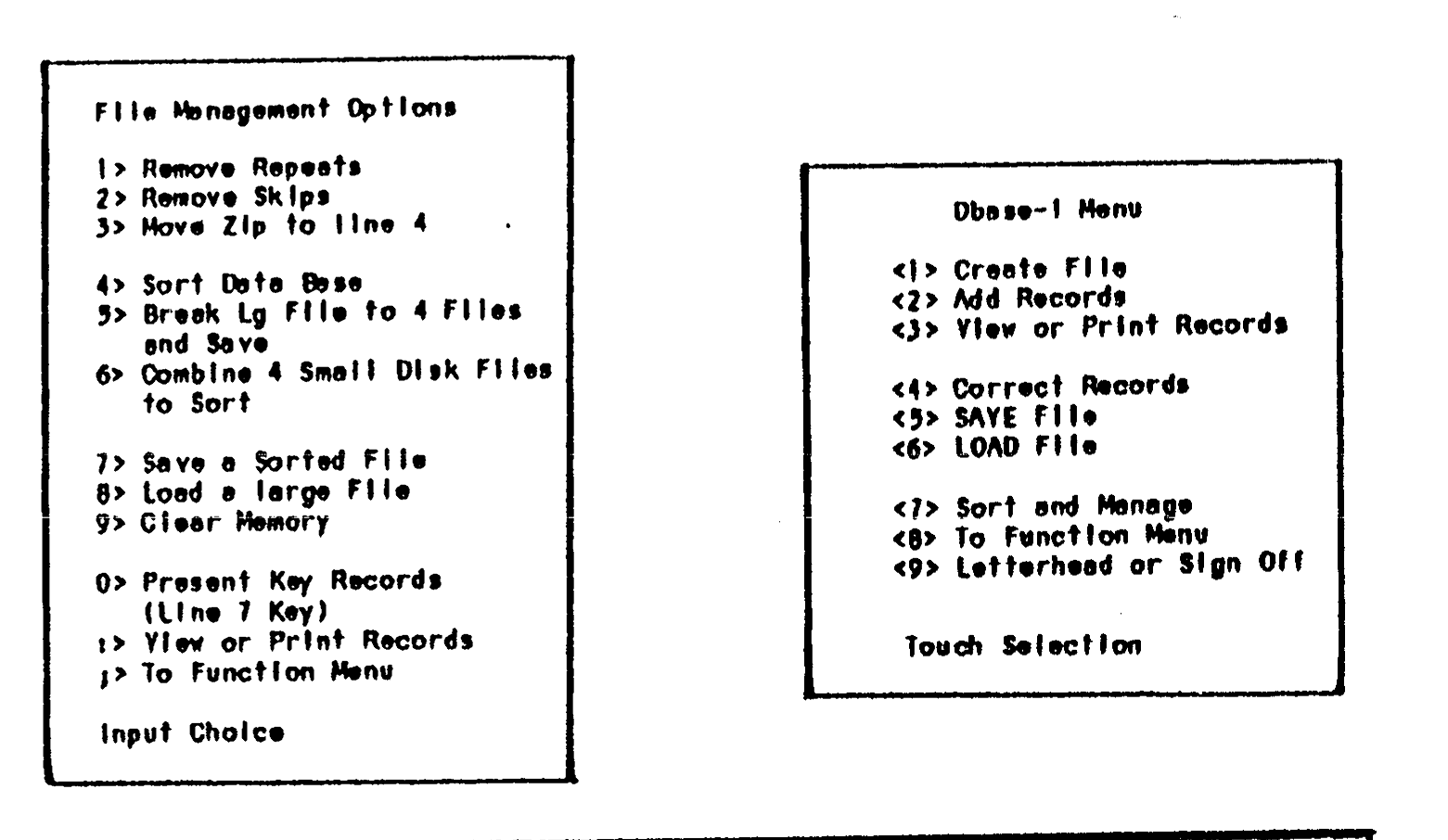
THE PROGRAMMING: Line number 6800 initializes a small data base (N$) for your Letterhead and signature lines. Change the LETs in this line for your letterhead lines. The letterhead prints at center page when elected at menu. A menu option allows printing a single letterhead or multiple copies of Letterhead stationary. Also, menu options allow a “sign off” to be printed upon demand. The sign off is “Sincerely, your name”. These print products were conceived for Invoices. Then Line 6804 is the primary Menu, having 9 electives. Each of these electives are straight-forward. The data base is created from this menu. Line 6808 contains the branches (GO TO) for each of the menu electives. This is in boolean logic which compresses 10 “IF THEN GO TO” evaluations into one line and conserves program length.
Line # 6814 is important because it establishes three key variables which are used throughout the program. L1 is the number of records, L2 is the number of lines in each record, and L3 is the line length. During management of Disk Files, the “Find Dimension” routine at line 7162 operates after a file has been loaded from disk. The disk file is then in memory, and its dimensions are found and assigned to variables L1, L2, and L3. Also the “last filled record” of the file is assigned to variable L5. These four variables allow the management of three dimensioned character arrays of various dimensions. One warning becomes appropriate. The management system requires that a file loaded from disk be accomplished via MENU SELECTION. If a file should be loaded from disk via a direct command, then the “L1 through L5” vars would not be correct and the system management would break down during some selected functions.
The Dbase-1 program does not use a “vars table”. The program variables are assigned as needed. When the program is keyed in and has been tested, you can gain around 1000 bytes of FREE by systematically editing all lines and enclosing all numbers in Quotes and preceeding them with VAL. Various “variable Switches” are used for “turning ON or Off” certain functions as menu options are elected. Two examples can be seen in the printing routine at line 7480, where variable “pgc” is used to switch ON or OFF “page control” and variable “ret” is used to switch ON or OFF dual return labels while printing address labels. You can discover other examples of “variable switches” in the LET statements throughout the program after prompts. Some prompts use INPUT for a variable to be assigned <INPUT A>, and others use INKEY$, as <PAUSE 0:LET A=CODE INKEY$-48>. The latter assigns a number key value to the LET variable A.
DIGGING IN TO CHARACTER ARRAY MANAGEMENT: CONCATENATION: Working with Numbers: Thats what Sinclair Computers do best. Learn this and most other things become more understandable. Every character that you see on screen is a “number”! A=65 and a=97 and space=32. To learn others refer to the user manual “Character Set”. The character set is known by another term “ASCII CODES”. All of the alphabet, plus math symbols, puncuation characters are assigned a number. The number is in consecutive order from zero (48) through number 9 (57). Then A=65 through Z=90. Lower case characters picks up; a=97 through z=122. The gaps are filled with math symbols and puncuation symbols, so we can SORT TEXT by NUMBER comparisons. If we sort a and A, then A comes first because A=65 and a=97. We can even say that in computer syntax: <IF”A”<“a” THEN PRINT “Aa”>. The computer evaluates and find TRUE and prints “Aa”.
Now lets SORT a string of data. Do it with your computer. <LET a$=”aAa”> <IF A$(1)>A$(2) THEN LET a$=a$(2)+a$(1)+a$(3 TO ) > <PRINT a$>. This exercise does two things. It compares the first two characters in a$ “by their number value” and then it CONCATENATES a$, re-arranging its characters. If this stumps you then you haven’t started off with a grasp of the fact that in any string of characters each character has its own “index number” in the string. We started off with a$ having 3 characters. A$(1) was a, a$(2) was A, and a$(3) was also a. If a$ had had 10 characters, as <LET a$=”ABCDEFGHIJ”, then A$(10) would be “J”. Count up the characters and this will come into focus. In dealing with CONCATENATIONS we use the “INDEX NUMBER” in the string. We will use that last example of 10 characters: LET B$=A$(5 TO ). Now we have “Sliced” some of A$ off and put the Sliced data into B$. <PRINT B$> produces “EFGHIJ”.
So now we have learned how to SORT and how to CONCATENATE in one small paragraph! Really, you have! All you need to do is PRACTICE with the computer and you’ll have it down pat. Once you can confidently Concatenate, Slice Strings, and SORT, you can join the head table at any computer programmer’s convention. And, you’ll know more than some at the table. These three operations are the stumbling blocks to learning computer programming, and they are so simple that everyone should STUDY and PRACTICE. Practice is more valuable than study. Now we will get into the SORTING FUNCTION of this Dbase-1 program. These are the functions which provides the versatility of the software, and each uses the simple methods of number comparison and String Contatination.
First we will study the listing, which is all in simple basic. This is quite a plate full, and it may take a week or two to key it all in and check the operation. You can tackle it with confidence knowing that this software DOES WORK. The job of keying it in will accomplish two worthy goals. First, a working understanding of how the program works will be gained. Then you will have a very useful software to use forever. As one keys in projects such as this long program, a full understanding is not usually gained at first. However, there is something about keying in programs that sticks in one’s memory and brings later comprehension. The act of doing it is the best way of learning computer programming.
We will start with the “Sort Selection Menu” at line # 7054. Here we see the “L” variables previously discussed. L1=first dimension of the character array O$(x,x,x). L2=second dimension, which is the Number of Lines in the records. The menu asks for you to decide “which line to sort”. If you elect to sort LINE #1″ then vars “so=1”. The next prompt asks for you to elect to sort “by first group of line 1, or last group of line 1”. For understanding I will give you a typical “line #1”. If Line 1 of the first record were “Mr. Benjamin K. Franklin”, and you selected “sort by line 1 and Last Group”, then you have set up to sort by “Last Name” of a mail file. You could have elected “first group” and the sort would sort “Mr.”, which would serve no useful purpose.
But if you were sorting an “Inventory file” then the first group of line 1 would likely be a “Stock Number”, and “sort by first group” would give you sort by Stock Number. The number of Sorting Options vary by the number of LINES in a record. If your data base has 6 lines then you have 12 choices of sorting. If the record contains 20 lines, then there are 40 choices of sorting. The Sorting method is “by first or last distinctive WORD or GROUP of the selected line”. During the Sorting, all lines of the record will be replaced as a sorting action occurs. A tremendous number of actions occurs during sorting of a 96 record file. The very least number would be 9216. Each “record sorted” would be 14 more actions by the nested counters. There could be as many as 129024 individual sorting actions for a 96 record file in the few lines beginning at line #7368 and ending at line #7388.
Now lets shift our attention to the actual SORTING routine which begins at line # 7364. Note the REM at line 7360, which states “Sort First Group”! Something is amiss here! We selected “sort by last group of line 1 (Franklin)”. Yep! If this line were to operate now, the sort would line up by “Mr.”, which would be of no value. So, lets go back to the menu at line # 7054. There we see the next program line (7058), and its statement “IF soL=2 THEN GO TO 7294”. Then line number 7294 is where we must continue the examination. At line 7294 the “last group” in the selected sort line is moved ahead to become the “first group” in the line. We do that with the “n counter” to count up all records in the data base. Then each first line of each record is re-arranged so that the character group that we want to sort is placed FIRST in the line (Franklin).
When finished with the reversing procedure, line number 7324 operates to <GO TO line 7368>. Now we can look at line 7368 where the SORTING occurs. At line #7368, we establish a buffer for holding each record as the sorting is accomplished. V$ is dimensioned “V$(L2,L3)” which matches the record size of the data file being sorted. The routine that follows counts up to the END record in the file. With each count, the “first character group” is compared with the first character group of the “last record” in the file. This is a “numeric evaluation” simillar to how we compared “a” and “A” in the earlier discussion. Each time the record at the END of the file is SMALLER, then the buffer (V$) receives all record lines of the first record. Then the first record is REPLACED with the LAST RECORD. This leaves two identical records.
Then the LAST record is replaced with the record that is in the buffer (V$). The results from this is that the entire file of records is sorted. Next, at line # 7392 there is a branch. Remember that we had to REVERSE the groups in line 1 to sort by “Franklin” or last name. Here “soL=2” and the branch is to line number 7332. At line 7332, the reverse again takes place to move the “first group” in each record’s sorting line back to its original position in the line. When finished with that we come back to line 7396 to present the “sort complete” message and return to menu. Of course, this double reversal is not used when the sorting selection is “First Group”.
REPORT CODES: While operating a Basic Program, and mistakes are made, the TS-2068 stops and gives a friendly REPORT CODE at screen bottom. Examination of the Report most times tells one what mistake was made. The suppression of these report codes can be done with programming, but often the program is extended to such length that the DATA CAPACITY is severely limited. But without suppression, the user is left with a STOPPED program with every mistake. The solution is to know the “GO TO” to get back into operation without loss of data. <GO TO 6800> is to the Master Menu of D.Base-1 and is the recovery for all Report Codes. But one should first “THINK, What Caused The Report Code”, so that the same mistake is not repeated.
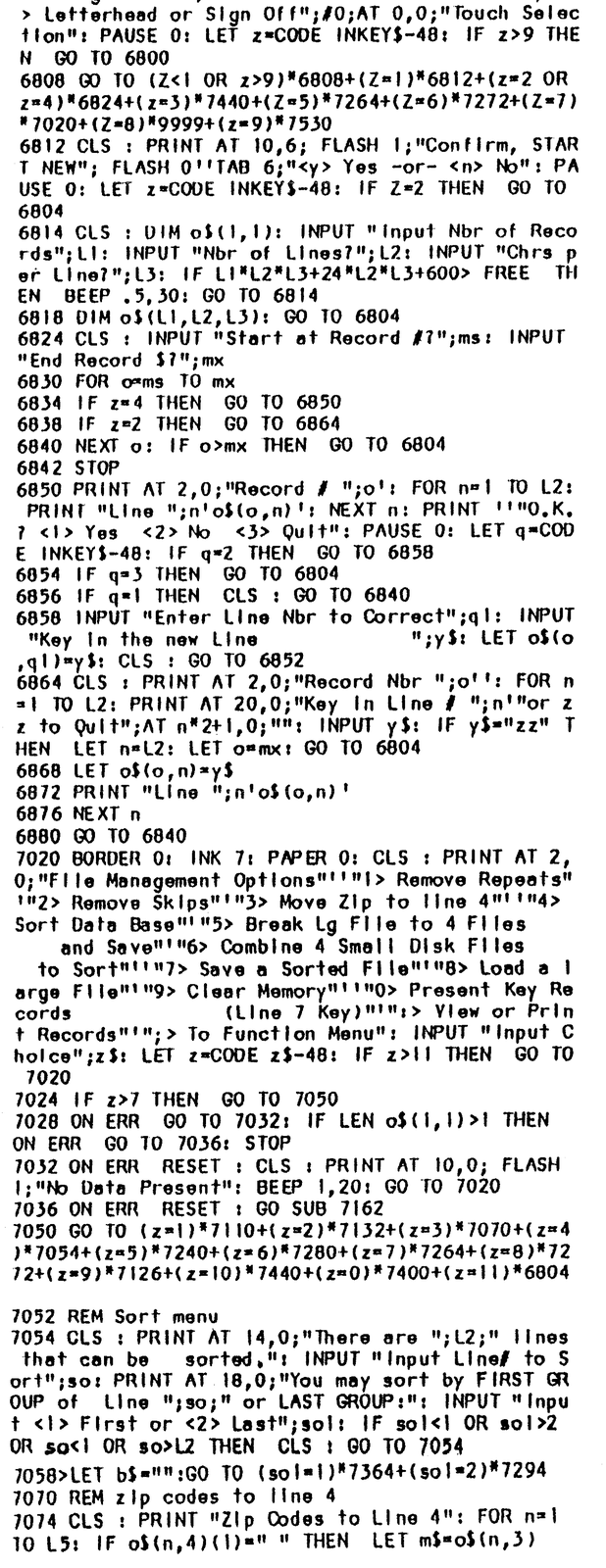
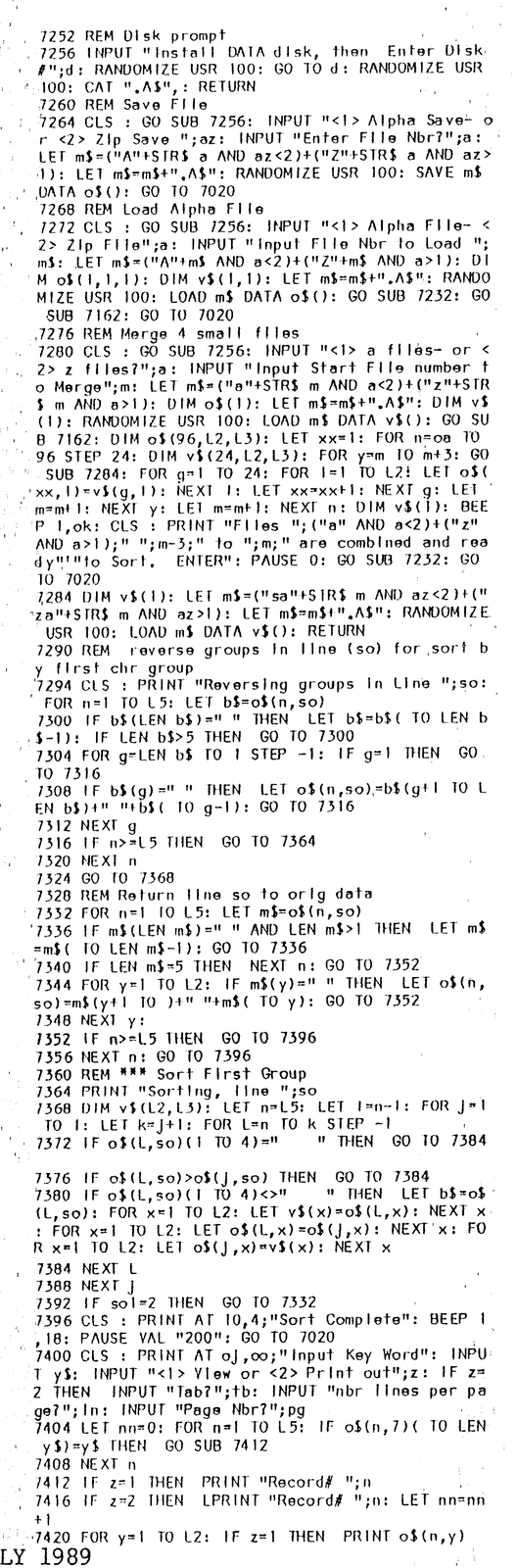
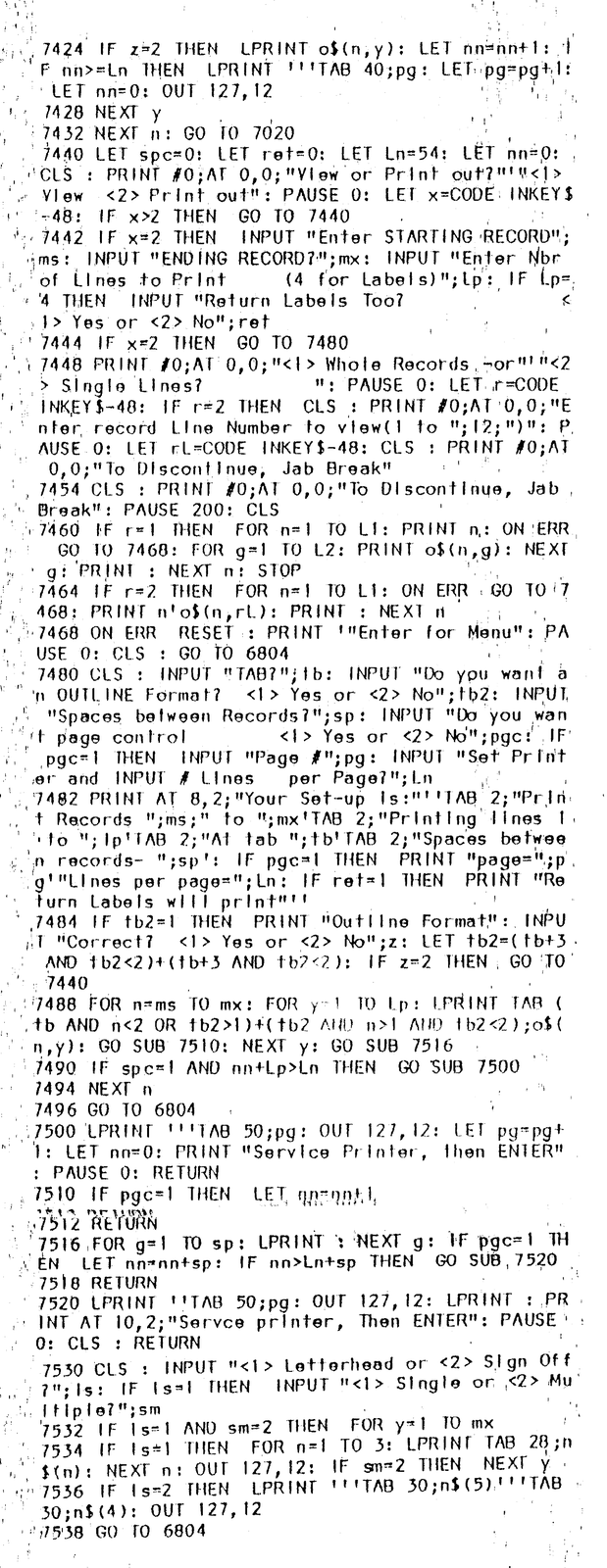
D.Base-1 listing

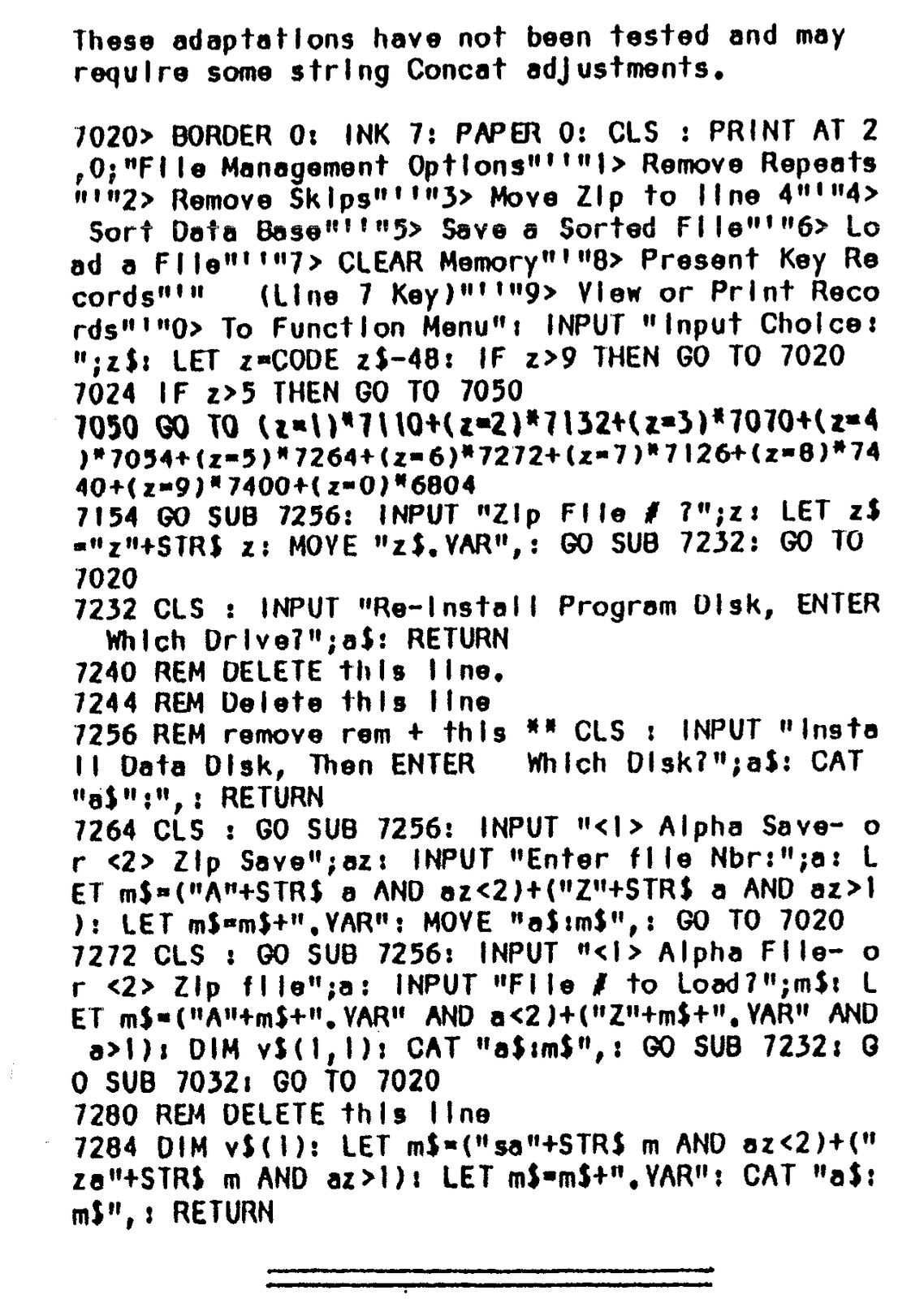
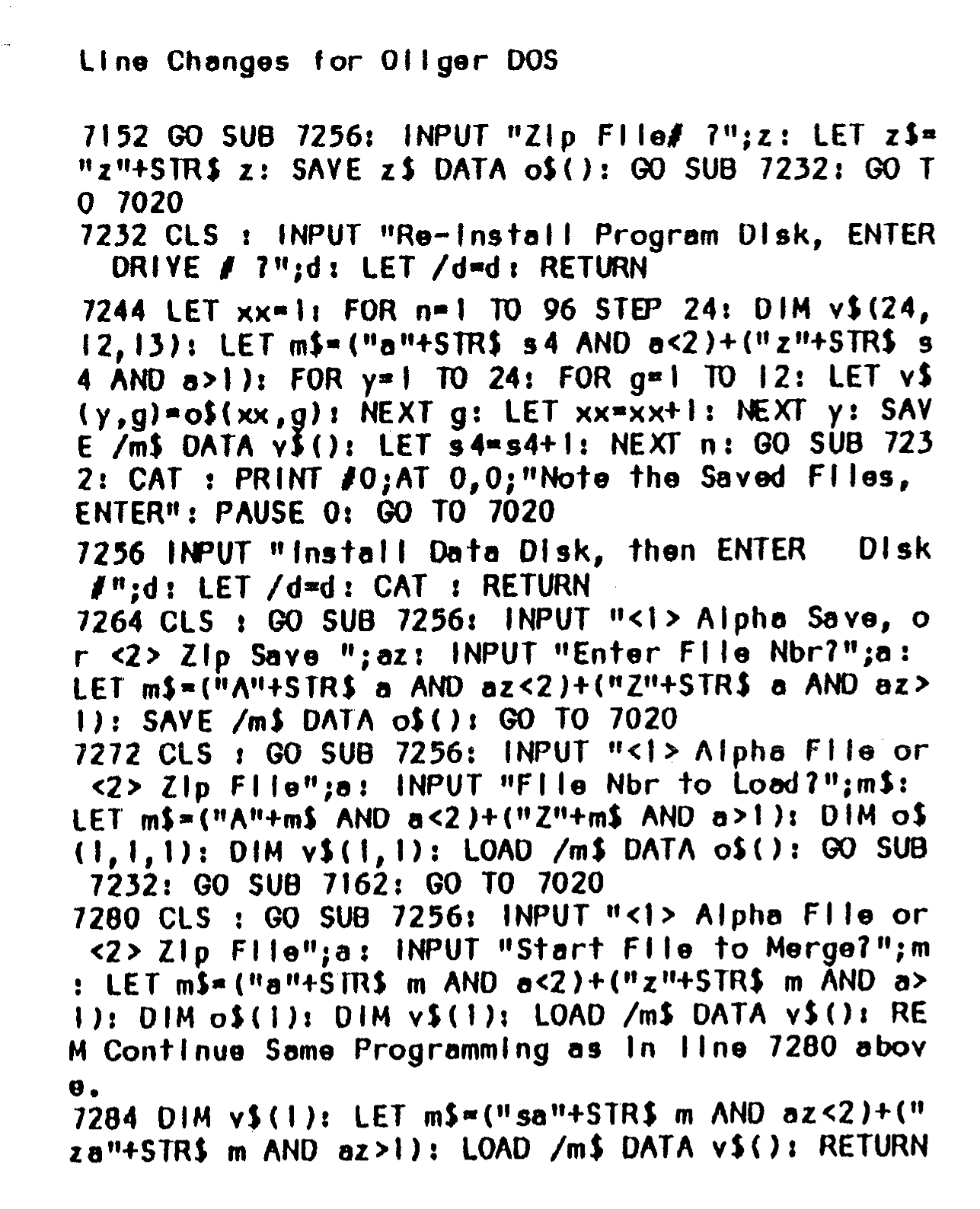
Line Changes for Oliger DOS
Line changes for the Aerco FD-68:
There are two functions that cannot be done with the Aerco FD-68 because of the lack of a .CHR Extension. These are the “Split and SAVE” and “Load and Combine Small Files”. The first change will be to delete those functions from menu.
These adaptations have not been tested and may require some string Concat adjustments.