
THE DISK CONTROLLER
Now that the details of the disk’s own electronics and the intricacies of soft sectoring have been explained (Parts 1 & 2), you should be able to see what is left for the disk controller to do. Most controllers on the market today are designed around a single chip (IC) – either the 8271 or one of the series of Western Digital 179X controllers. If you need to know how one of these chips work, then there is no substitute for a data sheet, however here is a short explanation of the 1791/2 operation.
A typical circuit can be seen in the diagram below:
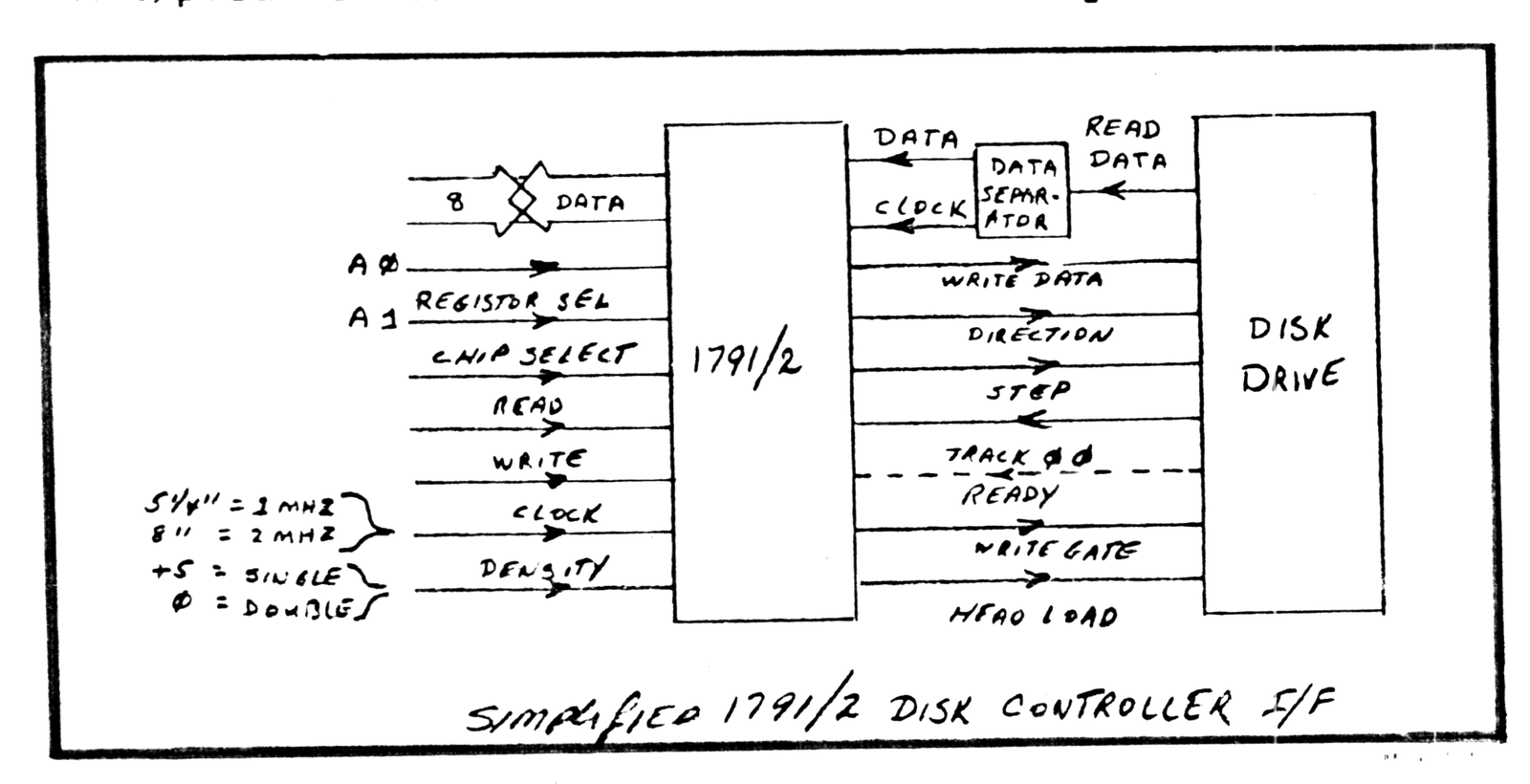
From the software point of view the controller looks like a number of registers – command, status, track, sector and data to be precise. The command register and the status register are used by the computer to give the disk controller its instructions and to find out how they are progressing. The track and sector registers are used to hold the disk address of the sector that an instruction refers to and the data register is used to send or receive data from the disk drive.
Given a disk that is already formatted, the needed operation to write some data to a sector is straightforward. If the track register contains the number of the track that the head is currently assumed to be over, then the number of the track required is stored in the data register and a SEEK command code is stored in the command register. A SEEK command causes the disk controller to set the stepping direction and to output stepping pulses until the track register contains the same number as the data register. If any point during disk operation that the track register is found not to contain the track number then an error is reported and usually the software will issue a RESTORE command to step the head out until the track zero (T00) switch is activated. This action moves the head to track zero so that the track register can be cleared (sometimes referred to as calibration),
Once the head is positioned over the desired track, the sector register is loaded with the desired sector and a READ SECTOR command is issued. This causes the disk controller to read the ID fields as they pass under the head until one of the correct track and sector number is located. The data in the corresponding data field is read in. If an ID field with the right track and sector is not found within one revolution, an error is reported and the disk software usually issues a RESTORE command and tries a few times before giving up and reporting a disk error to the user. Writing a sector follows the same stages of head positioning and of reading ID fields to find the correct sector only; instead of reading the data in, the new data is written out to the data field.
The only remaining problem is how a disk ever gets formatted in the first place. The ID fields cannot be written using a WRITE SECTOR command because this only changes data in the data field. The answer is that the 1791/2 and most other controller chips include a READ TRACK and a WRITE TRACK command. Both of these commands ignore the sector structure of a track and simply take the index pulse as a marker for the start of a track which is either read or written in its entirety. To format a disk, the formatter simply writes the track pattern described earlier onto each track in turn using the WRITE TRACK command.
WORKING UPWARDS
We have come a long way since this series of articles first appeared in LIST, but there is still some way to go before the level of disk and program files is reached. So far, all that the disk drive and the disk controller can do for us is store and recall chunks of data in the form of sectors. The final stage in making the floppy disk useful is converting this collection of sectors into named files. This is where hardware and electronics gives way to software – the DOS or DISK OPERATING SYSTEM.
If time is on my side and positive response from the past DDC&I articles is forthcomming, I will then continue the series with an explanation of the disk drive hardware and attempt to outline the DOS structure. Please advise your LIST editor.
……….Bob Gilder