
Most of us can visualize the computer’s “regular” memory. We know that the ROM part of memory has “fixed” machine programming put there by Timex when they built the computer, and that there Is a section called RAM that we store our own programs in. To carry this visualization further, we will do some diagrams that splits up the memory into CHUNK SECTIONS. The chunks will be identified by the ADDRESS that the computer’s CPU uses to send and receive data to and from the chunks of memory. Please refer to Figure 1 for the visualization.
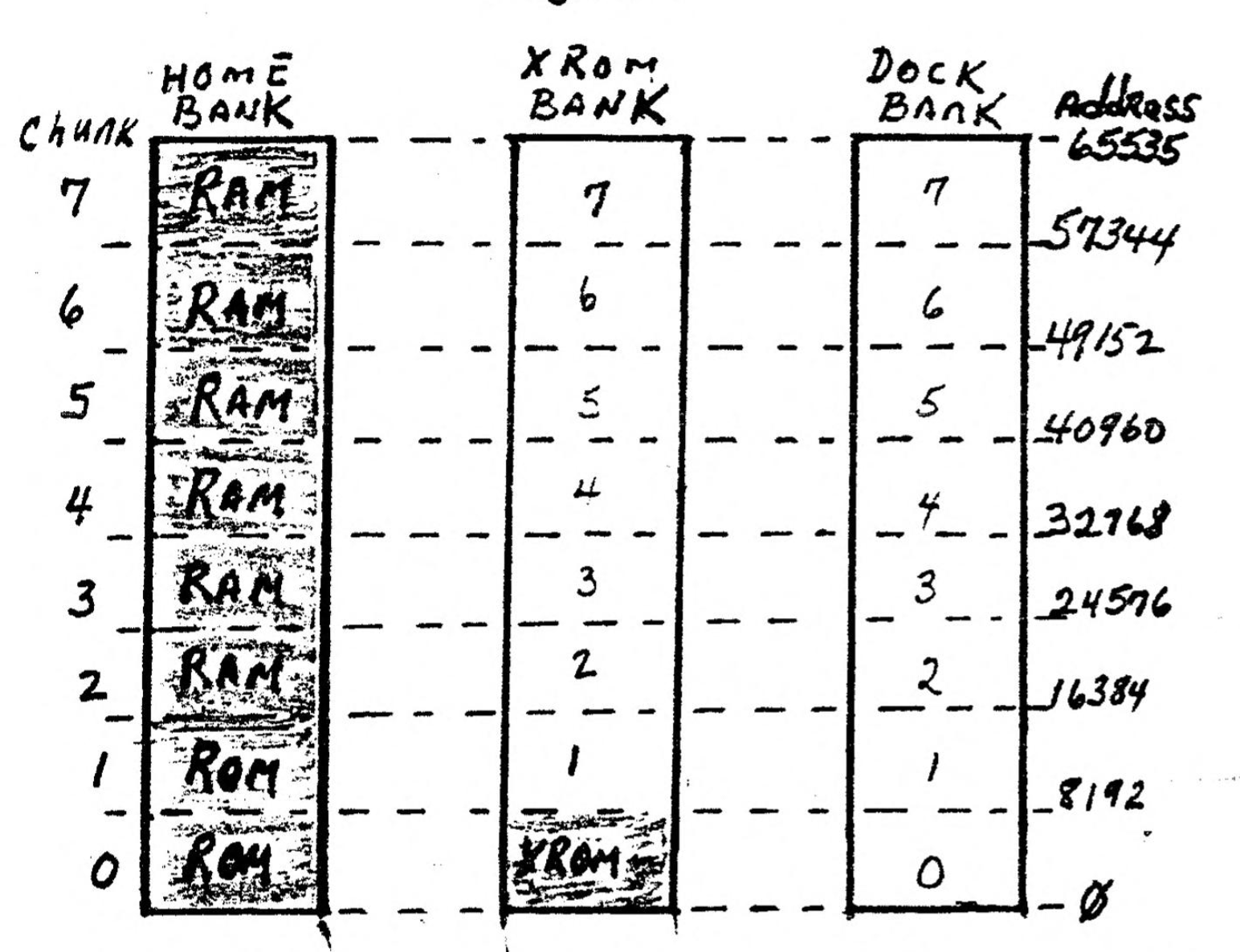
Now that is a busy diagram Isn’t it. The left block is what we normally visualize, having two sections of memory, “ROM and RAM”. The center block depicts another 64K “BANK of MEMORY” called “The XROM BANK”. Timex put only 8K of memory there to handle such things a Cassette Load and Save. When we type a LOAD or SAVE command, the computer switches OUT Chunk 0 from home bank and switches IN Chunk 0 of the XROM Bank, to do the LOAD or SAVE. Notice that the other “Chunks” of the XROM Bank are vacant, having no Memory Chips Installed. Timex didn’t even put sockets under the hood for more memory chips. Also, notice that the block on the right is named, “The Dock Bank”, and all three BANKS have the same CHUNKS identified in the same manner.
A CHUNK is 8K (8192 bytes). As we get into Extra Memory we will transfer CHUNKS of Memory Chips IN and OUT of the range of addresses that the CPU controls. As we visualize the computer, the CPU “sees” the memory chips that are in the left block, “the HOME BANK”. Now suppose that we add some memory chips and fix them so that they are in “CHUNK 7” of the DOCK BANK (the right block of figure 1). Would the CPU “see” that group of memory chips? NO, because the CPU can see (address) only 64K at one time, and the TS-2068 is fixed so that the HOME bank is what the CPU normally sees. Here is where PROGRAMMING comes Into the act. We can do some POKES, and wipe out CHUNK 7 of the HOME BANK and make the CPU see CHUNK 7 of the DOCK BANK instead.
When we do that, Chunk 7 of the HOME bank will still be available for storage of data. Now that is confusing, confusing, so we will transfer attention now to figure 2 to see how that can be possible. In figure 2 we delve into the way a program line works from a Extra Memory bank. The scenario Is: We have a BASIC program in Chunk 7 of the DOCK Bank, and that program is running. The TS-2068 always runs programs lines in the HOME BANK, no matter what bank the program lines are stored in. The ingenious way that this happens is kinda confusing and we will delve into that later. The key point here is: Since each program line runs in the HOME BANK, the CPU “sees all 64K of the home bank”, and Stores DATA that is being generated in HOME BANK RAM.
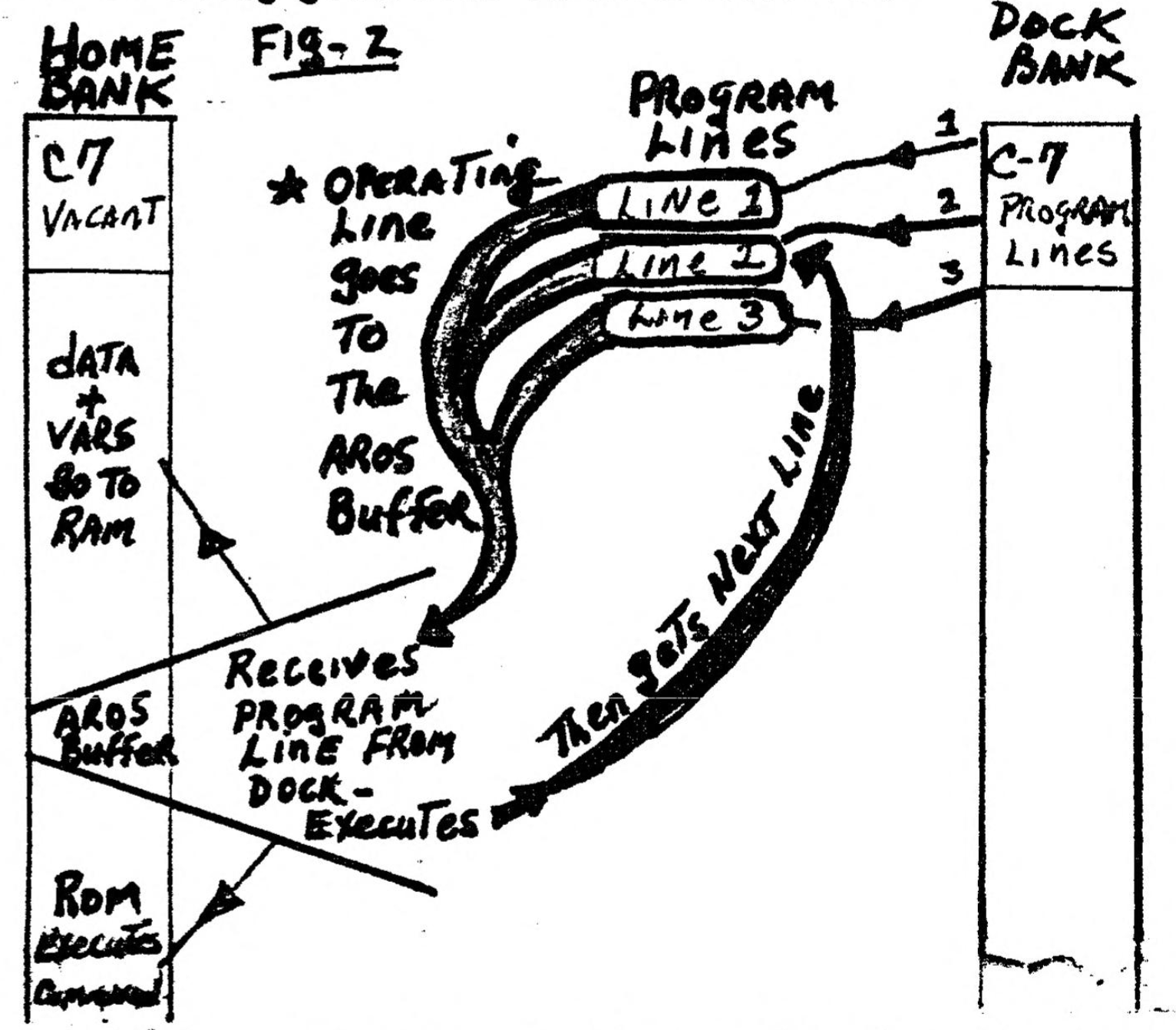
Still referring to Figure 2, the lines of programming that are in the Dock Bank are picked up ONE LINE AT THE TIME, placed in the “AROS BUFFER” of the HOME BANK and operated. Say that the line has programming that sez ‹LET A$=”| go to Church on Sunday”>. Then the contents of A$ is stored in the HOME BANK RAM. Then when the last part of the line of programming is finished, it is replaced with the NEXT line of programming that is in the DOCK BANK, and that line is executed. The Dock Bank program continues to run, one line at a time, until the last line of the program has finished. So, in effect, the CPU can manipulate TWO 64K banks of memory at the same time.
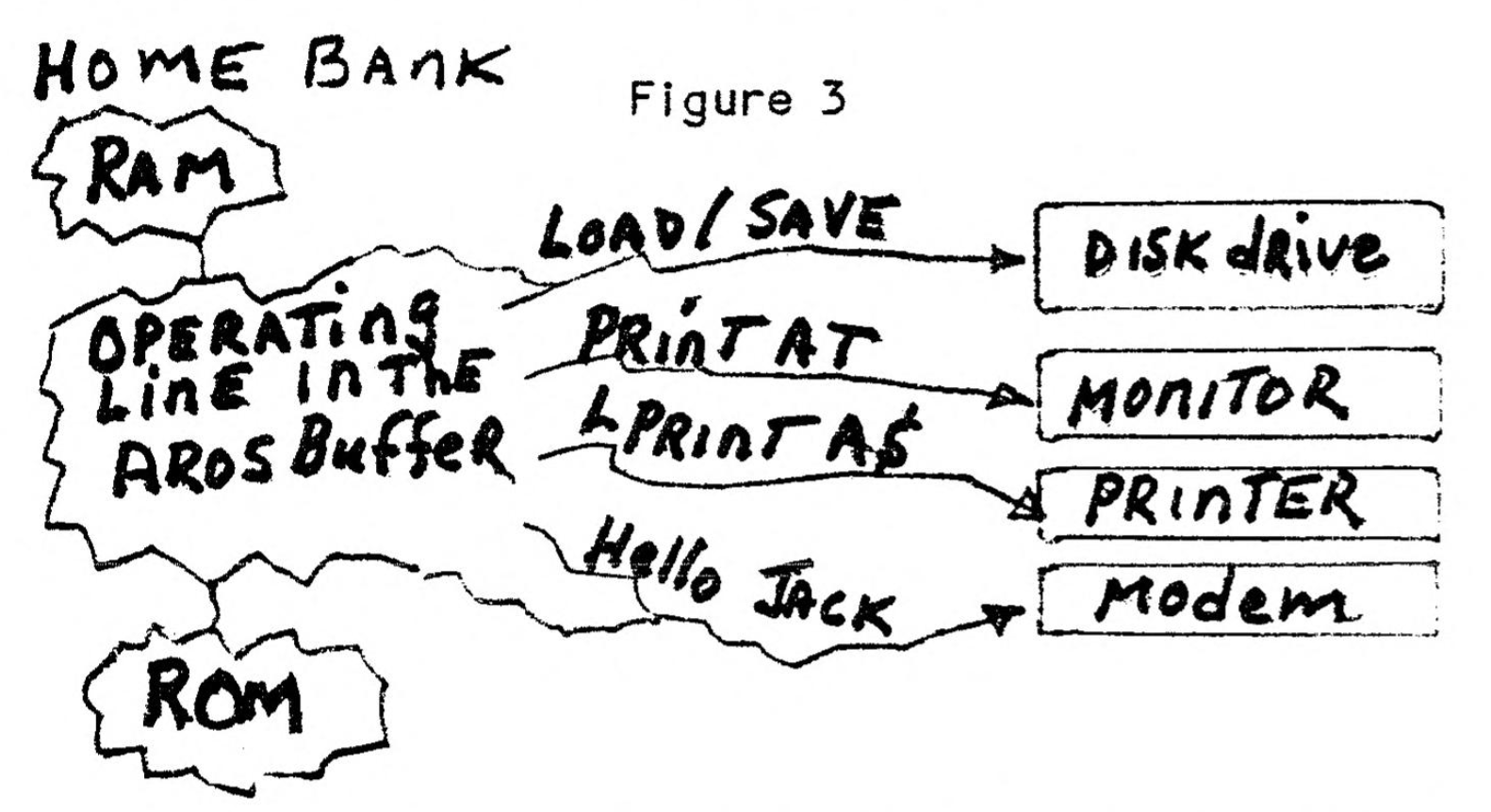
Now to complete the “visualization”, lets transfer our attention to figure 3, where we have added a disk drive, a printer, a monitor, a modem, and a cassette. We are still operating the program that is in the DOCK BANK, one line at a time. The LINE of programming that is operating is in the AROS BUFFER of the HOME BANK. That line of programming can contain LPRINT COMMANDS, or PRINT commands, or DISK LOAD/SAVE commands, or Cassette commands, or just anything that the TS-2068 can do. If data variables are created, as when receiving data from a modem, the data is stored in the HOME BANK RAM. OR, data that is in the home bank Ram may be printed by a LPRINT command in the program line.
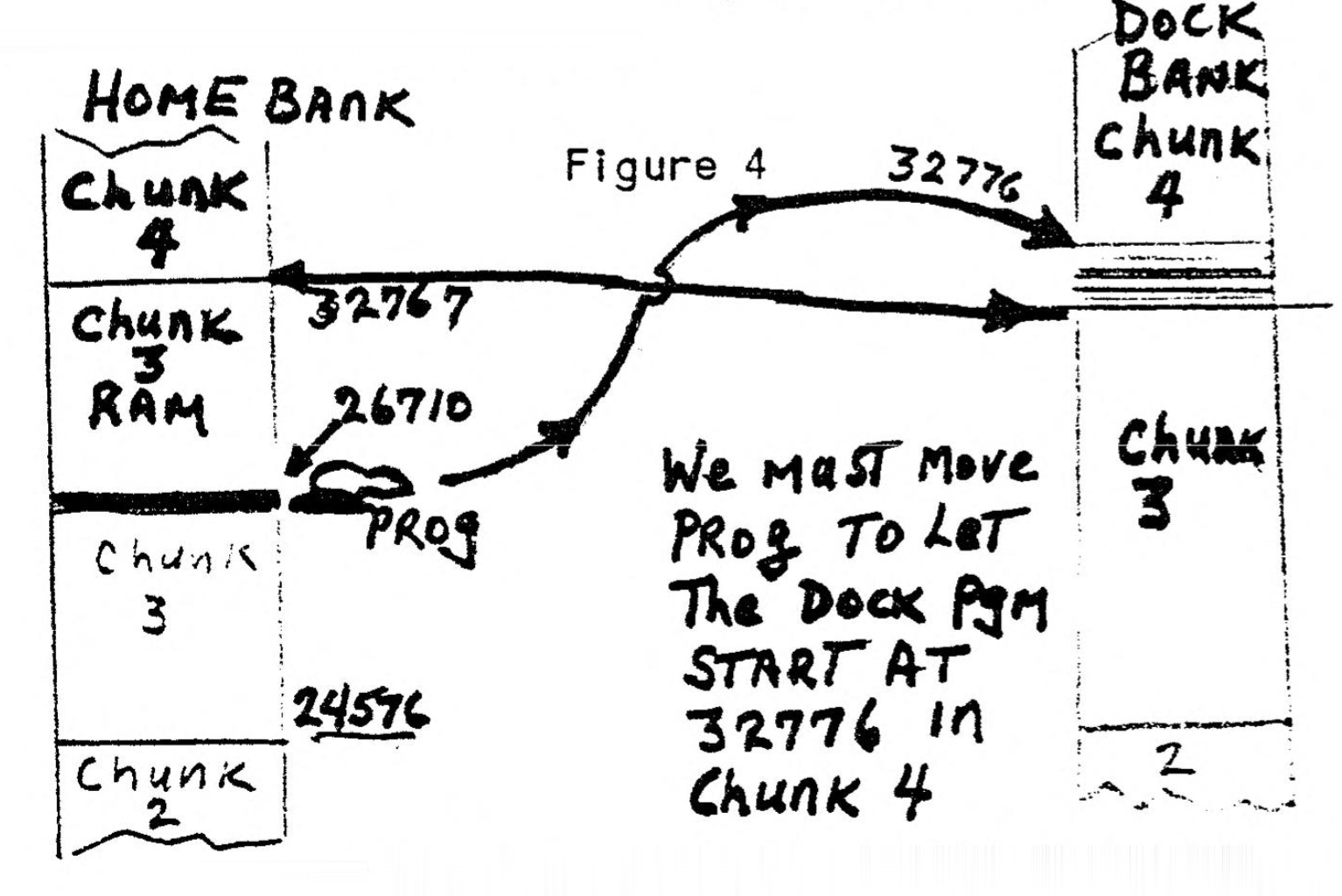
Now that we have the concepts of Extra Memory Operation in focus, we will go on to the “how to do it” phase. One could survive by just plugging in a cartridge and typing RUN, but since Dock Cartridge Software is about as scarce as hen’s teeth, we dont have that easy option. Besides, we want to learn how to do it anyway. Now we will look at figure 4 and see a fly in the soup. The soup is HOME BANK Memory, and the pesky fly is “PROG”. PROG is the memory address where the CPU finds the address of the first byte of a BASIC program. Normally PROG is at address 26710, and the first line of a basic program will start at 26710, which is right slap in the middle of CHUNK 3 of the home bank.
As we get into the methods of BANK SWITCHING, we must tell the CPU “where to find PROG”. We will do that later. Right now we must learn how to switch banks. we will We will use the term “Enable” to mean the chunks of memory that the CPU sees for program lines. For example if we enable Chunks 4 through 7 of the DOCK bank, then the CPU will not see chunks 4-7 of the HOME bank, and WILL see chunks 4-7 of the DOCK bank. Bank switching is accomplished by using the OUT command. “OUT port 244” is used to designate the chunks of memory to enable. is easier to visualize if we use BINARY numbers with the OUT command. OUT 244, BIN 00000000 would enable all 8 chunks of of the HOME BANK, while OUT 244, BIN 11111111 would enable all 8 chunks of the DOCK bank. Please refer to figure 5 for a visualization of the effect that each “bit” of the binary number has upon the chunks of memory enabled.
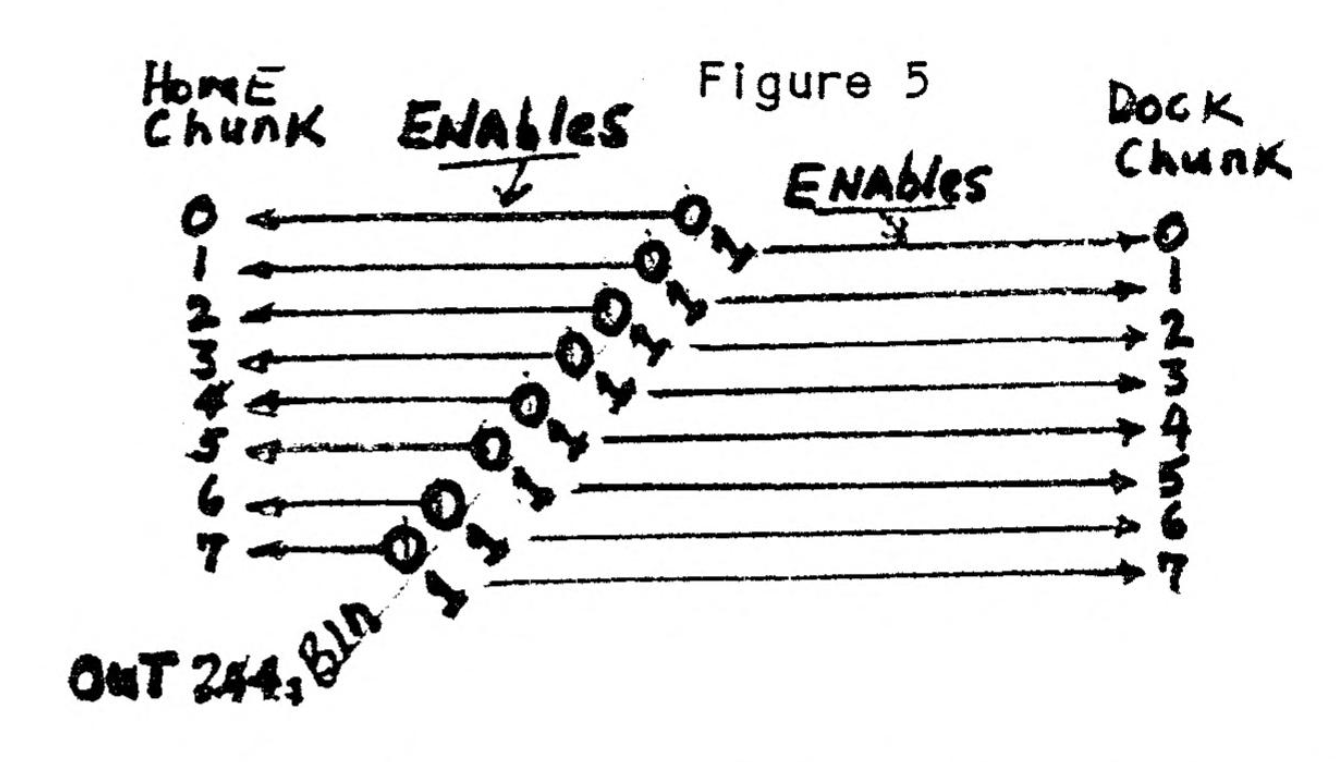
The easiest and most simple way of using extra memory banks is to enable chunks 4 through 7 at one time. OUT 244, BIN 11110000 will enable chunks 4 through 7 of the Dock bank. Then if you want to stop using program lines in the dock bank, OUT 244, BIN 00000000 would enable all 8 chunks of the HOME bank. Remember, each of the bits affect a single chunk enable. Zero enables a Home bank chunk, and “1” enables a dock bank chunk. The “OUT 244, BIN number” can be done in the direct mode or from within a line of programming to switch bank chunks.
Now suppose that we want to use a program that Is in the Dock Bank chunks 4 through 7 OUT 244, BIN 11110000 would do it. BUT, the CPU looks for the first line of a program at the address of PROG, and PROG is sitting at address 26710 in chunk 3 of the home bank. (re-visit figure 4). Now we must change PROG to the address of the first line of our program that is in the DOCK bank. The first address of CHUNK 4 of the Dock bank is 32768. But we cannot start there, as the first 8 bytes of a dock program is reserved for “control codes”. See the table of control codes in figure 6. Please study the table a bit and come on back.
| Address | Meaning | Value Significance |
|---|---|---|
| 23768 | Language type | 1=Basic and machine code, 2=Machine code only |
| 23769 | Cartridge type | 1=LROS, 2=AROS |
| 23770 | Program start | A two byte address |
| 23771 | Second byte | |
| 23772 | Chunk Select | Binary: 0=HOME, 1=DOCK |
| 23773 | Auto Start? | 0=No, 1=Yes |
| 23774 | Number of bytes | 2 byte number for length |
| 23775 | Reserved | Machine program starting at 26688 |
EPROM OR RAM?
O.K. You can now see that we want to move PROG to address 32776 which will be the first byte of the program lines in the dock bank. We can do that, but now we are getting to a point where procedures vary between using RAM or EPROM in the Extra Memory Bank.
The discussions so far have been applicable to both EPROM and RAM in the dock bank. We will now concentrate upon handling RAM Memory, and leave EPROM for another article. One canot just type and ENTER program lines into the Dock Bank as we are accustomed to doing. It is necessary to first put the program lines in HOME BANK Memory, and then move the program lines into the Dock Bank Memory for operation. The objectives and steps of operation are:
- Move PROG to Adr 32776.
- LOAD a Basic program from either Cassette of Disk.
- Move the Basic program that is in Home Bank Memory into Dock Bank Memory.
- Make the necessary POKES to the first 8 bytes of Dock Bank Memory.
- RUN the Basic Program that is in the Dock Bank.
Most of these functional steps may be accomplished by adding some short utilities to the Basic Program after it is first loaded from Cassette or Disk.
THE UTILITIES
Sources and Credits
PLANNING: We will create a group of utilities to ADD to ANY BASIC program. After the utilities are added, the program can be SAVED with a starting line number of 9800. When the program is RE-LOADED, a menu will appear. The menu choices will allow us to elect whether to MOVE the program into DOCK RAM, or to operate the program in the HOME BANK. If DOCK OPERATION is elected, the added utilities will be exercised, but if HOME Bank is elected, the utilities will be ignored. We may add this programming to all of our BASIC Softwares and utilities to have the choice of HOME or DOCK Bank operation. It is assumed that there is a set of RAM memory chips installed and set up to operate in the Dock Bank. To begin, we LOAD a Basic program from Cassette or disk and add the following program lines.
THE MENU
9800 INK 7: BORDER O: PAPER O: CLS: PRINT AT 10,4; "YOUR CHOICES ARE: "''TAB 4; "1. Operate In HOME BANK"''TAB 4; "2. Operate in DOCK BANK": INPUT A: IF A<1 OR A>2 THEN GO TO 9800
9802 IF A=1 THEN RUN: REM** You may replace RUN with a Go TO the program starting line.
9804 CLEAR
9999 RESTORE 9999: FOR X=23296 TO 23340: READ Y: POKE X, Y: NEXT X: RANDOMIZE USR 23296: DATA 175, 6, 2, 33, 83, 92, 94, 35, 86, 213, 33, 89, 92, 16, 247, 225, 209, 237, 82, 68, 77, 235, 175, 211, 244, 126, 245, 62, 240, 211, 244, 241, 119, 11, 35, 229, 33, 0, 0, 237, 66, 225, 32, 234, 201
When DOCK is elected, the above routine MOVES the BASIC Program into the DOCK RAM. Next, the AROS Overhead bytes will be poked.
9999 RESTORE 9999: FOR X=32768: READ Y: POKE X, Y: NEXT X: OUT 244, BIN 00000000: DATA 1,2,8,128, 15, 0,0,0 Now SAVE your Basic Program, with the above additions to cassette or disk. You may add the same lines to your other Basic programs that you may want to use in the dock bank. IMPORTANT: The basic program, when re-loaded WILL NOT operate in Dock Bank without the following being accomplished FIRST.
MOVE PROG FIRST
MOVE PROG
Before each LOAD of a Program to operate in the dock bank, PROG must be moved to the starting address of the Dock Program lines, which is 32776. Otherwise, the CPU will look for the normal starting address of 26710, which address will be in the HOME Bank chunk 3. Therefore, the operating procedure must be to FIRST, MOVE PROG, THEN LOAD the Basic Program that has the utilities installed. Then the program is moved into dock bank with a proper starting address. The following program to MOVE PROG must be the first step.
9999 RESTORE 9999: For X=23296 TO 23304: READ Y: POKE X, Y: NEXT X: RANDOMIZE USR 23296: DATA 33, 85, 104, 1, 178, 23, 195, 187, 18The above utility should be entered just after the computer has been turned ON. ENTER and RUN the program, then Delete the line. DONT type NEw, as that would RESET PROG to 26710. I mediately after running the above utility, and Deleting the line, go ahead and LOAD your Basic program that has the new menu and MOVE programming. Elect option 2 in order to move the basic program into the dock bank. When the utility has moved the program into dock, you should have a blank screen.
The Situation
If you have been following through so far, you now have your Basic program in the Dock Bank. It may or it may not it may not operate, depending upon several factors. First, there are no variables anywhere. Variables are not stored in the dock bank, and we didn’t store any in Home bank. Also, we didn’t delete the program from home bank, so it will still be there. And, because at line 9999 we did an ‹OUT 244, BIN 00000000> we are now operating in the Home bank. And, because at 9999, we POKED 32773,0, the program that is in Dock does not Auto Run. So, right now, the CPU “sees home bank” and the program that is still there. So, to continue, we should type ‹DELETE 1, ENTER> to get rid of the home bank program.
Next, to get into operation in the dock bank, we need to <OUT 244, BIN 11110000> and . Then ‹GO TO the start line of your program>. Try it if you have moved a program. If it doesn’t operate right, then join the 100% club, a group of extra memory users who ALL had their first Moved program to not fully functional. Then we will proceed with some more learning. But maybe it worked fine and you’ dont need to read further? If so, please write an article for UP-DATE!
Continuing for the new member of the 100% club: Dont give up! Be persistant! Cuss maybe, but dont quit! The rewards will come! That program wasn’t important anyway. And it is likely to be hiding in the dock bank right now. You cannot see it, because you cannot LIST a Dock program. Thats the reason why we must always carefully edit and fix a program before putting it in a extra memory bank. Some needed to know facts are: You can LOAD a variable file in two ways.
- A program line in the dock bank file in two ways. can be: or other disk syntax to load a vars file.
- You can POKE 23750,0 to get into the home bank.
Then vars files may be created with program lines, or LOADED from disk.
A third way of creating vars is to do it in program lines the dock bank, like LET A$= “l really dig this”. Then the vars so created will be stored in the home bank. You see, when a program line is executing, it is IN THE HOME BANK, the CPU “SEES HOME BANK”, and variables created are stored in home bank RAM. Next we will look at some more key memory addresses that have names. ARSBUF is adresses 23748 and 23749, and is the pointer to the AROS BUFFER. ARSFLG is Address 23750, and is the pointer to the current start of a AROS Data Line. Also 23750 acts as a switch to switch operations between the HOME BANK and the Dock bank. POKE 23750,0 enables the HOME bank, and POKE 23750, 128 enables the Dock Bank.
Other Key addresses are: ADATLN is address 23751 and 23752 and is a pointer to the current Start line of a AROS Data Line. ADATLENG is address 23753 and 23754 stores the length of the current AROS DATA LINE. Of that group you will get the most use of Address 23750, the switch for changing banks. After POKE 23750,0 you can enter program lines in the home bank, or LOAD another program from Disk or Cassette. While experimenting with changing between Home and Dock, try combinations of ‹POKE 23750,0: OUT 244, BIN 00000000> and . Keeping notes of results will be helpful.
PROGRAMMING LIMITATIONS
There are some restrictions on commands that can be used in EXTRA memory program lines. ON ERR GO TO cannot be used. But to skirt around this a ON ERR line can be put in the home bank, and “switched to” for use of that powerful routine. Example: your program line is <100 ON ERR GO TO 500> and <500 ON ERR RESET: do something: GO TO 102>. Now if those lines were in a program to go into DOCK Bank, they could be re-arranged as: <100 POKE 23570,0: OUT 244, BIN 00000000: GO TO 10>. Now that would enable the home bank where a line of programming could be: <10 ON ERR GO TO 20> and <20 ON ERR RESET: do the same thing: POKE 23570,120: OUT 244, BIN 11110000: GO TO 102>. Study that out for another way to skin the cat.
The Oliger SAFE “Fast FOR Counter” is not acceptable programming in Dock Bank. But, you can do a similiar switch to Home Bank, use the Fast FOR counter, and when finished, switch back to Dock Bank and continue. Disk Drive LOADS and SAVES of Character arrays, Vars files, and Screens work fine in Dock program lines, but not BASIC Programs that use starting line numbers or machine code tables. When you are using Extra memory, PROG is set UP to Chunk 4, leaving about 6K of address spaces vacant in chunk 3 of Home bank. Since this space is un-used, it could be used for Machine Language programs to be executed by RANDOMIZE. Also, that 6K is subtracted from FREE for Home Bank programs.
Finally, an awful lot of territory has been covered in this article to get from ground zero to “somewhere”. We have just scratched the surface of Extra Memory. Many facts have been left out, especially such things as how to use Machine Code utilities and programs. And, we have covered only the Dock Bank of extra memory. UP-Date will continue to provide as much useful information as can be dug up about Extra Memory programming and devices. Both UP-DATE and the subscribers will appreciate writer contributions to help in the understanding of this broad and relatively unexplored subject.
Note: Type-in program listings on this website use ZMAKEBAS notation for graphics characters.