
A Learning Tool
My 2068 serves me as a useful tool to cope with the many demands of semi-retirement. I use it frequently to help me acquire new knowlege and skills, an activity that to me is a prime reason and delight of retirement.
As a retiree I get to spend more time on the water sailing than I did in the past and have found it desirable to hone some old nautical skills as well as to learn some new ones. In order to accomplish this I find it useful to enlist my 2068 to serve as a partner in learning even though quite frequently no program seems to exist for the two of us to use.
For this reason I wrote several programs that have helped me review and learn nautical signaling techniques. One of these programs, designed to provide drill in receiving semaphore signals, is given in the listing.
The program is only minimally interactive because I find that too much interactivity slows things down and defeats the purpose of the program in providing drill. In effect the computer serves as a study partner who if it were a real person would be too far off to talk to except by signalling.
Semaphore signaling, you may remember from your scouting days, is a system of visual communication whereby information is transmitted by the position of the sender’s two hands normally holding a pair of hand flags for greater visibility. It is very useful for communicating across open spaces when the radio has conked out.
How It Works
My program displays randomly selected semaphore signals in the form of two flags shown on the screen. After a suitable time during which the user may identify the letter represented by the signal the letter will appear on the screen. If in “AUTOMATIC RUN” mode the computer will repeat the process until approximately fifty signals with their corresponding letters have been shown. The user, particularly if he is early in the learning process or reviewing after a long vacation from semaphore, may prefer the “MANUAL CONTROL” mode. If so, the computer will ask if he wishes to see the signal for another letter after each signal has been shown and identified.
The program begins with the display of a menu permitting the user to choose either of the two modes, to seek instructions, or to stop the program.
The selection of either of the two display modes eventually leads back to line 10 where the routine to select flag positions begins. Each of the two flags may appear in one of eight possible positions. The position of the first flag is determined by Line 20 and that of the second flag by Line 30. Line 40 filters out duplicates and Line 45 eliminates the one set of flag positions that does not represent a letter. Line 50 sends the computer to the subroutine for drawing the border around the screen. It then alternates between setting the flag centers and referring the program to the appropriate flag drawing subroutine position until both flags are drawn.
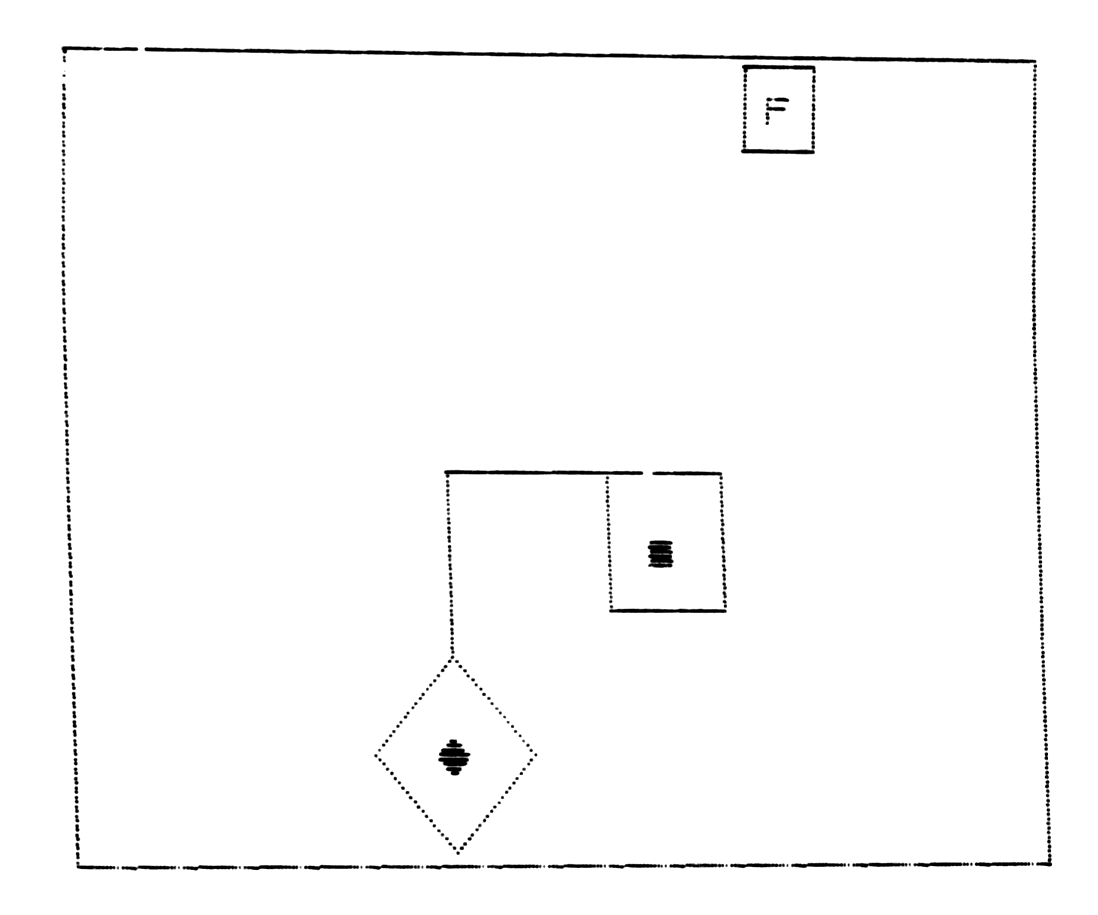
Up to this point the computer is ignorant of the meaning of the signal display it shows. It learns this by using Lines 7000, 7010, 7020 and 7030 to check out some simple arithmetical relationships of the of the numbers assigned to the flag positions. Then it compares its finding to the flag positions that have been chosen by Lines 20 and 30 and prints the letter equivalent. Logic operators were used to avoid clutter but IF…THEN statements would serve. (Editor’s NOTE: lines 7000 to 7030 are well worth study by those who are not familiar with this technique.)
Lines 8000 to 8514 create the UDGs necessary for the flag centers. The rest of the program is straightforward.
Oh! Those funny little numbers dancing in the upper left hand corner? I put those in to check on how often the 2068 discarded a duplicate or useless flag position. I sort of like them but if you don’t feel the same way just choose the fourth option on the menu, LIST 7045, type “n” to stop the scroll and delete the “PRINT i”.
I refrained from translating any of this all BASIC program into machine code as it appeared to me nothing would be gained by increasing the speed of the program and memory is no problem. On the other hand, there is occasionally an illusion of movement at BASIC speed which I felt added to the program’s charm.
   5 REM menu,instructions & initialize
   6 BORDER 4: PAPER 6: CLS : GO SUB 6000
   7 GO TO 5000
  10 CLS : GO SUB 8000: FOR i=1 TO 50: CLS : GO SUB 9500:
  15 REM select flag position
  20 LET b=INT (RND*8+1)
  30 LET c=INT (RND*8+1)
  38 REM eliminate non-letters
  40 IF b=c THEN GO TO 7042
  45 IF b*c=48 THEN GO TO 7042
  47 REM plot start for flags & look for flags
  50 GO SUB 8700: PLOT 100,85: GO SUB b*500: PLOT 100,85: GO SUB c*500
 112 REM give time to answer then go to answer routine
 114 PAUSE 100: GO SUB 6990
 116 REM implement auto-run or manual
 117 PAUSE 100: RUN
 118 IF Z=2 THEN GO TO 7510
 498 REM draw flags & print centers
 499 REM up flag
 500 DRAW 0,40
 510 DRAW 30/a,30/a: DRAW -30/a,30/a: DRAW -30/a,-30/a: DRAW 30/a,-30/a
 520 INK 2: PRINT AT 3,12;"E": INK 0
 550 RETURN
1000 REM down flag
1008 DRAW 0,-40
1010 DRAW -30/a,-30/a: DRAW 30/a,-30/a: DRAW 30/a,30/a: DRAW -30/a,30/a
1020 INK 2: PRINT AT 18,12;"A"
1022 PRINT AT 19,12;"B": INK 0
1050 RETURN
1500 REM right flag
1510 DRAW 72,0: DRAW 0,-30: DRAW -30,0: DRAW 0,30
1520 INK 2: PRINT AT 13,19;"C": INK 0
1550 RETURN
2000 REM left flag
2010 DRAW -70,0: DRAW 0,-30: DRAW 30,0: DRAW 0,30
2020 INK 2: PRINT AT 13,5;"C": INK 0
2040 RETURN
2500 REM lower left flag
2520 DRAW -70/a,-70/a: DRAW 30/a,-30/a: DRAW 30/a,30/a: DRAW -30/a,30/a
2530 INK 2: PRINT AT 17,8;"FG": INK 0
2550 RETURN
3000 REM lower right flag
3010 PLOT 100,85
3020 DRAW 70/a,-70/a: DRAW -30/a,-30/a: DRAW -30/a,30/a: DRAW 30/a,30/a
3030 INK 2: PRINT AT 17,15;"FG": INK 0
3050 RETURN
3500 REM upper right flag
3520 DRAW 70/a,70/a: DRAW 30/a,-30/a: DRAW -30/a,-30/a: DRAW -30/a,30/a
3530 INK 2: PRINT AT 7,18;"A"
3535 PRINT AT 8,18;"B": INK 0
3550 RETURN
4000 REM upper left flag
4020 DRAW -70/a,70/a: DRAW -30/a,-30/a: DRAW 30/a,-30/a: DRAW 30/a,30/a
4030 INK 2: PRINT AT 7,6;"A"
4035 PRINT AT 8,6;"B": INK 0
4050 RETURN
5000 REM instructions
5010 CLS : PRINT TAB 10;"INSTRUCTIONS"''
5020 PRINT "This program is designed to helpyou learn to read semaphore code"''
5030 PRINT "You have two choices:1)The mach-ine will show you a letter,give you a short time to decide what it is,then show you the answer  & go on to another letter.After about 50 letters it will give   you a chance to continue,";
5035 PRINT "change to Choice 2,or STOP."''
5040 PRINT "2)You may have the program show you a letter, give you a short  time to decide what  it is and  wait for you to ask for another letter."''
5045 PRINT "Press any key to continue.": PAUSE 0
5050 IF INKEY$<>" " THEN GO TO 6
6000 REM menu to choose auto-run
6005 CLS : GO SUB 8700
6010 PRINT AT 2,9;"SEMAPHORE DRILL."
6020 PRINT AT 7,4;"PLEASE CHOOSE ONE."
6030 PRINT AT 10,6;"1)  AUTOMATIC RUN"
6040 PRINT AT 12,6;"2)  MANUAL CONTROL"
6042 PRINT AT 14,6;"3)  SEE INSTRUCTIONS"
6044 PRINT AT 16,6;"4)  STOP PROGRAM"
6050 INPUT Z
6500 REM puts menu choice into effect
6605 IF Z=4 THEN STOP
6610 GO TO (10 AND Z=1)+(7700 AND Z=2)+(5000 AND Z=3)+(6050 AND (Z<1 AND Z>4))
6990 REM draw answer box
6995 PLOT 197,155: DRAW 0,18: DRAW -18,0: DRAW 0,-18: DRAW 18,0
6998 REM answer routine
7000 PRINT AT 1,23;("A" AND c*b=10)+("B" AND c*b=8 AND c+b=6)+("C" AND c*b=16 AND c<>4)+("D" AND c*b=2)+("E" AND c*b=14)+("F" AND c*b=6 AND c+b=5)+("G" AND c*b=12 AND c+b=8)
7010 PRINT AT 1,23;("H" AND c*b=20)+("I" AND c*b=40)+("J" AND c*b=3)+("K" AND c*b=5)+("L" AND c*b=35)+("M" AND c*b=15)+("N" AND c*b=30)+("O" AND c*b=32)
7020 PRINT AT 1,23;("P" AND c*b=4 AND c+b=5)+("Q" AND c*b=28)+("R" AND c*b=12 AND c+b=7)+("S" AND c*b=24 AND c+b=10)+("T" AND c*b=8 AND c+b=9)+("U" AND c*b=56)
7030 PRINT AT 1,23;("V" AND c*b=6 AND c+b=7)+("W" AND c*b=21)+("X" AND c*b=42)+("Y" AND c*b=24 AND c+b=11)+("Z" AND c*b=18)+("NUMBERS" AND c*b=7)
7035 IF Z=2 THEN GO TO 7500
7040 PAUSE 100
7045 PRINT i: PAUSE 10: NEXT i: GO TO 9000
7499 REM interactive routine
7500 PAUSE 100: PRINT AT 20,1;"Press Y for another go. Press N to Stop."
7510 IF INKEY$="" THEN GO TO 7500
7515 GO TO (10 AND INKEY$="Y")+(10 AND INKEY$="y")
7520 CLS : GO TO (6010 AND INKEY$="N")+(6010 AND INKEY$="n")+(7500 AND CODE INKEY$<>78 AND CODE INKEY$<>89 AND CODE INKEY$<>110 AND CODE INKEY$<>121)
7650 STOP
7700 CLS : PRINT AT 10,5;"Press ""Y"" to start."
7705 PAUSE 0
7710 IF INKEY$="" THEN GO TO 7710
7720 GO TO 7512
8000 REM graphics for flag centers
8010 POKE USR "e",BIN 00011000
8012 POKE USR "e"+1,BIN 00111100
8014 POKE USR "e"+2,BIN 01111110
8016 POKE USR "e"+3,BIN 11111111
8018 POKE USR "e"+4,BIN 11111111
8020 POKE USR "e"+5,BIN 01111110
8022 POKE USR "e"+6,BIN 00111100
8024 POKE USR "e"+7,BIN 00011000
8100 POKE USR "f",BIN 00000001
8102 POKE USR "f"+1,BIN 00000011
8104 POKE USR "f"+2,BIN 00000111
8106 POKE USR "f"+3,BIN 00001111
8108 POKE USR "f"+4,BIN 00001111
8110 POKE USR "f"+5,BIN 00000111
8112 POKE USR "f"+6,BIN 00000011
8114 POKE USR "f"+7,BIN 00000001
8200 POKE USR "g",BIN 10000000
8202 POKE USR "g"+1,BIN 11000000
8204 POKE USR "g"+2,BIN 11100000
8206 POKE USR "g"+3,BIN 11110000
8208 POKE USR "g"+4,BIN 11110000
8210 POKE USR "g"+5,BIN 11100000
8212 POKE USR "g"+6,BIN 11000000
8214 POKE USR "g"+7,BIN 10000000
8300 POKE USR "a",BIN 00000000
8302 POKE USR "a"+1,BIN 00000000
8304 POKE USR "a"+2,BIN 00000000
8306 POKE USR "a"+3,BIN 00000000
8308 POKE USR "a"+4,BIN 00011000
8310 POKE USR "a"+5,BIN 00111100
8312 POKE USR "a"+6,BIN 01111110
8314 POKE USR "a"+7,BIN 11111111
8400 POKE USR "b",BIN 11111111
8402 POKE USR "b"+1,BIN 01111110
8404 POKE USR "b"+2,BIN 00111100
8406 POKE USR "b"+3,BIN 00011000
8408 POKE USR "b"+4,BIN 00000000
8410 POKE USR "b"+5,BIN 00000000
8412 POKE USR "b"+6,BIN 00000000
8414 POKE USR "b"+7,BIN 00000000
8500 POKE USR "c",BIN 00000000
8502 POKE USR "c"+1,BIN 01111110
8504 POKE USR "c"+2,BIN 01111110
8506 POKE USR "c"+3,BIN 01111110
8508 POKE USR "c"+4,BIN 01111110
8510 POKE USR "c"+5,BIN 01111110
8512 POKE USR "c"+6,BIN 01111110
8514 POKE USR "c"+7,BIN 00000000
8516 RETURN
8700 REM draw border
8710 PLOT 0,0
8712 DRAW 255,0: DRAW 0,175: DRAW -255,0: DRAW 0,-175
8720 RETURN
9000 REM select another 50 letters on auto-run
9005 CLS
9010 IF Z=2 THEN GO TO 7500
9020 IF Z=1 THEN PRINT AT 8,1;"Would you like another fifty";AT 10,9;"letters? (Y/N)": PAUSE 0
9030 IF CODE INKEY$=89 OR CODE INKEY$=121 THEN GO TO 9050
9040 IF CODE INKEY$<>89 AND CODE INKEY$<>121 THEN RUN
9045 STOP
9050 CLEAR : LET Z=1: GO TO 10
9499 REM variable for calculating angles of flags
9500 LET a=SQR 2: RETURN
9990 SAVE "SEMAPHORE" LINE 1
9999 STOP
Figure 1. LISTing of SEMAPHORE drill
Note: Type-in program listings on this website use ZMAKEBAS notation for graphics characters.