
INVENTORY helps you keep track of household or business items.
Load 16K Syntactic Sum then enter INVENTORY as listed. Any keywords in PRINT or REM statements are keywords–do not type them in letter by letter. To type a keyword with the cursor in L (letter) mode, type THEN (shift 3)–the cursor now shows a K. Now press the keyword–it appears on the screen. Move the cursor to the left, between THEN and the keyword. DELETE the word THEN and the keyword remains. INVENTORY uses keywords and tokens to save memory in these lines: 50, 255, 430, 500, 1029, 1245, 2015, 2025, 3015, 3030, 3070, 3200, 4015, 4025, 5015, 5025, 6015, 7000, 7020, 7330, 7500, 8015, 8025, 9000, 9010, 9690.
Spaces and graphics characters form line 9800, the greeting after a successful SAVE or LOAD.
When you get the correct Syntactic Sum, prepare to SAVE INVENTORY to tape. First press CLEAR then ENTER. Next, enter:
LET AA=9500
Type in:
GOTO 9060
Start the recorder and press ENTER. The program SAVEs, then executes GOTO AA (9500), which assigns the variables and expands the DIMensioned arrays to full size. In the process, the computer reassigns AA to 9800, bringing up the INVENTORY graphic greeting when you SAVE or LOAD the program in the future.
You see a graphic greeting and a prompt to ENTER “M” FOR MENU. Press M to bring up the Menu. Select any menu option by pressing the corresponding key. If you make a mistake and the program stops with an error code, enter GOTO 100. Do not RUN this program or you will lose all variables and your data! To start over again, enter CLEAR, then GOTO 9500.
Follow the prompts to explore INVENTORY. When you add items (option 1), INVENTORY allows these inputs: catalog number, 8 alphanumeric characters; description, 15 characters; source, 2 alphanumerics; cost each 6 digits (decimal point counts as one digit); on hand, 3 digits; on order, 3 digits; reorder, 2 digits. The last five fields must contain numeric data for the program to work correctly.
When you select option 2, the program asks for the catalog number of the item to DELETE. Enter it with or without the leading zeros. If the computer can match this number with a previously entered item, it displays the information on the screen with a prompt to ENTER “D” TO DELETE.
If you press D, the program deletes the inventory item. If you decide not to delete the item, just press ENTER and the item remains.
To change an item’s quantity on hand, enter the catalog number, then the amount sold or used. If that amount exceeds the amount on hand, the program tells you it cannot complete the transaction. If your stock covers the sale, the program automatically brings the total up to date and displays it with the new amount on hand.
In response to the TIME TO REORDER prompt, or when ordering to replenish existing stock, enter the item’s catalog number. After entering the amount ordered, you see the ONORDER field updated.
When an order comes in, enter the catalog number, then quantity received. The program reduces the ONORDER amount and updates the ON HAND and TOTAL for that item.
To VIEW an item in the inventory (option 6), enter the catalog number. If the computer can’t find it, it displays RECORD NOT FOUND and you may return to the Menu.
This program can LIST all items held on file in order by catalog number. Press 7 from the Menu for LIST mode. For hard copy, press Y, otherwise press N in answer to the prompt. If you choose hard copy, the printer runs until the computer finds the last catalog number and sends all its data to the printer. If you choose N, the information appears on your screen; press C to go to the next record.
Now press S to see the SUMMARY. You see a list of the total number of records on file, the total quantity of all items ON HAND, and the total value (total amount held) of your inventory, with the program name and last update. If you want hard copy, press Z and the computer COPYs the SUMMARY to your printer.
Option 8 revises a record. Enter the catalog number. The item appears onscreen, with a cursor after the CATALOG NUMBER field. To change any data, just type the new one and press ENTER. If you press ENTER without typing new data, the old data remains and the cursor moves to the next line. If you change the ON HAND or COST EAch field, the TOTAL also changes.
REVISE also lets you recycle space used by a DELETEd item. Enter *DELETED to bring up the first available deleted catalog number. Input the changes in REVISE mode.
To SAVE, choose option 9 and enter the date you want displayed at the top of the Menu (up to eight characters). The computer SAVEs the contents of INVENTORY to tape. When the SAVE completes, you see the first INVENTORY message again.
INVENTORY comes on tape with full documentation for $10 from Medicine Creek Productions, P. O. Box 1184, Olympia, WA 98507. For a list of line and variable functions and tips on modifying INVENTORY, send an SASE to SYNTAX.–AZ
   1 REM ***INVENTORY****
   3 REM ***(C) 1983 ****
   5 REM *BRETT MCCARRON*
  50 REM **USE " GOTO I" TO RETURN TO MENU**
  60 REM **DO NOT RUN OR DATA WILL BE LOST**
 100 GOSUB 250
 210 PAUSE P
 220 LET S$=INKEY$
 230 IF CODE S$<29 OR CODE S$>37 THEN GOTO 210
 240 GOTO VAL S$*1000
 250 CLS
 255 PRINT AT 11,W;" (1) ADD ITEM",," (2) DELETE ITEM"," (3) FILL ORDER",," (4) ORDER STOCK"," (5) RECEIVE STOCK"," (6) VIEW ITEM",," (7) LIST ",," (8) REVISE",," (9) SAVE"
 260 PRINT AT Z,W;">PLEASE INPUT FUNCTION"
 265 PRINT AT U,W;"[illegible]"
 270 FOR C=11 TO 19
 275 PRINT AT C,W;"█ ";AT C,N;" █"
 280 NEXT C
 290 IF X$="M" THEN GOTO 310
 300 CLS
 310 PRINT AT L,W;" CAT. NO:",," DESCRPT:",," SOURCE :",," COST EA:",," ON HAND:",," TOTAL  :",," ONORDER:",," REORDER:"
 315 PRINT AT K,W;"[illegible]"
 320 PRINT AT Y,W;"[illegible]"
 325 FOR C=L TO Q
 330 PRINT AT C,W;"█ ";AT C,N;" █"
 335 NEXT C
 340 PRINT AT W,W;"INVENTORY",TAB 23;U$
 345 RETURN
 350 FOR C=L TO Q
 355 PRINT AT C,Y;"                   "
 360 NEXT C
 365 RETURN
 400 INPUT Q$
 405 IF Q$="" OR LEN Q$>E THEN GOTO 400
 410 LET I$="0000000"( TO E-LEN Q$)+Q$
 415 FOR A=K TO X
 420 IF I$=C$(A) THEN GOTO 450
 425 NEXT A
 430 PRINT AT 3,Y;">RECORD NOT FOUND"
 445 GOTO I
 450 GOSUB S
 470 GOTO 25+VAL S$*1000
 500 PRINT AT Z,W;">INPUT ""M"" FOR MENU            "
 505 PAUSE P
 510 LET X$=INKEY$
 520 IF X$="Z" THEN COPY
 530 IF X$="M" THEN GOTO 100
 540 GOTO 505
 550 LET T$(A)=STR$ (VAL E$(A)*VAL H$(A))
 610 LET C=C+K
 620 IF C>L THEN PRINT AT C-K,Q;" "
 630 IF C<Y THEN PRINT AT C,Q;">"
 700 IF S$="7" THEN LET A=T
 710 PRINT AT L,Y;C$(A);TAB Y;D$(A);TAB Y;V$(A);TAB Y;E$(A);TAB Y;H$(A);TAB Y;T$(A);TAB Y;O$(A);TAB Y;R$(A)
 810 IF S$="7" AND P$="Y" THEN LPRINT "[illegible] CAT. NO: ";C$(T);TAB N;"█DESCRPT: ";D$(T);TAB N;"█SOURCE : ";V$(T);TAB N;"█COST EA: ";E$(T);TAB N;"█ON HAND: ";H$(T);TAB N;"█TOTAL   : ";T$(T);TAB N;"█ONORDER: ";O$(T);TAB N;"█REORDER: ";R$(T);TAB N;"[illegible]"
 850 RETURN
1000 REM **ADD**
1010 GOSUB G
1015 LET X=X+K
1020 IF X>V THEN GOTO 1700
1025 LET A=X
1027 LET C=K
1029 PRINT AT Z,W;">PLEASE INPUT DATA"
1030 GOSUB D
1035 INPUT Q$
1040 IF Q$="" OR LEN Q$>E THEN GOTO 1035
1045 LET C$(A)="0000000"( TO E-LEN Q$)+Q$
1060 GOSUB D
1070 INPUT D$(A)
1080 IF D$(A)="                " THEN GOTO 1070
1090 GOSUB D
1100 INPUT V$(A)
1110 IF V$(A)="    " THEN GOTO 1100
1120 GOSUB D
1130 INPUT E$(A)
1140 IF E$(A)="        " THEN GOTO 1130
1150 GOSUB D
1155 INPUT H$(A)
1160 IF E$(A)="    " THEN GOTO 1155
1170 GOSUB 550
1190 GOSUB D
1195 INPUT O$(A)
1200 IF O$(A)="    " THEN GOTO 1195
1210 GOSUB D
1220 INPUT R$(A)
1230 IF R$(A)="    " THEN GOTO 1220
1240 PRINT AT C,Q;" ";R$(A)
1245 IF VAL R$(A)>=VAL O$(A)+VAL H$(A) THEN PRINT AT U,W;">TIME TO REORDER STOCK"
1500 PRINT AT Z,W;">ANY MORE? (Y/N)              "
1510 PAUSE P
1520 LET X$=INKEY$
1530 IF X$="Y" THEN GOTO 1600
1540 IF X$="Z" THEN COPY
1550 LET X$="M"
1560 GOTO 100
1600 GOSUB 350
1610 GOTO VAL S$*1000
1700 PRINT AT 3,Y;">MEMORY FULL"
1710 GOTO I
2000 REM **DELETE**
2010 GOSUB G
2015 PRINT AT Z,W;"> INPUT CAT. NO. TO DELETE"
2020 GOTO J
2025 PRINT AT Z,W;"> INPUT ""D"" TO [illegible]"
2040 INPUT I$
2050 IF I$<>"D" THEN GOTO 100
2060 LET C$(A)="*DELETED"
2062 LET D$(A)=""
2064 LET V$(A)=""
2066 LET H$(A)=STR$ W
2068 LET E$(A)=STR$ W
2070 LET T$(A)=STR$ W
2072 LET O$(A)=STR$ W
2074 LET R$(A)=STR$ W
2076 GOSUB S
2080 PRINT AT U,W;">ITEM SUCCESSFULLY DELETED"
2100 GOTO F
3000 REM **FILL ORDER**
3010 GOSUB G
3015 PRINT AT Z,W;"> INPUT CAT. NO OF ITEM SOLD"
3020 GOTO J
3030 PRINT AT Z,W;"> INPUT QUANTITY SOLD       "
3040 INPUT B
3050 IF B>VAL H$(A) THEN GOTO 3200
3060 LET H$(A)=STR$ (VAL H$(A)-B)
3070 IF VAL H$(A)+VAL O$(A)<=VAL R$(A) THEN PRINT AT U,W;">TIME TO REORDER STOCK"
3080 LET T$(A)=STR$ (VAL E$(A)*VAL H$(A))
3090 GOSUB S
3100 GOTO F
3200 PRINT AT U,W;">NOT ENOUGH TO FILL ORDER"
3210 GOTO F
4000 REM **ORDER STOCK**
4010 GOSUB G
4015 PRINT AT Z,W;"> INPUT CAT. NO OF ITEM ORDERED"
4020 GOTO J
4025 PRINT AT Z,W;"> INPUT QUANTITY ORDERED       "
4030 INPUT B
4040 LET O$(A)=STR$ (VAL O$(A)+B)
4050 GOSUB S
4060 GOTO F
5000 REM **RECEIVE STOCK**
5010 GOSUB G
5015 PRINT AT Z,W;"> INPUT CAT. NO. RECEIVED"
5020 GOTO J
5025 PRINT AT Z,W;"> INPUT QUANTITY RECEIVED"
5030 INPUT B
5060 LET O$(A)=STR$ (VAL O$(A)-B)
5065 LET H$(A)=STR$ (VAL H$(A)+B)
5070 LET T$(A)=STR$ (VAL E$(A)*VAL H$(A))
5080 GOSUB S
5090 GOTO F
6000 REM **VIEW**
6010 GOSUB G
6015 PRINT AT Z,W;"> INPUT CAT. NO. TO VIEW"
6020 GOTO J
6025 GOTO F
7000 REM ** LIST **
7010 CLS
7020 PRINT AT Y,W;"HARD COPY OF ALPHA LIST ? (Y/N)"
7030 PAUSE P
7040 IF INKEY$<>"N" AND INKEY$<>"Y" THEN GOTO 7030
7060 LET P$=INKEY$
7070 GOSUB G
7100 LET B=W
7120 LET T=X
7130 LET M=K
7140 LET B=M+K
7150 IF B>T THEN GOTO 7300
7160 IF C$(B)+D$(B)+E$(B)+H$(B)+O$(B)+R$(B)+T$(B)+V$(B)>C$(M)+D$(M)+E$(M)+H$(M)+O$(M)+R$(M)+T$(M)+V$(M) THEN GOTO 7200
7170 LET M=M+K
7180 GOTO 7140
7200 LET A$=C$(M)
7202 LET J$=D$(M)
7204 LET K$=E$(M)
7206 LET L$=H$(M)
7208 LET M$=O$(M)
7210 LET N$=R$(M)
7212 LET Q$=T$(M)
7214 LET W$=V$(M)
7220 LET C$(M)=C$(B)
7222 LET D$(M)=D$(B)
7224 LET E$(M)=E$(B)
7226 LET H$(M)=H$(B)
7228 LET O$(M)=O$(B)
7230 LET R$(M)=R$(B)
7232 LET T$(M)=T$(B)
7234 LET V$(M)=V$(B)
7240 LET C$(B)=A$
7242 LET D$(B)=J$
7244 LET E$(B)=K$
7246 LET H$(B)=L$
7248 LET O$(B)=M$
7250 LET R$(B)=N$
7252 LET T$(B)=Q$
7254 LET V$(B)=W$
7260 GOTO 7170
7300 GOSUB S
7310 IF P$="Y" THEN GOTO 7370
7330 PRINT AT Z,W;"> INPUT ""C"" TO CONTINUE"
7340 PAUSE P
7350 IF INKEY$<>"C" THEN GOTO 7340
7370 LET T=T-1
7380 IF T>W THEN GOTO 7130
7390 LET P$=""
7500 PRINT AT U,W;"> END OF FILE REACHED","> INPUT ""S""  FOR SUMMARY DATA"
7510 PAUSE P
7520 LET X$=INKEY$
7530 IF X$<>"S" THEN GOTO 7510
7540 LET H=0
7550 LET T=0
7560 FOR A=K TO X
7570 LET H=H+VAL H$(A)
7580 LET T=T+VAL T$(A)
7590 NEXT A
7600 CLS
7610 PRINT ,,,," CATALOG ITEMS:";X,,," TOTAL ON HAND:";H,,," TOTAL VALUE  :";T
7635 GOSUB 315
7640 GOTO I
8000 REM **REVISE**
8005 GOSUB G
8010 LET C=K
8015 PRINT AT Z,W;"> INPUT CAT. NO. TO REVISE"
8020 GOTO J
8025 PRINT AT Z,W;"> INPUT CHANGE OR PUSH [illegible]"
8030 GOSUB D
8035 INPUT Q$
8040 IF Q$<>"" AND LEN Q$<=E THEN LET C$(A)="0000000"( TO E-LEN Q$)+Q$
8045 GOSUB D
8050 INPUT Q$
8055 IF Q$<>"" THEN LET D$(A)=Q$
8060 GOSUB D
8065 INPUT Q$
8070 IF Q$<>"" THEN LET V$(A)=Q$
8075 GOSUB D
8080 INPUT Q$
8085 IF Q$<>"" THEN LET E$(A)=Q$
8090 GOSUB D
8095 INPUT Q$
8100 IF Q$<>"" THEN LET H$(A)=Q$
8110 GOSUB 550
8120 GOSUB D
8125 INPUT Q$
8130 IF Q$<>"" THEN LET O$(A)=Q$
8140 GOSUB D
8150 INPUT Q$
8160 IF Q$<>"" THEN LET R$(A)=Q$
8170 GOSUB D
8200 GOTO F
9000 REM ** SAVE **
9005 CLS
9010 PRINT AT Y,W;"> INPUT CURRENT DATE"," (MAX. OF 8 CHARACTERS)"
9020 INPUT U$
9030 IF LEN U$>E THEN GOTO 9010
9060 SAVE "IN[illegible]"
9070 GOTO AA
9200 STOP
9500 REM **VARIABLES**
9505 FAST
9510 LET D=600
9515 LET E=8
9520 LET F=1500
9530 LET G=300
9540 LET I=500
9550 LET J=400
9560 LET K=1
9570 LET L=2
9580 LET N=31
9590 LET P=32768
9600 LET Q=9
9610 LET S=700
9620 LET U=20
9630 LET V=180
9640 LET W=0
9650 LET X=W
9660 LET Y=10
9670 LET Z=21
9675 LET AA=9800
9680 LET P$=""
9690 LET U$=" NEW DATA"
9700 DIM C$(V,E)
9710 DIM D$(V,15)
9720 DIM E$(V,6)
9730 DIM H$(V,3)
9740 DIM O$(V,3)
9750 DIM R$(V,L)
9760 DIM T$(V,E)
9770 DIM V$(V,L)
9800 PRINT AT 5,W;"[illegible]"
9820 GOTO I
SYNTACTIC SUM: 25007, 8K ROM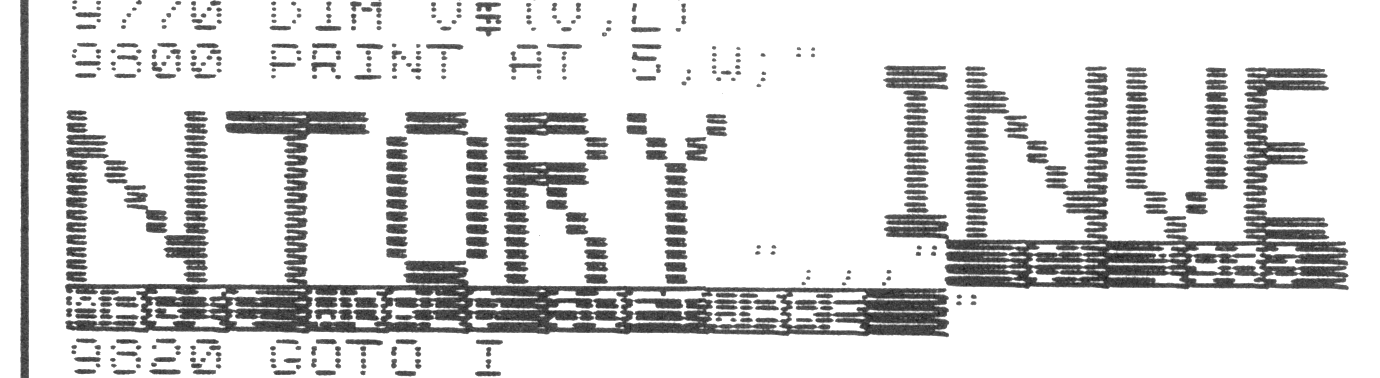
Note: Type-in program listings on this website use ZMAKEBAS notation for graphics characters.