
Generally SYNC prefers articles in some depth to help you get more out of your computer. However, we receive many short programs that illustrate a point, demonstrate a technique, or show something the reader has found interesting. “Just for Fun” shares these programs with you. If you learn something, great. If you have some fun, great. If you have some that you want to share, send them to: Just for Fun, SYNC, 39 E. Hanover Ave., Morris Plains, NJ 07950.
Mousetrap
M. Hampson
In “Mousetrap” your objective is to trap the mouse which is represented by the O. Your position is shown by the $. By constantly decreasing the amount of space the mouse has to run in, you will finally trap it in a small enough space and win the game. You decrease the space by building walls with the arrow keys. While you can go off the sides, you cannot go off the top or bottom. Your score will be displayed in the upper right hand corner. The aim is to get the lowest score possible.
Graphics line notes:
1 and 5: A (32).
8010: Inverse space (3), “GOT HIM. YOUR SCORE IS” in inverse characters, inverse space (2).
Reprinted from The Ultimate Magazine with permission.
   1 PRINT "▒▒▒▒▒▒▒▒▒▒▒▒▒▒▒▒▒▒▒▒▒▒▒▒▒▒▒▒▒▒▒▒"
   2 FOR Z=1 TO 20
   3 PRINT CHR$ 8;TAB 31;CHR$ 8
   4 NEXT Z
   5 PRINT "▒▒▒▒▒▒▒▒▒▒▒▒▒▒▒▒▒▒▒▒▒▒▒▒▒▒▒▒▒▒▒▒"
   6 LET V=1+PEEK 16396+256*PEEK 16397
   7 LET P=V+34+INT (RND*30)+33*INT (RND*20)
   8 LET D=(32+(RND>.5)*2)*SGN (RND-.5)
   9 LET Q=V+48
  10 LET GO=0
  99 LET A=0
 100 LET A=A+1
 101 IF A=9 THEN GOTO 8000
 102 IF PEEK (P+D) THEN GOTO 9000
 105 POKE P,0
 110 LET P=P+D
 120 POKE P,52
 200 IF PEEK Q<>118 THEN POKE Q,8
 210 IF INKEY$="8" THEN LET Q=Q+1
 211 IF INKEY$="5" THEN LET Q=Q-1
 212 IF INKEY$="6" THEN LET Q=Q+33
 213 IF INKEY$="7" THEN LET Q=Q-33
 220 IF PEEK Q<>118 THEN POKE Q,13
 225 LET GO=GO+1
 230 GOTO 99
8010 PRINT AT 0,0;"[inv    GOT HIM. YOUR SCORE IS  ]";
8020 PRINT 500-GO;"[inv space x3]"
8030 PAUSE 50000
8031 IF INKEY$="K" THEN GOTO 6
8035 CLS
8040 RUN
9000 GOTO 9500+D*10
9160 IF PEEK (P-33)=PEEK (P-1) THEN LET D=34
9161 IF PEEK (P-33) AND D=-34 THEN LET D=32
9162 IF PEEK (P-1) AND D=-34 THEN LET D=-32
9163 GOTO 100
9180 IF PEEK (P-33)=PEEK (P+1) THEN LET D=32
9181 IF PEEK (P-33) AND D=-32 THEN LET D=34
9182 IF PEEK (P+1) AND D=-32 THEN LET D=-34
9183 GOTO 100
9820 IF PEEK (P+33)=PEEK (P-1) THEN LET D=-32
9821 IF PEEK (P+33) AND D=32 THEN LET D=-34
9822 IF PEEK (P-1) AND D=32 THEN LET D=34
9736 GOTO 100
9840 IF PEEK (P+33)=PEEK (P+1) THEN LET D=-34
9841 IF PEEK (P+33) AND D=34 THEN LET D=-32
9842 IF PEEK (P+1) AND D=34 THEN LET D=32
9843 GOTO 100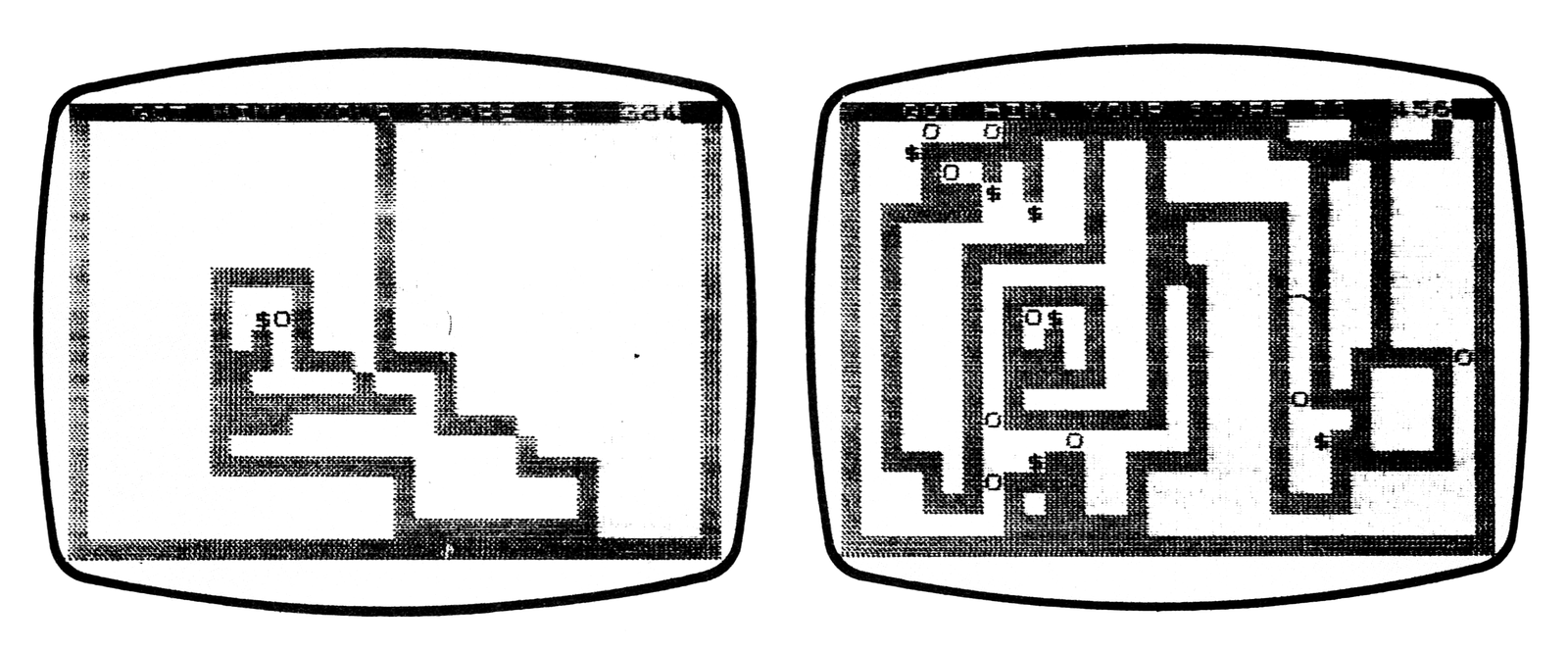
Unvader
M. Hampson
You have all played various kinds of invader in which the ships are streaking in from above your base and you must defend yourself. Usually you are greatly outnumbered by a fleet of ships.
Have you ever wanted to be on the other side? Now you have that opportunity. “Unvader” lets you play the game from the other side. You are the attacker coming in from the top of the screen, and the ZX81 is trying to shoot you down.
Your mission is to land your ship safely on the hostile planet’s surface. To do this you must dodge the shots aimed at you as you descend. Use the 5 key and the 8 key to move left or right and the 6 key to descend.
This program sets up the graphics for your ship, the ZX81’s firing base, and the missiles can be seen. A hit on your ship is shown graphically.
Graphics line notes:
150: E, E, 5, R, R, 1, 6, W, 4.
210: 5
  10 LET P=15
  20 LET Q=1
  30 LET R=P
  40 LET C=0
  50 LET B=C
 110 LET R=R+SGN (P-R)*(RND>.5)
 120 LET P=P+(INKEY$="8")*(P<>29)-(INKEY$="5")*(P<>0)
 130 LET Q=Q+(INKEY$="6")
 140 CLS
 150 PRINT AT Q,P;"▒▒▒ ";TAB P;"▒▒ ";TAB P;"▒ ▒";AT 21,R;"▒▒▒"
 160 IF Q=19 THEN GOTO 300
 170 PRINT AT C,B;" "
 180 LET C=C-1
 181 IF C>0 THEN GOTO 190
 182 LET B=R+1
 183 LET C=20
 190 PRINT AT C,B;
 200 LET K=PEEK (PEEK 16398+256*PEEK 16399)
 201 IF K<>0 AND K<>118 THEN GOTO 400
 210 PRINT "▒"
 220 GOTO 100
 300 PRINT AT 10,10;"**SUCCESS**"
 301 STOP
 400 PRINT AT Q+2,P-2;"*BOOM*"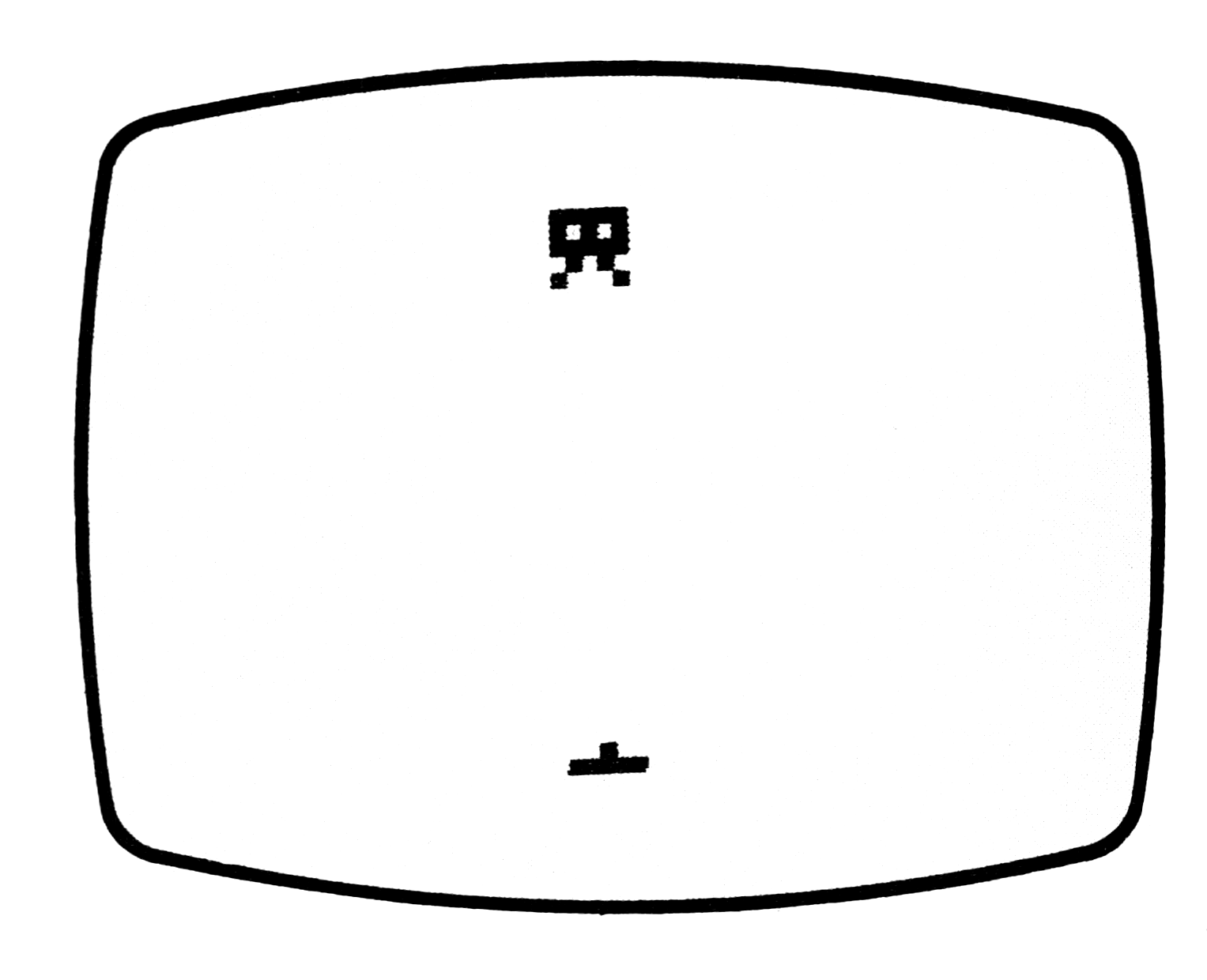
Draw and Store
James John Hollandsworth
Draw and Store not only allows you to draw a picture, but also to store your picture on tape for later use. When you have entered the program(or LOADed it), type in GOTO 1 and ENTER. The computer will ask if you want to draw the picture it has stored to be put on the screen or to erase and start a new picture.
The direction keys are used to move the pixel around. Holding the shift key down while pressing the keys leaves a trail.
When you want ot save a picture, hit ENTER and the display file will be PEEKed and put into a character array. SAVE the program and its array on tape. When you LOAD the tape later, you can also easily substitute your favorite drawing routine for the drawing routine section of the program.
Program notes:
1-80: The drawing routine.
505-550: Loads the array with the contents of the display file.
600-750: Reconstructs the picture from the character array.
2K RAM
   1 REM JJH 1-31-82
   2 REM USE GOTO 1
   5 GOTO 600
  10 LET Y=0
  15 LET X=0
  20 PLOT X,Y
  25 PAUSE 40000
  30 POKE 16437,255
  35 LET A=CODE INKEY$
  40 IF A=118 THEN GOTO 500
  55 IF A<100 THEN UNPLOT X,Y
  60 LET X=X+1*(A=36 OR A=115)*(X<63)-1*(A=33 OR A=114)*(X>0)
  70 LET Y=Y+1*(A=35 OR A=112)*(Y<43)-1*(A=34 OR A=113)*(Y>0)
  80 GOTO 20
 505 FOR A=1 TO 22
 510 FOR B=1 TO 32
 520 LET A$(A,B)=CHR$ PEEK ((PEEK 16396)+256*(PEEK 16397)+33*(A-1)+B)
 530 NEXT B
 540 NEXT A
 550 STOP
 600 PRINT "8K ROM DRAW A PICTURE"
 610 PRINT "NEW PICTURE? Y OR N"
 620 INPUT D$
 630 CLS
 640 IF D$="N" THEN GOTO 700
 650 DIM A$(22,32)
 660 GOTO 10
 700 FOR A=1 TO 22
 710 FOR B=1 TO 32
 720 PRINT A$(A,B);
 730 NEXT B
 740 NEXT A
 750 GOTO 10
1K RAM
   1 PLOT X,Y
   2 PAUSE 40000
   3 LET A=CODE INKEY$
   4 IF A<100 THEN UNPLOT X,Y
   5 LET X=X+1*(A=36 OR A=115)*(X<47)-1*(A=33 OR A=114)*(X>0)
   6 LET Y=Y+1*(A=35 OR A=112)*(Y<37)-1*(A=34 OR A=113)*(Y>0)
   7 GOTO 1
Number Nine
Jon Passler
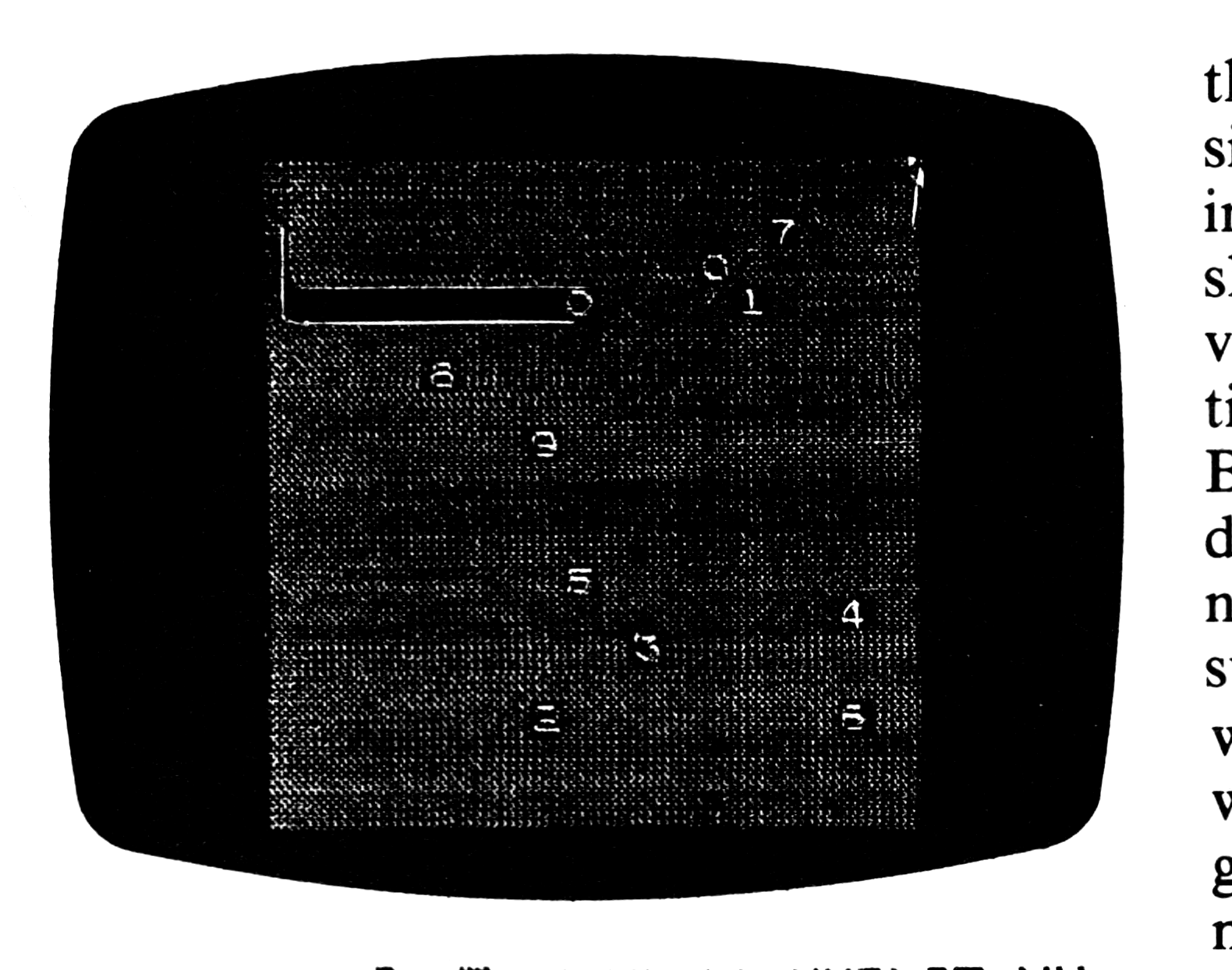
The object of Number Nine is to overwrite the digits 0 to 9 in order without recrossing your path or exceeding the boundaries of the playing area.
Enter line 1. Note that keywords are used to save memory. Do not type them in letter by letter. First enter 1 PAUSE, backspace, enter UNPLOT, and backspace agains, and enter REM. Proceed to enter the rest of the characters shown in the line.
Graphic line notes:
1: T, A, and 3.
21: graphics space.
31: A.
After entering the program, enter in the immediate mode, i.e., without a line number:
LET R=16514
LET B=156
LET C=165
LET S=15
LET O=2
LET K=1+PEEK 16396+256*PEEK 16397
K will have to be reinitialized if any changes are made in the length of the program. Once the variables have been entered, (do not enter) CLEAR or RUN or they will be erased. Use GOTO 1 to “run” the program.
Use the I, J, K, and M keys to move the flashing black character at print position O,O. This is the character to use in overwriting the digits 0 to9, and it should alternate between being an inverse space and an inverse representation of the next digit to be overwritten. Before starting however, make sure all digits ) to 9 are on the gray field and that none got overwritten by another. If you successfully overwrite 0 to 9 then you will be rewarded with a W to indicate a win. If you are not successful, the program will end with a 0/35 error message.
   1 REM ▒=Y▒:=NOT $4 UNPLOT YV▒NOT ( PAUSE TAN
   3 RAND USR R
   5 FOR A=B TO C
   7 PRINT AT RND*S+O,RND*S+O;CHR$ A
   9 NEXT A
  11 LET X=NOT PI
  13 LET Y=X
  15 FOR A=B TO C
  17 PRINT AT X,Y;CHR$ A
  19 LET I$=INKEY$
  21 PRINT AT X,Y;"▒"
  23 IF I$<"I" OR I$>"M" THEN GOTO S+O
  25 LET X=X+(I$="M")-(I$="I")
  27 LET Y=Y+(I$="K")-(I$="J")
  29 LET L=K+X*21+Y
  31 IF PEEK L=CODE "▒" THEN GOTO S+O
  33 IF PEEK L=A THEN NEXT A
  35 IF A>C THEN POKE L,CODE "W"
Eliminator
Sheldon Maloff
In Eliminator the object is to maneuver your spaceship to eliminate as many stars as possible by running over them.
The stars are indicated on the screen by the asterisk. Your ship’s view screen will display a constellation of eight stars. Your space ship is moved down by the A key and up the L key. You have 10 chances to cross the screen. On each passage you try to eliminate as many of the stars as possible. Upon each crossing, your score is updated to reflect how many stars you have eliminated and eight new stars appear.
Graphics notes:
2: inverse space
   1 FOR Z=SGN PI TO VAL "256"
   2 PRINT "[inv  ]";
   3 NEXT Z
   4 LET P=PEEK VAL "16396"+VAL "256"*PEEK VAL "16397"
   5 LET S=NOT PI
   6 LET R=VAL "133"+P
   7 FOR T=SGN PI TO VAL "10"
   8 FOR Z=SGN PI TO VAL "8"
   9 LET X=RND*VAL "263"+SGN PI+P
  10 IF PEEK X=VAL "118" THEN GOTO VAL "9"
  11 POKE X,VAL "151"
  12 NEXT Z
  13 FOR Z=SGN PI TO VAL "31"
  14 IF PEEK (R+Z)=VAL "151" THEN LET S=S+SGN PI
  15 POKE R+Z,VAL "146"
  16 POKE R+Z,VAL "128"
  17 IF INKEY$="A" THEN LET R=R+VAL "33"
  18 IF R>=VAL "264"+P THEN LET R=R-VAL "33"
  19 IF INKEY$="L" THEN LET R=R-VAL "33"
  20 IF R<=P THEN LET R=R+VAL "33"
  21 NEXT Z
  22 PRINT AT SGN PI,SGN PI;S
  23 NEXT T
Note: Type-in program listings on this website use ZMAKEBAS notation for graphics characters.