
Dear Bill, Please send the Jan 88 disk. Check inclosed. How about asking the readers if anyone can help me out with schematics or other info concerning the TS-1000 “BASICARE” modules that I have.
The units are: a connecting module, a 64K RAM, two 16K RAMs, a DROM expandable to 8K, and a printer interface. These should be much less expensive to convert to TS-2068 than to buy new ones.
Ray Norton, [address omitted]
Ray, this reply wont be in specific detail but may help. Someone out there may have schematics but I doubt that the maker released their tech data. YES! You can make modifications to any TS-1000 memory device to use with the TS-2068, and it is worth the effort to try. Generally, the memory chips of that era were 2 and 8K chips. It would not be cost effective to replace these old chips, but if they are still good, then the 64K RAM board would be worth salvaging.
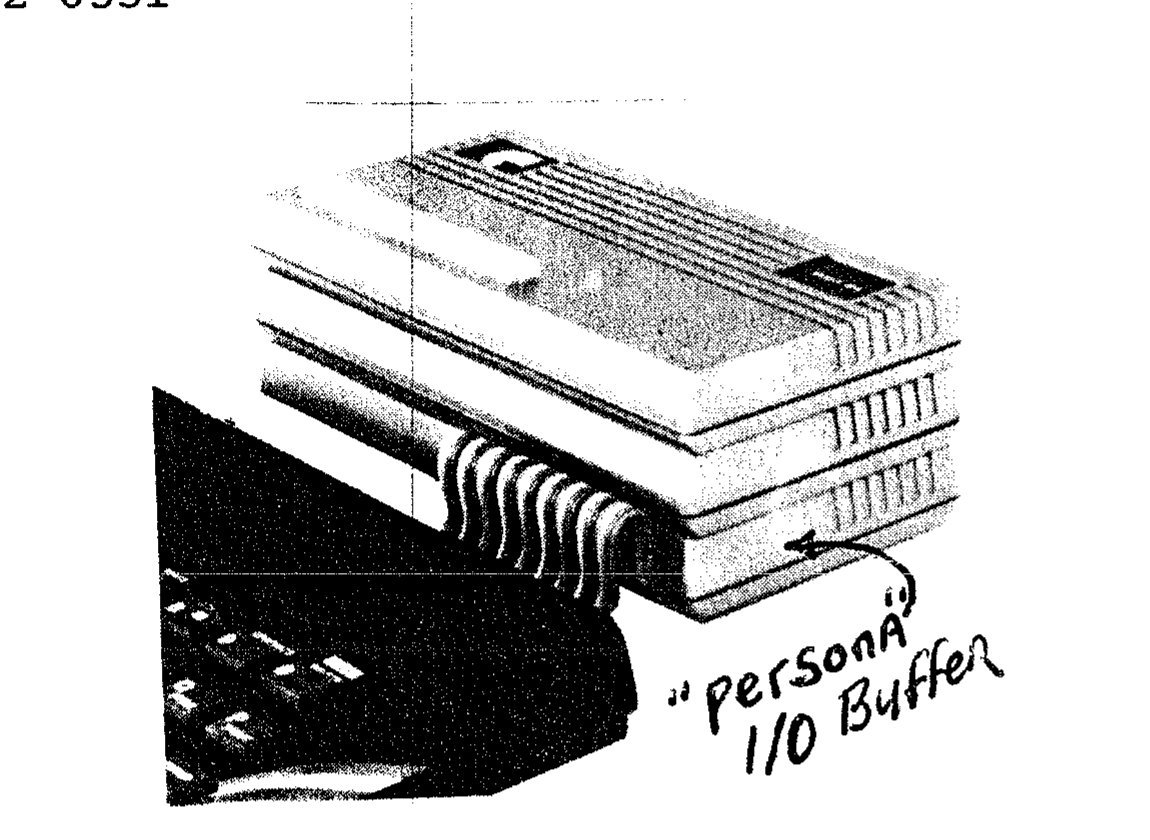
The BASICARE system is the neatest expansion package that I have ever seen for any computer. It consists of several “stackable” modules. As each module stacked on top of the one below, the I/O buss of each mated. The first module which connects to the computer is named “Persona” and is a I/O Buffer for the Z-80 CPU buss lines. Since all of the TS-1000 I/O buss lines are “pin compatable” with the TS-2068, the Persona” unit should work almost AS IS with the 2068. One more TS-2068 buss trace (MREQ) should be brought into the Persona unit as is shown in the diagram given in this issue about the Oliger 64K Ram. This MREQ line should be furnished to the 64K Ram that you modify. The rationale given in the January UPDATE article about modifying the Oli RAM should be followed.
Generally, the ICs used and the method for coding for memory addressing during the TS-1000 era was fairly standard, and it is likely that the 64K Ram that you have will have almost identical coding chips to those in the Oliger RAM. If not, then you will need to obtain data sheets for the chips used (Jamesco Electronics is a good source). Or call me and I’ll likely have the data sheets that you need. The memory of the TS-1000 modules must be re-coded to the TS-2068 memory map.
If I were you I would set aside the modules that contain the printer interface and the DROM. The task of making these useful for the 2068 involves re-design of the circuits for another purpose. Instead, the more productive approach would be to re-code the 64K Ram for two 32K dock banks as per the Oliger Ram conversion. Then later, as the project develops, you may want to re-design these boards for another purpose.
The Basicare system offered two branches of modules for using one 64K RAM or (up to) 16 64K modules. The “second” stacked module, which could be left out, is named “Minimap“. This module provided addressing for 16 “pages” of 64K RAM Modules, for a total of one mega byte of RAM. If you have this unit, and more RAM modules, then a study of Mr. Bothner‘s article in this issue could provide guidance for modification of your “minimap” module. Notice that Mr. Bothner starts his project with a I/O Buss BUFFER board built upon a Zebra Proto board. You already have 99% of that unit in your “Persona” module. Believe me, a I/O buffer is one BIG project to build. About half way through it takes on the appearance of a “Afro head”.
So, you really have two options. You can make your Basicare modules into “Switchable Dock Bank RAM” as we do with the Oliger Ram modification. Or, you can follow the lead given by Mr. Bothner to make a more elaborate system. UPDATE will present a follow on article that gives Mr. Bothner’s corrected TS-2068 PROM. But as shown in his article, he already has several 64K banks in operation. Also note in his article that a auxillary power supply is a part of his system. Basicare also had a auxillary power supply module that was needed as more 64K Rams were stacked.
The advantage that you start with is having neatly packaged modules which can be modified to become a TS-2068 system. I can visualize them pretty silver modules stacked behind the TS-2068 providing a substantial increase in memory capacity. Go fer it!