Dear List:
Now that I have my QL hooked up to my Sears RGB monitor I need to change the screen display width. The cursor is about 4 columns off of the screen in monitor mode.
My problem is two fold. Florida TV experts CHARGE and CHARGE. I could probably do it myself if I knew what to look for and do to the monitor. I do not wish to go into this blind so, someone, help please! What do I look for and do??
Thanks,
Marinus W. Heusevelt
Lantana, Florida
* Mr. Heusevelt and others with screen adjustment problems- on the Sears RGB there is an H-CENTER control in the side door. You must use the tool mounted inside the door to adjust this. Other monitors have this control on their back panel…usually a tool is required to reach it- the tool being a long, thin plastic screwdriver like device. These are available in sets from stores like Radio Shack. But be careful- the control can easily be bent on its circuit board. Remember- all projects you undertook (even if mentioned here in LISTing) you do at YOUR OWN RISK.
Dear LIST:
Do you have a fix for the QL microdrive that won’t read or write, yet lights the LED and runs until it stops with an error code? Is the Doug Dewey capstan fix with Magic glue a fix for the new read/write condition on a new drive?
Now about N. Pashtoon‘s note on the RTTY program. Well, this is a common complaint about all no-interference CW and RTTY programs using a computer program to decode incoming signals. It is not the fault of the program, but due to the selectivity of the receiver being too broad to get a quiet channel. A good ham receiver with a filter set to 100 to 500 cycles will have no problem. The average receiver, even ham grade, without extra filters, has a bandwidth of 2 to 3 KC generally set fo SSB and hoping to be okay for code or RTTY. The shortwave receiver that the average person might hook up to a computer will probably have a selectivity of 6 KC or so and be quite noisy. The easiest cure is to buy or build an audio filter since the computer program is fed from the audio output of the receiver. A typical filter box is the Heathkit ACTIVE AUDIO FILTER HD-1418. Some of the computer interfaces for ham CW and RTTY programs also filter the audio so as to have a quiet channel. On a CW program strings of E’s and T’s are a sure sign of a noise problem. Often reducing the RF gain and turning up the volume to max (i.e. setting loudness with the RF gain) will work in lieu of filtering or with a wide filter.
The reason Packet is only on the vhf bands is because of the noise in the bands. AMTOR is supposed to be usable in the HF band but filtering and good signals are still necessary. Packet is ideal for a satellite and a mailbox operation. This has the least noise of all.
Sincerely,
Bob Howard, WA6DLI
West Covina, CA
* Bob and to others who seem to have a runaway microdrive- the capstan is often the source of the problem. You can take a light and shine it into the faulty drive’s slot. You will be able to see the rubber capstan on the left. If the capstan is pushed up against the top of the QL case, it is most likely causing the problems. It may be possible to reach a small thin implement into the slot and push the capstan back down. This may not solve the problem, and if it does, there is no guarantee the capstan won’t rise up again. Opening the QL case and carefully adding a drop of glue to the capstan shaft should hold it in place. Just BE CAREFUL! If pushing the capstan down does not solve the problem, contact A+ Computer Response or the dealer who sold you your QL. If you determine replacing the drive is necessary and you wish to do it yourself on an out of warranty QL, your dealer should be able to supply you with a microdrive unit. The cost should be between $40 and $60.
Thanks for your comments on Nazir’s comments.
“Keep up the good work” –Stan Nagrod, Mamaroneck, NY
“Congratulations on the new format for LIST. It makes the newsletter so readable that this ‘old guy’ can finally read it!” -Rae Clough, Levittown, NY
“The new LIST is a pleasure to read at last!” -Bob Howard, West Covina, CA
“I have been very pleased with the magazine…good quality” –K.A. Ball, Cambridge, MA
“Print quality on LIST continues to be very good!” –Joan Kealy, El Paso, TX
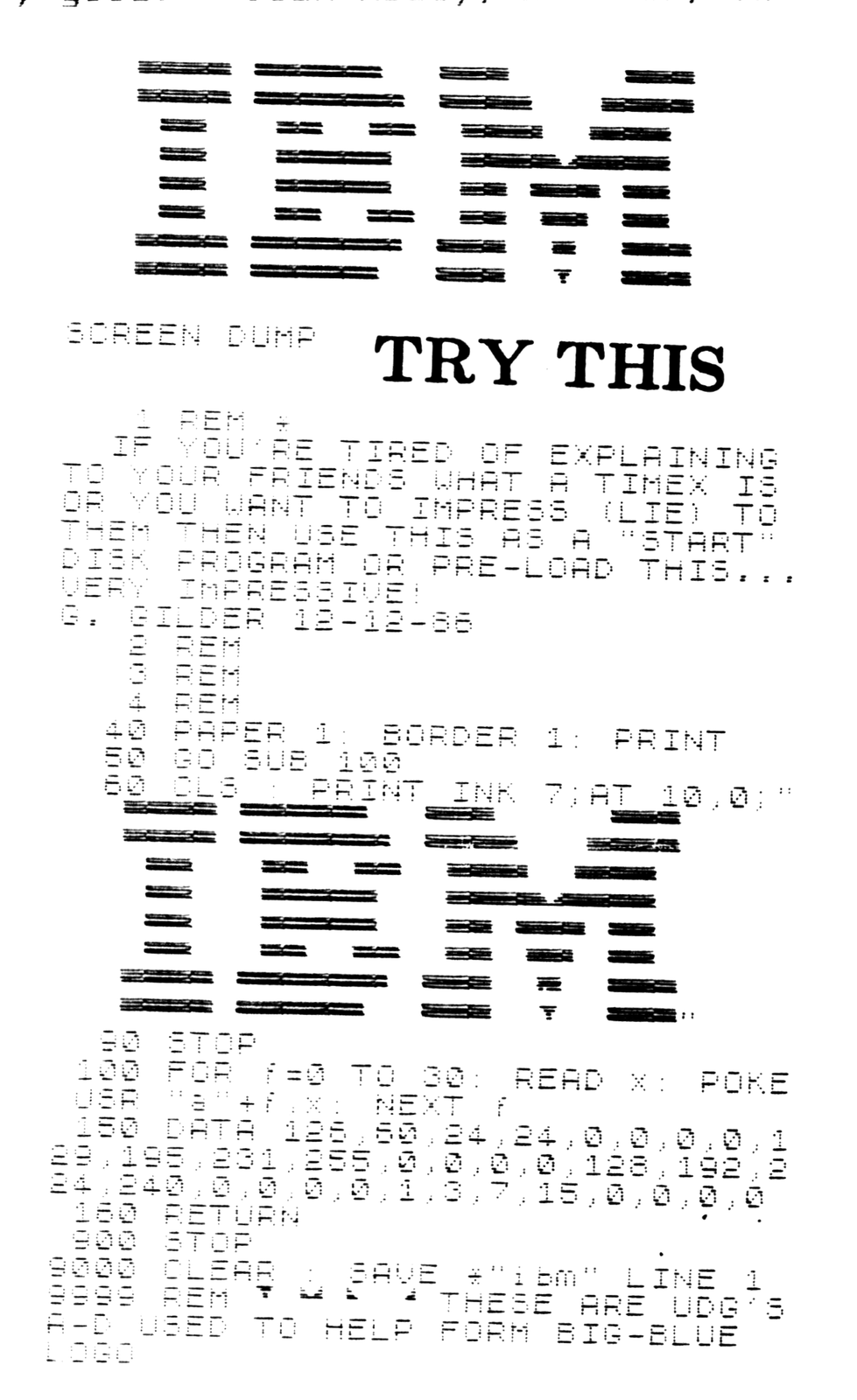
TRY THIS
   1 REM *                        IF YOU'RE TIRED OF EXPLAINING TO YOUR FRIENDS WHAT A TIMEX IS OR YOU WANT TO IMPRESS (LIE) TO THEM THEN USE THIS AS A "START" DISK PROGRAM OR PRE-LOAD THIS...VERY IMPRESSIVE!                G. GILDER 12-12-86
   2 REM
   3 REM
   4 REM
  40 PAPER 1: BORDER 1: PRINT
  50 GO SUB 100
  60 CLS : PRINT INK 7;AT 10,0;"   \''\''\''\'' \''\''\''\''\''\'   \''\''\''     \''\''\''        \''\''\''\'' \''\''\''\''\''\''\'  \''\''\''\''   \''\''\''\''         \''\''   \''\''  \''\''  \''\''\''\'  \ '\''\''\''          \''\''   \''\''\''\''\''   \''\''\''\''\b\''\''\''\''          \''\''   \''\''\''\''\''   \''\'' \''\''\'' \''\''          \''\''   \''\''  \''\''  \''\'' \ '\''\'  \''\''         \''\''\''\'' \''\''\''\''\''\''\'  \''\''\''  \''  \''\''\''        \''\''\''\'' \''\''\''\''\''\'   \''\''\''  \a  \''\''\''"
  90 STOP
 100 FOR f=0 TO 30: READ x: POKE USR "a"+f,x: NEXT f
 150 DATA 126,60,24,24,0,0,0,0,129,195,231,255,0,0,0,0,128,192,224,240,0,0,0,0,1,3,7,15,0,0,0,0
 160 RETURN
 900 STOP
9000 CLEAR : SAVE *"ibm" LINE 1
9999 REM \a \b \c \d THESE ARE UDG'S A-D USED TO HELP FORM BIG-BLUE LOGO