
PCL is such a fun language. I speak ironically, of course, but there is an undeniable thrill to getting fancy formats out of a program that was developed ten years before the printer it utilizes.
As CATS members that have been to recent meetings know, I’ve joined the laser generation. My trusty C. Itoh 9 pin printer, still mechanically just as sound as the day ten years ago when I bought it to take print outs from my 2068, let some of that magic smoke out, and turned belly up.
This happened just as three deadlines were fast approaching – two newsletters and a trip to Vancouver. Fortunately, a Christmas check also appeared in the same week, and it didn’t take much encouragement to get me to take the plunge.
The laser printer I decided on was the HP4l, the lite version of the HP4 series of printers. It is physically light, as well as electrically light – 5 watts on standby! At first glance, one might think it was functionally light as well, without the mass of front panel buttons, but this lack is remedied with a “Bi-tronics” parallel port. The Bi-tronics bit allows a conforming IBM computer to take the place of the missing printer buttons. A willingness to use direct PCL commands makes up for the rest.
I’m very happy with it. The bulk of my editorial work is done in GEOS or WordPerfect, and I tested the HPIII drivers in GEOS before I bought the printer – they worked perfectly, porting the GEOS soft fonts without complaint. Heavily formatted pages can take ~4 minutes from GEOS, as each font is downloaded to the printer before the page is issued – some printer files can amount to 200K for a one page file! WordPerfect is much faster, benefiting from its use of the 24 native printer fonts in the HP4L, as well as more recently tailored drivers.
Once I got the kid home, I tried it out on the other machines in the stack. The Tandy 102 worked fine, and, after the January CATS meeting, the QL did as well! The catch for both of these machines, however, was the complete lack of driver software.
That’s where I started to get to know my ~100 page printer manual. While the HP4l is a full graphic printer with that Bi-tronics interface, it also will swallow plain ASCII without complaint, returning an impressive quality of output in that mode as well. It wasn’t a very big leap to start incorporating PCL commands into the QL’s printer driver page.
To learn PCL, I took printer dumps from WordPerfect and cross referenced them to the manual’s list of commands. It turned out that the syntax was fairly straight forward.
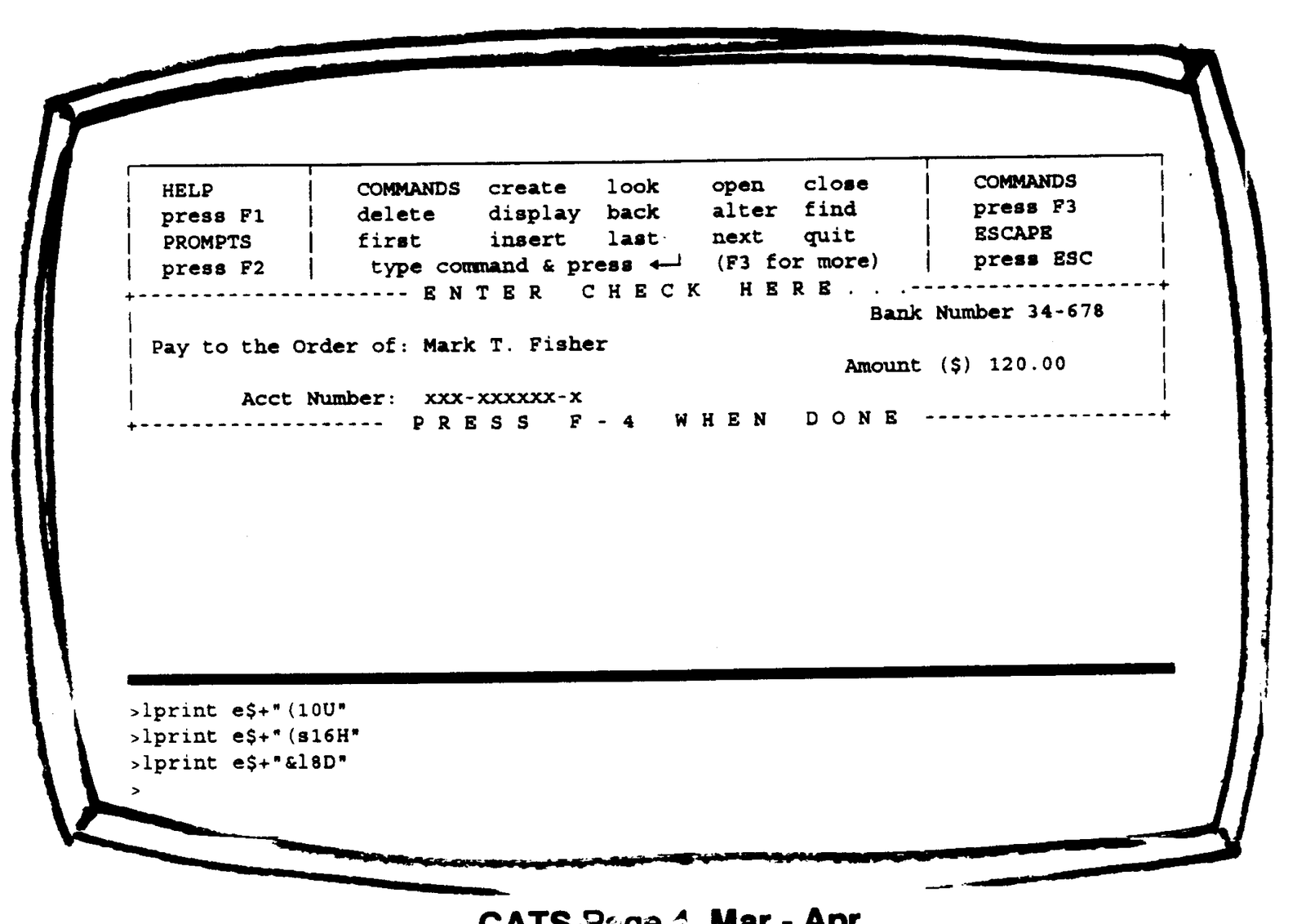
Probably the most complex formatting I’ve done is the accompanying “CHECKS.PRG” Archive application. In it, I change fonts, rotate text twice, and play between Archive’s rather rudimentary formatting and the still unknown pitfalls of PCL.
The big difference between the decade-old dot matrix technology and the HP is that the HP deals with a page at a time. Sequential commands that rotate text, store positions, and advance to fixed points are related to the future final page, held it the printer’s 1MB (doubled, with compression) of memory.
The basic PCL syntax is fairly simple. There are about ten basic families of Ec (escape, chr$(27)) sequences, with dozens of modifiers following. E.G. “Ec(s” is the prefix for the text quality modifiers – upright, italic, condensed, outline, shadowed, etc. Now, not all these are available in any combination – some qualities adhere to certain fonts – a common example is the combination of fixed pitch and the Courier font.
The program:
This program evolved from my impatience with copying out an account number and “For Deposit Only” on every check to deposit. I came up with a BASIC version on the Tandy 102 laptop, and adapted it to the HP4L printer. I hadn’t gotten all the bugs out of it, however, and finally decided to have a go at porting it over to Archive. I was able to use the PCL commands pretty much as in the Tandy program, though the program structure is quite different. I also tried writing a version using WordPerfect’s tables feature, but I haven’t mastered the implications of that yet, as well as the problems of rotating text all over the page.
Program flow is fairly straightforward; start sets up the printer in ptr_setup then gets account and name info, then switches to main to control the overall flow. Check information is picked up in ck_log, then verified, with the option of starting over. Output to the printer is in slip, then checks are endorsed. Q cleans up the .DBF file that was used to hold the data.
PCL commands:
EcE             Clears all printer setup material
                  from previous jobs.
Ec&l2H          Manual feed paper.
Ec(s0P          Fixed pitch - dealing with the pretty
                  proportional fonts would be
                  impossible without tables of
                  character widths.
Ec&s0C          Wrap lines - the default ignores text
                  beyond the edge of the paper.
Ec&a16R         Move to row 16. Archive's TAB
                  wouldn't work as the setup
                  commands must occur in the first
                  line, and Archive doesn't know
                  they won't print.
Ec&f0S          Push (store) cursor position.
Ec&a7r8c270P    This is a compound command.
                  Commands that have a common
                  prefix can be strung together. The
                  last command of a string is
                  finished with a capital letter. In
                  this case, the 7r moves to row 7,
                  8c moves to 8th column, and
                  270P rotates text 270°.
Ec&f1s0S        Pop (recall) position (1s), then store
                  it again (0S).
Ec&a0p7R        This line cannot be strung with the
                  line previous, as the prefix is
                  different. 0p returns to "portrait
                  mode," and 7R moves to row 7.
Ec&f1S          Pop position: The total will always
                  be in the same position, no matter
                  how many checks are listed. This
                  is an easy way of "indexing" the
                  cursor's position.
Ec&a32r20C      Row & column for total.
Ec&a38r21c270P  Row & column for check
                  count.
Archive “CHECKS.PRG” MTF 1995
proc start
  ptr_setup: rem PCL  is such a fun language
  cls
  print : print : print
  print tab 15;"C H E C K  D E P O S I T  P R I N T E
    R"
  print
  print tab 18;"Setup to print to HP 4L Printer"
  print : print tab 16;"Press '1' for Mark or '2' for Sarah"
  let a$=upper(getkey())
  if a$="1"
      let name$="Mark T. Fisher": let acct$="xxx-
        xxxxx-xx"
      endif
  if a$="2"
      let name$="Sarah B. Fisher": let acct$="yyy-
        yyyyy-y"
      endif
  main
endproc

proc main
  print "Deposit slip must be inserted in manual feed
    slot of HP4L printer"
  print "Checks less than 7 inches long will not feed
    through."
  print "Type 'slip' to repeat printing of deposit slip"
  print "Press any key to continue"
  let a$=getkey(): let a$="N"
  while a$="N"
      log_cks
      first : cls
      print : print
      print "DEPOSIT SLIP AMOUNTS FOR ";name$;"
        on ";date(2): print
      while not eof()
          print bank$; tab 12;dec(val(ck_amt$),2,8)
          let ttl=ttl+val(ck_amt$)
          next
          endwhile
      print : print "OK? [Y/n]"
      let a$=upper(getkey())
  endwhile
  slip
  first
  while not eof()
      endorse
      next
  endwhile
  print "Type 'Q' to quit."
  endproc

proc e: rem This is just for convenience: one letter and
    I'm in EDIT
  edit
  endproc

proc ptr_setup
  let e$=chr(0)+chr(27): rem there are a lot of ESC
    char's needed to get the HP4L to do its tricks. The
    leading ASCII 0 is needed by ARCHIVE.
  let ff$=chr(0)+chr(12)
  lprint e$+"E";:rem    reset printer
  lprint e$+"&l2H";:rem manual feed paper
  lprint e$+"(s0P";:rem fixed pitch.
  endproc

proc log_cks : rem check data is loaded in here...
  error q : rem "Chec.dbf" is created new for each
    deposit slip, then erased upon quitting.
  let ttl=0
  create "chec"
      bank$
      ck_amt$
      endcreate
  sload "check": rem see illustration...
  screen
  insert :rem here's where the checks are entered.
  endproc

proc slip: rem The routine that prints the deposit slip...
  lprint E$+"&a16R";date(2)
  rem position @ date area and print it...
  rem
  lprint e$+"&f0S"+e$+"&a7r8c270P";name$: lprint :
    lprint tab 14;acct$
  rem rotate text, move to name area & print it
  rem
  lprint e$+"&f1s0S"+e$+"&a0p7R"
  rem pop position (&store it again immediately); then
    level print again
  first
  while not eof()
      lprint tab 13;bank$; tab 20;dec(val(ck_amt$),2,9)
      next
      endwhile
  lprint e$+"&f1S"+e$+"&a32r20C";dec(ttl,2,8);
  rem pop position & move to totals area, no matter
    how far down the slip I've come.
  lprint e$+"&a38r21c270P";count()
  rem move to second totals area and rotate text again.
  lprint e$+"=": lprint : lprint : lprint
  lprint tab 60;dec(ttl,2,8)
  lprint e$+"&a0P"+ff$: rem kick it out with a form feed.
  endproc

proc endorse
  lprint e$+"(s1p4148t3B";name$
  rem switch to a pretty font for the endorsement
  lprint acct$
  lprint "For Deposit Only";ff$
  endproc

proc q
  close
  kill "chec.dbf"
  endproc
A Word from the Editor:
April will be Paste-up Month. Bring the articles you’d like to see in the newsletter and help put them in!
The BBS is Moving!
As of Feb. 15, a check was sent in to SAILOR to establish an E-Mail account that will be accessible via a local call to all Maryland CATS’ers, and, of course, able to recieve messages from anywhere on the planet via Internet.
The word is that the account should be active in 30 days from that date. More details will be available at the March meeting.
Note: Type-in program listings on this website use ZMAKEBAS notation for graphics characters.