
Now that you have your ZVOICE board up & running, how can you learn to use it with a minimum of difficulty? The scheme presented here should give you reasonable results with very little effort. The quality of speech, however, will not be quite as good as the quality from Wilf Rigter‘s machine code routines, but should be quite acceptable for your first attempts. The speech will be a little slower, but the programming will be easier, — mostly BASIC. Follow the simple steps below, and you will easily be able to add speech to any BASIC program.
   1 REM YYPEEK *TAN
      (TYPE IN EXACTLY AS SHOWN
      USING SINGLE KEY COMMANDS
      FOR PEEK AND TAN)

   2 REM TS1000 "ZVOICE" SPEECH
      ROUTINE FOR BASIC PROGRAMS
      BY KEN ABRAMSON

   5 GOTO 61
  10 FOR I=1 TO 1000
  20 LET O=VAL Q$(2*I-1 TO 2*I)
  30 POKE 16515,O
  40 RAND USR 16514
  50 IF O=0 THEN RETURN
  60 NEXT I

1000 PRINT "GOOD WORK"
1010 LET Q$="3430330446524200"
1020 GOSUB 10
1030 PRINT "TIMEX"
1040 LET Q$="13061607425500"
1050 GOSUB 10
1060 PRINT "COMPUTER"
1070 LET Q$="42151609253113525200"
1080 GOSUB 10
1090 PRINT "HELLO"
2000 LET Q$="2707455300"
2010 GOSUB 10
2020 PRINT "NURSERY RHYME"
2030 LET Q$="13461944426204134619444262044512136204551359510404273204060446151133520448231304253104595100"
2040 GOSUB 10
2050 LET Q$="46261355042362044053425500"
2060 GOSUB 10
1. The main subroutine is given in lines 1 to 60. Take note of the three variables used: I, O, & Q$. These variables should not appear anywhere else in the main BASIC program.
2. Load the BASIC program to which you want to add speech. Look through the program and examine the variables that are used. If any are the same as I, O, and Q$, you must change these variables IN THE SPEECH ROUTINE PROGRAM SHOWN ABOVE.
3. Type the speech subroutine (lines 1 to 60) into your larger BASIC program, as close to the beginning of the program as possible. You might have to use different line numbers, but line 1 in the TS1000 version must remain the first line of the program.
4. Use the allophone chart below in order to compose your speech string, Q$ (see example speech strings shown in the above program, lines 1000 to 2060). Insert this speech string and your GOSUB 10 statement into the place in your BASIC program where you want the computer to speak. Note that you must terminate each speech string with 00 in order to silence the ZVOICE board. Also note that all allophone numbers should be entered as double digits in the string; e.g.: use 05, NOT 5. Use 04 as the silent space between words in a sentence. You can use three 04’s in a row to give the silent period between sentences.
Example speech strings are shown in lines 1000 to 2060 under the main speech subroutine (lines 1 to 60). You can try these out by inserting a few into your BASIC program or just by running the whole speech routine program (lines 1 to 2060) by itself.
If you wish to delve more deeply into SPO256 speech synthesis, check your newsletters over the past year for routines by myself or Wilf Rigter. There are also phonetic text to speech editor programs called PHONETIC ZSPEAK available for the TS1000 and the TS2068 in our software library.
   1 REM TS2068 "ZVOICE" SPEECH
      ROUTINE FOR BASIC PROGRAMS
      BY KEN ABRAMSON

   5 GOTO 61
  10 FOR I=1 TO 1000
  20 LET O=VAL Q$(2*I-1 TO 2*I)
  30 OUT 23,O
  40 IF O=0 THEN RETURN
  50 PAUSE 9
  60 NEXT I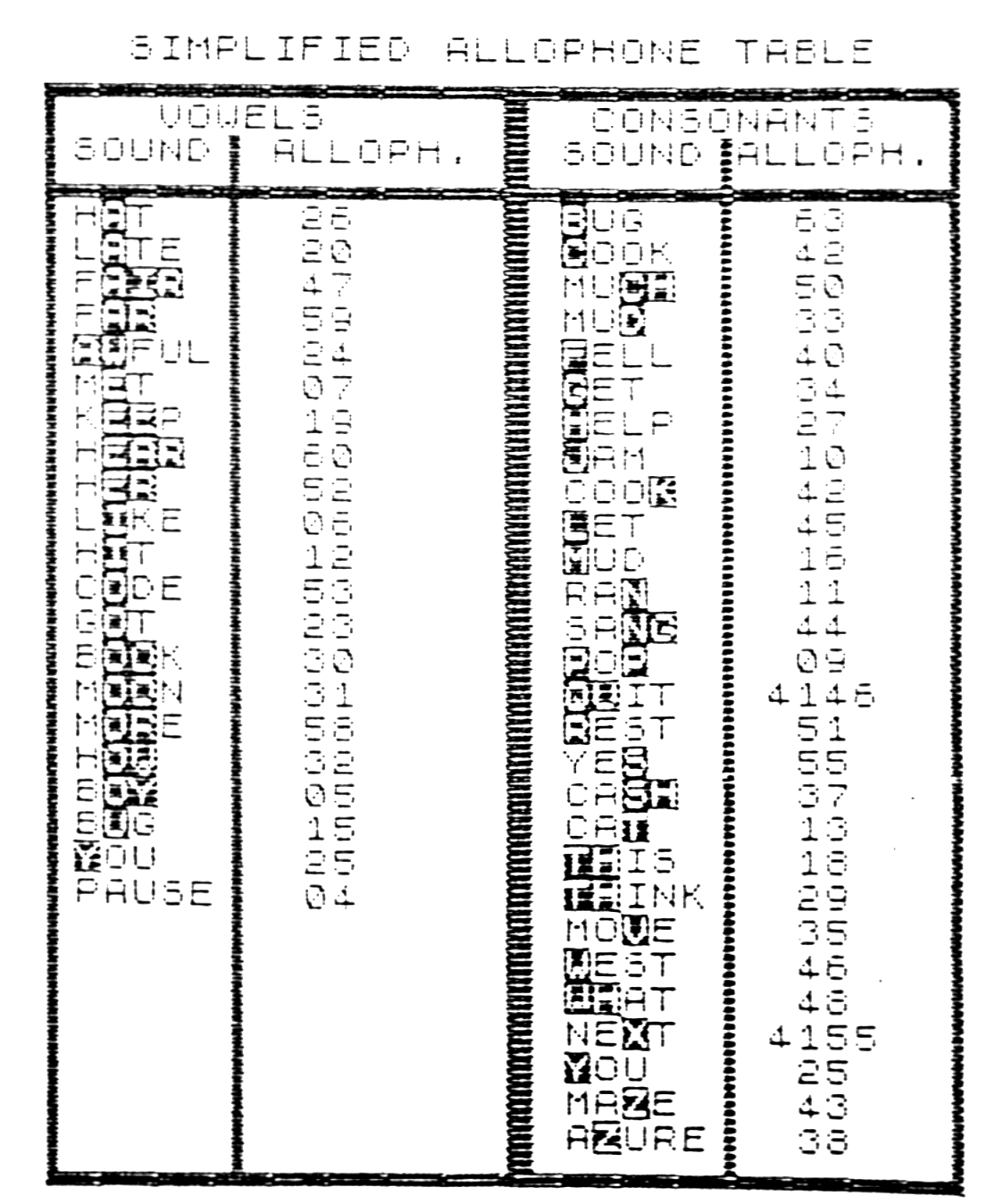
   1 REM TS2068 "ZVOICE" SPEECH          ROUTINE FOR BASIC PROGRAMS      by KEN ABRAMSON
   5 GO TO 61
  10 FOR I=1 TO 1000
  20 LET O=VAL Q$(2*I-1 TO 2*I)
  30 OUT 23,O
  40 IF O=0 THEN RETURN
  50 PAUSE 9
  60 NEXT I
1000 PRINT "GOOD WORK"
1010 LET Q$="3430330446524200"
1020 GO SUB 10
1030 PRINT "TIMEX"
1040 LET Q$="13061607425500"
1050 GO SUB 10
1060 PRINT "COMPUTER"
1070 LET Q$="42151609253113525200"
1080 GO SUB 10
1090 PRINT "HELLO"
2000 LET Q$="2707455300"
2010 GO SUB 10
2020 PRINT "NURSERY RHYME"
2030 LET Q$="13461944426204134619444262044512136204551359510404273204060446151133520448231304253104595100"
2040 GO SUB 10
2050 LET Q$="46261355042362044053425500"
2060 GO SUB 10Note: Type-in program listings on this website use ZMAKEBAS notation for graphics characters.