
Sept 1994
This project is specifically for the ZX81/TS1000, giving it the same sound capabilities as the 2068 and a joystick port. The circuit is quite old,being published in various magazines in the 1985/1986 period. The biggest problem using the AY-3-8912 with a ZX81 is the lack of In and Out commands and the number of registers on the chip that have to be programmed to generate the desired sounds. Earlier this year, I began to experiment with Fred Nauchbaur‘s SHREB (Static ram High Resolution Extended Basic) to see if I could modify a program written for the Spectrum (Ref. 1) that would simplify the programming of the sound chip. The results are approximately 600 bytes of code that reside in a REM statement that provides three new commands accessed by the BASIC Command:
IF USR M[USIC] THEN LPRINT Command; Parameters
(previously defined: M[USIC]=16586)
1. P[LAY];d,e,n,t
where d = duration 0-65335
e = envelope 0-7 (fig 1)
n = noise channel 0-7
t = tone channel 0-7
PLAY enables the channels and defines the type of sound that MUSIC and SOUND will make. There are 3 noise and 3 tone channels and 8 envelope shapes. The channels are activated as follows:
0     000    no channels
1     001    Channel A
2     010    Channel B
3     011    Channels A & B
4     100    Channel C
5     101    Channel A & C
6     110    Channel B & C
7     111    Channel A,B & C
2.    M[USIC];v,n,o,c
      where   v = volume            0-15
              n = note              1-12 (fig 2)
              o = octave            0-6
              c = channel           1-3
MUSIC must be used with PLAY. Octave 0 starts 2 below middle C. If volume is set to zero, control of the output is passed to the envelope generator of PLAY.
3.    S[OUND];v,p,c
      where   v = volume            0-15
              p = pitch             0-65335
              c = channel           1-6
SOUND simply blasts a tone of the specific pitch through the specified channel. PLAY is used to select the envelope shape and duration.
Commands can be chained together, separated by a semi-colon. Error checking is done when the program is run. Errors P,M, and S will indicate parameter errors in the respective PLAY, MUSIC and SOUND commands.
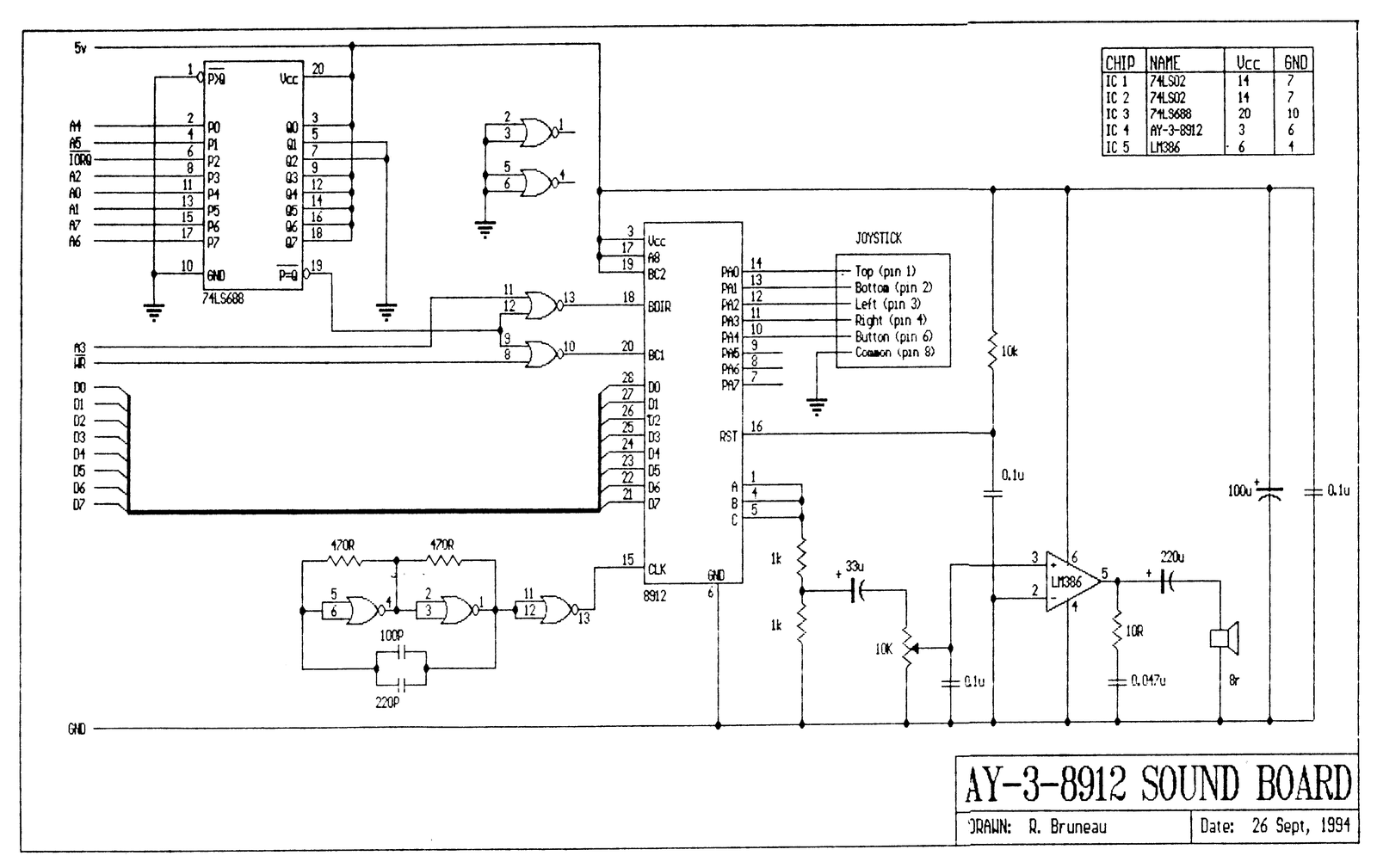
The AY-3-8912 also has one I/O port that can be accessed via register 14 and a machine code routine has been included at 17037 to use it. LET variable = USR 17037 will give the status of the I/O port.
As it stands, the machine code is NOT relocatable, but can be reassembled at any address required (for example, as an addition to SHREB). For those who have boards that use the AY-3-8910 or 8912, such as the ZON X-81, it is a simple matter of changing the port addresses. This board uses Port 215 (D7h) to set the register and Port 223 (DFh) to tranfer the register data.
GETTING STARTED
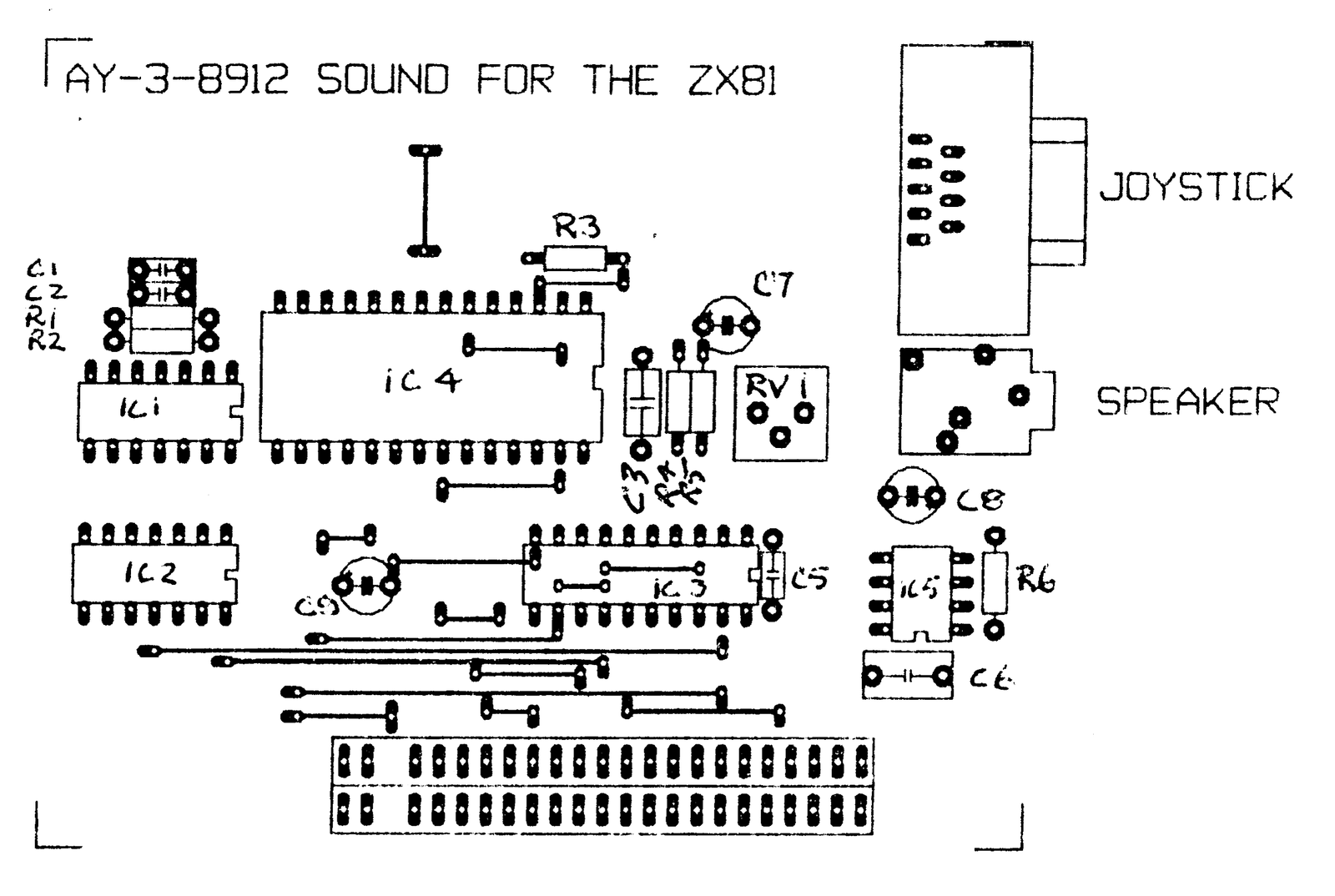
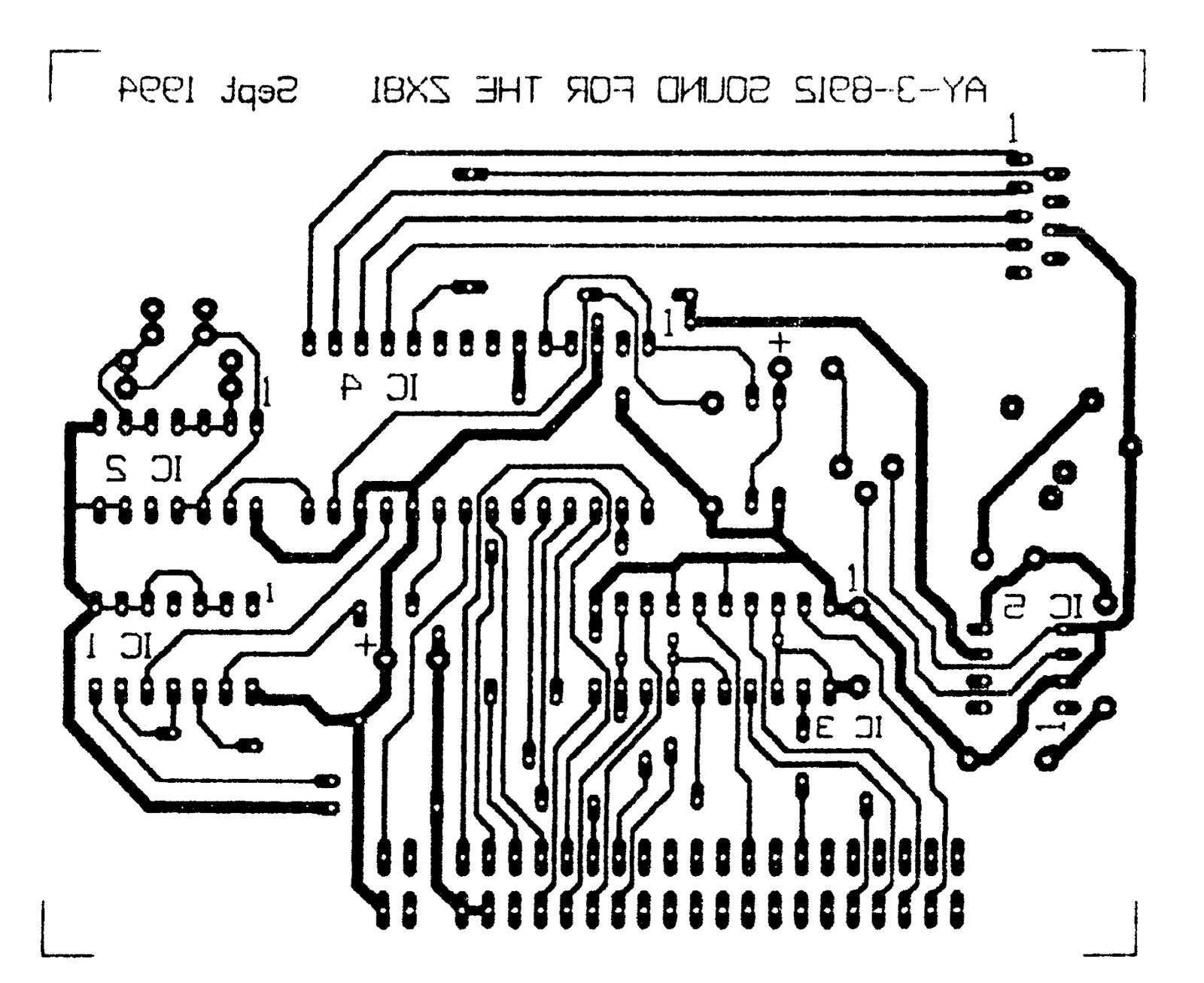
Schematics, printed circuit board and placement drawings are shown on the following pages. To set up the software, start by typing in the following:
1 PRINT (80 zeros separated by plus signs)
2 REM
As a direct command type:
POKE 16513,234
POKE 16509,0
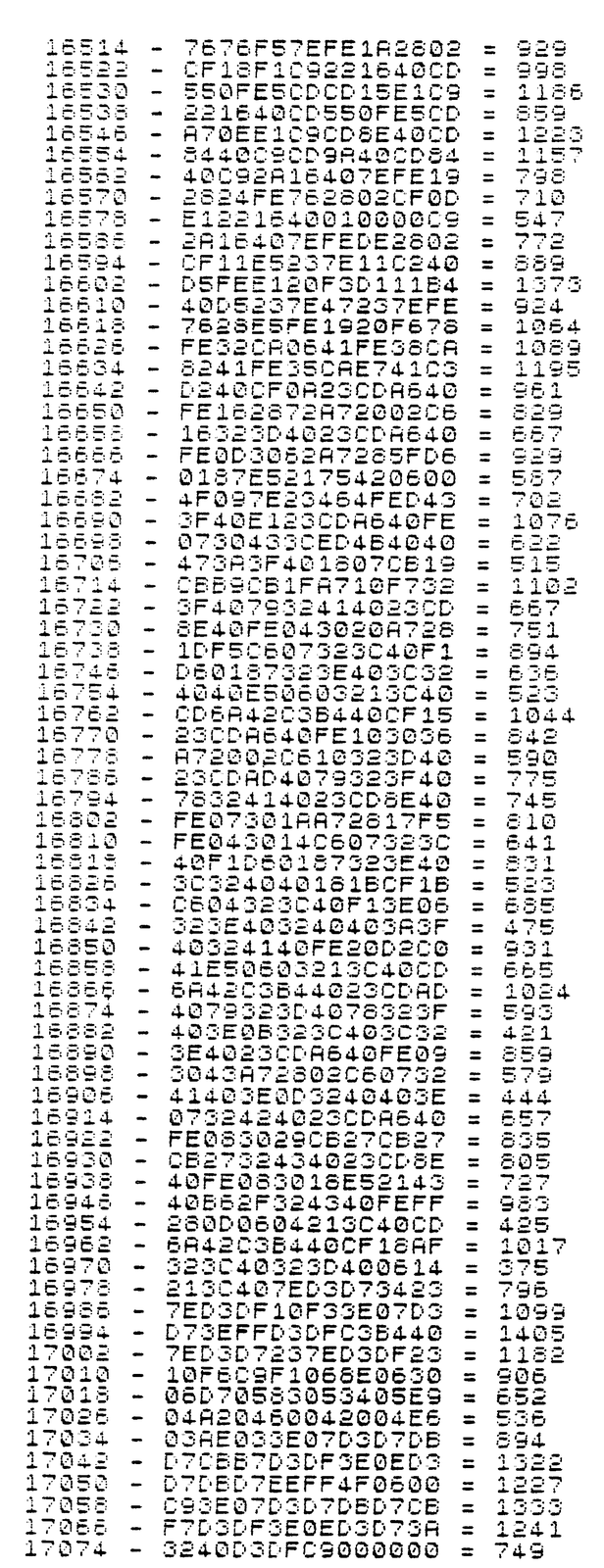
Key in the Hex loader and machine code (Listing 1 & 2). When that is done, delete everything after Line 2 and enter the Demo program in Listing 3.
Any questions can be directed to
Rene Bruneau, [address omitted]
Ref 1. The Sound of Music
John Ainslo
ZX COMPUTING Dec 1985/Jan 1986
AY-3-8912 PARTS LIST
CAPACITORS
C1        220p Ceramic
C2        100p Ceramic
C3,4,5    0.100u Polyester
C6        0.047u Polyester
C7,8      4.7uF/16v Electrolytic
C9        100uF/16v Electrolytic

RESISTORS
R1,2      470R
R3        10K
R4,5      1K
R6        10R
RV1       10K Trim Pot

SEMICONDUCTORS
IC1,2     74LS02          14 pin
IC3       74LS688         20 pin
IC4       AY-3-8912       28 pin
IC5       LM386           8 pin

MISCELLANEOUS
3.5mm Jack Socket, IDC 9-pin (male) socket, ZX81 Edge connector,
sockets for ICs (2-14 pin, 1-20 pin, 1-28 pin, 1-8 pin)
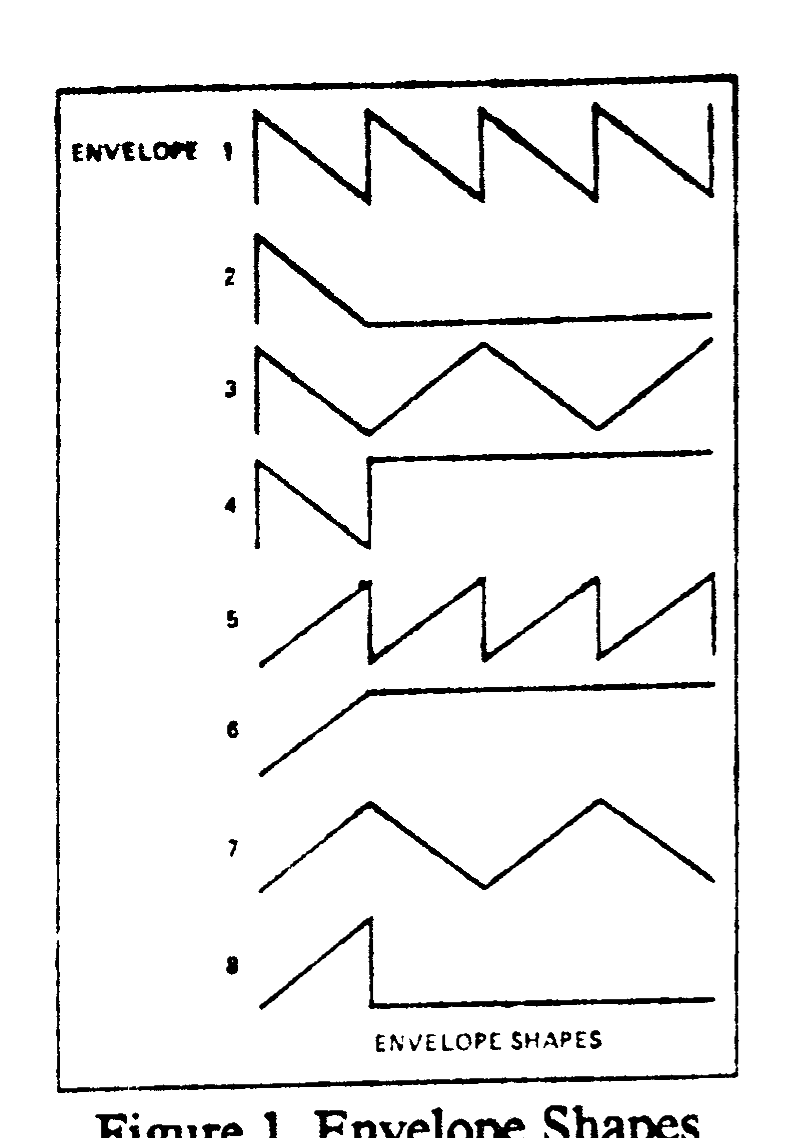
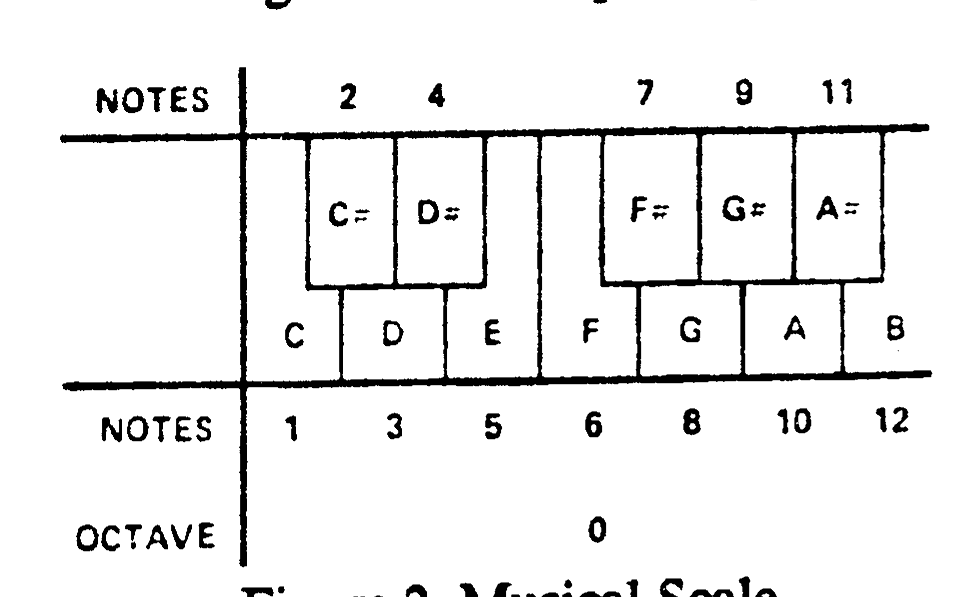
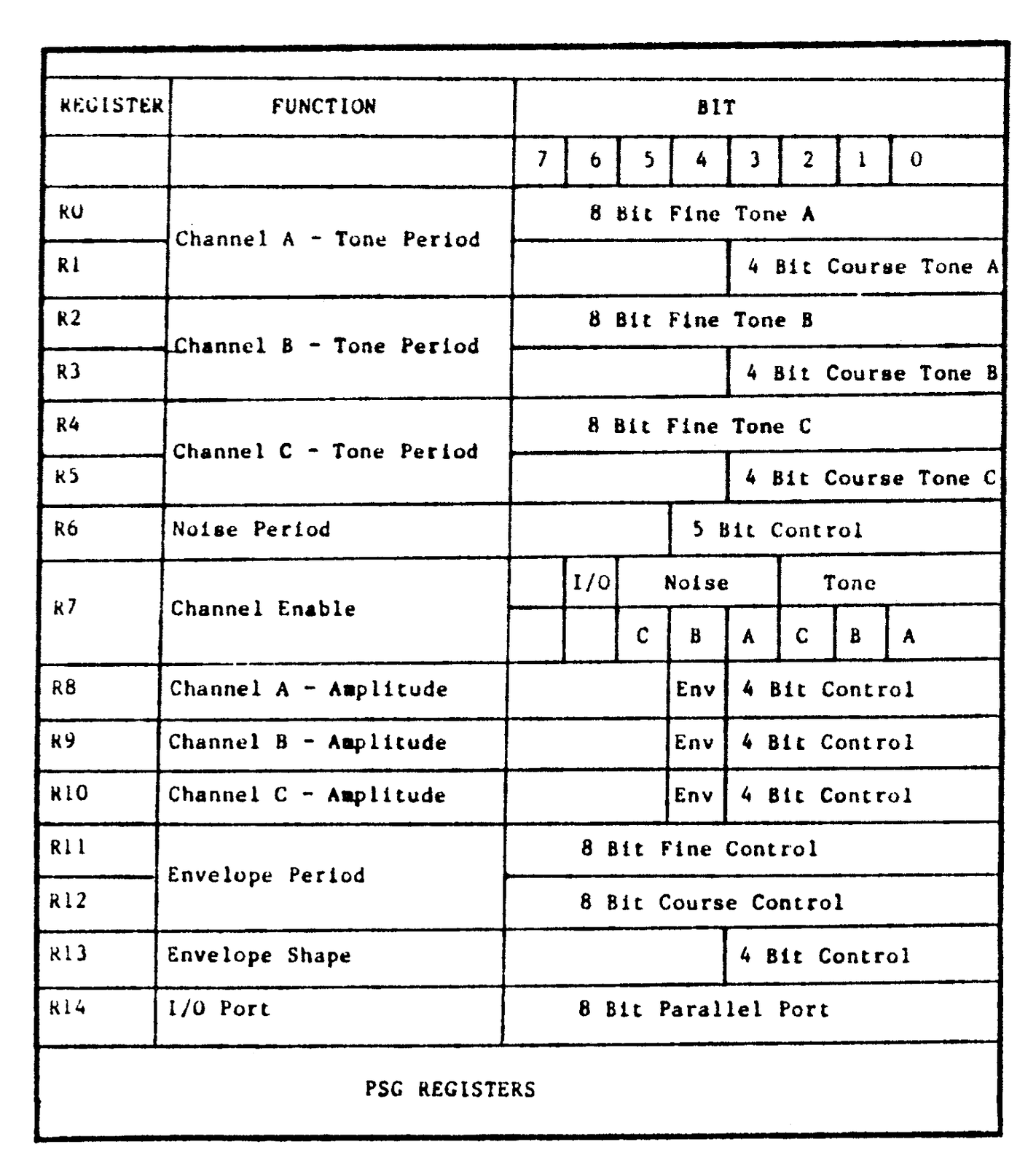
Figure 4. Hex Loader
1 PRINT 0+0+0+0+0+0+0+0+0+0+0+0+0+0+0+0+0+0
2 REM ** ENTER 80 ZEROS WITH
         PLUS SIGNS BETWEEN
3 REM ** POKE 16513,234
4 REM ** RUN HEX LOADER
90 PRINT "READ OR WRITE (R/W)"
95 INPUT M$
100 CLS
110 PRINT "START ADDRESS"
120 INPUT S
130 PRINT "FINISH ADDRESS"
140 INPUT F
145 IF M$="R" THEN GOTO 400
150 FOR N=S TO F STEP 8
160 LET T=0
170 SCROLL
180 PRINT N;" - ";
190 INPUT A$
200 PRINT A$;" = ";
210 INPUT TOT
220 PRINT TOT
230 LET Z=0
240 FOR K=1 TO LEN A$ STEP 2
250 LET C=(CODE A$(K)-28)*16+CODE A$(K+1)-28
270 LET T=T+C
280 POKE N+Z,C
290 LET Z=Z+1
300 NEXT K
310 IF TOT=T THEN GOTO 340
320 SCROLL
330 PRINT "ERROR - PLEASE INPUT AGAIN"
340 GOTO 190
350 NEXT N
360 STOP
400 FOR N=S TO F STEP 8
405 LET T=0
410 SCROLL
420 PRINT N;" - ";
430 FOR B=0 TO 7
440 LET C=PEEK (N+B)
445 LET T=T+C
450 LET F$=CHR$ (INT (C/16+28))
460 LET S$=CHR$ ((C-((CODE F$-28)*16))+28)
465 PRINT F$;S$;
470 NEXT B
480 PRINT " = ";T
490 NEXT N
495 STOP
16514 - 7676F57EFE1A2802 = 929
16522 - CF18F1C9221640CD = 998
16530 - 550FE5CDCD15E1C9 = 1186
16538 - 221640CD550FE5CD = 859
16546 - A70EE1C9CD8E40CD = 1223
16554 - 8440C9CD9A40CD84 = 1157
16562 - 40C92A16407EFE19 = 798
16570 - 2824FE762802CF0D = 710
16578 - E1221640010000C9 = 547
16586 - 2A16407EFEDE2802 = 772
16594 - CF11E5237E11C240 = 889
16602 - D5FEE120F3D111B4 = 1373
16610 - 40D5237E47237EFE = 924
16618 - 7628E5FE1920F678 = 1064
16626 - FE32CA0641FE38CA = 1089
16634 - 8241FE35CAE741C3 = 1195
16642 - D240CF0A23CDA640 = 961
16650 - FE162872A72002C6 = 829
16658 - 16323D4023CDA640 = 667
16666 - FE0D3062A7285FD6 = 929
16674 - 0187E52175420600 = 587
16682 - 4F097E23464FED43 = 702
16690 - 3F40E123CDA640FE = 1076
16698 - 0730433CED4B4040 = 622
16706 - 473A3F401807CB19 = 515
16714 - CBB9CB1FA710F732 = 1102
16722 - 3F407932414023CD = 667
16730 - 8E40FE043020A728 = 751
16738 - 1DF5C607323C40F1 = 894
16746 - D60187323E403C32 = 636
16754 - 4040E50603213C40 = 523
16762 - CD6A42C3B440CF15 = 1044
16770 - 23CDA640FE103036 = 842
16778 - A72002C610323D40 = 590
16786 - 23CDAD4079323F40 = 775
16794 - 7832414023CD8E40 = 745
16802 - FE07301AA72817F5 = 810
16810 - FE043014C607323C = 641
16818 - 40F1D60187323E40 = 831
16826 - 3C324040181BCF1B = 523
16834 - C604323C40F13E06 = 685
16842 - 323E403240403A3F = 475
16850 - 40324140FE20D2C0 = 931
16858 - 41E50603213C40CD = 665
16866 - 6A42C3B44023CDAD = 1024
16874 - 4079323D4078323F = 593
16882 - 403E0B323C403C32 = 421
16890 - 3E4023CDA640FE09 = 859
16898 - 3043A72802C60732 = 579
16906 - 41403E0D3240403E = 444
16914 - 0732424023CDA640 = 657
16922 - FE083029CB27CB27 = 835
16930 - CB2732434023CD8E = 805
16938 - 40FE083018E52143 = 727
16946 - 40B62F324340FEFF = 983
16954 - 280D0604213C40CD = 425
16962 - 6A42C3B440CF18AF = 1017
16970 - 323C40323D400614 = 375
16978 - 213C407ED3D73423 = 796
16986 - 7ED3DF10F33E07D3 = 1099
16994 - D73EFFD3DFC3B440 = 1405
17002 - 7ED3D7237ED3DF23 = 1182
17010 - 10F6C9F1068E0630 = 906
17018 - 06D70583053405E9 = 652
17026 - 04A20460042004E6 = 536
17034 - 03AE033E07D3D7DB = 894
17042 - D7CBB7D3DF3E0ED3 = 1322
17050 - D7DBD7EEFF4F0600 = 1227
17058 - C93E07D3D7DBD7CB = 1333
17066 - F7D3DF3E0ED3D73A = 1241
17074 - 3240D3DFC9000000 = 749View the printed page (Figure 5. Machine Code Data (hex dump 16514-17074 with line checksums))
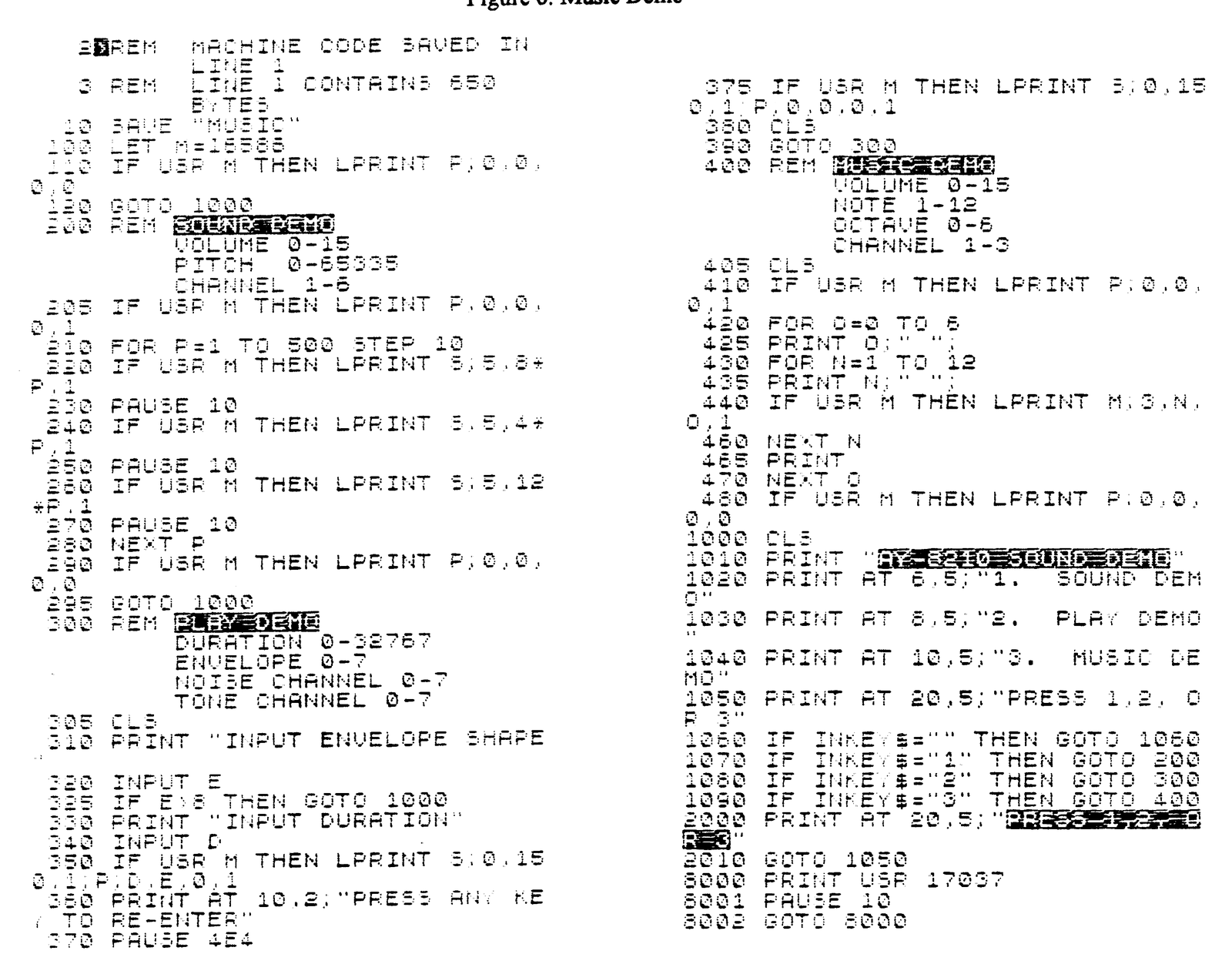
2 REM  MACHINE CODE SAVED IN           LINE 1
3 REM  LINE 1 CONTAINS 650             BYTES
10 SAVE "MUSIC"
100 LET M=16586
110 IF USR M THEN LPRINT P;0,0,0,0
120 GOTO 1000
200 REM SOUND DEMO                      VOLUME 0-15                     PITCH  0-65335                  CHANNEL 1-6
205 IF USR M THEN LPRINT P,0,0,0,1
210 FOR P=1 TO 500 STEP 10
220 IF USR M THEN LPRINT S;5,8*P,1
230 PAUSE 10
240 IF USR M THEN LPRINT S,5,4*P,1
250 PAUSE 10
260 IF USR M THEN LPRINT S;5,12*P,1
270 PAUSE 10
280 NEXT P
290 IF USR M THEN LPRINT P;0,0,0,0
295 GOTO 1000
300 REM PLAY DEMO                       DURATION 0-32767                ENVELOPE 0-7                    NOISE CHANNEL 0-7               TONE CHANNEL 0-7
305 CLS
310 PRINT "INPUT ENVELOPE SHAPE"
320 INPUT E
325 IF E>8 THEN GOTO 1000
330 PRINT "INPUT DURATION"
340 INPUT D
350 IF USR M THEN LPRINT S;0,150,1;P;D,E,0,1
360 PRINT AT 10,2;"PRESS ANY KEY TO RE-ENTER"
370 PAUSE 4E4
375 IF USR M THEN LPRINT S;0,150,1;P,0,0,0,1
380 CLS
390 GOTO 300
400 REM MUSIC DEMO                      VOLUME 0-15                     NOTE 1-12                       OCTAVE 0-6                      CHANNEL 1-3
405 CLS
410 IF USR M THEN LPRINT P;0,0,0,1
420 FOR O=0 TO 6
425 PRINT O;" ";
430 FOR N=1 TO 12
435 PRINT N;" ";
440 IF USR M THEN LPRINT M;3,N,0,1
460 NEXT N
465 PRINT
470 NEXT O
480 IF USR M THEN LPRINT P;0,0,0,0
1000 CLS
1010 PRINT "AY-8210 SOUND DEMO"
1020 PRINT AT 6,5;"1.  SOUND DEMO"
1030 PRINT AT 8,5;"2.  PLAY DEMO"
1040 PRINT AT 10,5;"3.  MUSIC DEMO"
1050 PRINT AT 20,5;"PRESS 1,2, OR 3"
1060 IF INKEY$="" THEN GOTO 1060
1070 IF INKEY$="1" THEN GOTO 200
1080 IF INKEY$="2" THEN GOTO 300
1090 IF INKEY$="3" THEN GOTO 400
2000 PRINT AT 20,5;"PRESS 1,2, OR 3"
2010 GOTO 1050
8000 PRINT USR 17037
8001 PAUSE 10
8002 GOTO 8000
View the printed page (Figure 6. Music Demo (listing))
Note: Type-in program listings on this website use ZMAKEBAS notation for graphics characters.