
As you read this, 1988 should be upon us, hopefully a year that will see a continued flow of new software and peripherals for the Timex & Sinclair Systems.
I will try to add some software via this column to your collection, I’m certain you will find some of them useful.
Lets start with one of the more practical programs, one that has been around for a while, called “VU-FILE” known for it’s speed and flexibility. Only one problem, it’s written to accommodate only 32 col. printouts! Is it?
Rather then rewriting the code portion, let’s examine how it manipulates the printer. Simple, it dimensions a chr$ string called F$ to 32, then writes the data to it, since it is the first variable defined upon running the program, its location is well known.
It would be easy to re-dimension F$ to 80, but the code will continue to write only a maximum of 32 chr$ to it. Now one could change the code of course, so it would write more then 32 chr$ to F$, but there is still the screen, which will only display 32 columns! Lets keep it simple and work with what we’ve got, let’s not do a major re-write of the code (I looked at it, and found it’s probably easier to find Timbuktu without a map then to find that portion of code that manipulates F$).
F$ is forwarded to the printer via the LPRINT command, that’s easy, so let’s just send one F$ after another to the printer, but hold it, F$ is 32 chr$ long (your text and the rest spaces).
We have to print F$ ( TO X), which means we have to find out what X is for every string. This is where a 19 byte subroutine located at 28254 decimal comes in. It will check F$ from the last chr$ back to the first chr$ for code greater than 32, if it finds such a chr$ it will then add one space and put the count (X) to location 28286. The space is added, so that if F$ does not contain text, the field will be printed as a blank.
I added a few bells & wistles to the program as well, like automatic Tabsetting, which is done using a search routine which will check each field for lenght of text. It will then give you the tabsetting information on the screen, so that you will be able to set tabs as is, or make any changes you desire. Another feature is automatic printer formating, let’s say you have several fields whose combined text-lenght per line is greater then 80 chr$, the program will then automatically switch over to elite, if the text-lenght will exceed 96 chr$ the program will now switch to condensed printing, which will give you as much as 136 chr$ per line.
The programs and code you will find at the following pages where written for the Timex 2068 being in the Sinclair mode, this will give you enough space to add all the extra basic I have added (VU FILE was originally written for the Sinclair). To run the basic in the Timex mode you would have to add VAL “” to numbers, this will slow the program down somewhat, but will leave you with enough memory to use this program in the Timex mode. There also is a poke table on the following pages, which you should poke into memory to make the code functional for the Timex mode.
The code is set up to run printers which need Epson printer codes for elite and condensed printing, look up the codes your printer needs and poke such numbers, if different, to the locations given later. I must point out, that this program is written to run with the OLINGER system and would need a printer-driver to run on other systems, sorry about that, but so much for superior systems.
Now to the laborious part of all this, frankly I’d rather write a program from scratch then to enter one from paper. There is an easy way out, but more about that later.
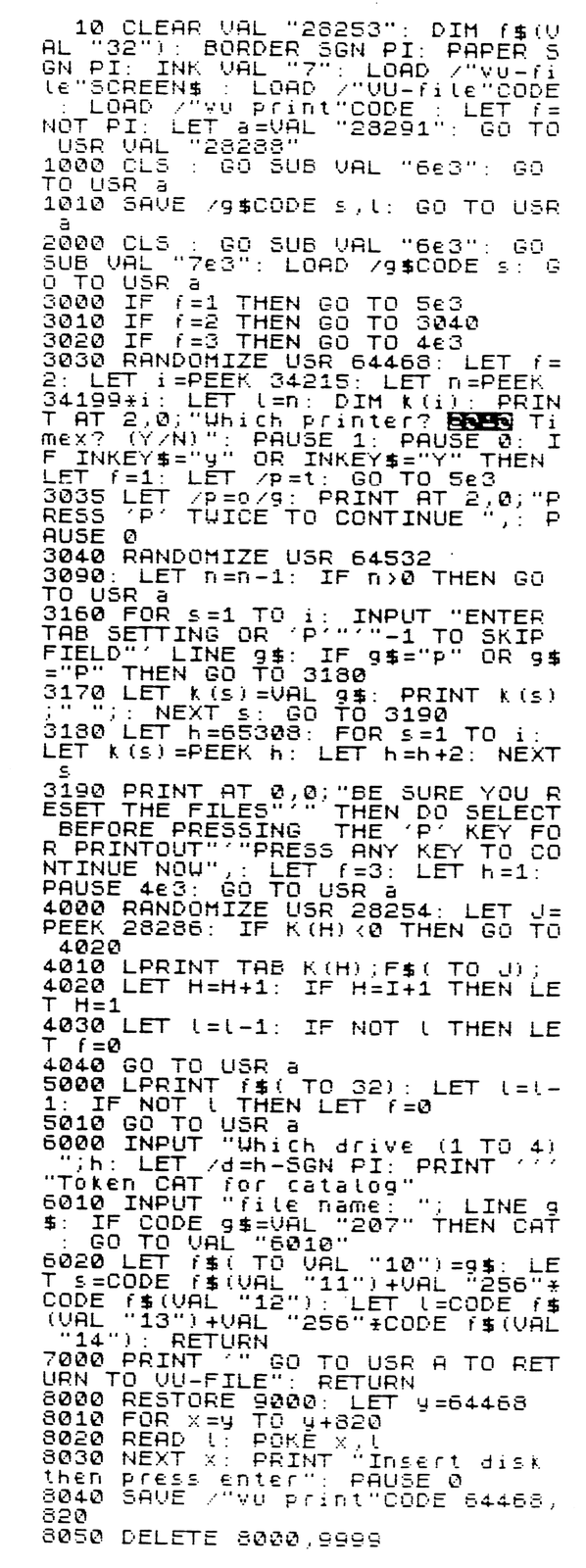
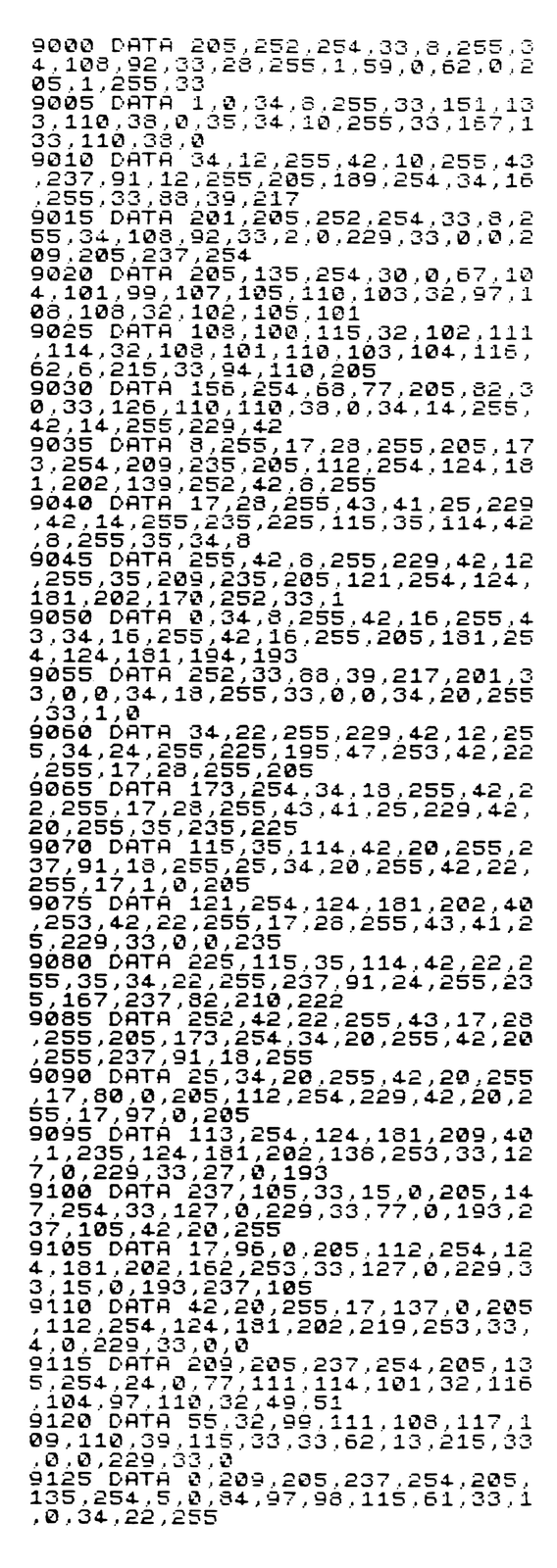
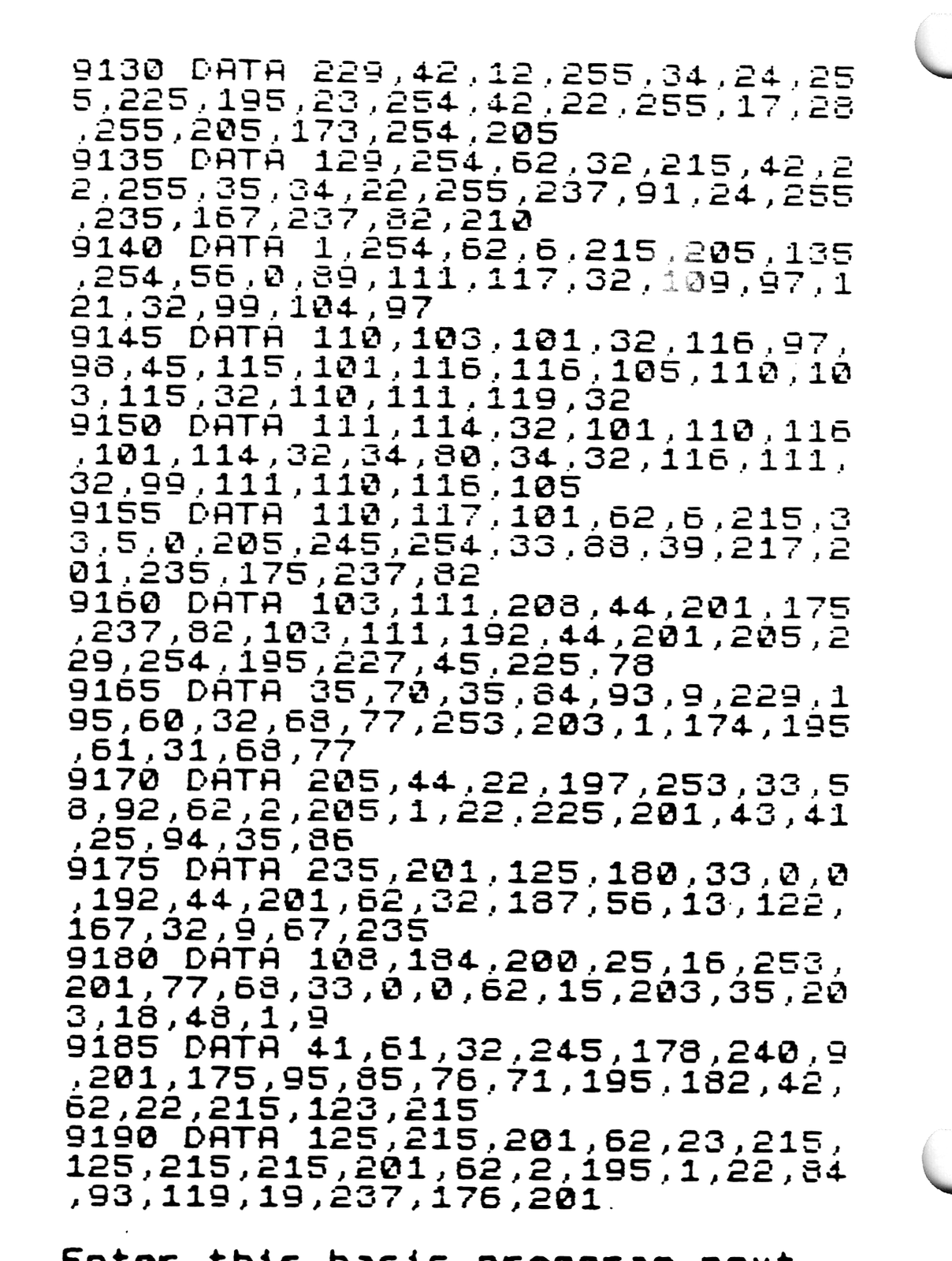
First thing you would want to do is to set up your disk-drive or tape-deck, now type in the basic program as listed with the 2068 being in the Timex mode, if your saving to tape you should save the program before you enter lines greater than 7000. After you have entered all the lines, run it using GO TO 8000, if saving to disk, save the basic portion now with; CLEAR: SAVE /”vu file” LINE 10. If you wish to waste memory on your disk or tape, you should next load the screen for VU FILE, break after it has loaded and save it using SAVE /”vu-file”SCREEN$.
Now load in the excisting code for VU FILE to location 28288, enter the next basic program and run it, next save the code using; SAVE /”VU-file”CODE 28254,7250. It should be clear by now that the / after SAVE should be omitted in the program if your saving to tape. Since the second basic program is only a loader program for the code, it need not be saved.
Lets now talk about on how to use the program once you have it all safely tucked away on disk or tape. Load vu file basic as usual and also manipulate the program as usual once loaded, before using the print option you should make sure that all fields are flush left at tab 0, use the “Printer Layout” option at the main menu to accomplish this. Each field has to be at a seperate line.
After returning to the file, press “P” as usual to start printing, you will be asked if your using the 2040 printer at this point, just enter N to print to a centronic type printer. The program will ask you next to press the P key twice, once to get the menu back and once more to start the file formating routine. Files should start paging on the screen now, checking each for lenght. After the routine has finished, press either the “P” key to leave tabs for each field as they appear on top, or enter tabs for each field, making any changes as you desire. If you wish that a field is not to be printed, enter a negative number like -1. You have to recalculate each following tabsetting if you do so, because each field following is now in a different position.
Make sure you reset the file now before doing a select or a printout.
A few tips on this new way of printing files to paper. When setting tabs different than the computer has figured them, be sure not to overlap the previous field, or the next field will be printed on the next line, this of course could be used to your advantage.
If you like to use titles with your fields, consider using them as headers instead, titles will probably look better as headers anyways. Enter headers as a file, one title for each field. Using the select option, such header can be printed as the first line followed by a manual line feed before selecting the next items to be printed.
Yes the program will give you a chance to use the select option, you will not have to reformat the printer or the files, just keep pressing the P key after selections have been made.
One last item, do not fill all the memory up, leave about 1K for the code I added, there is no way I could protect it. Pressing the I key when in the file menu will tell you how much memory is left.
If you feel that you are to lazy to type all those numbers into memory, relax! This program is available for $5 to club-members, $4 if you get it from me at a meeting, and bring your own tape or disk. (OLINGER only please). Non-members please send $ 7 including a note telling me which program you would like (VFILE+80), and which system your running,
TO:
IMPEX SOFTWARE
c/o R.A. Hilsmann
P.O. BOX 45
MENOMONEE FALLS, WI. 53051
One thing though, I can only sell you the additional code and the new basic program, you would have to add the original code for VU FILE yourself. Also you may make as many copies as you like for your friends (you would do it anyways), as long as you dont sell them. The tape or disk will have both the Timex & Sinclair version on it. Disks will only be for quad-density drives using the OLINGER system (sorry thats all I have on the Timex system).
This is the Poke-Table for the Timex version. POKE:
64528,22    64529,43    64599,215
64701,22    64702,43    65132,22
65133,43    65157,161   65158,49
65169,219   65170,33    65178,242
65183,100   65184,18    65193,48
65194,18    65259,116   65260,46
65279,48    65280,18
Also change all numbers to VAL”” for the timex basic version.
POKE LOCATIONS FOR YOUR PRINTER
64901 holds dec. 77 for ELITE printing. This code is preceeded by OUT 127,27 followed by OUT 127,77
64925 holds dec. 15 for CONDENSED printing. Condensed printing requires only an OUT 127,15 for Epson printers, should your printer vary, then poke above locations with a correct code.
Now enter the programs here and on the following page.
Enter this basic proggram next.
  10 RESTORE 100
  20 FOR X=28254 TO 28284
  30 READ L: POKE X,L: NEXT X
  40 PRINT "PRESS ANY KEY TO SAV
E CODE": PAUSE 0: SAVE /"VU-file
"CODE 28254,7250
 100 DATA 229,213,197,245,42,75,
92,17,37,0,25,6,32,126,43,5,254,
32,40,249,4,4,120,50,126,110,241
,193,209,225,201
If you wish to check your data from line 9000 to 9190 for correct entry, enter this basic program and run it using GO TO 9500, before using GO TO 8000, to enter the code into memory.
9500 RESTORE 9000: LET A=0
9510 FOR X=1 TO 820: READ L
9520 LET A=A+L: NEXT X
9530 IF A<>93059 THEN PRINT "CHE
CK LISTING  FOR ERROR"
9540 IF A=93059 THEN PRINT "DATA
 OK": BEEP 1,1
This is it, I hope you have fun. In the next issue of this column – I will try to have VU-CALC+80 all polished up for you. I like to mention that VU-FILE & VU-CALC are two programs published by PSION. Also my apoligies for not giving credit to Roelof Mulder for using some of his ideas and small portions of his original Menu-Loader program in my version of it.
Sorry about that, so much for being a novice in writing a column like this, and trying to meet a deadline. When I started writing the thought was there to give credit to Mr. Molder and John Oliger, but in the heat of the battle I forgot. Anyways my apologies. What bothers me though is the way this omission was brought to my attention by MR. Mulder via the Editor of this Newsletter, totally discrediting my efforts as having “made a few minor changes presumably by” me, and so on. It would certainly help the Timex-Sinclair community, if such oversights or any other errors could be brought to the attention of writers in a more civilized manner. Right now I feel like discontinuing writing this column, as well as writing or rewriting any software for publication, who needs this.
Good luck! Enjoy…..
till next month, maybe!
Rudy Hilsmann.
Note: Type-in program listings on this website use ZMAKEBAS notation for graphics characters.