
Another look back at one of the programs you have found here in SMUG BYTES. This time the RECOVER program will be updated. As I mentioned before, “Haste makes waste”, this is still another good demonstration of it.
When I looked at the program at the time I thought it was ready for this column, I figured I covered it all, but I forgot to consider the folks with single sided drives. Sorry about that. This new version will take care of it, and cover some more quirks the old program had. This version will restore a disk so that it can be used again, of course you would loose any diskspace which has exited into another computer world, but if there is any diskspace left on the disk, one could again save/ to it.
Another area has been covered by John Oliger in his latest version of his operating system, namely an ERASE feature. If you have a corrupted program on the disk, you could either try to save that portion which is still intact with this program, or erase it from the disk using his new version.
What is RECOVER really designed to do, you may ask? Its major function is to restore the disk directory ones corrupted by either an accidental format process, which you have stoped just in time to leave some or all data otherwise intact, or if you have a bad program, which includes data as variables saved along with the program, you may now recover such variable data seperately. Maybe, it should work to some degree at least, even save uncorrupted portions of a program. How much good this would do is just speculation, but what does one have to loose? I am sure someone will try it in time.
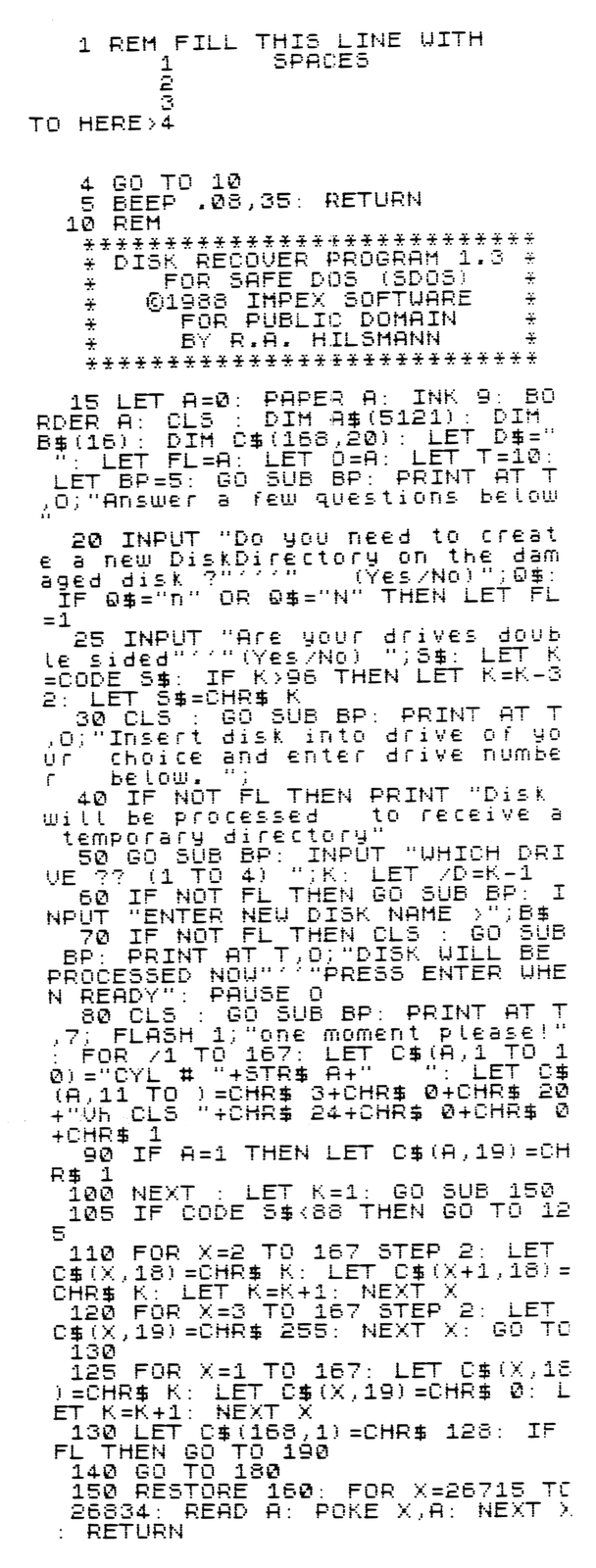
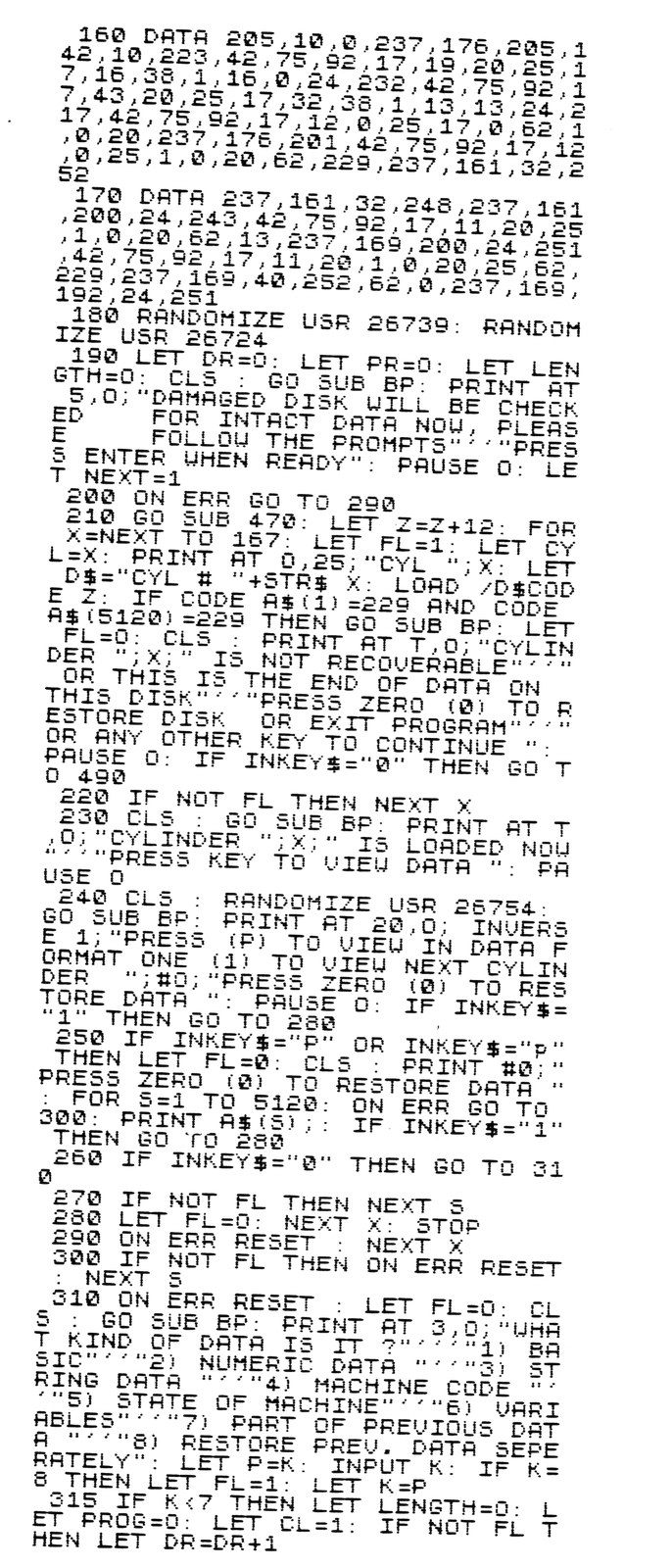
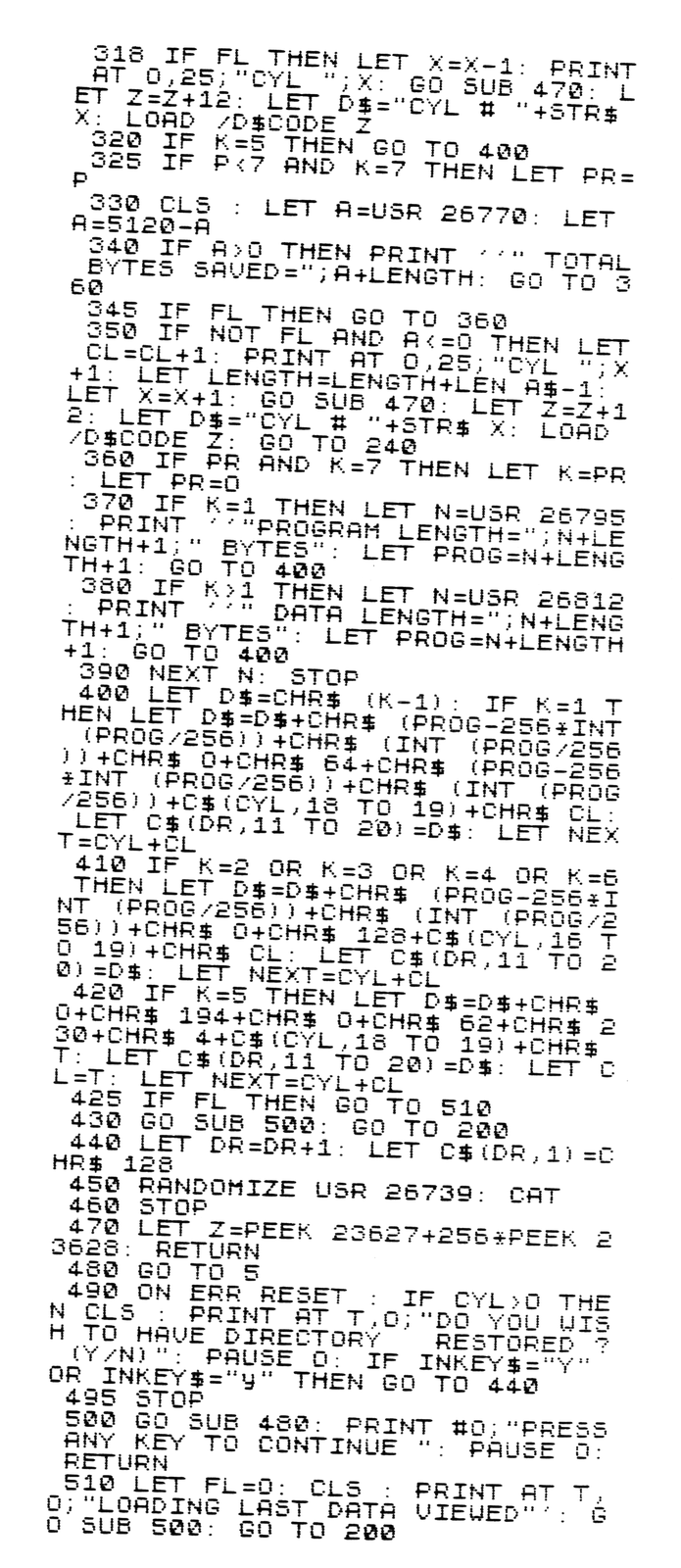
Thats all folks! Now if you have never entered the program, just do it. For those who have entered it previously, you may just update the program line by line. I dont know which would be easier. Now as how to to use the RECOVER program?
Practice makes perfect! Copy a disk with data on it, then CAT the disk using; OPEN# 2,”P”, this will dump the catalog to the printer. Dont forget to CLOSE# 2, after your done. This printout will help you when restoring the disk. Load RECOVER, and insert the copied disk into a drive, run the program following the prompts.
After the first CYL has loaded, press <enter> as promted, and since you know whats on the disk, press “0” to recover! This will get you to a menu, which will ask you what type of data it is, just enter the number for the type data, even if the program is larger than 1 cyl.
Now load the next cylinder, press “0” again, and if the next cylinder was part of the first section, enter “7” for “Part of previous data”. Naturally you should perhaps have a look at the data as it is loaded, so that you will recognize data like it in the future.
After you have stepped through all the data on the disk you will be asked if you wish to restore the directory, enter “Y” for yes, and the new directory should be on the disk now, the program will catalog the disk now, to make sure.
Program names will be CYL # 1 etc. just change the names using RESTORE/ “CYL # 1” to “NEW NAME”. After you’r done the disk should be restored to its previous state.
As the program loads individual cylinders the program will display in the upper right corner of the screen “CYL #”, where # is the number of the cylinder being loaded. This is it, nothing to it.
Now something else, sometime in the past I said; “I used all the memory up in the MENU LOADER!” You did not really believe me, did you? Well here is the latest version, it features PAGING, forward and backwards, now don’t you think this calles for a reprint?
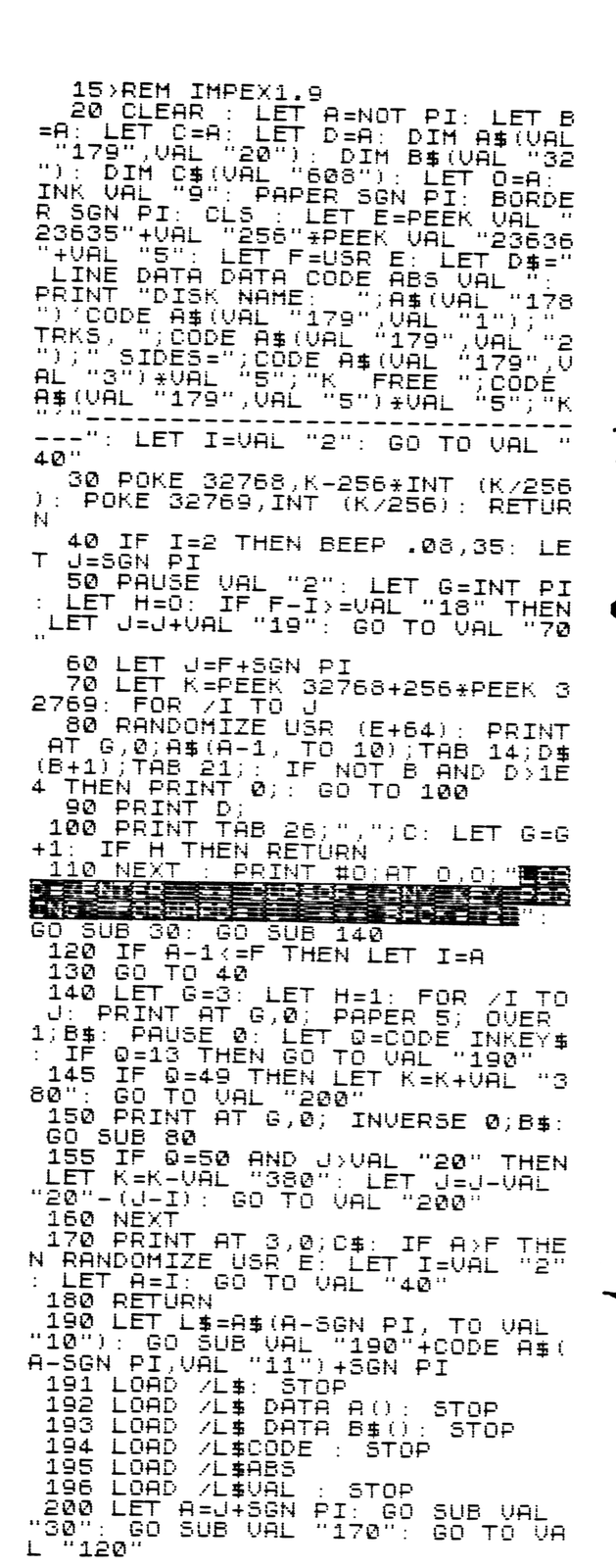
That’s what Bud Dankert thought at least, he came over the other day and probably thought he did not see right when he looked at the screen. I think this should do it for a while though, geeez there is only so much a guy can do with 1.4K “Write it all in machine code”!!?? come on guys, remember the days of the ZX81 or the 1000? How much time we spend then to load a program!
How fast one forgets! “The good old days”, wonder if there is still someone out there using the darn thing? By the way, my thanks to all the readers of SMUG BYTES for all the nice letters you had send me. It really encourages a guy to keep on writing. This Newsletter must really get around, I get mail from all corners of the US. Keep it up, I like it.
While your at it though, give me some hints of what kind of articles or software you would like to see here, one of these days I will run out of ideas, most unlikely the XYL would probably say. Oh, “XYL” stands for “ex young lady”, that’s what we call wifes in Amateur Radio Circles (“Ham Radio” for all of you who don’t know what Amateur Radio means), just kidding.
Well this should be it, hope all of you don’t mind a few reprints? For the next issue of this Newsletter I hope to have VU-Calc ready, almost forgot about that one. Hope it is still worth the effort, I have the feeling everybody is in to QL’ing nowadays.
Have fun your #3 (Rudy).