
A programmer I am not, but a knitter I am. One of the routines in knitting has been reduced to a minimum with the help of a knitting machine. Now what takes longer than the actual knitting of an article is figuring out the pattern and adjusting it to the specific measurements of the individual. This conversion is a routine, or rather combination of routines which I have made one of my knitting/computer goals. “GAUGE” and “GAUGECHART” are two of these routines.
Any knitter, whether male or female, knows that you don’t just pick up knitting needles, yarn and pattern and begin knitting without first figuring out your stitch and row gauge for the specific yarn and needles that you are using. You knit a sample swatch, block it, measure 40 stitches by 60 rows of it in centimeters and figure your gauge.
“GAUGECHART” prints out your stitch and row gauges in chart form; “GAUGE” gives the same result but is the routine I have written for use within my knitting program. It requires input of the stitch and row measurements of the worked swatch.
Agreed, probably not too many computer nuts are interested in knitting, but I’m sure that I am not alone, and I have seen no programs at all geared to help knitters.
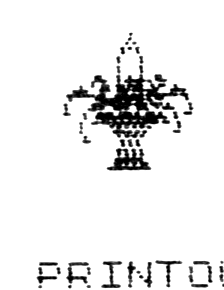
“FLOWERS” was a fun thing that would look better 6 to 8 times larger but would probably be entirely too long in BASIC.
The “GAUGECHART” gives a voluminous printout–over a foot and a half on the TS2040 printer. To give you an idea of its output, here are the first few and the last few lines:
CM      INCH    ST      ROW

10      4       10.16   15.24
10.1    4.04    10.05   15.08

.   .   .   .   .   .   .

21.8    8.72    4.66    6.99
21.9    8.76    4.63    6.95
The “GAUGE” program doesn’t take nearly as much paper. Its printout is shown in the illustration.
In this case, the numbers 3 and 5 were supplied by your Editor, who has no idea whether or not they are realistic. The calculated results, 33.87 stitches per inch and 30.48 rows per inch, are accurate, but are likely to be pure GIGO.
EDITOR’s note: Programmer she may not be, but Miss Bundy certainly has a fine instinct for matching the abilities of the computer with the needs of real life. There must be a lot of our readers who have found ways to use their computers in their other hobbies. Let’s hear from you.
 300 CLS : PRINT TAB 6;"STITCH AND ROW GAUGE": PRINT
 310 PRINT TAB 2;" OUR STITCH AND ROW GAUGE IS";TAB 6;"BASED ON A SWATCH OF";TAB 4;" 40 STITCHES BY 60 ROWS": PRINT
 320 REM 40 STITCHES/C * 2.54=STITCHES PER 1"
 325 REM 60 ROWS/CM * 2.54=ROWS PER 1"
 330 PRINT "40 STITCHES MEASURES HOW MANY   CENTIMETERS?"
 340 INPUT C: PRINT C: PRINT
 350 PRINT "60 ROWS MEASURES HOW MANY CENTIMETERS?"
 360 INPUT CM: PRINT CM: PRINT
 370 LET ST=40/C*2.54: LET R=60/CM*2.54
 380 PRINT TAB 2;"STS PER INCH","ROWS PER INCH": PRINT
 390 PRINT TAB 6;INT (ST*100+0.5)/100,TAB 21;INT (R*100+0.5)/100
8999 STOP
9000 SAVE "GAUGE" LINE 0
LISTing of “GAUGE”
       STITCH AND ROW GAUGE

   OUR STITCH AND ROW GAUGE IS
       BASED ON A SWATCH OF
      40 STITCHES BY 60 ROWS

40 STITCHES MEASURES HOW MANY
CENTIMETERS?
3

60 ROWS MEASURES HOW MANY CENTIM
ETERS?
5

  STS PER INCH  ROWS PER INCH

      33.87          30.48
PRINTOUT of “GAUGE”
 100 CLS
 110 REM **GAUGE CHART
 130 LET CM=10.0: LET I=CM*0.4: LET ST=40/CM*2.54: LET R=60/CM*2.54
 135 PRINT TAB 5;"KNITTING GAUGE CHART"
 140 PRINT TAB 1;"CM";TAB 9;"INCH";TAB 16;"ST";TAB 24;"ROW"
 145 FOR C=9 TO 21 STEP 0.1
 150 PRINT TAB 1;CM;TAB 9;I;TAB 16;ST;TAB 24;R
 155 LET CM=CM+0.1: LET I=INT (CM*0.4*100+0.05)/100: LET ST=INT (40/CM*(2.54)*100+0.05)/100: LET R=INT (60/CM*(2.54)*100+0.05)/100
 160 NEXT C
8999 STOP
9000 SAVE "GAUGECHART" LINE 0
LISTing of “GAUGECHART”
   1 CLS
  10 FOR x=0 TO 7: READ n: POKE USR "A"+x,n: NEXT x
  20 DATA 0,0,0,0,0,0,0,0
  30 FOR x=0 TO 7: READ n: POKE USR "B"+x,n: NEXT x
  40 DATA 0,0,0,0,1,1,2,2
  50 FOR x=0 TO 7: READ n: POKE USR "C"+x,n: NEXT x
  60 DATA 0,64,64,160,80,16,8,8
  70 FOR x=0 TO 7: READ n: POKE USR "D"+x,n: NEXT x
  80 DATA 0,0,0,0,0,0,0,0
  90 FOR x=0 TO 7: READ n: POKE USR "E"+x,n: NEXT x
 100 DATA 0,0,0,0,0,0,0,0
 110 FOR x=0 TO 7: READ n: POKE USR "F"+x,n: NEXT x
 120 DATA 0,0,0,1,9,60,127,64
 130 FOR x=0 TO 7: READ n: POKE USR "G"+x,n: NEXT x
 140 DATA 2,2,194,226,51,115,99,254
 150 FOR x=0 TO 7: READ n: POKE USR "H"+x,n: NEXT x
 160 DATA 8,8,72,250,89,187,171,218
 170 FOR x=0 TO 7: READ n: POKE USR "I"+x,n: NEXT x
 180 DATA 0,0,192,224,100,143,253,192
 190 FOR x=0 TO 7: READ n: POKE USR "J"+x,n: NEXT x
 200 DATA 0,0,0,0,0,0,128,128
 210 FOR x=0 TO 7: READ n: POKE USR "K"+x,n: NEXT x
 220 DATA 129,131,196,4,9,8,8,4
 230 FOR x=0 TO 7: READ n: POKE USR "L"+x,n: NEXT x
 240 DATA 255,198,89,255,181,10,5,2
 250 FOR x=0 TO 7: READ n: POKE USR "M"+x,n: NEXT x
 260 DATA 221,156,211,255,85,170,84,168
 270 FOR x=0 TO 7: READ n: POKE USR "N"+x,n: NEXT x
 280 DATA 208,184,68,228,178,2,6,0
 290 FOR x=0 TO 7: READ n: POKE USR "O"+x,n: NEXT x
 300 DATA 64,64,192,0,0,0,0,0
 310 FOR x=0 TO 7: READ n: POKE USR "P"+x,n: NEXT x
 320 DATA 6,0,0,0,0,0,0,0
 330 FOR x=0 TO 7: READ n: POKE USR "Q"+x,n: NEXT x
 340 DATA 1,1,2,2,3,6,15,0
 350 FOR x=0 TO 7: READ n: POKE USR "R"+x,n: NEXT x
 360 DATA 80,80,168,168,248,172,254,0
 370 FOR x=0 TO 7: READ n: POKE USR "S"+x,n: NEXT x
 380 DATA 0,0,0,0,0,0,0,0
 390 FOR x=0 TO 7: READ n: POKE USR "T"+x,n: NEXT x
 400 DATA 0,0,0,0,0,0,0,0
 410 FOR X=2 TO 16
 420 PRINT AT 2,2;"B";"C"
 430 PRINT AT 3,1;"F";"G";"H";"I";"J"
 440 PRINT AT 4,1;"K";"L";"M";"N";"O"
 450 PRINT AT 5,1;"P";"Q";"R";"S";"T"
 500 STOP
9000 SAVE "FLOWERS" LINE 0
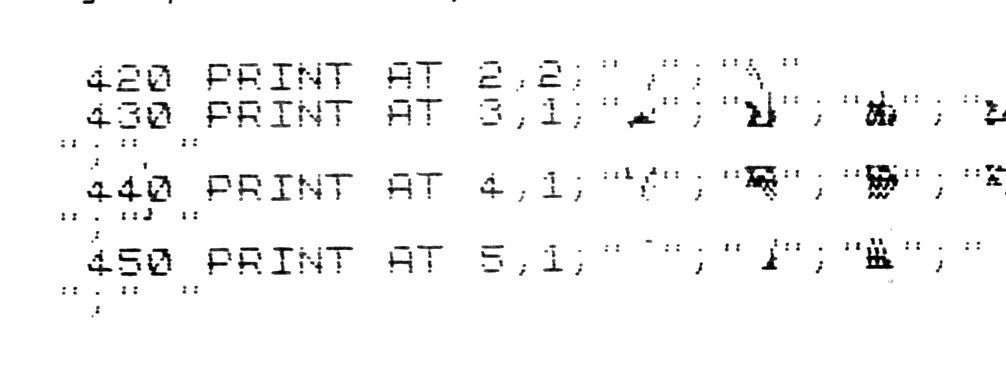
NOTE: Lines 420 TO 450 print graphics CHR$s
Note: Type-in program listings on this website use ZMAKEBAS notation for graphics characters.