I use my TS2068 for many tasks. But if I had to choose one major use, I would have to say it’s WORD PROCESSING. Be it for writing letters, making a check list, or compiling articles (like this one), I make great use of my Word Processor.
A short time back, I did an extensive overview of available 2068 Word Processing software for a newsletter. Of all of the programs I looked at, two were exceptional: MSCRIPT and TASWORD TWO.
Both programs were well written, and had some very nice features not found in programs for other computers.
I personally prefer using TASWORD TWO, mainly because of its screen presentation. If, for example, a line of text needs to be centered on the page, it will be centered on the screen. “What you see is what you get” is the best way to describe it.
As I said before, both programs were well written. But do we T/S users EVER leave a good program alone? Heavens, NO! We have to make it BETTER!
In the case of MSCRIPT, Jack Dohany has authored a major rewrite: MSCRIPT Version 5. Jack has added every imaginable feature, and a few you may not have thought of. All owners of the original MSCRIPT should contact Jack about his upgrade. You need to legally own a copy of the original, because he only includes documentation on the added new features. Write to: Jack Dohany, 390 Rutherford Ave., Redwood City, CA 94061.
As for TASWORD TWO…enter TASWORD TWO+! Tasword Two+ adds a few new features, and improves upon some original ones:
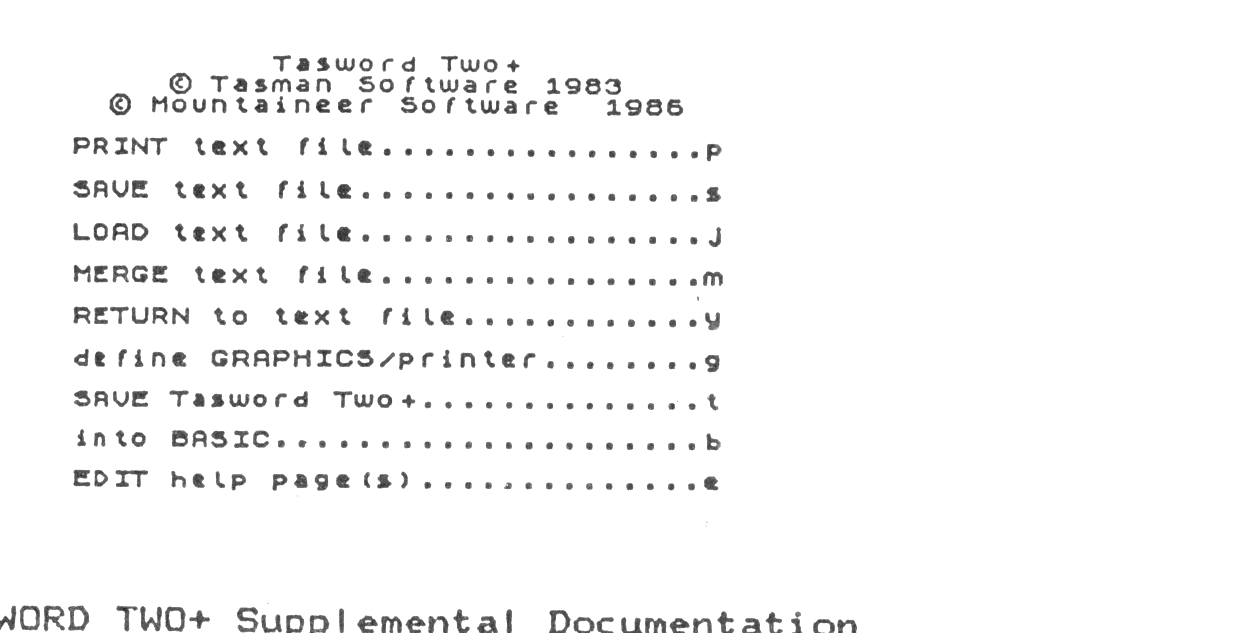
1. An expanded and easier-to-understand Main Menu.
2. Easily modify Help Pages from the Menu.
3. Make multiple copies of your document (includes an on-screen copy # indicator).
4. User-definable Paper/Ink colors from the Menu.
5. Easier modification of the left print margin.
6. TS2040 printer is not disabled after use of a full-size printer.
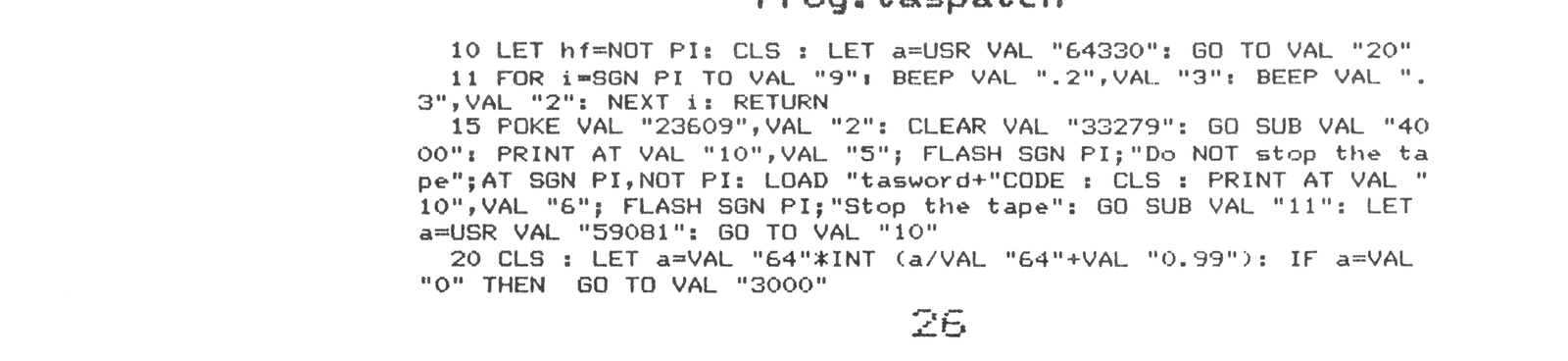
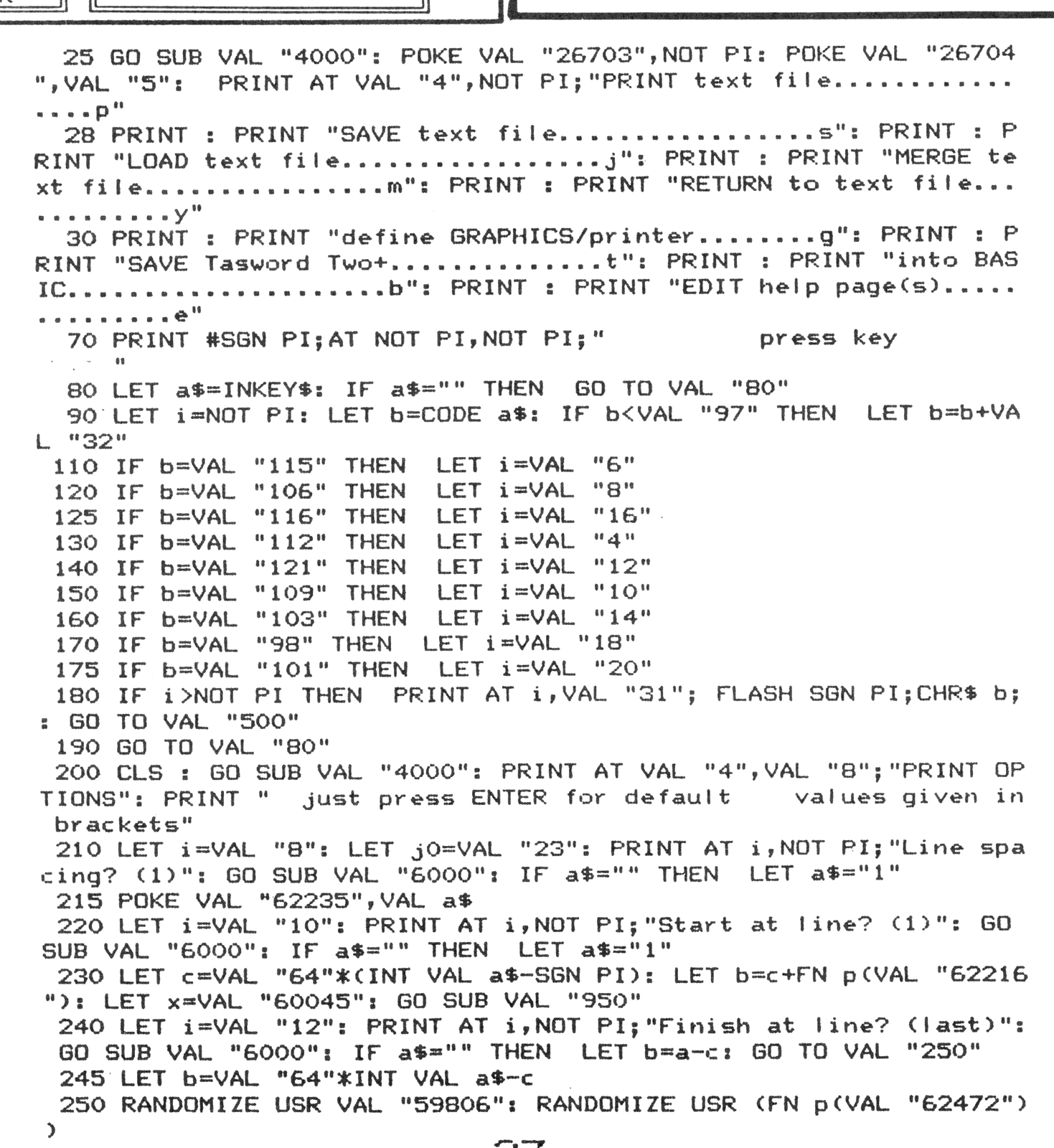
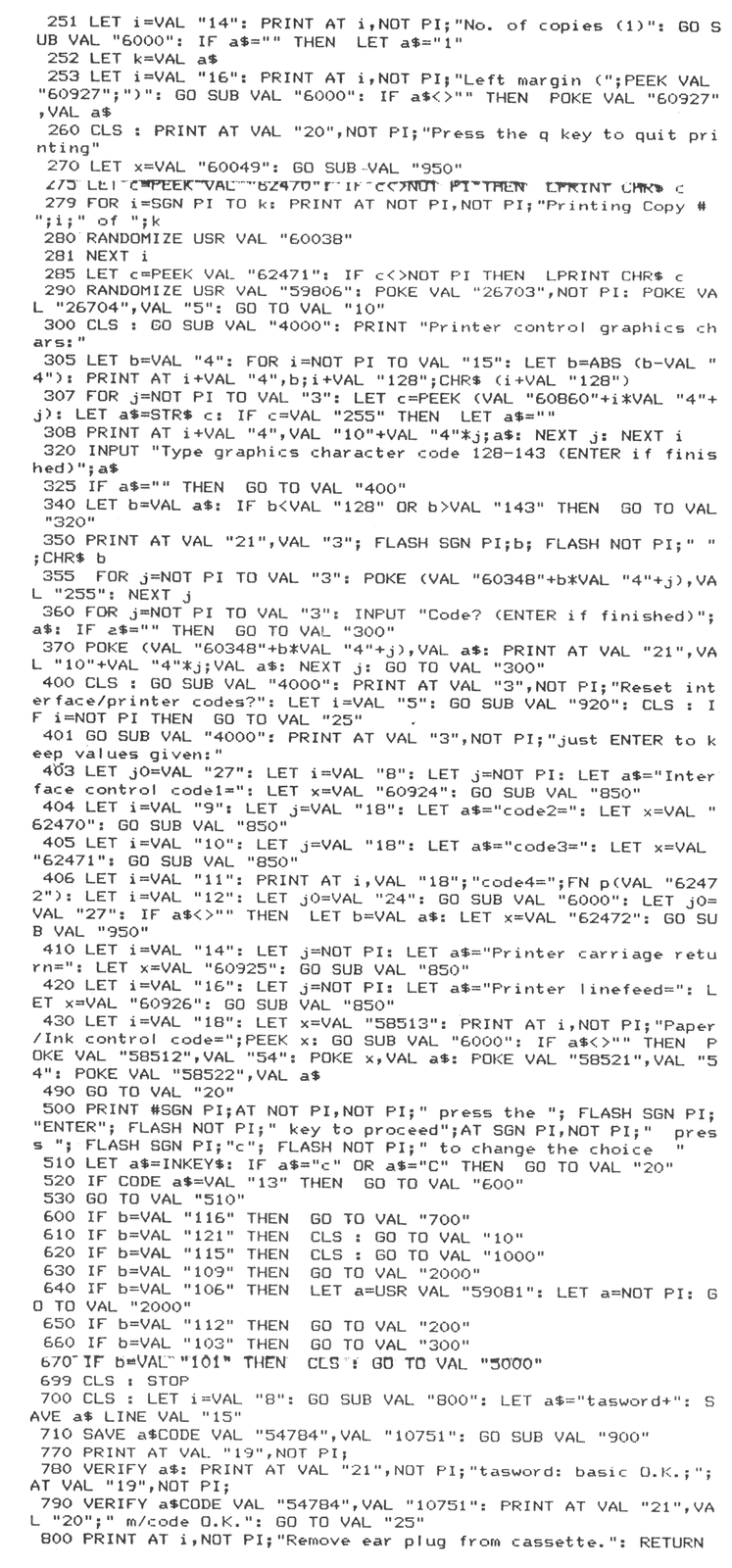
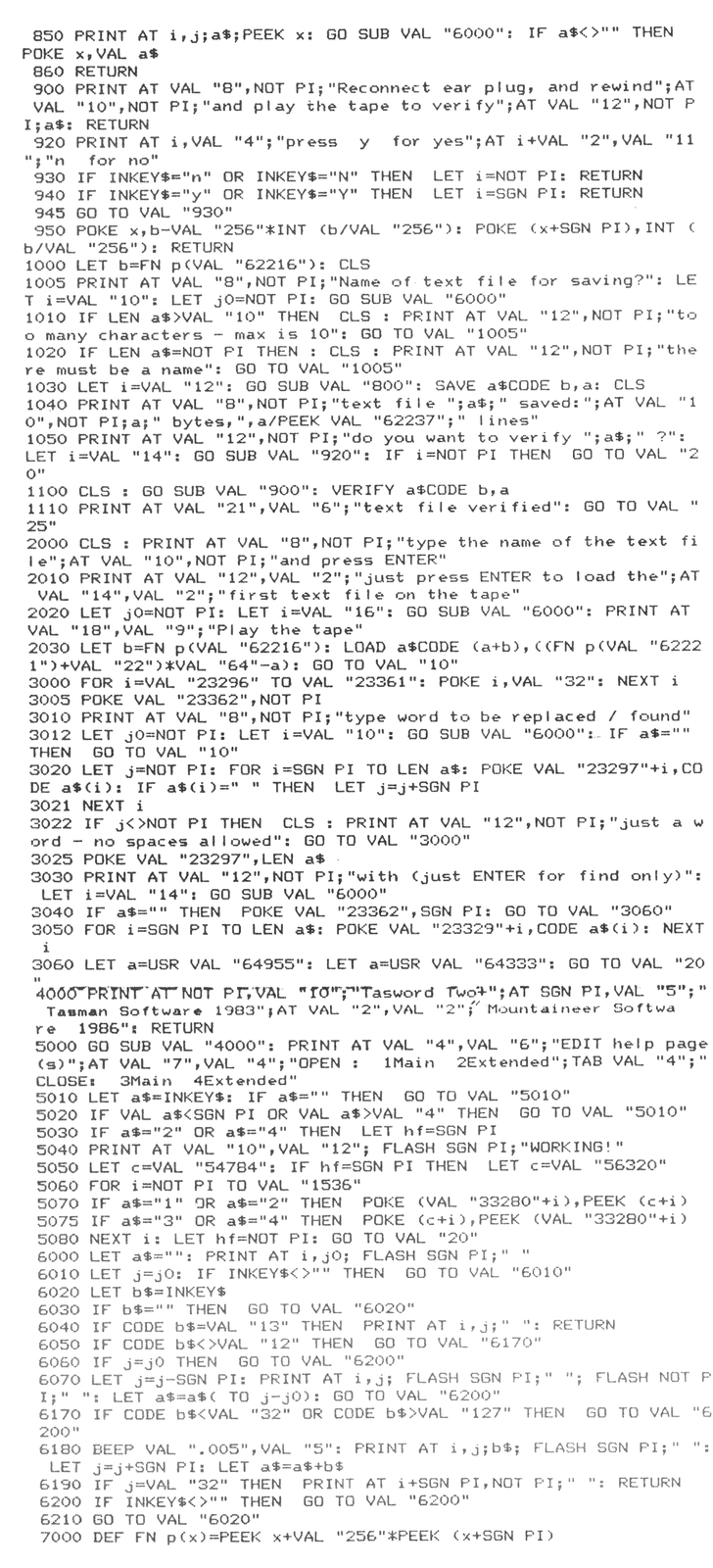
The following program “Taspatch” as listed replaces the original BASIC portion of Tasword Two. Once entered into the computer, the Machine Code (bytes:tasword) portion of your original program needs to be added.
Once both parts are entered, simply go to the Main Menu, and save back a new copy of TASWORD TWO+.
Also included with this article is the supplemental documentation that explains the use of the new features of TASWORD TWO+.
Good luck with your copy of TASWORD TWO+. If you have any other modifications for this program, please send them to me. I also have cassette copies of the “taspatch” BASIC and “tasdoc” text file available for $9.95 postage paid. Bill Ferrebee, Mountaineer Software, 749 Hill Street #6, Parkersburg, WV 26104.
TASWORD TWO+ Supplemental Documentation
1986 Mountaineer Software
Welcome to TASWORD TWO+! This program gives you even more Word Processing power, and will make use even easier.
This extra documentation will guide you through the changes made by TASWORD TWO+, and will help you to make the best use of those changes.
MAIN MENU
The Main Menu has been augmented with new choices, and streamlined for easier use. Its use is the same as before: press the corresponding letter to your choice, and ENTER to verify.
PRINT MENU
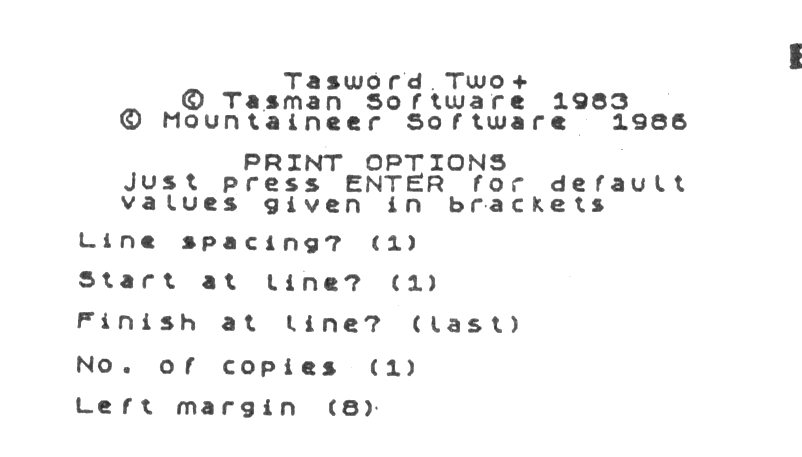
The PRINT text file Menu has a few new options added to it. First, you may select the number of copies you want printed by typing that number in at the prompt.
Remember to either designate a graphics symbol for form-feed, or space the proper number of spaces between pages, or the text will be printed continously, with no break between copies.
Also, the left margin of your printout may be specified from this menu. Originally, this selection was in the Printer Interface control code selection routine.
PAPER/INK COLOR SELECTION
You may now specify what PAPER/INK color combination you would like to use with TASWORD TWO+. To make your choice, first go to the Main Menu and select “define GRAPHICS/printer….g”. When you are asked to “Reset interface/printer codes?”, press (y)es. Press ENTER until you get to “Paper/Ink control code=”, and use the chart below to enter your choice.
(Remember, some color combinations may not be very suitable to use. This will depend on your TV/Monitor selection.)
PAPER:   BLACK           BLUE           RED            MAGENTA
         -------------   ------------   ------------   ------------
INK  :   Blue.......1    Black......8   Black.....16   Black.....24
         Red........2    Red.......10   Blue......17   Blue......25
         Magenta....3    Magenta...11   Magenta...19   Red.......26
         Green......4    Green.....12   Green.....20   Green.....28
         Cyan.......5    Cyan......13   Cyan......21   Cyan......29
         Yellow.....6    Yellow....14   Yellow....22   Yellow....30
         White......7    White.....15   White.....23   White.....31

PAPER:   GREEN           CYAN           YELLOW         WHITE
         -------------   ------------   ------------   ------------
INK  :   Black.....32    Black.....40   Black.....48   Black.....56
         Blue......33    Blue......41   Blue......49   Blue......57
         Red.......34    Red.......42   Red.......50   Red.......58
         Magenta...35    Magenta...43   Magenta...51   Magenta...59
         Cyan......37    Green.....44   Green.....52   Green.....60
         Yellow....38    Yellow....46   Cyan......53   Cyan......61
         White.....39    White.....47   White.....55   Yellow....62
HELP PAGES
Help Pages (Main & Extended) may be customized for your own use by using the (e) command on the Main Menu. Once you have entered the particular page into the text file, make sure to replace it as soon as you have made your changes. Then SAVE a new copy of TASWORD TWO+ with your new Help Pages.
Prog:taspatch