
The Hidden Chessmen is a search and find game like Hurkle (SYNC 1:1, p. 12). A knight, a bishop, and a rook are hidden on a chessboard by the computer. You begin the play by guessing a square on the chessboard. The computer tells you if you have found a chess piece and/or what pieces are attacking the square. From this information you deduce your next guess, and eventually the locations of the three pieces.
In this game no two pieces can be on the same square. The pieces attack in the normal chess fashion, except that an intervening piece does not block the attack of the bishop or rook.
You enter your guess by entering the square’s coordinates consecutively without a space, comma, or NEWLINE between them. The first number is across, the second down. This means that the upper left square is 11 (one across, one down), the upper right is 81, the lower left is 18, and the lower right is 88. Pressing NEWLINE enters the guess. Guesses off the chessboard are rejected (so you would get no response for a guess such as 03) but they are tallied in the running total of the number of guesses made.
Each individual square of the chessboard is made up of four character display squares. For the purpose of explanation these numbered 1–4 in the diagram.
+---+---+
| 1 | 2 |
+---+---+
| 3 | 4 |
+---+---+
If no chess piece is at the position guessed, a 0 will appear in square 1 of that position. But if a piece is at the guessed position a B, K, or R will appear in square 1 representing the bishop, knight, or rook respectively. In display squares 2, 3, and 4 a B, K, or R will appear if the corresponding piece is attacking the chosen square.
For example, if you had entered 46, the square 4 across and 6 down on the chessboard might appear as:
+---+---+
| O | B |
+---+---+
|###| R |
+---+---+
The 0 means that no piece is on square 46, but the B and R mean that both the bishop and the rook are attacking square 46.
A guess of 35 might give:
+---+---+
| B |###|
+---+---+
|###|###|
+---+---+
No piece is attacking the square, but you have found the bishop!
After four guesses—46, 35, 16, 78—the screen might show a display such as Figure 1.
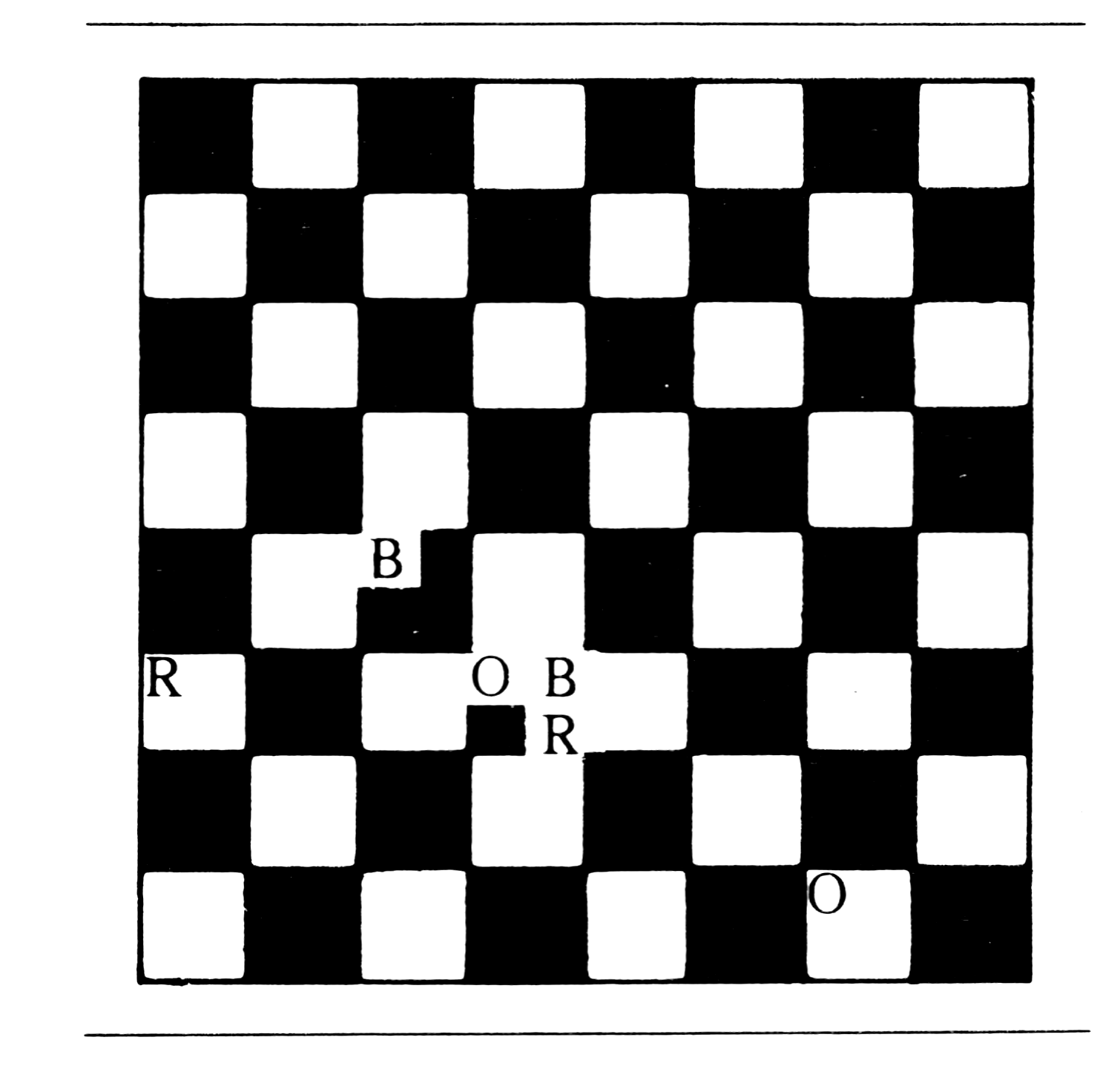
The program does not tell you when you have found all three pieces. When you believe you have found all the chessmen or have given up, you can enter 0 as your guess. The location of the pieces and the number of guesses you made will appear below the normal display. If after the four moves made in the above example you entered a zero, the following would be added to the display:
B 3 5 K 8 1 R 1 6
4 Guess
The program uses all of the 1K ZX80 memory. To conserve memory, we used all the one digit line numbers (1-9) and then only the two digit line numbers (10-99). This does not save in the line numbering, but in the GOTO lines we save 5 bytes.
More memory space was saved by switching from two character variable names like B1 and B2 to one character names such as B and C. This saved another 40 bytes.
The computer saves the value of variables in the variable section of its memory. To save more space, we reused the names of some variables: X and Y from the PRINTing routine, and Q from the INPUTting routine. This lets the computer forget information no longer useful and remember new data in its place.
When a variable is first used, it is given a spot in the variable storage and this moves the memory location of the display file. A problem would occur if Q had not been used before line 50 where the start of the display file is found by PEEKing. A memory location for Q would have been made after the PEEKing. The display file is not where your program thinks it is. This would mess up the information POKEd onto the board by the first guess (and could be a problem in similar programs).
POKEing into the display file creates one other problem: it is easy to remove a line delimiter (code 118). This can produce lines longer than 32 characters which crash the program. Unplugging the computer seems to be the only solution. Before running a new program which includes POKEing into the display file, you should save it. This avoids retyping all of the program should it crash. Also beware of a POKEing mistake that changes the program.
The Hidden Chessmen Program Listing
 1 LET B=RND(8)
 2 LET C=RND(8)
 3 LET K=RND(8)
 4 LET L=RND(8)
 5 IF K=B AND L=C THEN GOTO 3
 6 LET R=RND(8)
 7 LET S=RND(8)
 8 IF R=B AND S=C OR (R=K AND S
   =L) THEN GOTO 6
 9 LET N=0
10 FOR X=1 TO 4
12 FOR Y=1 TO 2
14 PRINT "AA##AA##AA##AA##"
16 NEXT Y
18 FOR Y=1 TO 2
20 PRINT "##AA##AA##AA##AA"
21 NEXT Y
22 NEXT X
30 PRINT
32 PRINT "ACR; DN?"
34 PRINT
40 INPUT Q
42 IF Q=0 THEN GOTO 90
43 LET N=N+1
44 LET X=Q/10
46 LET Y=Q-10*X
48 IF X<1 OR Y<1 OR X>8 OR Y>
   8 THEN GOTO 40
50 LET Q=PEEK(19396)+256*PEEK(
   19397)+2*X-1+34*(Y-1)
52 POKE Q,28
54 IF X=B AND Y=C THEN POKE Q,
   39
56 IF X=K AND Y=L THEN POKE Q,
   48
58 IF X=R AND Y=S THEN POKE Q,
   55
60 IF ABS(X-B)=ABS(Y-C) AND NO
   T (X=B) THEN POKE Q+1,39
62 IF ABS(X-K)=1 AND ABS(Y-L)=
   2 OR (ABS(X-K)=2 AND
   ABS(Y-L)=1) THEN POKE Q+17, 48
64 IF (X=R OR Y=S) AND NOT (X=
   R AND Y=S) THEN POKE Q+18, 55
66 GOTO 40
90 PRINT "B#";B;"#";C,"K#";K;"
   #";L,"R#";R;"#";S
92 PRINT N;"#GUESS"
Variables List
B,C; K,L; R,S — Chess piece coordinates
X,Y — FOR NEXT variables; later coordinates of guess.
Q — INPUT variable; later location of the guessed chess square in the display file.
N — number of guesses.
Program Summary
Lines 1-8 place the chess pieces.
Line 9 sets guess counter to zero.
Lines 10-34 print the chess board.
Lines 40-48 input guess and process it.
Lines 50-64 put information about guessed square onto the displayed chessboard.
Line 66 returns to input.
Lines 90-92 print the piece location and number of guesses.
Note: Type-in program listings on this website use ZMAKEBAS notation for graphics characters.