
“dprtr.B6”
A Universal Code Data File Printer. For All TS-2068 Configurations
Donated to Public Domain, by Update Magazine.
5226 CLEAR : RANDOMIZE USR VAL "100": LOAD "cclear.C1"CODE : RANDOMIZE USR VAL "100": LOAD "ca.C1"SCREEN$ : PAUSE 0: LET z=CODE INKEY$-VAL "48": GO TO (z>VAL "2")*VAL "5226"+(z=VAL "2")*VAL "5228"+(z=VAL "1")*VAL "5250"
5228 LET x=VAL "0": LET p=VAL "1": LET l=VAL "1": LET a=VAL "0": LET pl=VAL "56": LET c=VAL "64": RANDOMIZE USR VAL "100": LOAD "cinfo.C1"SCREEN$ : PAUSE VAL "0"
5230 RANDOMIZE USR VAL "100": LOAD "cclr.C1"CODE : CLS : INPUT "Insert Data Disk, then ENTER DD#";dd: RANDOMIZE USR VAL "100": GO TO dd: RANDOMIZE USR VAL "100": CAT ".C^",: INPUT "Key In Code File + EXT";w$: RANDOMIZE USR VAL "100": LOAD w$CODE VAL "50000"
5232 INPUT "Install Program Disk, then      ENTER Disk #";dd: RANDOMIZE USR VAL "100": GO TO dd: INPUT "Input Line length";c: RANDOMIZE USR VAL "100": POKE VAL "16090",(c-VAL "1"): CLS : INPUT "Print at TAB?";tab: RANDOMIZE USR VAL "100": POKE VAL "16094",tab: LPRINT : INPUT "Start print at Line#?";x: LET l=x: FOR g=VAL "1" TO x: LPRINT : NEXT g: INPUT "Lines per page?";pl: INPUT "Page #?";p
5234 LET b=VAL "0": FOR n=50000 TO 65535: LET a=PEEK n: IF a=0 THEN GO TO 5242
5236 IF a=13 THEN LPRINT '
5238 IF a>31 THEN LPRINT CHR$ a;: LET b=b+1: IF b>63 THEN LET b=0: LET L=L+1: IF L>c THEN LPRINT ''TAB 32;p: LET L=0: LET p=p+1: LPRINT : OUT 127,12: LPRINT : BEEP 1,20: PAUSE 0
5240 NEXT n
5242 FOR n=L TO c: LPRINT : NEXT n: LPRINT TAB c/VAL "2";p: OUT VAL "127",VAL "12": GO TO VAL "5290"
5250 STOP
5290 CLS : PRINT AT VAL "10",VAL "0";"<1> Print another File"''"<2> QUIT": PAUSE VAL "0": LET z=CODE INKEY$-VAL "48": GO TO (z>VAL "1")*VAL "5300"+(z<VAL "2")*VAL "5230"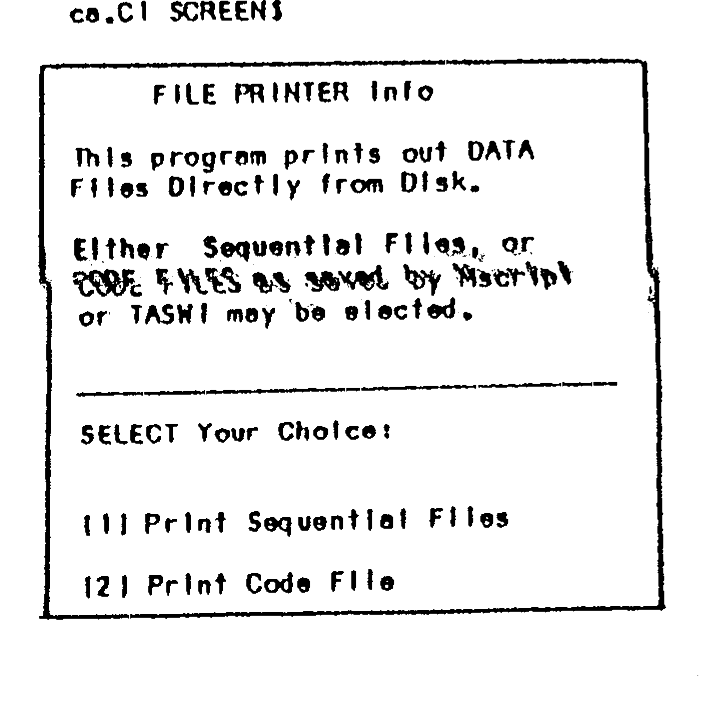

The Universal Code Data Printer:
This neat program will work with any TS-2068 configuration, Including Cassette, or Disk Systems. (with modifications). The program is designed to be a MERGE IN program for the new DAISY.B6 software, but it operates independantly, with RUN or GO TO 5226. When MERGED to any Basic program, it provides the capability to PRINT-OUT data files previously SAVED as ASCII Files in Code. Some examples of such files are “Mscript Files, Taswi Files, and files saved via Telecom Modem”. For the Daisy.B6 software this “dprtr.B6” program is MERGED via a menu elective to “steal and print” data files created with other software. (Sneaky, eh?) Well, what the heck! Most TS-2068 users have one of the small word processors, either Mscript or Tasword, and many swap data files back and forth on either cassette or disk. Now Smart Text users can print out these files at will. And the Daisy.B6 program does it via menu elective.
Line #5226 starts right off with some intangables to be explained. 1. The program ASSUMES that a LKDOS INITIALIZATION has taken place, the type of interface poked to adr 16096, and line feed need poked to adr 16092. For other DOS systems, change the programming to initialize the DOS with printing parameters. For some this will involve adding a line ahead of #5226 to load the prcode and initialize it.
2. Still at line 5226, A “BLANK” Code program “cclear.C1” is loaded to CLEAR the area in memory from adr 50000 to 65367. To get this code program on disk or cassette, Turn ON the Computer and type < SAVE “cclear” CODE 50000,15367 >. This saves 15367 “zeroes”, not worth too much for any purpose but to clear out that range of addresses when needed. We will use this space in memory later for loading all sorts of Code Data files to be printed, one file after another until the computer room overflows with paper.
3. Still at line 5226, we load in a information Screen with <LOAD “ca.C1″SCREEN$. Refer to fig 1 for a print out of the screen. You can omit this in the program and just go on to the next line. By the way, the selection <1> is not included here. That “Print Sequential Files” routine will be added in the October issue of Update.
4. Another info screen is booted in with line #5228. Figure 2 shows this “cinfo.C1″SCREEN$ file. 5. At line #5230 we LOAD the cclear.C1 file of zeroes to clear out any code that may be hiding in the needed area 50000-65367. Then the disk directory is gotten and a prompt placed at bottom to input the code file name. Incidentally the “©” is my printer’s character for the UP ARROW on the H Key. The Up Arrow with LKDOS is a wild card that gets all “.C” files for the directory. Continuing- The file name input is LOADED with a starting place of adr 50000. This limits the file length to 15367 total characters, enough for most code files. But if you want to allow for larger files, you can change the load-in address to a lower address in memory.
5. Line #5232 gets back the Program Disk and begins prompts for print-out. Since we DONT KNOW what line length the creator of the code file used, we have to guess. A smart guess would be “64”. A few seconds later we will find out whether the guess hit the mark. If the lines print with wrap-around words, we BREAK after a few lines have printed, and examine the printed lines. Count the characters in the lines and you can find the formatted line length. Then TYPE GO TO 5230. This time you can enter the proper line length and the print-out will be true to its prepared format.
6. Lines 5234 through 5340 uses the N counter to peek out the code characters and print them. Taswi files have padded in spaces (code 32) to format lines. Since this program is in BASIC, a line of spaces causes a short pause in the first couple of lines. After that the printer’s character buffer begins to store characters and work ahead of the printer, thus the time for subsequent line spacing is absorbed. On the other hand, Mscript line spacing is gotten by the insertion of ENTER (chr Code 13) at the end of each line. Line #5236 takes care of Mr. Mscript. Other Ascii Files may use a combination of these techniques. Text files that contain PRINTER CODED Command Characters may need to be EDITED if the character codes are printable ones, as “/”, “°”, “*”, etc. You can EDIT LINE 5238 and add within the “IF THEN” statement “IF a>13 OR a <123 THEN”—–. This will exclude any Un-Printable character codes from being processed.
7. Line #5238 contains programming to affect a Page END, providing a page number and a FORM FEED. You may remove the “PAUSE 0” if using a Dot Matrix printer. The pause is to allow the insertion of a cut sheet of paper. 8. Line 5242 is the clean-up programming after all code has been printed. The N counter is used again to space down to the page end and print the last page number. 9. Line #5250 is where we will start the next programming to print out Sequential Files (in the next issue of Update). 10. Line # 5290 allows you to go back and print another code file, or QUIT. The QUIT line (5300) is hiding in the DAISY.B6 program. Change the GO TO to whatever line number you need for Quitting. The following lines are used by Daisy.B6 to first MERGE this “dprtr program”, then “DELETE it when QUIT is elected”:
5220 CLEAR : RANDOMIZE USR VAL "100": MERGE "dprtr.B6"
5300 DELETE VAL "5226",VAL "5290": RANDOMIZE USR VAL "100": POKE VAL "16090",VAL "136": RANDOMIZE USR VAL "100": POKE VAL "16094",VAL "0": CLEAR : RANDOMIZE USR VAL "100": MERGE "varsv.B6": DIM K$(VAL "8"): DIM v$(VAL "1866"): GO TO VAL "9990"
The above is given for an insight into the Daisy.B6 manipulations of the MERGE function. First we DELETE the “dprtr.B6” program, THEN RESET the LKDOS EPROM. Then we MERGE in the VARIABLE SAVE LOAD program. Then we set up the K$ and V$ parameters to accommodate a VARIABLE FILE LOAD of the initialization vars file “01876.C2”. GO TO 9990 affects the vars file load to re-initialize the Daisy.B6 software. (The Variable File SAVE LOAD program was given in a previous issue of Update). See you next issue with the SEQ FILE Printer.
-BJ
Note: Type-in program listings on this website use ZMAKEBAS notation for graphics characters.