
MTERM SMART II HELP FILE
The transmit function supports X/ON – X/OFF protocol. Use CTRL S or CTRL Q.
The receive buffer may be OPEN/CLOSED remotely. Send CTRL R (open, decimal code 18) or CTRL T (close, decimal code 20).
Scroll pause when “VIEWing the BUFFer” use space bar ENTER to resume VIEWing.
Transmitting with the buffer OPEN and in HALF DUPLEX will fill the buffer with a copy of the transmitted data.
Transmitting or Receiving a program will require the BUFFER CON:HEX mode.
EXIT to BASIC with the BUFFER FULL may cause system to hang. (POWER OFF required)
DOWNLOADED programs with receive errors may not list, erasing buffer and second try may not work, even though the data is received correctly.
When TRANSMITTING a file the PROMPT STRING is is the string of characters the receiving terminal must send to start the transmission and after each line it must be repeated to send the next. Just ENTER will default to NO PROMPT STRING. The character delay may be set from 0 to 255. 0 is default.
PATCH FOR THE PATCH
The “MTERM SMART II PATCH for AERCO I/F” from the last [illegible]nth issue of SINCUS creates a problem when auto-dialing, the modem does not “CONNECT” when the line is answered. Using the CAPS SHIFT & ENTER and “M” to make the CONNECT will work. The code that checks the print buffer and printer busy on a status read from the serial port is incorrect. To eliminate this problem, the following bytes must be changed in the patch procedure:
58755-245  58756-197  58757-229  58758-42   58759-176
58760-229  58761-237  58762-75   58763-174  58764-229
58765-237  58766-66   58767-32   58768-4    58769-225
58770-193  58771-241
The patch when applied will cause the auto dial and the keyboard to be slower. This happens because the added code must check the print buffer and the status of the printer busy line each time the serial port status is read. If this response is not tolerable and you still desire to print to the AERCO I/F then the portion of the patch which prints data from the buffer can be installed by POKING just the data to locations 58618 to 58735.
Installing the patch may prove difficult because of the large number of locations which must be altered, compounded by the fact that one byte incorrect will cause unpredictable results. I have found that entering a BASIC program using DATA lines and FOR/NEXT loops works the best. This program can be saved on tape and each line edited if necessary. See example:
THE “MTERM PATCH PROGRAM” IS FULLY LISTED ON PAGE 4. LOAD THE “mterm” CODE and the type in the program and RUN. When all is done you should make the SAVE by
SAVE "patch" CODE 54016,7721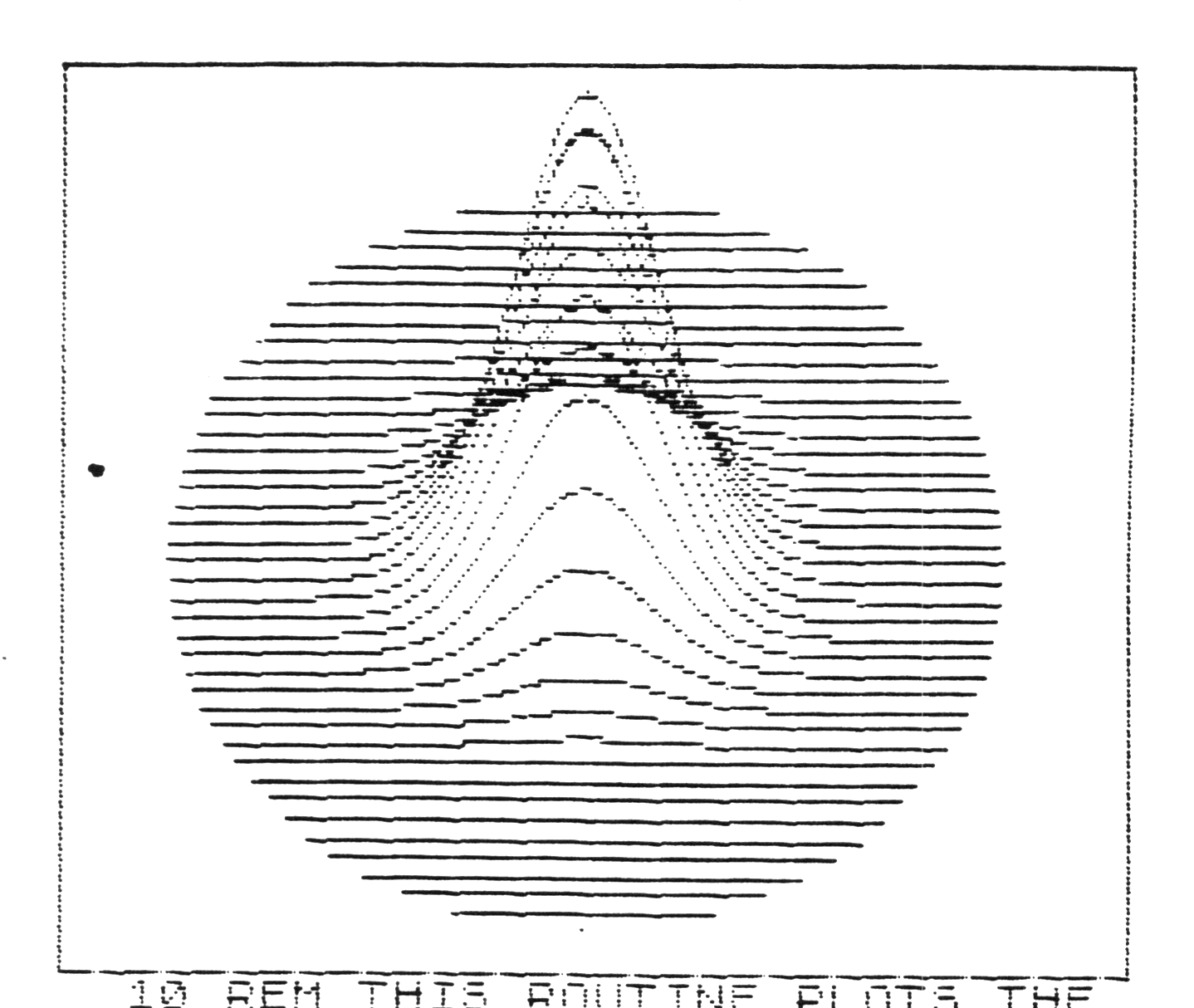
  10 REM THIS ROUTINE PLOTS THE
GRAPH OF A FUNCTION IN 3-D
  50 REM SET COLORS
  55 BORDER 4
  60 INK 0
  70 PAPER 6
  80 REM DRAW BORDER
  90 GO SUB 400
 100 REM DEFINE FUNCTION TO BE P
LOTTED
 105 REM
 110 REM THE IS CHANGED BYALTERI
NG THE CONTENTS OF LINE 150
 120 REM
 150 DEF FN A(Z)=90*EXP (-Z*Z/60
0)
 195 REM
 200 REM PLOT GRAPH
 205 REM
 210 LET K=5
 220 FOR X=-100 TO 100 STEP 1
 230 LET L=0
 240 LET P=1
 250 LET Z1=0
 260 LET Y1=K*INT (SQR (10000-X*
X)/K)
 270 FOR Y=Y1 TO -Y1 STEP -K
 280 LET Z=INT (80+FN A(SQR (X*X
+Y*Y))-.707106*Y)
 290 IF Z>L THEN GO TO 320
 295 GO SUB 380
 300 LET L=Z
 310 IF P=0 THEN GO SUB 380: IF
Z=Z1 THEN GO SUB 380
 320 PLOT X+125,Z
 330 IF P=0 THEN LET Z1=Z
 340 LET P=0
 350 NEXT Y
 360 NEXT X
 370 GO SUB 390
 380 RETURN
 390 STOP
 395 REM
 400 REM DRAW BORDER
 405 REM
 410 PLOT 0,0
 420 DRAW 255,0
 430 DRAW 0,175
 440 DRAW -255,0
 450 DRAW 0,-175
 460 RETURN
Note: Type-in program listings on this website use ZMAKEBAS notation for graphics characters.