
Inverse characters, including graphic symbols can be included in program lines as either literals or string variables, resulting in improved displays and faster graphics. Titles, headings, and prompts are examples of display items that can benefit from the added emphasis of inverse printing. Full use of the ZX80 character set also requires inverse characters.
The ZX80 achieves printing by accessing a separate set of codes in the character set that is contained in the ROM. Normal characters are assigned codes from 0 to 63 and inverse characters have codes from 128 to 191. Code values from 64 to 127 and from 192 to 211 have no valid interpretation and their use with the CHR$ function will print a question mark (“?”). Codes above 212 are reserved for Basic tokens.
You can use the CHR$(n) with any valid code to print a character. The program statement 10 PRINT CHR$(38) will print the normal character “A”, and the line 10 PRINT CHR$(166) will print the inverse character ” [inverse A] “. The first line is equivalent to 10 PRINT “A”, which takes fewer bytes and executes faster, but, because the keyboard has no [inverse A] key, there is no direct equivalent for the second statement.
The limitation is in the input, not the interpretation. If the program contained the line 10 PRINT “A”, it would be properly interpreted and the result would be an inverse ” [inverse A] ” on the display.
You can construct that line by typing NEW and entering these lines:
10 PRINT “A”
20 POKE 16428,166
RUN this and a normal “A” will appear on the screen. When you return to the listing, you will find that the first line has been altered to read:
10 PRINT ” [inverse A] “
This has happened because Basic programs begin at location 16424. The first two bytes contain the line number; byte three holds the decimal value 244 which is the code value for PRINT; byte four has the value 1, code for a quotation mark and byte five (address 16428) has the value 38, the code for “A”. Line 20 sets this byte equal to 166 (erasing 38). Once you have RUN this, line 20 is no longer needed and can be deleted.
If you want to use the ” [inverse A] ” as a string variable, edit line 10. Type SHIFT/NEWLINE and then SHIFT/8 to remove the cursor to the right of PRINT. Type SHIFT/0 to delete PRINT and then type LET A$ = and NEWLINE. Your program should now show:
10 LET A$=” [inverse A] “
You can also use the edit mode to relocate the line anywhere in your program by changing the line number.
The effect is even more valuable when applied to longer strings of characters. Try this:
10 PRINT “XXXXXXXXX” (9 X’s)
20 POKE 16428,128
30 POKE 16429,173
40 POKE 16430,174
50 POKE 16431,185
60 POKE 16432,128
70 POKE 16433,179
80 POKE 16434,149
90 POKE 16435,177
100 POKE 16436,128
When you RUN this you will have created the line:
10 PRINT ” [inverse: HIT N/L] “
This line now occupies 14 bytes. To achieve this result using CHR$ would require a total of 93 bytes, almost seven times as many bytes. Note that the string of characters begins and ends with an inverse space to improve readibility. Here is a prompt with emphasis!
The method shown here can be used with any valid character code but some caution is required. When POKE is used to set the value of a byte, the previous value of that byte is lost. If that byte held code that was critical to the interpretation of the statement, then a syntax error or a crash could result. In the example above, the addresses 16427 and 16437 contain the string delimiting quotes. To replace these with any other value would cause a syntax error. Address 16438 contains the NEWLINE character code 118 that ends line 10. To replace it would cause a crash. It is therefore necessary that you have an “X” or other dummy character or space in line 10 for each character or space that you want in the final version of the string. A crash may also occur if you POKE an invalid character code or certain Basic token codes into a program line and list the line on the screen. So stick to the values 0 through 63, and 128 through 191. The code value 1 can also cause you difficulty. Because it is the sting delimiter, it will be interpreted as the end of the string, not as the quotation mark or ditto character. The codes for the ditto that can be used within a string are 129 for inverse and 212 for normal.
Entering all of these POKE’s and addresses can be a pain in the neck so I use a short routine which provides an onscreen progress review, allows for corrections and checks for the end of dummy string.
 1 LET AD=16440
 2 PRINT "ANY DUMMY STRING"
10 IF PEEK(AD)=1 THEN LIST 2
11 INPUT C
12 IF C<0 THEN LET AD=AD-1
13 POKE AD,ABS(C)
14 CLS
15 LET AD=AD+1
16 GO TO 2
I use this routine during program entry to build any necessary inverse strings or graphic strings and then delete it from the final version. The routine displays the dummy string, and, as you enter each code, the change is made visible on the screen. If you entered the wrong code, you can correct the last character entered by entering the correct code as a negative.
When all of the codes have been entered, the display returns to the listing with the cursor at line 2 for editing. The dummy string statement can be numbered 2 through 9 as long as it is the second line of the program. PRINT statements numbered 2 through 9 will be printed on the screen, but only the second program line will be modified. This allows you to build multi-line graphic statements and check the whole display before editing.
To construct the toad in the program that follows, use a 3 character dummy to create each of these lines:
2 PRINT "[graphics]"    (133,6,6)
3 PRINT "[graphics]"    (0,128,142)
4 PRINT "[graphics]"    (135,4,4)
Start with line 4, entering the codes for the bottom third of the toad. Leave line 4 where it is and enter the dummy for line 3. When it is complete, leave it in place and enter the dummy for line 2. Each line will be modified in turn and added to the top of the previous construction. Having the the entire toad on screen will help to spot errors. After all three lines are created, they can be edited to locate them at the proper location in the program by changing line number 2 to 960, 3 to 980, and 4 to 1000.
In the following program, three of these toads hop across the screen and announce their order of arrival at the finish line. When all of the toads have finished, the race results are printed on a scoreboard making lavish use of inverse characters. If you have 2K or more of RAM, the progam can be expanded to allow two players to enter their opinion as to which toad will win the race and to comment on each player’s choice after the race.
The 1K version runs within 6 bytes of the memory limit. Using CHR$ to print all of the inverse character would require more than 400 additional bytes and would exceed the limit.
The 2K version requires just over 1400 bytes to run, leaving about 600 bytes for additional expansion such as more toads, more players, bets on the outcome or the use of machine language routines such as found in Dr. Logan’s “Auto Display Changing” article (SYNC 1:3).
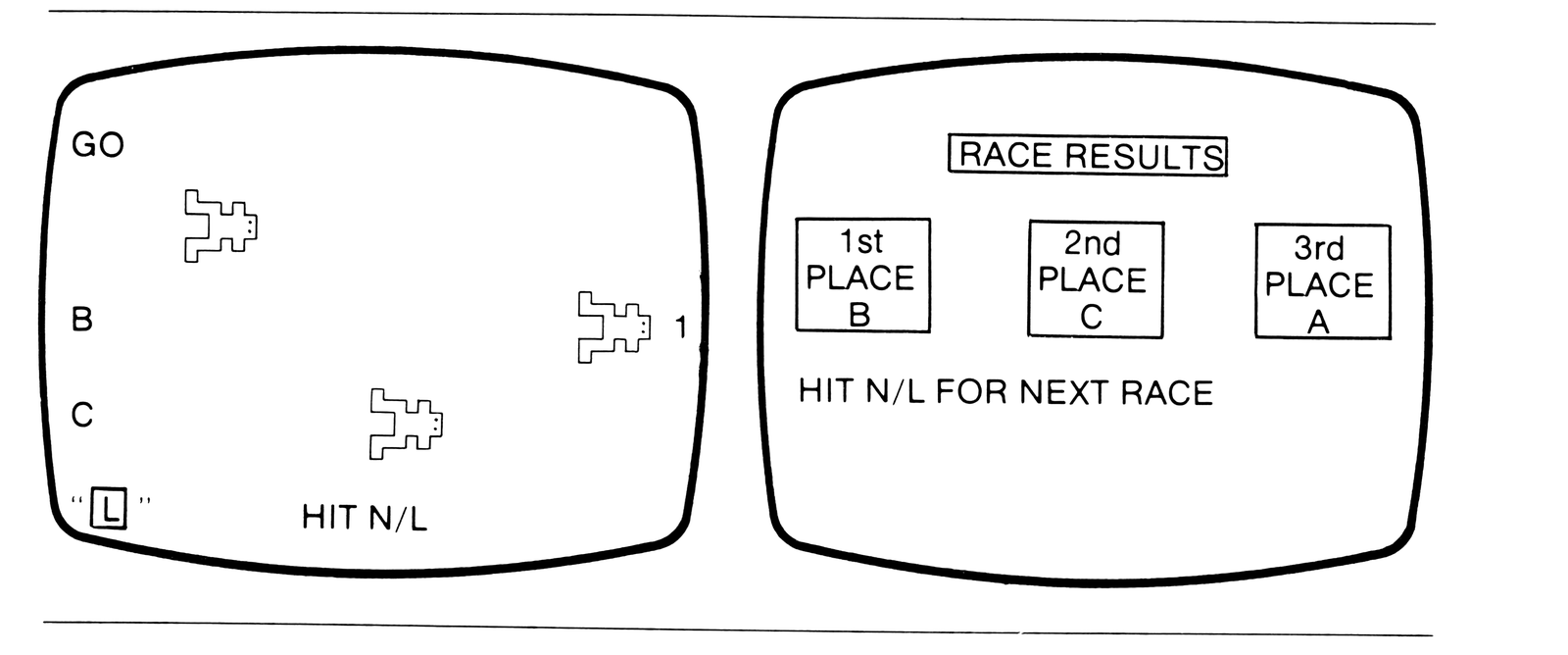
Inverse text is shown as [inv …]; the toad graphics lines 960-1000 hold the codes given above.
**    1 LET AD=16440
**    2 PRINT "ANY STRING"
**   10 IF PEEK(AD)=1 THEN LIST 2
**   11 INPUT C
**   12 IF C<0 THEN LET AD=AD-1
**   13 POKE AD,ABS(C)
**   14 CLS
**   15 LET AD=AD+1
**   16 GO TO 2

*   100 DIM T(1)
    110 DIM P(2)
    120 DIM F(2)
    130 DIM R(2)
    140 LET A$="GET READY"
*   150 CLS
    160 LET F$="123"
*   180 PRINT
*   190 PRINT, "[inv TIOGA COUNTY]"
*   200 PRINT, "[inv  TOAD RACES ]"
*   210 PRINT, "[inv             ]"
*   230 PRINT
*   240 PRINT
*   250 PRINT "PICK YOUR TOAD...(A,B
        OR C)"
*   260 PRINT
*   270 FOR N=0 TO 1
*   280 PRINT "PLAYER ";N+1;"? ";
*   290 INPUT U$
*   300 PRINT U$
*   310 LET T(N)=CODE(U$)-38
*   320 PRINT
*   330 NEXT N
*   340 PRINT
*   350 PRINT "[inv HIT N/L TO START RACE]"
*   360 PRINT
*   370 INPUT U$
    390 CLS
    400 PRINT
    410 PRINT A$
    420 PRINT
    430 FOR T=0 TO 2
    440 PRINT
    450 FOR L=1 TO 3
    460 PRINT CHR$((T+38)*ABS(L=2));
    470 IF P(T)=0 THEN GO TO 510
    480 FOR N=1 TO P(T)
    490 PRINT "####";
    500 NEXT N
    510 GO SUB L*20+940
    520 NEXT L
    530 PRINT
    540 NEXT T
    550 PRINT ,"HIT N/L"
    560 INPUT U$
    570 CLS
    575 LET A$="GO"
    580 IF F$="" THEN GO TO 700
    590 LET X=RND(3)-1
    600 IF P(X)=5 THEN GO TO 590
    610 LET P(X)=P(X)+1
    620 IF P(X)=5 THEN GO SUB 640
    630 GO TO 390
    640 LET F(X)=CODE(F$)
    650 LET F$=TL$(F$)
    660 LET R(F(X)-29)=X
    670 RETURN
    700 PRINT
    710 PRINT
    720 PRINT,"[inv RACE RESULTS ]"
    730 PRINT
    740 PRINT
    750 PRINT "[inv  1ST ]","[inv  2ND ]","[inv  3RD ]"
    760 PRINT "[inv PLACE]","[inv PLACE]","[inv PLACE]"
    770 FOR N=0 TO 2
    780 PRINT "[inv  ]";CHR$(R(N)+166);"[inv  ]",
    790 NEXT N
*   800 FOR N=0 TO 1
*   810 PRINT
*   820 PRINT "PLAYER ":N+1:
*   830 GO SUB (F(T(N))-29)*20+900
*   840 NEXT N
    850 PRINT
    860 PRINT "HIT N/L FOR NEXT RACE"
    870 PRINT
    880 INPUT U$
    890 RUN
*   900 PRINT " IS A FINE JUDGE"
*   905 PRINT ,"OF TOAD FLESH."
*   910 RETURN
*   920 PRINT " JUST MISSED."
*   930 RETURN
*   940 PRINT " IS A TURKEY."
*   950 RETURN
    960 PRINT "[graphics 133,6,6]"
    970 RETURN
    980 PRINT "[graphics 0,128,142]"
    990 RETURN
   1000 PRINT "[graphics 135,4,4]"
   1010 RETURN

NOTE: LINES MARKED ** CAN BE ERASED AFTER ALL INVERSE
      STRINGS AND GRAPHICS ARE CREATED.
      LINES MARKED * MUST BE DELETED TO RUN IN 1K
Note: Type-in program listings on this website use ZMAKEBAS notation for graphics characters.