
If you got my SW-LO-RES program up and running, then you are aware of the many graphic possibilities using low resolution. Now imagine what could be done with high resolution (256 x 192)! In this article I will give you the necessary information to set up a minimal high resolution operating system, which can be used to display user defined characters on the screen. With this information you should be able to develop a comprehensive high resolution operating system implementing such functions as plot, circle, draw, etc as I have done. [See end of article for further details].
Even though the routines presented here are “software only,” they are hardware dependent. That is, due to hardware differences between the T/S 1000 (ZX81) and T/S 1500, they will only work correctly on a T/S 1500; hence the title of this article. In addition, the routines will only work on a T/S 1500 in which the 8K to 16K block of memory has been decoded, i.e. “Hunter” board, 64K ram, possibly other devices, such as EPROM readers, etc. Fred Nachbaur has reported that the routines will also work on an unexpanded (16K) T/S 1500, if the ROM is replaced with a T/S 1000 ROM. I have not tested this ROM switch, but if it works, this would be the least expensive method of making your T/S 1500 “hi-res compatible”. [I only tested this on the one machine I have here; feedback about this from other users is encouraged. In principle, the “Bent ROM upgrade” should also work. It is available from G. Russell Electronics and from Thomas B. Woods, but will require a little modification to fit into the 24-pin socket of the TS1500. -fn See SWN 2/6 forum for these details.-ed.]
Before we continue, let’s test your T/S 1500 to see if it is HI-RES compatible. Enter and run the short test program of listing 1. If you get a short, one pixel wide, line on the screen then it’s OK to continue. On the other hand, if the screen fills with garbage, or turns black, then you will need to add a device to decode the 8-16K range, as mentioned above. Press any key to return to the normal display mode.
LISTING 1.
  10 REM 12345
  20 LET L=16514
  30 POKE L,62
  40 POKE L+1,32
  50 POKE L+2,237
  60 POKE L+3,71
  70 POKE L+4,201
  80 RAND USR L
  90 PRINT CHR$ 1
 100 PAUSE 4E4
 110 POKE L+1,30
 120 RAND USR L
Now replace lines 30 to 120 with listing 2, leaving lines 10 and 20 intact. Run the program and watch the display.
LISTING 2. BINARY CHR$ DISPLAY
  30 POKE L+1,32
  40 RAND USR L
  50 FOR N=0 TO 255
  60 SCROLL
  70 PRINT CHR$ N
  80 NEXT N
  90 PAUSE 4E4
 100 POKE L+1,30
 110 RAND USR L
Do you see what’s happening? If you look carefully, you will notice that binary patterns are being displayed according to the following rules:
A. Chr. codes 0 to 63, a direct binary equivalent of the chr. code is displayed.
B. Chr. codes 64 to 127, the binary equivalent of the token word or unused chr. codes is displayed.
C. Chr. codes 128 to 191, a complimented (“inverted”) pattern is displayed.
D. Chr. codes 192 to 255, the binary equivalent of the token words are displayed.
The significance of this is that 128 binary patterns are directly available, from 0000 0000 to 0111 1111. Binary patterns with bit 7 set are not available as these are interpreted by the ULA to be either a graphic character or a token character and it will, therefore, automatically output the inverted form or token word.
The absence of bit 7 will be the only disadvantage to using this method of producing a high resolution display. The advantages are that the missing bit is usually not needed for user defined characters, such as lower case letters. For example, the only Sinclair characters (excluding graphics) which use this bit are T and Y. For most graphic applications, if the plotting is not too dense, the missing bit is hardly noticable.
How It Works
For a detailed explanation of the display system I recommend getting a copy of Mike Lords “Explorer’s Guide to the Timex Sinclair 1500/1000”.
What the above programs have done is altered the value of the I register, which is normally set to 1E(h), to point to the base address of the ROM character pattern table at 1E00(h). The machine code in REM line one is:
LD A,20
LD I,A
RET
The ULA can be fooled into reading the ROM patterns at a different base address by changing the contents of the I register. Change the POKE value in line 30 of listing 2 to a value from 0 to 29 to see what happens. For example, a value of 1 will set the base address of the character table to 0100(h). As you can see, the display is a random mess of bit patterns, depending on the binary contents of the new character table. Incidentally, most previous software-only high resolution programs use this method to access a different set of bit patterns for their displays.
What happens when the I register is set to 32 is a totally different mode of operation, since the ULA can’t address a character table with a base address greater than the ROM itself.
My theory on how the binary patterns are produced is based on the fact that, according to Mike Lord:
“When a byte is being read from the display file the ULA chip forces the low 9 address lines to the ROM to a pattern consisting of:
The last 6 significant bits of the character code being read from the display (A0 to A5).
Three bits defining which of the eight scan lines for each row of characters is being generated (A6 to A8).
The high seven address lines are the high 7 bits of the Z80 I reg. (A9 to A15).”
Apparently, when I=32 the ULA has no where to go for a character pattern and instead outputs the contents of the lower six address lines, which happen to be the character codes obtained from the display file. This is probably also the reason that the routines do not work on a T/S 1000, if I=32 on a T/S 1000 these address lines will always appear to contain FF or 00.
User Defined Graphics for the TS1500
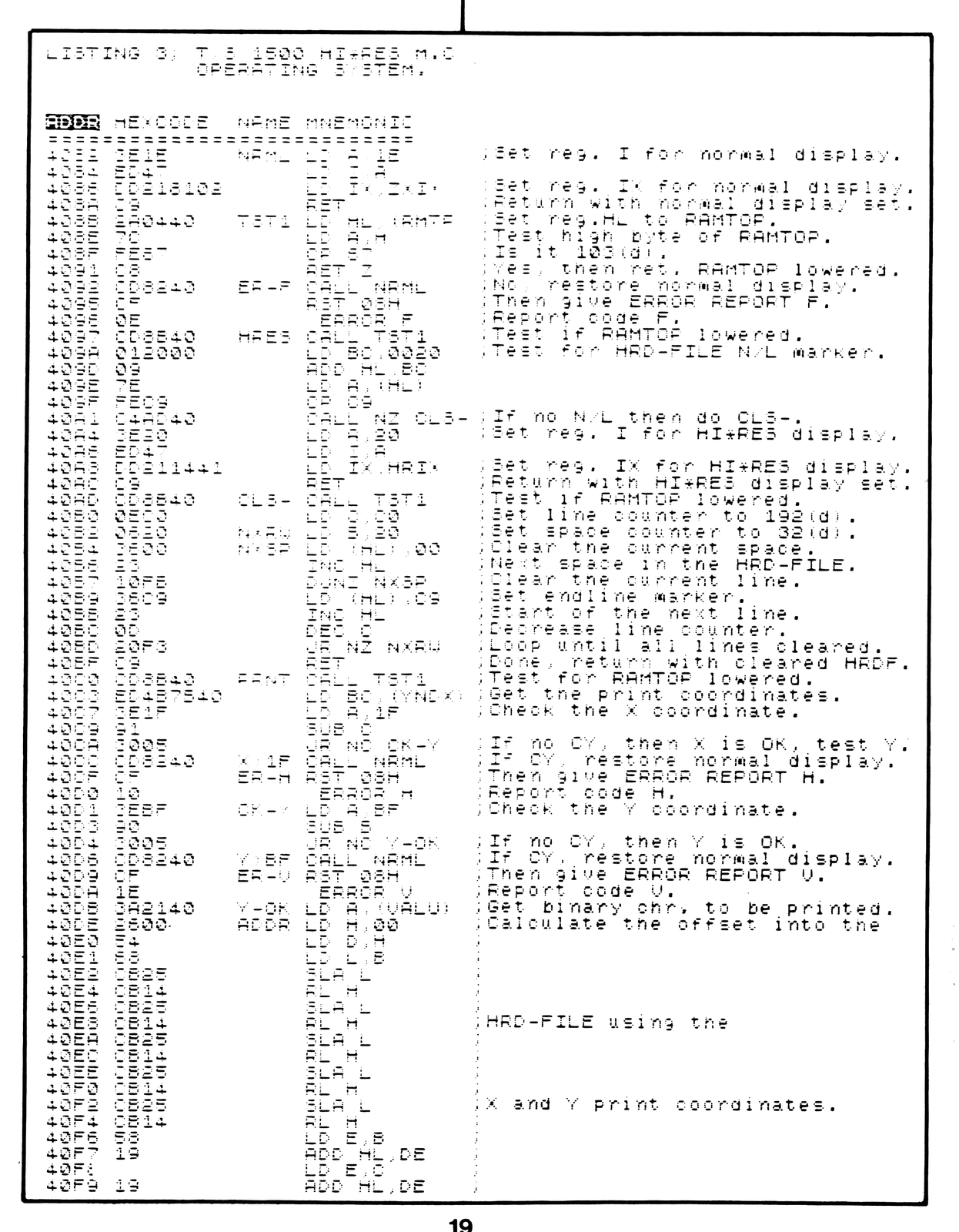
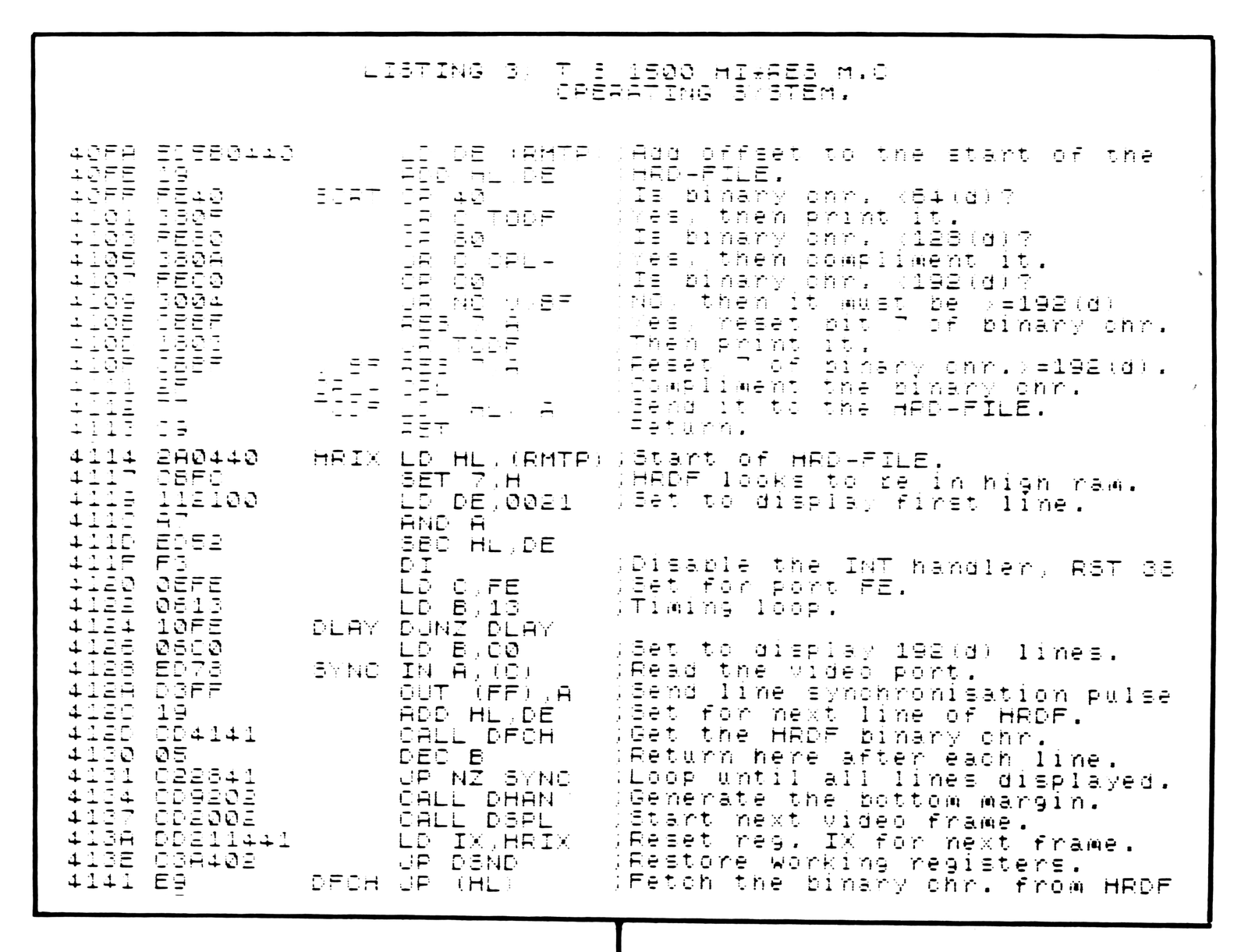
Since we can now access 128 binary patterns all that is needed is to set up a high resolution operating system to use them. The minimal operating system presented in listing 3 will do this for you.
To start you will need a REM line of at least 704 bytes. Although the operating system is only 192 bytes long we need an additional 512 bytes to hold the UDG character patterns. You can enter the REM line by hand, or alternatly, use listing 4 which will do this task for you. In addition, an area of ram at least 6336 bytes long will also be needed, to hold the high resolution display file. This will be done by lowering RAMTOP prior to running the routines.
LISTING 4. REM GENERATOR.
   1 REM
  10 POKE 16510,0
  20 FAST
  30 LET A$="01[illegible]C5E5CD9E09E1C13617230B78B120F8C9"
  40 LET A=16444
  50 FOR B=1 TO 60 STEP 2
  60 POKE A,16*CODE A$(B)+CODE A$(B+1)-476
  70 LET A=A+1
  80 NEXT B
  90 RAND USR 16444
LISTING 5. HEX LOADER.
  10 LET L=16514
  20 PRINT "INPUT HEX CODE."
  30 INPUT C$
  40 SCROLL
  50 REM **> CONVERT L TO HEX$
  60 LET S=INT (L/4096)
  70 LET P=L-S*4096
  80 LET C=INT (P/256)
  90 LET D=P-C*256
 100 LET E=INT (D/16)
 110 LET G=D-E*16
 120 LET T=28
 130 LET H$=CHR$ (S+T)+CHR$ (C+T)+CHR$ (E+T)+CHR$ (G+T)
 140 PRINT L;"  $";H$;"  ";C$
 150 IF C$="" THEN GOTO 30
 160 IF C$="S" THEN STOP
 170 POKE L,16*CODE C$+CODE C$(2)-476
 180 LET L=L+1
 190 LET C$=C$(3 TO )
 200 GOTO 150
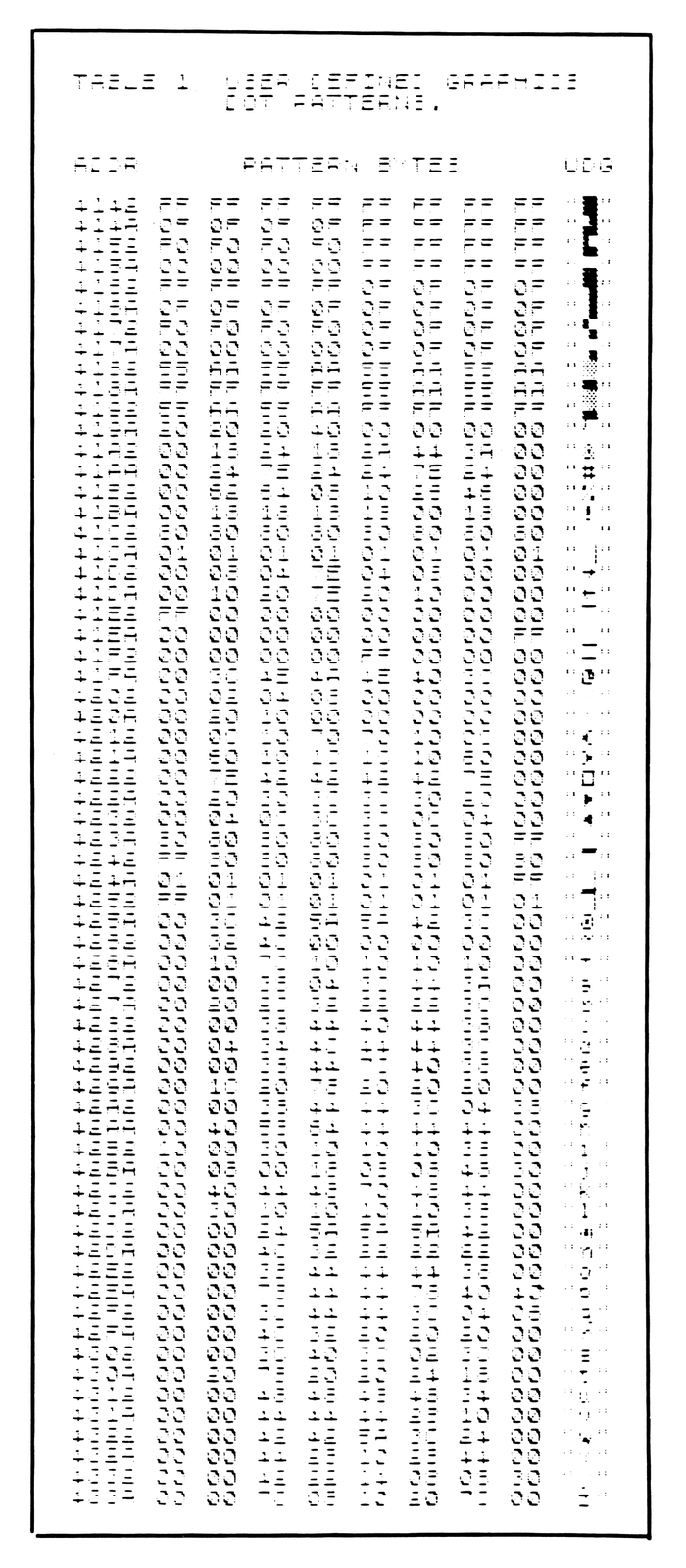
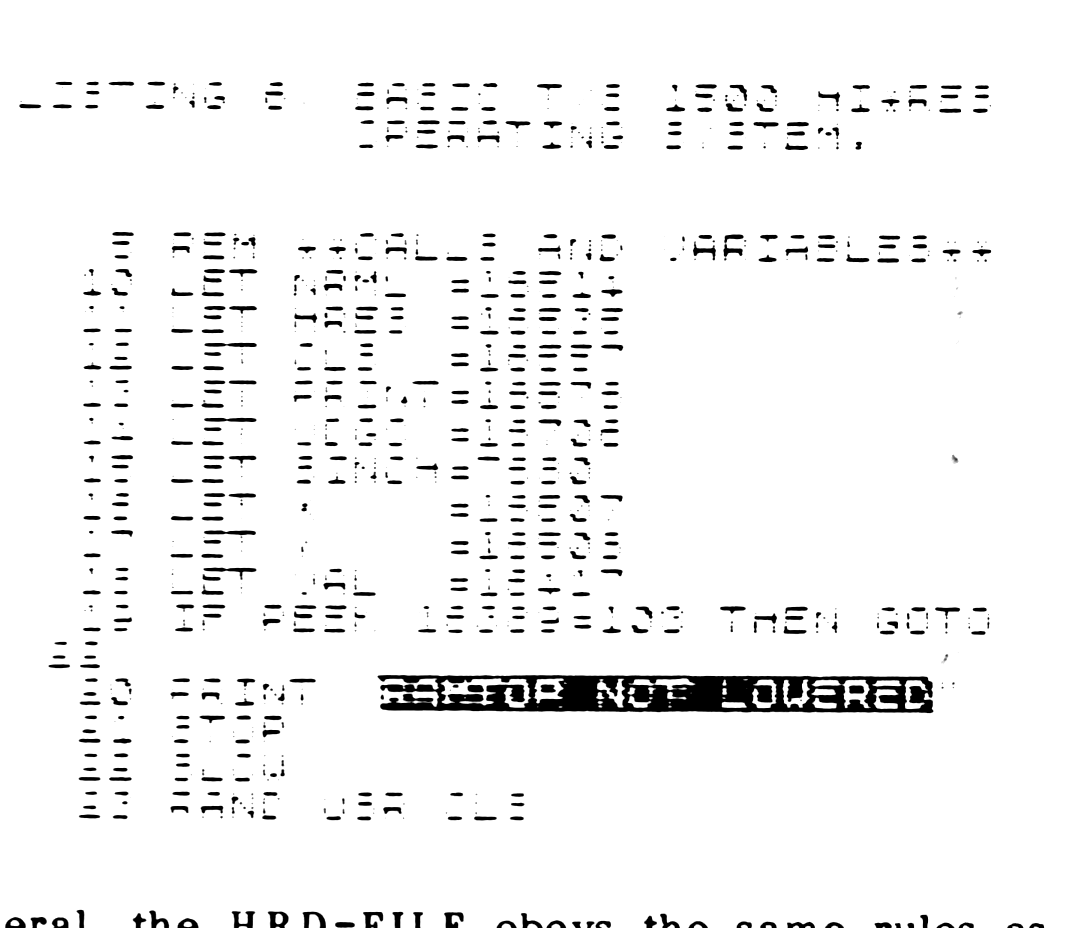
Once the REM line has been entered, use a hex loader, or listing 5, to enter the hex code as shown in listing 3. After this is done, continue loading from data table 1, this is a table containing 512 bytes which define 64 characters (eight bytes per character). When all of this is done, POKE 16510,0 to change REM line 1 to 0 (makes it impossible to accidently delete or edit). Remove all lines greater than zero, then enter the lines from listing 6. These are your USR calls, variables, and constants. You may have to POKE S-TOP with 10 to prevent listing of line 0 each time (POKE 16419,10). You should now have the basic system ready for use, make at least two copies on tape.
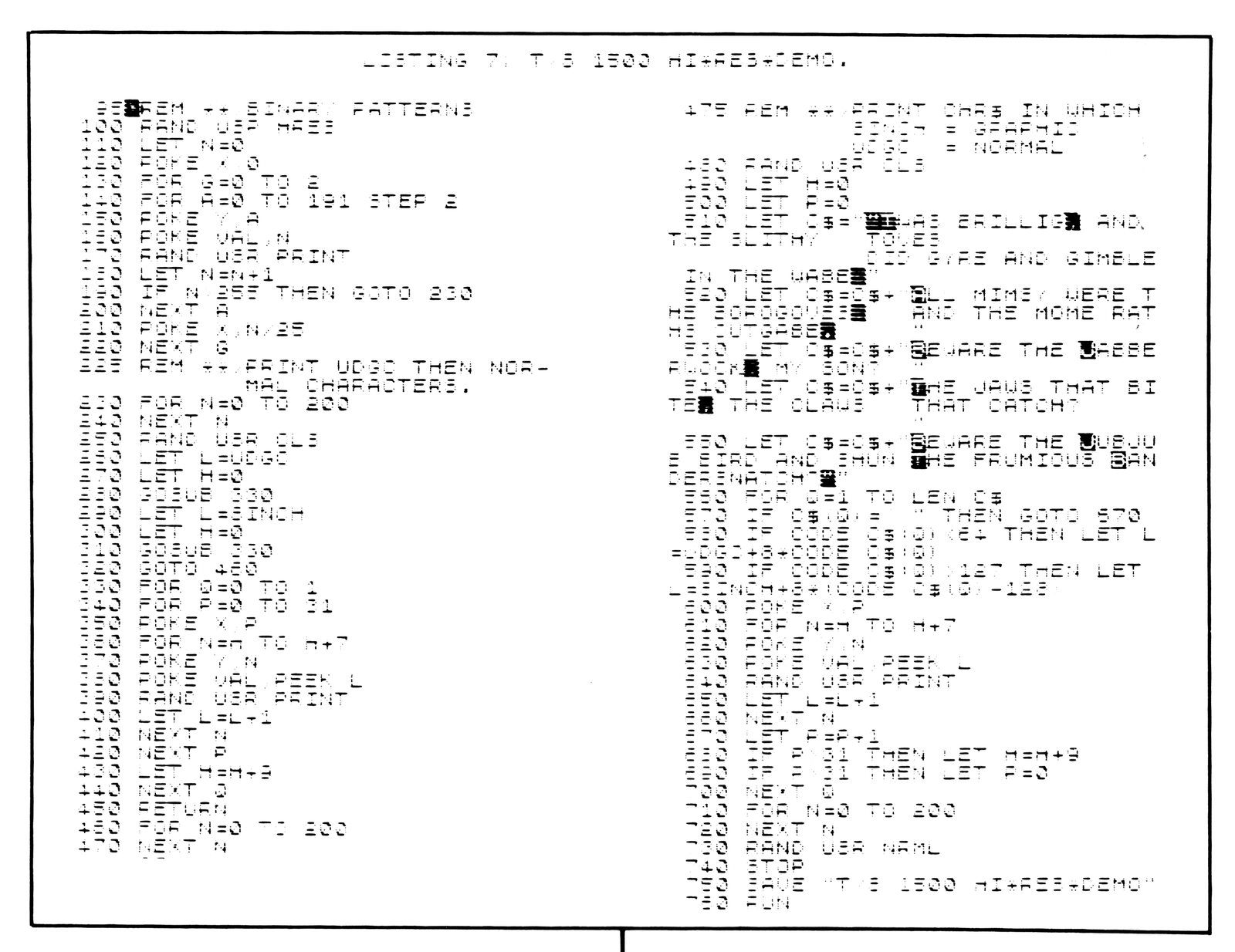
Before we can proceed with the demo program, RAMTOP has to be lowered to make room for the HRD-FILE. POKE 16389,103 then “NEW”. Reload the basic operating system, then enter the lines from listing 7.
The Demo Program
Lines 100 to 220 display an inventory of all the possible binary patterns available. Lines 230 to 470 first display the new UDG characters followed by the normal Sinclair characters. Lines 480 to 700 print out a string text in which the graphic characters are displayed as their normal Sinclair characters and all others as the new UDG characters.
General Notes
If you use these routines to write your own basic program and it stops, keep in mind that the HRD-FILE is being displayed and you will not, therefore, see any of the normal error reports. If your program stops you will have to “RAND USR NRML” to get back to the normal display mode.
In general, the HRD-FILE obeys the same rules as the normal display file. You can POKE a value directly to it, but beware of sending a character with bit 6 set (CHR$ 64-127 and 192-255) or you will crash. Also be careful that you don’t overwrite an endline marker (analogous to the normal display file, except that the HR end-marker is CHR$ 201 = RET instead of CHR$ 118 = HALT).
I hope you find these routines interesting and can find useful ways of utilizing the HI*RES capabilities of the T/S 1500.
Summary of the M.C. Routines
LABEL

NRML    Restores normal display mode
HRES    Displays the contents of the HRD-FILE.
CLS-    Clears the HRD-FILE.
PRNT    This is equivalent to PRINT AT Y,X;VAL.
        The normal Sinclair display file consists
        of 24 lines by 32 characters, however,
        this routine maps the HRD-FILE as 192
        lines by 32 characters. VAL is the value
        of the binary character to be displayed.

          Y=contents of address 16508 (0 to 191).
          X=contents of address 16507 (0 to 31).
          VAL=contents of address 16417 (0 to 255).

        A print coordinate of X=0,Y=0 will be the
        upper left corner, X=0,Y=191 the bottom
        left, X=31,Y=0 the upper right and
        X=31,Y=191 the lower right.

ADDR    This routine calculates the print position
        within the HRD-FILE corresponding to the
        "Y,X" coordinates of PRNT.
SORT    This converts VAL to the correct binary
        form for printing.
HRIX    Takes over control from the normal display
        system to produce a HRES display of 192
        lines by 32 characters.

ERROR CONDITIONS
When using these routines the following error
reports may occur:

  REPORT  ERROR CONDITION
    F     File error, RAMTOP not lowered.
    V     Vertical parameter out of range (Y>191).
    H     Horizontal parameter out of range (X>31).
NOTE: Mr. Harder has written a machine-code HI-RES EXTENDED BASIC package for the TS1500 based on his discovery. Included are PLOT, UNPLOT, DRAW, UNDRAW, CIRCLE, UNCIRCLE, SCROLL UP/DOWN, INVERT, FLASH, and several other commands. PRINT allows printing normal Sinclair characters, or either of two UDG sets. SWDF, WINDOWA and WINDOWB allow transferring full or partial contents of the normal DF to the HRDF. The complete package is available at a price of $19.95 from Fred Nachbaur (Silicon Mountain Computers) at the address on the masthead. A 64-column package will also be available in the future, drop a card if you wish to be placed on the “inform when ready” list.
Note: Type-in program listings on this website use ZMAKEBAS notation for graphics characters.