
This explanation of number systems was written to explain the working of my home computer to my son. It is all too easy to destroy enthusiasm for learning by trying to teach a technical subject from generalizations (boring) or from technical terms (confusing); either way can be self-defeating.
So let’s begin with the definitions of three terms that will be used heavily: 1) a numeral is a figure that represents a number; 2) a digit is any of the numerals in a number; and 3) a value is the total amount represented by numbers.
We humans use ten numerals in our everyday life because we count on our ten fingers. We refer to values created from the base ten, i.e., the decimal number system. We need to take great care to understand the concept of the zero i.e., no fingers: it is a valid numeral in all number systems, and it is the only numeral that can be a place-holder, i.e., represents no value. Also undertand the foresight of the ancient mathematicians in not counting from one through ten with a single digit.
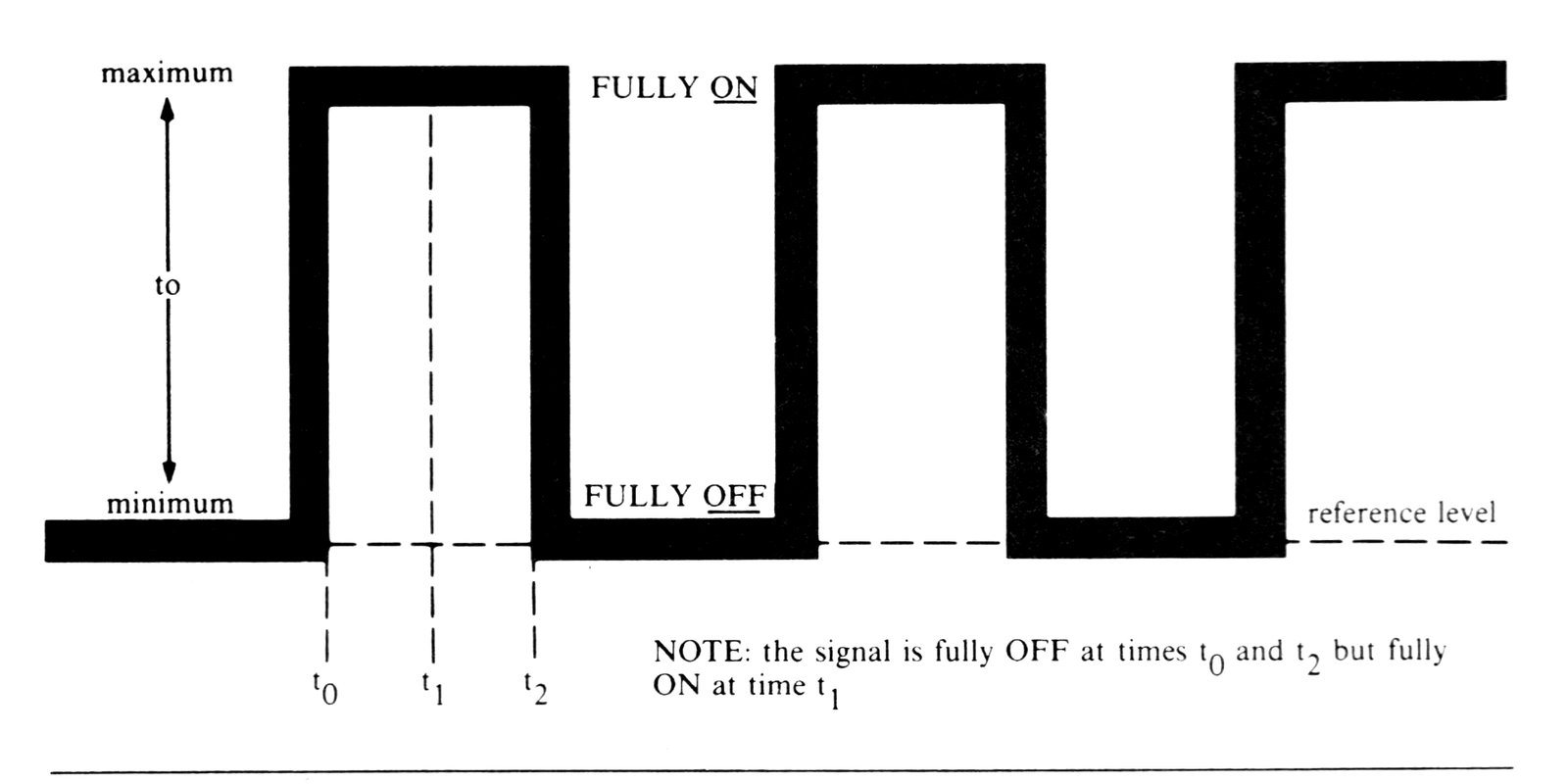
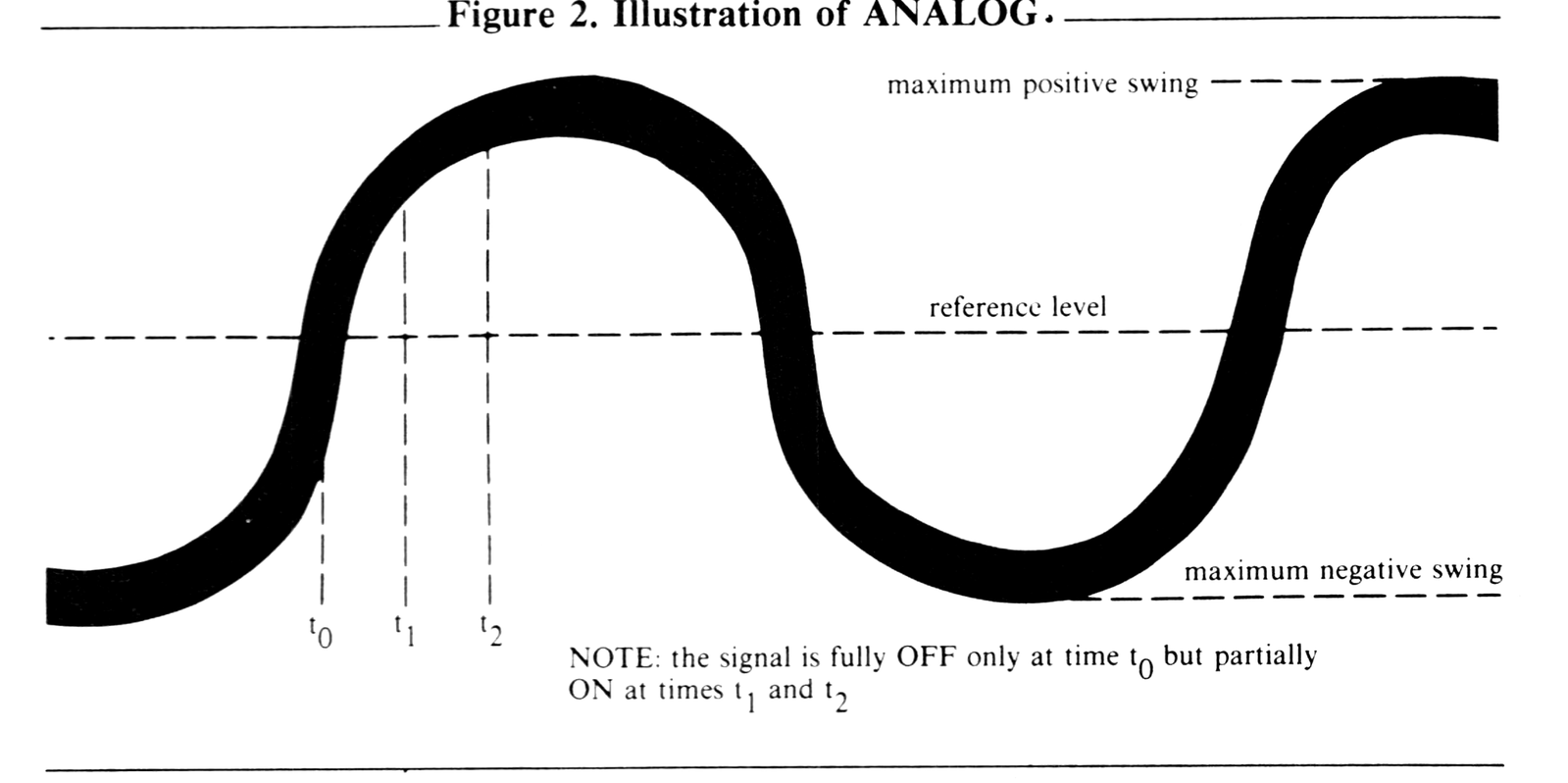
Modern electrical devices, from switches to digital computers, can represent only two values: electrical energy is either off (represented by the numeral zero), or on (represented by the numeral one). We refer to values created from these two numerals as being in the base two, i.e., the binary number system. This dual-state concept is known as digital, and is illustrated in Figure 1. Another concept, known as analog and illustrated in Figure 2, can represent all the values between fully off and fully on. At any instant in time, a digital signal is either off or on, while an analog signal can be anywhere between off and on. An example of an analog device is an amplifier. We shall discuss analog concepts no further, but you should be aware of the antithesis of digital.
Computer professionals began to use the base eight (the octal number system) and the base sixteen (the hexadecimal number system) because binary values can be difficult for the human brain to interpret if there are too many digits. The binary digits, dubbed bits by these same computer professionals, are grouped together into logical units of three bits of octal (from the days of 24-bit computers), or into four bits for hexadecimal (for today’s 8-, 16-, and 32-bit computers). Table 1 is a visual comparison of parts of the basic number systems that we have discussed. See that we can represent zero through seven with three bits, and zero through fifteen with four bits.
As in our familiar decimal number system, notice that no single digit in any number system can have a value equal to (or greater than) the number system itself, because the value zero is included as a valid numeral. For example, our decimal number system represents the values zero through nine; the hexadecimal number system represents the values zero through fifteen. This phenomenon brings us to our next-to-last math fact we need to understand number systems: we must use some special characters as numerals to represent values greater than nine in a single digit. Since the logical sequence of the alphabet is easy enough to remember, A represents ten, B represents eleven, and so forth as shown in Table 1. With these basics of the binary number system in hand, our next step is to do something with it.
Table 1.
Binary   Octal   Decimal   Hexadecimal
 (2)      (8)     (10)        (16)
    0      0        0          0
    1      1        1          1
   10      2        2          2
   11      3        3          3
  100      4        4          4
  101      5        5          5
  110      6        6          6
  111      7        7          7
 1000     10        8          8
 1001     11        9          9
 1010     12       10          A
 1011     13       11          B
 1100     14       12          C
 1101     15       13          D
 1110     16       14          E
 1111     17       15          F
First, we must understand the mechanical process used to construct a value exceeding one digit. We simply add up how many times each exponent of the number system can fit into the whole value. To demonstrate what this final math fact means, let’s work through some examples after we review a few rules about exponents:
- a number raised to the power of zero yields one (e.g., X^0 = 1);
- a number raised to the power of one yields itself (e.g., X^1 = X);
- a number raised to a fractional power yields a root (e.g., X^1/2 = √x).
- a number raised to a negative power yields an inverse (e.g., X^-1/2 = 1/√x).
Now we can work on some examples. To an English speaking human, the words “four thousand ninety-six” has been drilled to mean the following:
4 times 1000 (10^3), plus
0 times  100 (10^2), plus
9 times   10 (10^1), plus
6 times    1 (10^00 for a total of 4096
in the base ten. This information can be shown in tabular form as follows:
| 10^3 | 10^2 | 10^1 | 10^0 |
| 1000 | 100  | 10   | 1    |
| 4    | 0    | 9    | 6    |
The mechanics of this example must be perfectly clear to you before we proceed. If you are not sure, think “how many times will this exponent’s value for this digit fit into the current remainder?”
4096/1000 = 4 (remainder 96)
  96/ 100 = 0 (remainder 96)
  96/  10 = 9 (remainder 6)
   6/   1 = 6 (no remainder)
Further examples of the same value, but expressed in different number systems, demonstrate the link between the logical grouping of four bits we described earlier.
Binary                          Hexadecimal
1 times 4096 (2^12), plus       1 times 4096 (16^3), plus
0 times 2048 (2^11), plus       0 times  256 (16^2), plus
0 times 1024 (2^10), plus       0 times   16 (16^1), plus
0 times  512 (2^9 ), plus       0 times    1 (16^0) for a total of
0 times  256 (2^8 ), plus
0 times  128 (2^7 ), plus
0 times   64 (2^6 ), plus
0 times   32 (2^5 ), plus
0 times   16 (2^4 ), plus
0 times    9 (2^3 ), plus
0 times    4 (2^2 ), plus
0 times    2 (2^1 ), plus
0 times    1 (2^0 ) for a total of

| 1 |  0   |  0   |  0   |   in the base sixteen.
| 1 | 0000 | 0000 | 0000 |   in the base two.
Isn’t it easier to say “one zero zero zero hex” than “one zero zero zero zero zero zero zero zero zero zero zero zero binary”?
Now, you try it for the base eight. HINT: first fill in the exponent values, then begin dividing the decimal value (4096) by the largest octal value.
_____times_____(8^4), plus
_____times_____(8^3), plus
_____times_____(8^2), plus
_____times_____(8^1), plus
_____times_____(8^0), for a total of
_______________in the base eight.
Now that we have the basics and the mechanics of different number systems under control, let’s mount one final assault in a similar direction. So far, our examples have represented internal digital values, i.e., values upon which a human or machine can perform arithmetic functions directly. There is one more number system by which external input and output devices, such as thumbwheel switches and seven-segment displays, can be connected to logical devices directly; their data representations also can be used directly. An example of a representation that cannot be used directly is the holes punched in a card column.
Computer professionals have defined a register as a circuit that holds several adjacent digits which are to be treated as a unit. In the base two, if all the bits are set on (i.e., to ones), you can see that a sixteen bit register would represent 1111 1111 1111 1111, or 2^16-1 or 65,535 in the base ten, or FFFF in the base sixteen.
Now, combining all that we have learned so far, we can understand why the logical representation of binary digits (to the electrical device) and decimal digits (to the human brain), is called binary coded decimal, or simply BCD. Although it sounds formidable, BCD simply refers to a number system by which a decimal numeral (zero through nine) is represented by a group of four bits called a nibble.
Therefore, our continuing example of “four thousand ninety-six” becomes represented as in Table 2.
Table 2.
                     (four digit BCD register)
external digit values  |  4   |  0   |  9   |  6   |
internal BCD values    | 0100 | 0000 | 1001 | 0110 |  (four bit nibbles)
                       (sixteen bit register).
Prove this relationship to yourself by reviewing each digit’s representation in Table 1. You can now appreciate why the biggest BCD number that can fit in a sixteen bit register is 9999.
In conclusion, if you have worked through the examples, it must be clear by now that any internal or external value can be converted from any number system to any other number system. You can do it, now that you understand the true meaning of each digit, and the conversion process between number systems. You proved it by computing the total of 10,000 in the octal exercise. Congratulations!