
by Bill Powers of MAXSOFT.
An almost limitless number of shapes can be made using the User Definable Graphics ability of the 2068 computer. UDGs are quite useful in moving graphics programs, but also in other programs (IE: word processors, to indicate a non-print control character), and other applications limited only by the programmer’s imagination.
The trouble is draging out the graph paper, and doing the old “1”s and “0”s bit (pardon the pun).
But weep no more, friends and neighbors. Now you can turn your monitor or TV screen into a piece of graph paper (ain’t computers wonderful), and forget that “1”s and “0”s stuff.
ENTER the program in fig. 1. and RUN it. It will draw a box 8 rows high by 8 columns wide, with an arrow by the top row. Use the number keys, (1 thru 8) to darken the appropriate square (press again to lighten), and use the A or Z key to move the arrow up or down to another row. Darken your design as you wish it to be, and then press ENTER. The computer will print the numbers that you will need to use to generate that graphic, and then print an actual UDG to see if that is the way you really want it. Press M to modify the existing drawing, or write down the numbers for later use, and press ENTER to make another one. (Use break to STOP).
If you had designed the clown as in figure 2, then you would use the numbers shown to the right in any UDG program to create the UDG character shown (below the large one). A typical UDG program is listed in fig. 3, which would cause the clown to be printed any time that you use the graphics E.
Happy Computing.
Illustration 1
   1 REM "█"=GRAPHICS A                   "[graphic E]"=GRAPHICS E
  10 PLOT 95,55: DRAW 65,0: DRAW 0,65: DRAW -65,0: DRAW 0,-65
  20 POKE 23658,8: DIM A$(8,8): LET R=1: FOR L=0 TO 7: POKE USR "A"+L,255: NEXT L
 100 PRINT AT R+6,10;">"
 110 PAUSE 0: LET I$=INKEY$
 120 IF I$>="1" AND I$<="8" THEN LET A$(R,VAL I$)=(" " AND A$(R,VAL I$)="█")+("█" AND A$(R,VAL I$)=" "): PRINT AT R+6,12;A$(R): GO TO 110
 130 PRINT AT R+6,10;" ": LET R=R+(1 AND I$="Z" AND R<8)-(1 AND I$="A" AND R>1)
 140 IF CODE I$<>13 THEN GO TO 100
 200 DATA 128,64,32,16,8,4,2,1
 210 FOR J=1 TO 8: LET L=0: RESTORE 200: FOR R=1 TO 8: READ X: LET L=L+(X AND A$(J,R)="█"): NEXT R: PRINT AT J+6,23;L: POKE USR "E"+J-1,L: NEXT J: PRINT AT 17,15;"[graphic E]"
 300 PRINT #1;AT 1,0;"Another or Modify existing": PAUSE 0: IF INKEY$="M" THEN PRINT #1;AT 1,0;"                          ": FOR R=7 TO 15: PRINT AT R,23;"   ": NEXT R: PRINT AT 17,15;" ": LET r=1: GO TO 100
 310 CLS : GO TO 1
Illustration 2
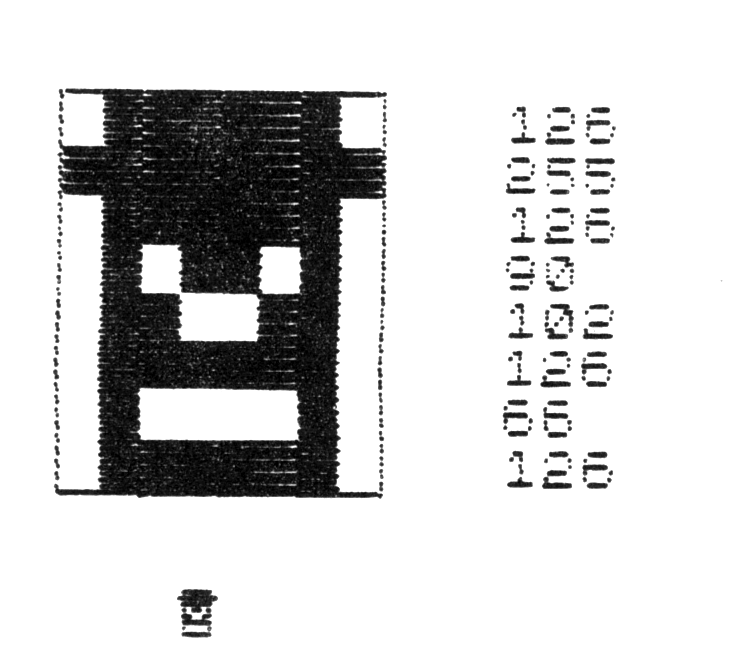
Illustration 3
1000>DATA 126,255,126,90,102,126,66,126
1010 RESTORE 1000: FOR X=0 TO 7: READ Z: POKE USR "E"+X,Z: NEXT X
Note: Type-in program listings on this website use ZMAKEBAS notation for graphics characters.