
The Game Changer Interface (reviewed elsewhere) enables you to upload ATARI VCS (2600) cartridge contents into your ZX/TS, SAVE them on tape and play them, using the ZX/TS RAM. Since the copy of the game is in RAM, you can also change any part you wish, to suit your own personal style. The ATARI uses a 6507 (processor), significant changes require programming in 6502 machine code.
However, an understanding of 6502 machine code (MC) is not really necessary for you to change some aspects of your recorded ATARI games. Specifically, any character or icon (a symbol representing you , an object, enemy etc.) can be changed to another shape, just by POKEing new values into its data array.
In order to be represented on the screen, an object must have “bit image” stored somewhere in memory. The game software sends these bits to the hardware which in turn produces the picture you see on the screen. Here’s a simple example of a face using an 8 X 8 bit image (that is, 8 bits wide by 8 bits high):
Binary Code            IMAGE                CODE(Hex)
                D7 D6 D5 D4 D3 D2 D1 D0

00000000                                        00
00111110                                        3E
01101011                                        6B
00110110                                        36
00011100                                        1C
00000000                                        00
00000000                                        00
00000000                                        [illegible]0

  (a)                    (b)                    (c)

                        Fig. 1
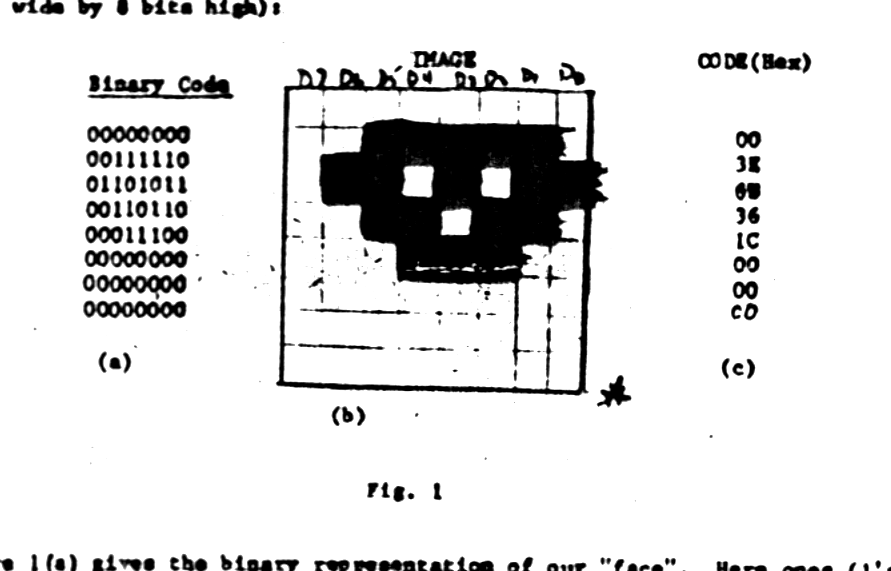
Figure 1(a) gives the binary representation of our “face”. Here ones (1’s) will represent “turned on” bits and will be dark,while ‘0’s are turned off or blank (the background color will show through). In Fig. 1 c), since this image is exactly 8 bits wide, we’re shown the hexadecimal numbers representing one bit bytes. This face can be stored in 8 consecutive memory locations.
If we were to pull up the ATARI game code on the screen a byte at a time and represent it as a series of black and white squares we could “see” the actual character images used in the game. Fig. 2 gives a partial program listing that will do just that.
Before you GOTO 7000 however, you may have to do a little detective work. A typical ATARI cartridge contains a 4K ROM which you will already have downloaded to the 4K of RAM starting at 16514. The 6502 interupts (where the program restarts after something important or bad happens) point to the very high memory locations and addresses pointing to the actual program code will be stored there. You can use the disassembler or monitor to check the top sections of RAM (FFFA through FFFF) for these pointers. You can be reasonably sure the data tables for the characters are not in the immediate areas pointed to by those three sets of 2 bytes and should look elsewhere. Places to look are; 1) boundaries between pages (F000, F300 etc. – a “page” is 256 bytes) 2) the beginning of the program 3) addresses which occur frequently.
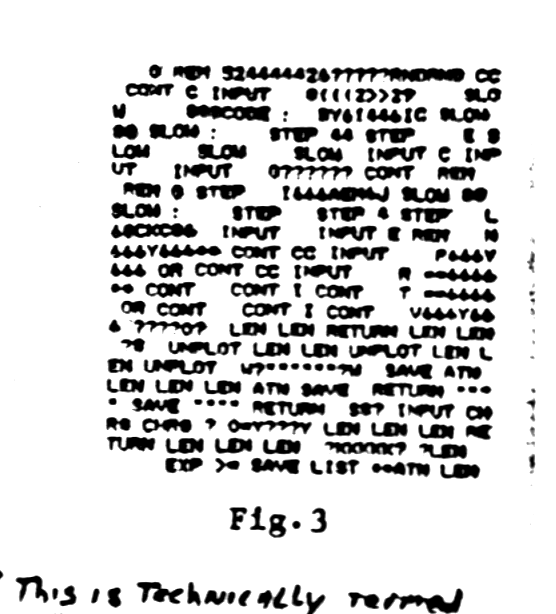
For ATARI BASIC we used the disassembler to spot check some of these areas and found absolute garbage at the beginning of the program. A good hard look at the 1 REM (see fig 3) also shows the experienced programmer something which just about has to be nonsense. The reoccurance of the same code number several times in succession is very unlikely in an MC program. These clues led us to choose 16514 as a starting address. After offset,this address corresponds to F000(H) in the ATARI.
After GOing to 7000 we obtained the listing in Fig. 4. A pattern of dots is clearly emerging, but hard to identify as letters or figures. Connecting the dots (or using the inverse space instead of an asterisk) can help make the patterns more intelligible. We’ve done that for the “GOTO” command of ATARI BASIC. You should be able to pick out some other upside-down commands like Print, and Else. The game software and hardware automatically turn these right side up.
How does the routine work? First we dimension some new variables and pick a starting address. These are:
S = Starting address (decimal only)
D(I) = The binary i th Digit of a Byte
A$ = A string which will print either filled-in or MT squares
P = The decimal value of the byte at location S
N = A temporary “part” of the P variable as it is reduced to its D or binary digits.
Next we PEEK the data stored in the currently chosen memory location. The subroutine at 8000 repeatedly divides the decimal number by 2,saving the remainder as D(J) to convert the decimal number to its binary (actually binary still stored as decimal) bit equivalents.
Returning to 7025ff from the subroutine we convert each “character” in the string A$ to its bit pattern; it remains a blank if D(J)≠1(that is, if its 0) and becomes an asterisk if D(J)= 1.
Finally we print the memory location, decimal value and our new blocked out string of “bits”. Don’t forget that the actual addresses where this data table reside are some 32000 (decimal) memory locations higher in the ATARI. Also, the conventions used by this programmer may not be used in other games. In ATARI BASIC, in fact, two more, different, techniques are used for addressing the numbers (for MATH) and the display area titles.
You should be able to add these lines to the “change” program with no problems on 4K or less games. You could even just pick an address at random and observe the screen for intelligible patterns. For 8K games create a free standing version of the program addition and try to PEEK the (with the actual cartridge installed) memory locations above 28000. Remember, the bank switching may get in the way.
Some hints at what to change in ATARI BASIC:
1) The symbol table for the display areas (STATUS, PROGRAM etc.) Abbreviating these would free up RAM for your own 6502 MC routines.
2) Change the “Block” graphics character to more interesting picture (e.g., a smiley face).
3) Change the alpha or numeric characters to provide a more interesting display. The letters, for example, can be converted to those of another language.
4) Your own ideas.
7000>DIM D(8)
7003 DIM A$(8)
7005 PRINT " INPUT STARTING ADDR
ESS.."
7007 INPUT S
7010 FOR I=S TO S+2[illegible]
7015 LET P=PEEK I
7020 GOSUB 8000
7025 FOR J=1 TO 8
7030 LET A$(J)=" "
7040 IF D(J)=1 THEN LET A$(J)="[illegible]
"
7045 NEXT J
7050 PRINT I;"   ";PEEK I,A$(1 T
O 8)
7060 NEXT I
7900 STOP
8000 FOR J=8 TO 1 STEP (-1)
8010 LET N=INT (P/2)
8020 LET D(J)=INT (P-2*INT (P/2+
.05))
8025 LET P=N
8040 NEXT J
8050 RETURN
9000 STOP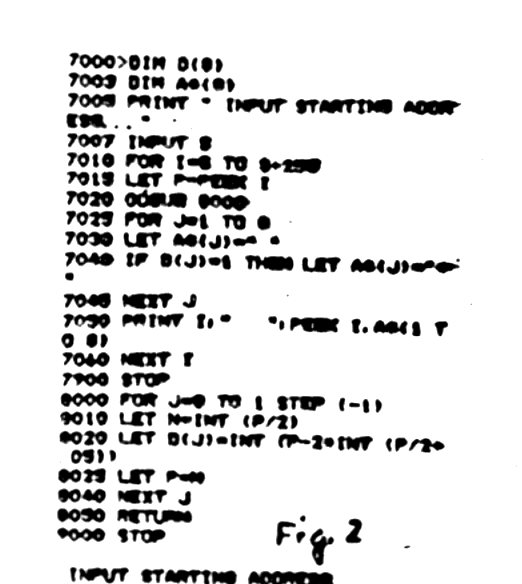
  INPUT STARTING ADDRESS..
16514    161     * *    *
16515    30         ****
16516    32        *
16517    32        *
16518    32        *
16519    32        *
16520    32        *
16521    30         ****
16522    162     * *   *
16523    78       *  ***
16524    72       *  *
16525    78       *  ***
16526    74       *  * *
16527    78       *  ***
16528    64       *
16529    64       *
16530    0
16531    160     * * *
16532    160     * * *
16533    232     *** *
16534    160     * * *
16535    238     *** ***
16536    8           *
16537    0
16538    164     * *  *
16539    16         *
16540    16         *
16541    16         *
16542    30         ****
16543    18         *  *
16544    18         *  *
16545    30         ****
16546    165     * *  * *
16547    132     *    *
16548    132     *    *
16549    132     *    *
16550    228     ***  *
16551    120     *
16552    4            *
16553    0
16554    0
16555    164     * *  *
16556    164     * *  *
16557    164     * *  *
16558    196     **   *
16559    14          ***
16560    4            *
16561    0
16562    167     * *  ***
16563    62      [see note: hand-drawn lines over the dots]
16564    34      [see note: hand-drawn lines over the dots]
16565    46      [see note: hand-drawn lines over the dots]
16566    32      [see note: hand-drawn lines over the dots]
16567    32      [see note: hand-drawn lines over the dots]
16568    34      [see note: hand-drawn lines over the dots]
16569    46      [see note: hand-drawn lines over the dots]
16570    160     * * *
16571    228     [see note: hand-drawn lines over the dots]
16572    164     [see note: hand-drawn lines over the dots]
16573    164     [see note: hand-drawn lines over the dots]
16574    228     [see note: hand-drawn lines over the dots]
16575    14      [see note: hand-drawn lines over the dots]
16576    4       [see note: hand-drawn lines over the dots]
16577    0
16578    0
16579    224     [see note: hand-drawn lines over the dots]
16580    160     [see note: hand-drawn lines over the dots]
16581    160     [see note: hand-drawn lines over the dots]
16582    224     [see note: hand-drawn lines over the dots]
16583    0
16584    0
16585    0
16586    170     * * * *
16587    228     ***  *
16588    132     *    *
16589    132     *    *
16590    228     ***  *
16591    132     *    *
16592    132     *    *
16593    228     ***  *
16594    0
16595    238     *** ***
16596    40        * *
16597    238     *** ***
16598    130     *   * *
16599    238     *** ***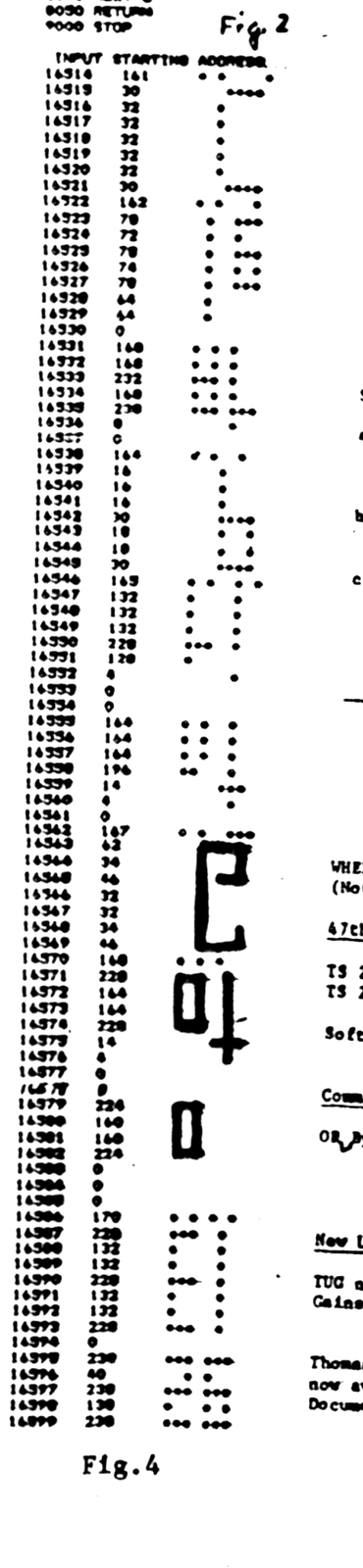
* This is Technically termed a “Shape TABLE”!
SPECIAL NOTES
a) TS 2068 owners should already be familiar with the generation of user defined graphics.
b) Use graph paper to lay out your characters.
c) You need not use 8 bytes (in fact our “face” could have been done in 5 bytes, four bytes of data and one attribute “byte”). But, this requires a sound understanding of how the software works.
©1984 P. Donnelly
WHERE TO BUY IT?
(Not Recommendations – just observations)
47th Street Photo
TS 2068           $99.99
TS 2040            55.00
Software (2000) $15 & up
Commack – Consumers Corner
OK Byte, Softsync – Timex Software
ALL TYPES $4.95
New Literature Received:
TUG newsletter – from the Gainesville, Fla. User’s Group
Thomas B. Woods PRO/FILE 2068 now available for $29.95 Total Documentation to follow
Transcription note: In the last table, addresses 16531, 16532, 16534, 16551, 16570 and 16598 are typed 160, 120 or 130 as they print, though their dot pictures give 168, 128 and 138.
Note: Type-in program listings on this website use ZMAKEBAS notation for graphics characters.