
INTRODUCTION
from Paul Holmgren
World Map is a geography lesson for the ZX81, TS1000, or TS1500. It consists of an oversized map which scrolls around on the screen to center a particular location. There are two modes the program can run in: 1) The computer reviews the student by centering locations on the screen, flashing an asterisk, and printing the location’s name. 2) The locations are centered on the screen and the student is asked to enter the name.
ENTERING THE PROGRAM
The first step in entering the program is creating a large REM statement at line 1 consisting of at least 2821 bytes. This area will be used to store the machine code and the data necessary to define the map. If you do not have a utility program or some other easy way of doing this then use this procedure:
- enter line 1 exactly as follows:
1 PRINT 0+0+0+0+0+0+0+0+0+0+0+0+0+0+0+0+0+0+0- edit this line (using SHIFT 1) and change the line number to 2 and enter a second line exactly like the first.
- repeat changing line numbers until you have 18 duplicate lines numbered 1 through 18.
- at this point enter the following line (without a line number):
PRINT PEEK 19334,PEEK 19335you should see this line on the screen:
118 118
- carefully enter these four lines:
POKE 16511,5
POKE 16512,11
POKE 16513,234
2 REM NEVER DELETE
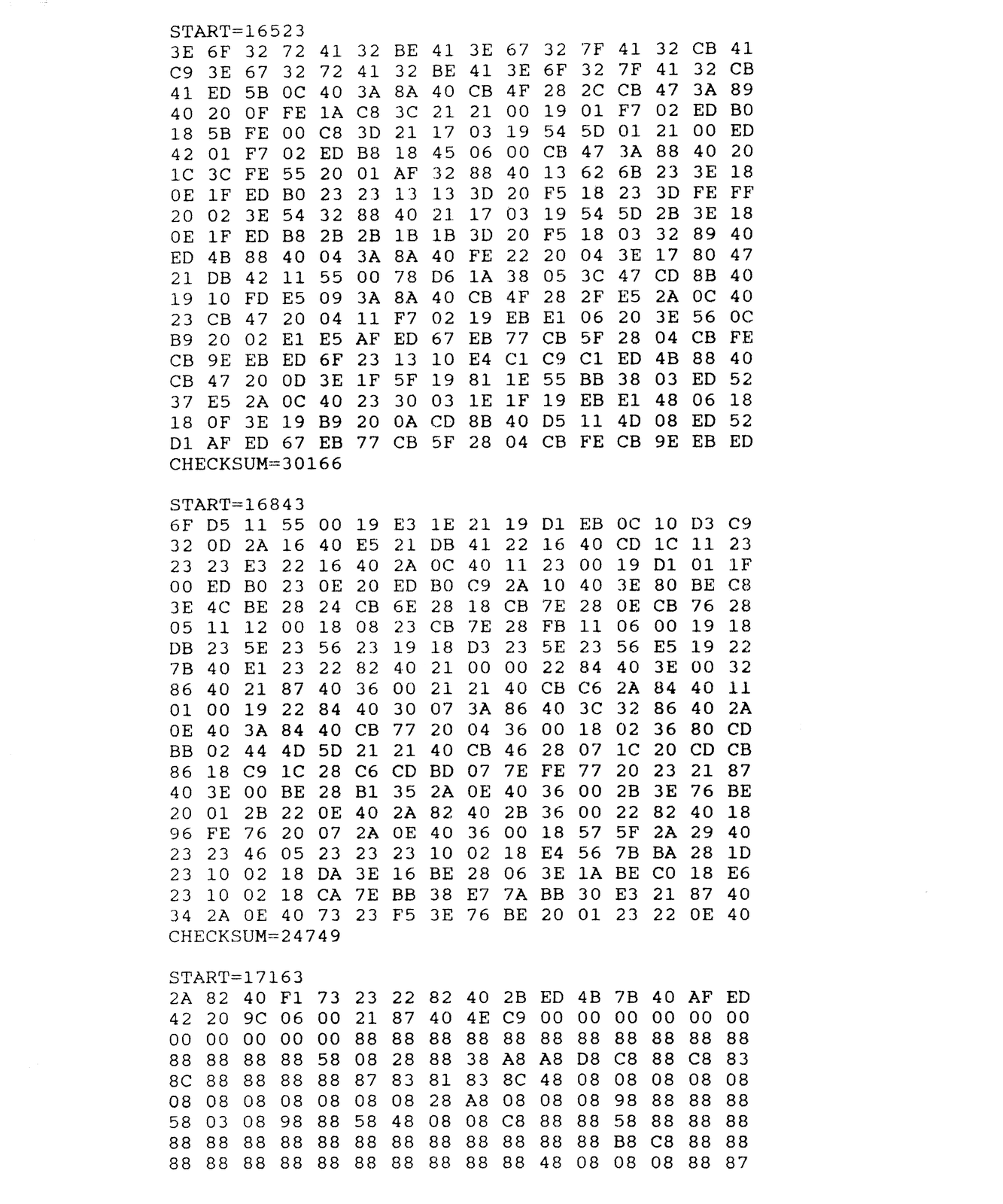
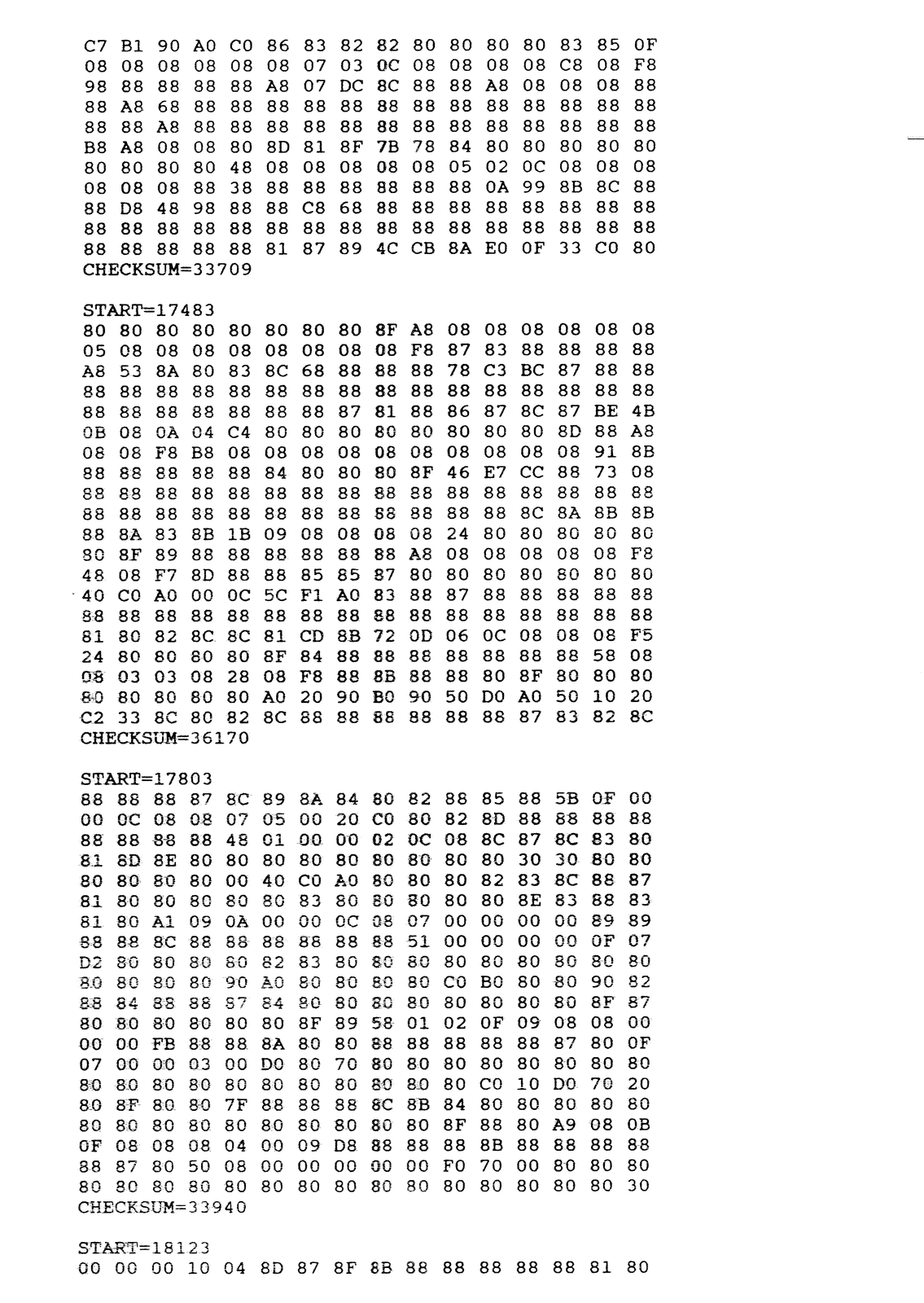
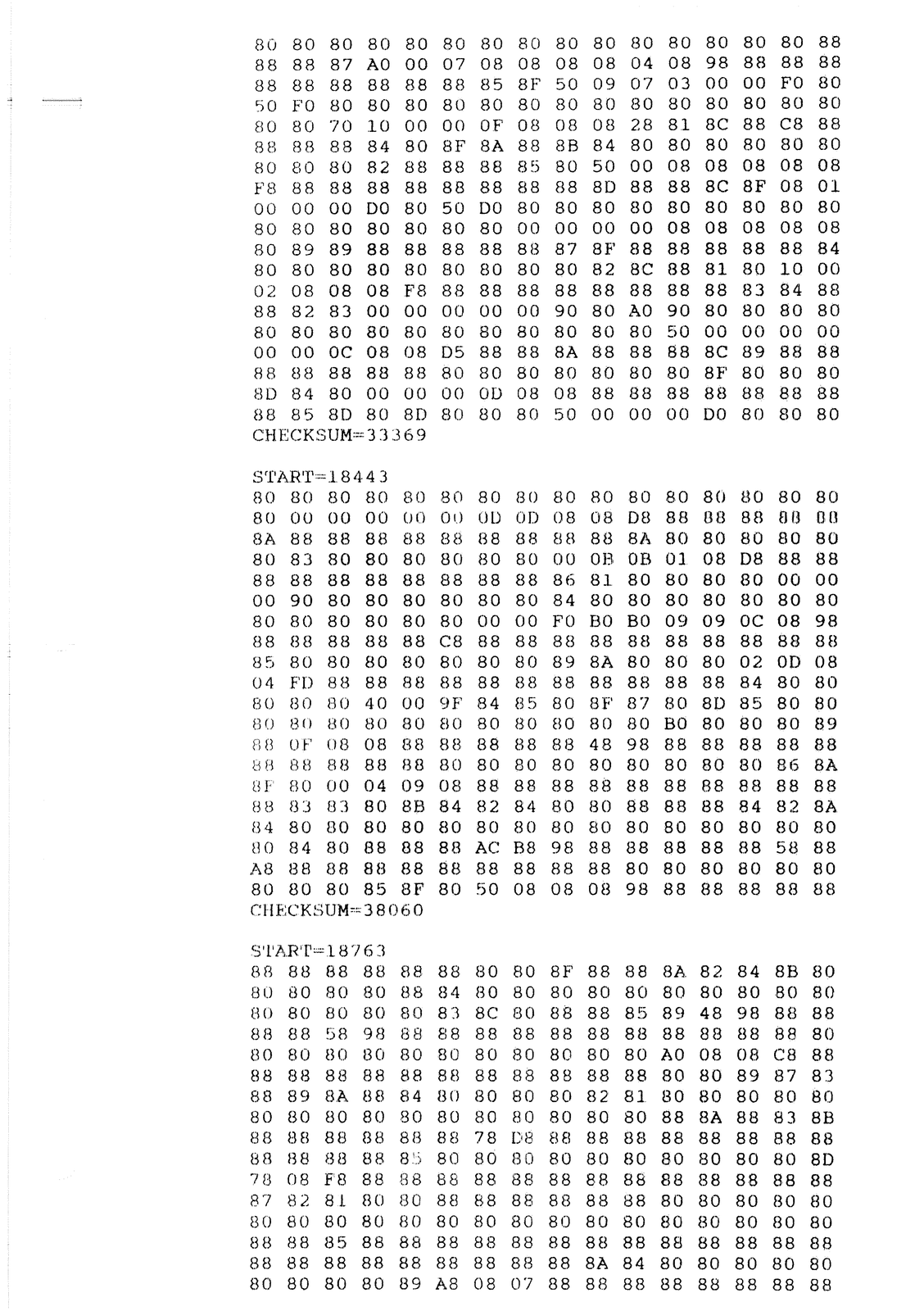
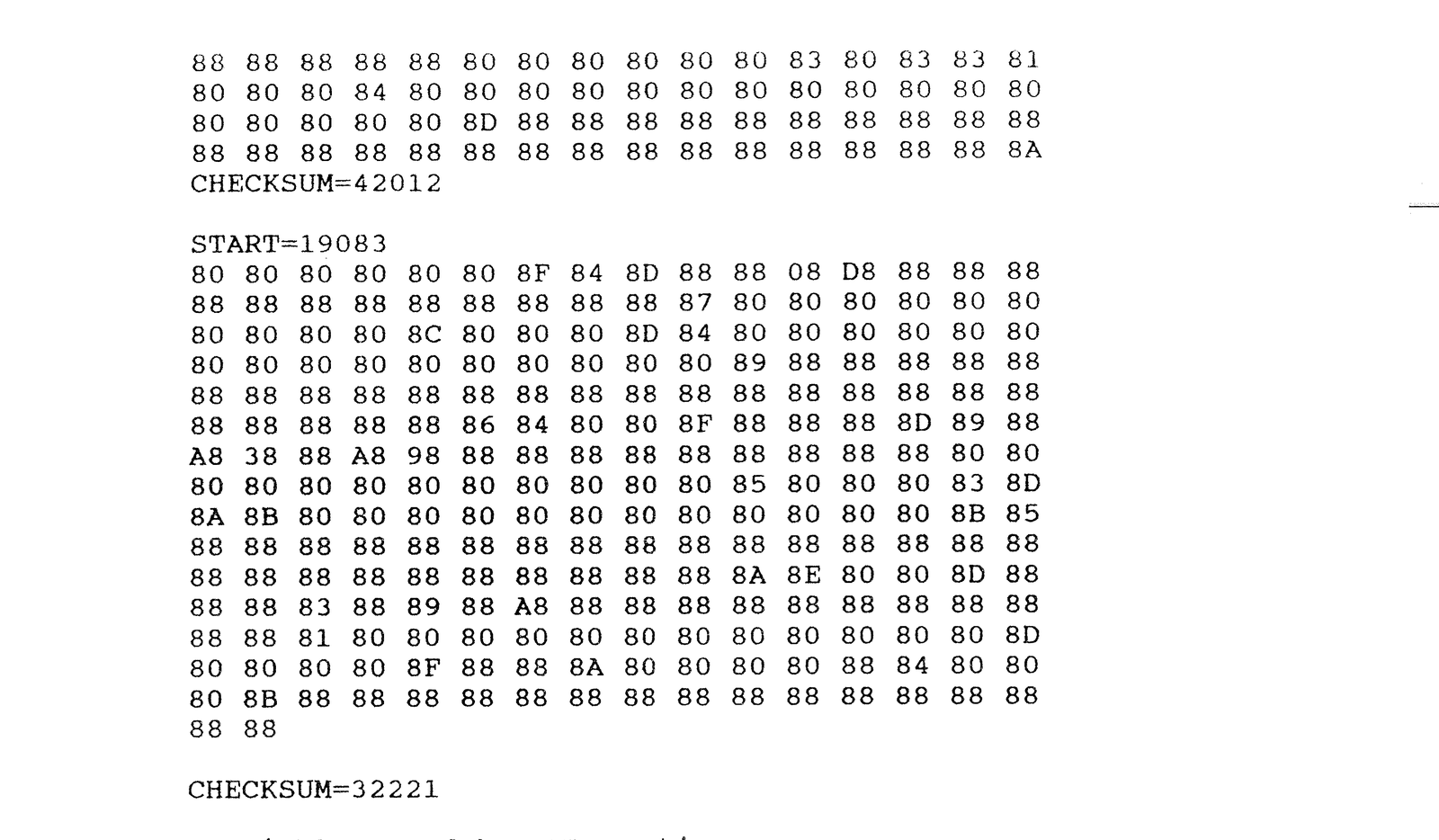
At this point you have your “mega-REM” and might want to save it to tape. Remember NEVER to edit line 1 and NEVER delete line 2. You now need a way of POKEing almost 3K of data into this REM statement. LISTING 1 is provided for this task if you don’t already have a hex loader or don’t know how to calculate the checksums. Add the BASIC lines starting at line 100. Having done this, carefully proofread the program and save it. Run the program and enter the address of the START. To enter the hex data, you can enter any even number of digits, or enter any number of minus signs (“-“) to back up that many bytes. When the screen is full, if the checksum does not match, you need to locate the error and correct it. As you finish each screen, if you want to save your work at that point, break out of the program, save it, and RUN it again until you have entered all 9 screens. Having done this, delete all the lines starting at 100, leaving lines 1 and 2, and add the BASIC of LISTING 2. In this listing there are several REM statements which occur immediately following every line which contains a USR GET call. These are necessary and cannot be omitted since they define which keys are recognised as valid for input. At line 5262, be sure that there are 2 spaces following the REM keyword (the first automatically follows the REM keyword, then put a space, then put the comma, etc.)
THE BASIC
The BASIC (LISTING 2) is responsible for determining which options the student wishes, keeping track of all the countries and locations, and deciding how to scroll the map around to center the locations. Here are some of the more important variables used:
DF  - address of the start of the display file
GET - address of the entry to the GET machine code routine
M   - address of the map scrolling routine
M$  - 63 character string used to remember screen contents
      before the area corrupts it
G$  - used by the GET routine for input
O$  - remembers which option was chosen
T   - keeps track of which countries have been randomly selected
X   - horizontal position of where the top left corner of the
      screen should be placed on the map
Y   - vertical position
Lines 7-240 initialize the program and asks for the 2 options. Depending on which option was chosen, either lines 1000-1193 or 2000-2173 initialize the variables containing information about the locations. This is where you can change the program if you want to put in your own set of locations.
NN        - the number of locations for this option. Change
            this action to how many locations you wish to include
            for this option.
N$(NN,18) - array to store the location names. 1st dimension
            indicates which location 2nd dimension is the maximum
            length of a location name (This should always be 18)

L(NN)     - array which stores the length of each name
X(NN)     - horizontal position on map of location (0-84)
Y(NN)     - vertical position (0-49)
Therefore to create your own set of locations, decide how many to include and LET NN = this number (line 1000 or 2000). Now for each location, LET N$() = the name, LET L() = the length of the name, and LET X() and Y() = the coordinate position on the map of the location.
THE MAP
The map is made from the 16 basic graphics characters. There are 85 characters across and 50 lines. It is stored using 2125 bytes of the mega-REM of line 1, occupying bytes 17200-19324. Bits 0-3 of each of these bytes are used to store a character from the top half of the map and bits 4-7 a character from the bottom half. Therefore the byte at 17200, for example, defines the 1st character of the 1st line and the 1st character of the 25th line. The 4 bits for the top or bottom are translated to graphics characters (codes 0-7, 128-135).
THE MACHINE CODE
There are 3 entry points to machine code in the mega-REM. The 1st, at 16540 (409C hex), is a routine to scroll the map in either direction according to the contents of byte at 16522 (408Ah). The 2nd, at 16861 (41DDh), is to copy the screen area which is used for text into M$ so it can later be restored (by printing M$). The 3rd is the GET routine (which was also in SWN:3:3) at 16900 (4204h).
-Variables used by GET routine
  FLAG 4021  bit 0: 1=key pressed, 0=no key pressed
  GLST 407B  (2 bytes) points to last byte of G$
  GCUR 4082  (2 bytes) points to current entry position in G$
  TIMR 4084  (3 bytes) least significant byte of timer
  TMR3 4086  3rd (most significant) byte of timer
  ELEN 4087  entry length (returned in USR function)

-Variables used by map scrolling routine
  XPOS 4088  horizontal position of window (screen) on map
                              00h <= x <= 54h
  YPOS 4089  vertical position of window on map
                              00h <= y <= 1Ah
  DIRN 408A  direction to move map
             (note: this is opposite the direction in which the
                    window (screen) is scrolled)
           values:
               21h = 33d = CODE "5" : move map left (scroll right)
             22h = 34d = CODE "6" : move map down
             23h = 35d = CODE "7" : move map up
             24h = 36d = CODE "8" : move map righT

; routine to change code to be able to access bottom half of map

408B 3E6F     ACCB LD A,6F
408D 327241         LD (4172),A   ;change instructions at 4171 and
4090 32BE41        LD (41BE),A   ; at 41BD to be RLD
4093 3E67          LD A,67
4095 327F41         LD (417F),A   ;change instructions at 417E and
4098 32CB41        LD (41CB),A   ; at 41CA to be RRD
409B C9            RET
Note: Type-in program listings on this website use ZMAKEBAS notation for graphics characters.