
(C)1986 by W.RIGTER.
Like many of you ,I have been facinated by the idea of Speech Synthesis. I even bought a GI SP0256 chip only to have it sit on a shelf, silently gathering dust.
After all you need a ROBOT or I/O board to make it work,right?.
Meantime others were having fun and contributing to the growing library of speech programs for Karl B. ZSPEAK unit.
Then I saw Ken A. do a demo of Text To Speech in software and heard him describe the potential of such systems for students in the ESL program.
Well, I got hooked and decided to contribute something of my own.
After some discussion with Ken and Harry S.,it became apparent that at least 3 improvements might be needed to the existing ZSPEAK system:
1. Make it cheaper, simpler, compact.
2. Get rid of the screen flicker.
3. Improve the machine language driver.
ZVOICE is the solution to all 3
THE HARDWARE
For the first improvement I used the rule “Simplicity without compromise” to achieve the desired objective.
FIG.1 shows the resulting circuit:
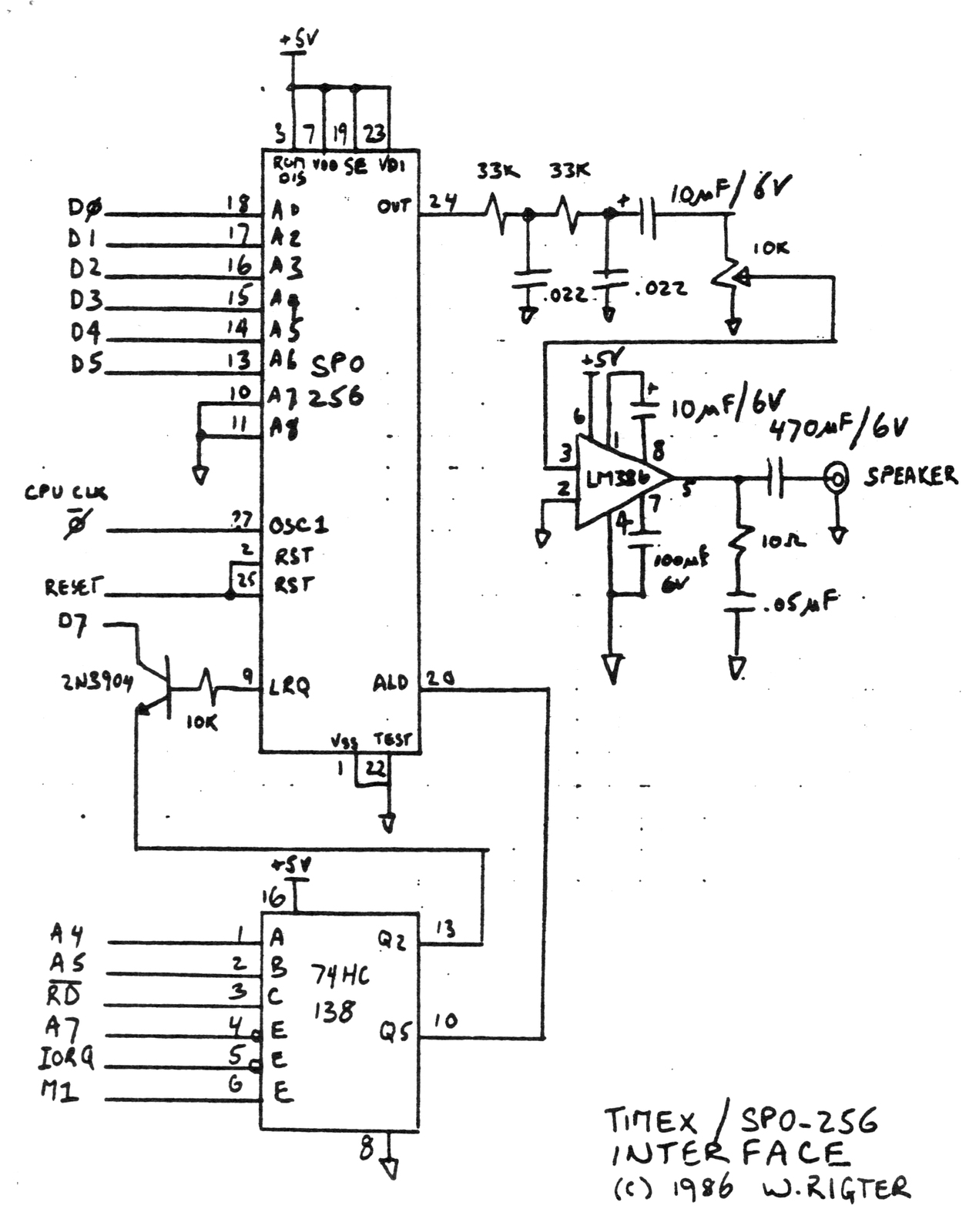
a chip count that is hard to beat,a 50 percent reduction in size, and performance equal to the ZSPEAK SYSTEM.
The I/O ADDRESS remains the same as the ZSPEAK SYSTEM, and hence existing ZSPEAK SOFTWARE can be run unmodified on the new ZVOICE unit. Furthermore new software for the ZVOICE unit can used with the older unit.
The ZVOICE design takes advantage of the “on chip” I/O port of the SP0256 IC and uses the existing CPU clock signal instead of a crystal oscillator. The handshake SBY (active low when busy) signal is gated to the DATA bus with transistor O1 when I/O address 37h is read. If not “busy” a 6 bit DATA byte can be written to I/O address. 17h selecting the PHONEME to be voiced.
The ZVOICE unit can be used with the both TS1000/1500 and 2068 computers.
THE SOFTWARE
Item 2 on our wish list calls for “flicker free” operation and that means SLOW MODE for the TS1000.
But existing BASIC software has a hard time keeping up with a SP0256 chip hungry for PHONEMES.
Like a PRINTER BUFFER,a PHONEME BUFFER could be designed in hardware but this would add to the complexity and cost.
What about a SOFTWARE BUFFER with some MACHINE CODE to speed things up.
LISTING 1 shows a ML routine that does the job.
When combined with the basic program in LISTING 2, the user can assemble a PHONETIC WORD, PHRASE, PARAGRAPH or even a whole book of PHONEMES in a STRING VARIABLE BUFFER. Then using RAND1() and RAND USR 16516,this BUFFER is loaded into the SP0256, one PHONEME at a time,while the printed version of the spoken phrase can be viewed without screen flicker.
The ML routine RETURNS to BASIC when it finds the last phoneme in the BUFFER which was set to a value greater than CHR$ 127.
You can try this software, together with LISTING 3, on your existing ZSPEAK units and discover INTERGRATED SIGHT AND SOUND.
LISTING 1
16514-118,118,42,16,64,17,5,0,25
16523-237,91,50,64,25,219,39,230
16531-128,40,250,126,211,23,35
16537-230,128,0,242,201.
SOFTWARE DETAILS
For those of you wishing to delve deeper into this concept,HANG ON TO YOUR HEADS.
The ML routine in LISTING 1 is decepively simple but conceptually powerful.
As a CORE routine, called from a BASIC or ML program, it expects to find the PHONEME BUFFER in the FIRST VARIABLE of the variable area and uses an OFFSET passed in SYSTEM VARIABLE “SEED” to point to the start of the phoneme phrase to be voiced.
This means that a number of such phrases can be arranged in the buffer, with the start of the selected phrase pointed to by “SEED”.
The ML routine ADDs the offset to the start of the buffer. The SBY line is tested using IN A,(17). The program loops until bit 7=1 Then phonemes are loaded using LD A,(HL) and OUT (17),A . The program loops until phoneme to be loaded has bit 7 set. This is tested using AND A,80, after which the routine returns to the CALLING PROGRAM
If the calling program is MACHINE LANGUAGE ,a slight variation may be used where the SBY polling loop can JR Z,08 to return to the calling program with the Z flag set ,allowing the program to excecute other stuff BETWEEN PHONEMES.
This might provide a continuous speech output while writing data to the VIDEO SCREEN (ie a face with lips moving while speaking).
WOW that left me kind of breathless.
A slower but effective method uses a BASIC calling program which executes the other stuff BETWEEN WORDS when a PAUSE occurs. Still longer pauses between sentences can be used to do FLOATING POINT calculations which may require more time.
Careful PROGRAM ORGANIZATION provides smooth results, with the apparent execution of 2 simultaneous tasks.
True multitasking can be achieved by rewriting the video routine at 281h which is excecuted 60 times per sec , and calling this routine by loading the IX register with the starting address of the new video routine. Considerable fine tuning is required to synchronize with the video timing but the results are worthwhile for this application which could include BUILDIN COMMANDS for VERBAL SCREEN COPY ,LSPEAK,etc.
This is the same technique used for SOFTWARE HIRES GRAPHICS.
LISTING 2
   1 REM
   3▒DIM A$(256)
  10 LET Q=128
  99 REM ASSEMBLE PHONEMES IN B$
 100 LET B$=""
 110 PRINT "INPUT PHONEMES 0 TO 63","""Q"" TERMINATES ENTRY"
 120 INPUT A
 130 LET B$=B$+CHR$ A
 140 PRINT A;",";
 150 IF A<>Q THEN GOTO 120
 199 REM TEXTINPUT/B$ TO BUFFER
 200 PRINT AT 19,0;"ENTER TEXT WORD(S)"
 210 INPUT T$
 215 PRINT T$
 217 LET A$(1 TO )=B$
 220 RAND 1
 230 RAND USR 16516
 235 PRINT AT 19,0;"PRESS N/L TO CONTINUE"
 240 PAUSE 10000
 250 CLS
 260 GOTO 100
*** This article will be concluded next issue.***
Wilf says that anyone can reprint this article if they wish as long as he is given credit.
Reprinted from:
ZX-Appeal, the newsletter of the
Vancouver Sinclair Users Group
2006 Highview Place
Port Moody, BC V3H 1N5
CANADA
$15.00 CDN/yr