
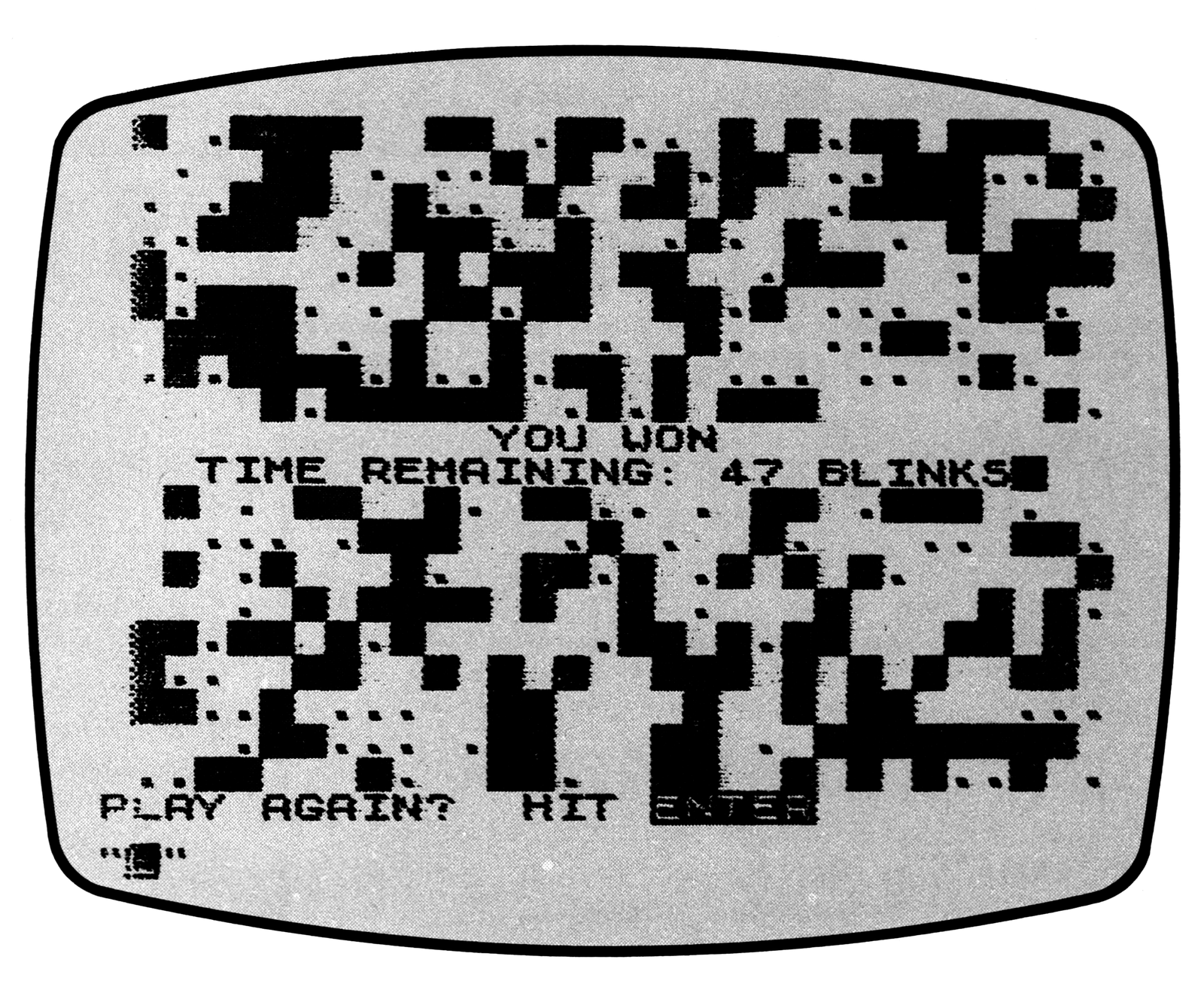
Have you dreamed of writing a graphics game complete with maze, treasure, and gobbling hunter? Perhaps you figured out how to move your man and draw the maze, but how in blazes do you teach your treasure seeker that he cannot just march through walls to collect his prize?
Finding a way around this dilemma had me banging my head against the wall until I discovered that the secret lies in mapping the display and then checking points of action against that map to keep everything within the rules.
This program “ZX Maze” does just that by charting the TV screen with a numerical array. Each value of the array corresponds to a point in the maze. Depending on the assigned value of the point, the roving treasure hunter proceeds through the maze, bumps into a wall, loses or collects points, or finds his treasure.
“ZX Maze” fits in ZX81 or Timex/Sinclair 1000 computers with 16K RAM. After entering the program, type RUN and ENTER. First a random maze and bonus dots are drawn. Then the treasure ($) and blinking gobbler (0) are also randomly placed. Move the man by pressing one of the arrow keys 5, 6, 7, 8. Since everything is positioned randomly, you or the treasure (or both) could materialize inside a wall or closed room with no chance to win. The solution to this minor problem was to give the man a blaster. Push S and the man blows a hole through anything. Watch out though because you could blow up the treasure.
The object of the game is to take the treasure within an alloted amount of time (50 blinks of the man). Using your blaster costs you 9 blinks, but for every bonus dot you gobble, you gain a blink. If you manage to land on the treasure without running out of blinks, the program proclaims your victory in flashing lights. If you run out of time or if you are a little too trigger happy on your blaster, the program says, “YOU LOSE.” In either case the blinks remaining are PRINTed and the computer gives you the option to play again.
How the Program Works
In line 5, C is the clock. You start off with 50 blinks. Increase the value of C to make the game easier.
At line 10 the numerical array A(21,31) is dimensioned. This array is a map of the video screen. Each point on the screen corresponds to a point in the array. A(X,Y) would equal the X,Y coordinates of a screen location. At this stage all values are 0.
Lines 20 to 90 print the maze. In line 40, if a random number between 1 and 10 is greater than 5, you GOTO 70 where a maze wall is PRINTed.
If the random number is less than or equal to 5 you skip line 40 and proceed to 42 where a corridor gives the array position a value of 1.
Next, line 45 acts just like 40, but this time you GOTO 61 to PRINT bonus points. Array values for these are set at -1 in line 62.
When the loop is finished, lines 100 to 150 come into play. In turn they select random X and Y coordinates on the screen for the treasure (“$”) and the man. Line 130 gives the treasure a value of 10 in the array.
Line 155 initializes L$ which is used in the man moving routines.
Then lines 157 to 250 act as a keyboard scanning cycle. First, line 160 prints the man. 162 checks for win or lose conditions. If one is met, you GOTO 2000. If not, then line 163 adjusts the time remaining. If the man is sitting on a “.”, A(Y,X) will equal -1 so C will increase: C-(-1) is the same as saying C+1. But the next line, 164 changes the value to a blank space so the next time you land there you will not get another bonus blink.
Lines 165 to 190 check if you are pushing a key. At 165, L$ is given the same value as INKEY$, but if you are not pressing a key, L$ will remain unchanged. Once the man starts moving, this line keeps him going in the same direction until you press a key to change it.
At line 170 the computer looks for the arrow keys. If an arrow was pressed, you will GOTO either 500, 600, 700, or 800 where the man is moved.
The instruction at line 180 blinks the man between positions.
190 checks to see if you want to use the blaster. If you are pushing S when the computer comes to this line, you will GOTO 1000, an explosion routine.
Lines 500 to 520 and then 160 move the man from right to left, the direction of the arrow on the 5 key. The remaining lines to 820 also move him down, up, and from left to right in the same manner. Before the actual change is made, the computer checks the array value of the next position. It will proceed only if the array value is not zero: i.e., not a wall.
As stated before, line 1000 is an explosion which executes if you were pressing S. Lines 1010 to 1060 fix the new values of the array since you are removing portions of the maze with each blast. Line 1020 checks whether you blew up the treasure. If you did, you lose at 2000.
2000 to the end is the win/lose display. If the man’s array position equals 10, line 2005 gets PRINTed. If the explosion points are 10 or if you run out of time, line 2010 gets displayed.
Play the game to see just how screen mapping works. You can add all kinds of complexities for the graphics to interact with.
If you come up with something interesting, I would be interested in seeing it.
([inv …] = inverse characters; [g…] = graphics, see the graphics line notes below.)
   1 REM [inv ZX MAZE.]
   2 REM [inv (C) 1982.]
   3 REM [inv THOMAS B. WOODS.]
   4 REM
   5 LET C=50
  10 DIM A(21,31)
  20 FOR N=1 TO 30
  30 FOR Q=1 TO 20
  40 IF INT (RND*10)>5 THEN GOTO 70
  42 LET A(Q,N)=1
  45 IF INT (RND*10)>5 THEN GOTO 51
  50 NEXT Q
  55 NEXT N
  60 GOTO 100
  61 PRINT AT Q,N;"."
  62 LET A(Q,N)=-1
  63 GOTO 50
  70 PRINT AT Q,N;"[inv space]"
  90 GOTO 50
 100 LET X=INT (RND*28)+2
 110 LET Y=INT (RND*18)+2
 120 PRINT AT Y,X;"$"
 130 LET A(Y,X)=10
 140 LET X=INT (RND*28)+2
 150 LET Y=INT (RND*18)+2
 155 LET L$="X"
 157 SLOW
 160 PRINT AT Y,X;"O";AT Y,X;"*"
 162 IF C<=0 OR A(Y,X)=10 THEN GOTO 2000
 163 LET C=C-A(Y,X)
 164 IF A(Y,X)=-1 THEN LET A(Y,X)=1
 165 IF INKEY$<>"" THEN LET L$=INKEY$
 170 IF L$>="5" AND L$<="8" THEN GOTO 100*VAL L$
 180 PRINT AT Y,X;" "
 190 IF INKEY$="S" THEN GOTO 1000
 250 GOTO 160
 500 PRINT AT Y,X;" "
 510 IF X>2 THEN IF A(Y,X-1)<>0 THEN LET X=X-(X>2)
 520 GOTO 160
 500 PRINT AT Y,X;" "
 610 IF Y<20 THEN IF A(Y+1,X)<>0 THEN LET Y=Y+(Y<20)
 620 GOTO 160
 700 PRINT AT Y,X;" "
 710 IF Y>2 THEN IF A(Y-1,X)<>0 THEN LET Y=Y-(Y>2)
 720 GOTO 160
 800 PRINT AT Y,X;" "
 810 IF X<30 THEN IF A(Y,X+1)<>0 THEN LET X=X+(X<30)
 820 GOTO 160
1000 PRINT AT Y-1,X-1;" * ";AT Y,X-1;"*[inv O]*";AT Y+1,X-1;" * ";AT Y-1,X-1;"   ";AT Y,X-1;" O ";AT Y+1,X-1;"   "
1010 FOR Q=Y-1 TO Y+1
1015 PRINT AT Y,X;"*"
1020 FOR N=X-1 TO X+1
1025 IF A(Q,N)=10 THEN GOTO 2000
1030 LET A(Q,N)=1
1035 PRINT AT Y,X;"O"
1037 LET C=C-1
1040 NEXT N
1050 NEXT Q
1060 GOTO 160
2000 FOR B=1 TO 7
2005 IF A(Y,X)=10 THEN PRINT AT 10,0;"[gF,gG,gF,gG,gF,gG,gF,gG,gF,gG]* YOU WON *[gG,gF,gG,gF,gG,gF,gG,gF,gG,gF]";AT 10,0;"[inv X x10]* YOU WON *[inv X x10]";AT 10,0;"XXXXXXXXXX* [inv YOU WON] *XXXXXXXXXX";AT 10,0;"*********** [inv YOU WON] **********";AT 10,0;"           YOU WON           "
2010 IF A(Q,N)=10 OR C<=0 THEN PRINT AT 10,0;"[inv space x12][inv YOU LOSE][inv space x12]"
2020 NEXT B
2025 IF A(Q,N)=10 THEN PRINT AT 10,0;"    YOU BLEW UP THE TREASURE   "
2027 PRINT TAB 2;" TIME REMAINING:  ";C*(C>0);" BLINKS"
2030 PRINT AT 21,0;"PLAY AGAIN? HIT [inv ENTER]"
2040 INPUT A$
2050 CLS
2055 FAST
2060 RUN
Graphics line notes:
- 1: ZX MAZE.
- 2: (C) 1982.
- 3: Thomas B. Woods.
- 70: Inverse space.
- 1000: Inverse letter O.
- 2005: F,G,F,G,F,G,F,G,F,G; G,F,G,F,G,F,G,F,G,F; inverse X (10); inverse X (10); inverse YOU WON; inverse YOU WON.
- 2010: Inverse space (12); inverse YOU LOSE; inverse space (12).
- 2030: Inverse ENTER.
Note: Type-in program listings on this website use ZMAKEBAS notation for graphics characters.