Transfering Files Between Computers
Picture this…. You have just been ejected from your publisher’s office with these angry words shouted in your ear…”Last time you brought me a manuscript typed up on toilet paper, now you say you’ve got one on disk but my Mac can’t read it !?…
Don’t dispair, That priceless manuscript that took you three years to type into your 2068 or TS1000 can easily be transferred to any other computer with the right equipment and software.
To transfer files, you will require communications programs and serial ports or Modems for each machine.
Source Computer       Target Computer
2068 or TS1000        APPLE, IBM, etc

2050 modem            requires a modem
                      (external or internal)

Z-SIO (2068)          serial interface
Memotech RS-232       (usually installed)
Byte-Back RS-232
Before you transfer your document file to the target system, it is recommended that you remove all punctuation and embedded codes to make the job of reformating the file on the target system easier. This is standard proceedure for desktop publishing.
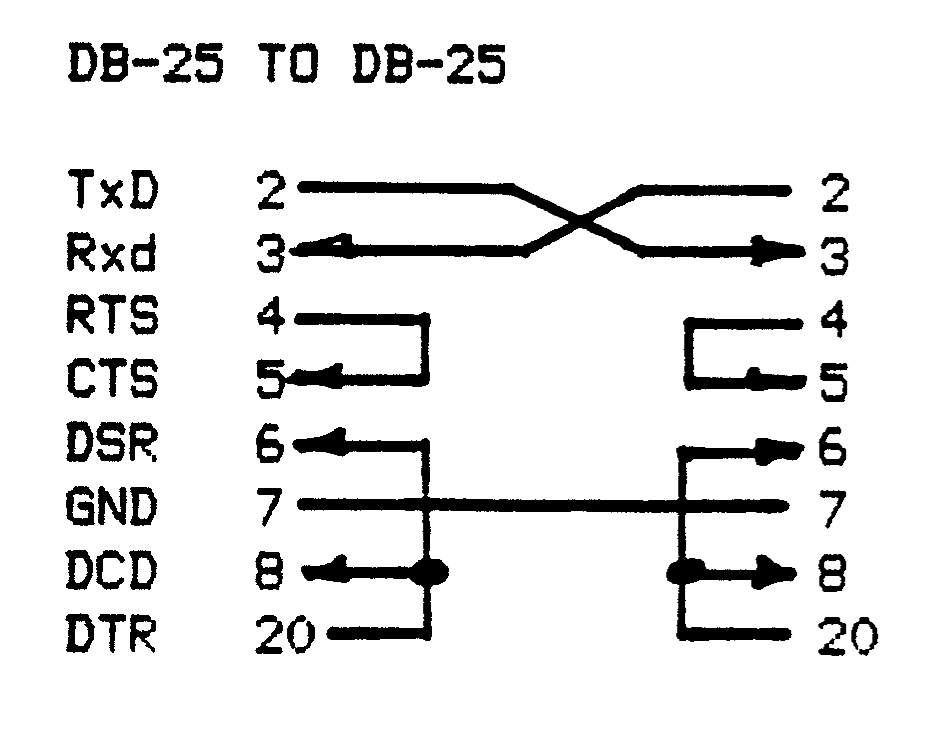
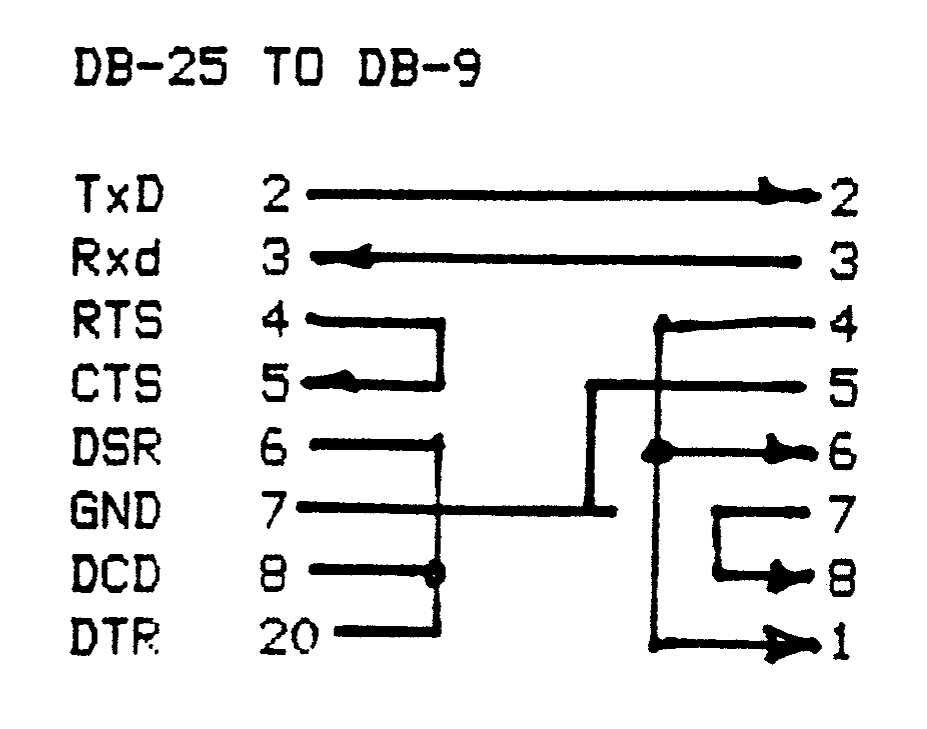
If you are using a 2050 modem, simply connect the phone cable that comes with it to the target modem. To connect serial ports (the prefered choice), you require a ‘Null Modem’ cable. Shown are the connections required for standard DB-25 and DB-9 (IBM-AT) serial ports,
Run your communications software on each machine, and set baud rates, parity and stop bits to match. Connect the two systems via the software (read the manuals !), and confirm that data is transmitting between the two systems… simply enter a string of key strokes and see if it appears on the other monitor. If the software allows it, set up one of the systems in Host mode (ie: your very own BBS) and handle the file transfers from the other system. For example, with a 2068 using MAXCOM in BBS mode, you would “call” from the target system and “download” your required files from the 2068.
If your software does not have this feature, you must set up the target system to “download” your file, and while it waits for the file, have the source system “upload” the file. Note that while the process is fairly straight forward, complications can occur if you are not familiar with the software so read the manuals.
Once your document is transfered, you can load it into the target word processor and reformat it to your requirments.
this transfer process can also be used for other purposes. For example, a hex file could be transfered from one system to another that has a eprom programmer. Thus, the source code for an eprom on an embedded microprocessor board, compiled on an IBM XT clone, could be downloaded to a TS1000 with John Oliger‘s eprom burner… eprom burners for the IBM start at about $100 US and go up from there.