
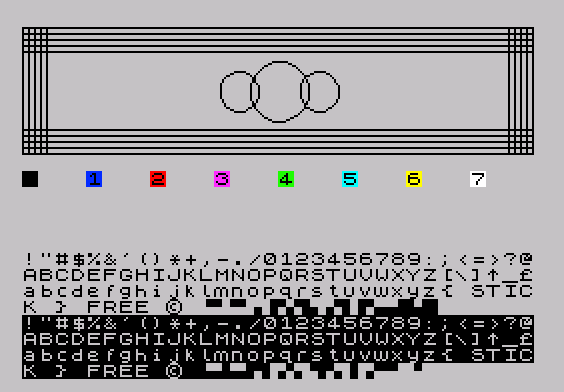
This program is a display demonstration that showcases several TS2068 graphics and color capabilities in sequence. It first renders a row of colored paper patches (INK 0, PAPER 0–7) across the middle of the screen, then prints the full printable character set (CHR$ 33–143) twice — once in normal video and once in inverse video. Finally, it draws a geometric figure using CIRCLE and PLOT/DRAW commands: three concentric-radius circles at the bottom of the graphics area, flanked by vertical line grids on the left and right edges and horizontal line grids forming two banded rows across the full screen width. The BRIGHT 1 attribute is applied to the color patch display, and the loop at line 20 has a structural anomaly where the inner FOR loop (variable i, lines 20–60) is never closed with a matching NEXT i, meaning only the NEXT c at line 60 executes and the i variable goes unused. The graphics section uses STEP 3 in both PLOT/DRAW loops to produce evenly spaced parallel lines.
Program Analysis
Program Structure
The program is divided into three functional sections separated by line number ranges:
- Lines 5–60: Initializes display attributes and prints colored paper blocks for all eight PAPER colors (0–7).
- Lines 100–140: Prints the printable character range CHR$ 33–143 twice — first in normal video, then in inverse video.
- Lines 200–290: Draws geometric shapes using
CIRCLEandPLOT/DRAW, including three circles and two sets of parallel grid lines.
Color Patch Display (Lines 5–60)
Line 5 sets up a clean white-on-black display with INK 0: PAPER 7: BORDER 7: CLS. The outer loop (FOR c=0 TO 7) iterates over all eight PAPER colors. Each color patch is printed at screen position AT i, c*4 — spacing the eight patches four columns apart across the screen. The BRIGHT 1 attribute modifier is applied to each patch.
Notable Bug: Mismatched FOR/NEXT Loops
There is a structural anomaly in lines 20–60. Variable i is initialized with FOR i=9 TO 12 at line 20, but the only NEXT statement in the block (line 60) references c, not i. In Sinclair BASIC, NEXT c will correctly advance the c loop, but the i loop is never properly iterated or closed. As a result, i is always 9, the AT i,c*4 positions patches only on row 9, and the intended row-scanning behavior (rows 9–12) never occurs. The program functions but silently discards the i dimension of the display.
Character Set Display (Lines 100–140)
Lines 120–130 use a tight inline FOR/NEXT loop on a single line to print every character from CHR$ 33 (exclamation mark) through CHR$ 143 (the last block graphic) consecutively with no separating spaces. The outer loop (FOR v=0 TO 1) repeats the sequence twice: once with INVERSE 0 (normal) and once with INVERSE 1 (inverse video), producing a visual catalog of all printable and block-graphic characters.
Geometric Graphics (Lines 200–290)
Three circles are drawn at y=143 centered at x positions 108, 128, and 148, with radii 10, 15, and 10 respectively, creating a small cluster. Two sets of vertical lines are drawn using PLOT/DRAW pairs: one set at the left edge (x=0 to 12, step 3) and a mirrored set at the right edge (x+243). Each vertical line spans from y=175 down 63 pixels. Two sets of horizontal lines are drawn at y=112–124 and y=163–175 (y+51), each spanning the full 255-pixel screen width.
Key Idioms and Techniques
- Using
c*4as the column parameter inATto evenly space eight items across the 32-column display. - Printing character sets via an inline
FOR/NEXTon a single line (line 120) to minimize line overhead. STEP 3in bothPLOT/DRAWloops produces visually spaced parallel lines without additional arithmetic.DRAW 0,-63andDRAW 255,0use signed delta arguments for vertical and horizontal lines respectively.
Variable Summary
| Variable | Purpose |
|---|---|
c | Color index (0–7) for PAPER patches; also column multiplier |
i | Declared row index (9–12), unused due to mismatched NEXT |
v | INVERSE mode toggle (0=normal, 1=inverse) |
h | Character code for CHR$ printing (33–143) |
yc | Y-coordinate for circle centers (143) |
x | X offset for vertical line grid (0–12, step 3) |
y | Y offset for horizontal line grid (112–124, step 3) |
Image Gallery
Source Code
 5 INK 0: PAPER 7: BORDER 7: CLS
 10 FOR c=0 TO 7
 20 FOR i=9 TO 12
 30 PRINT BRIGHT 1; PAPER c;AT i,c*4;c
 60 NEXT c
 100 PRINT AT 13,0
 110 FOR v=0 TO 1
 120 FOR h=33 TO 143: PRINT INVERSE v;CHR$ h;: NEXT h
 130 PRINT
 140 NEXT v
 200 LET yc=143
 210 CIRCLE 108,yc,10: CIRCLE 128,yc,15: CIRCLE 148,yc,10
 220 FOR x=0 TO 12 STEP 3
 230 PLOT x,175: DRAW 0,-63
 240 PLOT x+243,175: DRAW 0,-63
 250 NEXT x
 260 FOR y=112 TO 124 STEP 3
 270 PLOT 0,y: DRAW 255,0
 280 PLOT 0,y+51: DRAW 255,0
 290 NEXT y
Note: Type-in program listings on this website use ZMAKEBAS notation for graphics characters.