
This program is a collection of four graphical pattern generators, selectable from a menu at line 1500. The first two modules draw symmetrical random-color plots and overlapping line patterns using OVER 1 (XOR) drawing mode. The third module, converted from an IBM program by Ted Knyszek, draws three successive geometric figures using an iterative polygon-shrinking technique: each pass replaces vertex coordinates with weighted averages (RU and SU fractions) of adjacent vertices, producing spirograph-like converging polygons. A Tiny Turtle module at line 1000 implements a simple Logo-style turtle graphics engine using trigonometric functions, accepting user input for repeat count, turn angle, and step distance. The program uses RANDOMIZE USR 50450 between geometric sections, suggesting a machine code routine stored in memory for screen capture or other utility purposes.
Program Analysis
Program Structure
The program is organized as four independent modules sharing a common menu entry point at line 1500. Execution begins via RUN 1500 at line 5. Each module runs autonomously and returns to the menu via GO TO 90 or RUN at the end. The modules are:
- Pattern 1 (lines 10–90): Random symmetric four-point XOR plots.
- Pattern 2 (lines 100–160): Overlapping diagonal line sweeps using subroutines.
- Geometric Drawings (lines 300–740): Three iterated polygon-shrink figures, converted from IBM BASIC.
- Tiny Turtle (lines 1000–1130): Interactive Logo-style turtle graphics.
Pattern 1 — Symmetric Random Plotting
Lines 40–80 pick random coordinates x (0–127) and y (0–87), then plot four symmetrically mirrored points using PLOT x,y, PLOT 255-x,y, PLOT x,175-y, and PLOT 255-x,175-y. This produces four-fold reflective symmetry across both screen axes. OVER 1 enables XOR plotting so points toggle rather than overwrite, giving a flickering layered effect. Random INK and BRIGHT are set each iteration. The loop continues until any key is pressed (INKEY$<>"").
Pattern 2 — Diagonal Line Sweeps
Two subroutines at lines 150 and 160 each sweep all 256 x-positions, drawing diagonal lines across the full screen in opposite directions. Line 140 calls them in sequence with color changes, creating a dense cross-hatch interference pattern under OVER 1. The color selection at line 130 avoids repeating the previous ink color by looping until i <> a.
Geometric Drawings — Iterated Polygon Shrinking
This section (lines 320–740), credited to Ted Knyszek as an IBM conversion, draws three distinct figures using the same algorithmic skeleton: an outer loop over grid positions, an inner loop of N iterations that connects current polygon vertices, then updates them by blending adjacent vertices using the formula:
T(M) = RU*X(M) + SU*X(NJ)K(M) = RU*Y(M) + SU*Y(NJ)
where SU is a small step fraction and RU = 1 - SU. Each iteration moves every vertex slightly toward the next one, causing the polygon to spiral inward, producing converging nested polygon figures. The three sub-figures use quadrilateral (4-vertex), triangular (3-vertex), and hexagonal (6-vertex) base polygons respectively.
NOT PI and SGN PI Idioms
NOT PI evaluates to 0 (since PI is non-zero, NOT PI = 0 in Sinclair BASIC), and SGN PI evaluates to 1. These are used throughout lines 350–710 as loop start values, replacing the literals 0 and 1. This is a well-known Sinclair BASIC code-golf idiom that saves a few bytes in the tokenized program.
Machine Code Call — RANDOMIZE USR 50450
Lines 440, 580, and 720 each call RANDOMIZE USR 50450 between geometric figures. The address 50450 falls in the upper RAM area; this is a machine code routine presumably stored there (likely loaded separately or resident in the system). It is called between patterns, possibly to perform a screen snapshot, palette reset, or other utility function. Its exact behavior depends on externally loaded code not present in this listing.
Tiny Turtle Module
Lines 1000–1130 implement a Logo-inspired turtle graphics engine. A helper function FN R(X) converts degrees to radians (X*PI/180). The turtle maintains a cumulative ANGLE variable, which accumulates the user-supplied right-turn value each step. Movement is computed as:
ACROSS = SIN(FN R(ANGLE)) * FORWARDDOWN = COS(FN R(ANGLE)) * FORWARD
and rendered with a single DRAW ACROSS, DOWN. Note that DRAW uses relative coordinates, so this is correct. The initial PLOT 127,87 centers the turtle. After each full repeat loop, the program loops back to line 1030 to accept new parameters without clearing the screen unless the user requests it, allowing overlapping patterns to accumulate.
Menu and Navigation
The menu at lines 1500–1570 uses RUN n to jump to each module. RUN without a line number (line 1530) restarts from line 5, which immediately re-runs the menu via RUN 1500. Line 90 uses INPUT ... LINE a$ followed by bare RUN to return to the menu after Pattern 1 or Pattern 2. The CLEAR at line 1500 resets the variable space on each menu entry.
Notable Anomalies
- Line 350 uses
NOT PIas a loop start of 0, iteratingIandJfrom 0 to 3 (4 values). This means indices 1–4 of theX()andY()arrays are used, matching theDIMsizes declared at line 330. - Line 410 computes
NJ = INT(M - 4*INT(M/4)) + 1, which is modulo-4 wrap (giving 1–4 cycling), used to link the last vertex back to the first. - Line 540 contains
DRAW (X2-X1),((Y2-30)-(Y1-30)), which simplifies toDRAW X2-X1, Y2-Y1; the subtraction of 30 from both operands cancels out and has no effect. - The
INK 9at line 1500 is a transparent ink attribute (value 9 is not a standard ink color; on the TS2068, values above 7 may produce transparent or undefined ink behavior).
Image Gallery
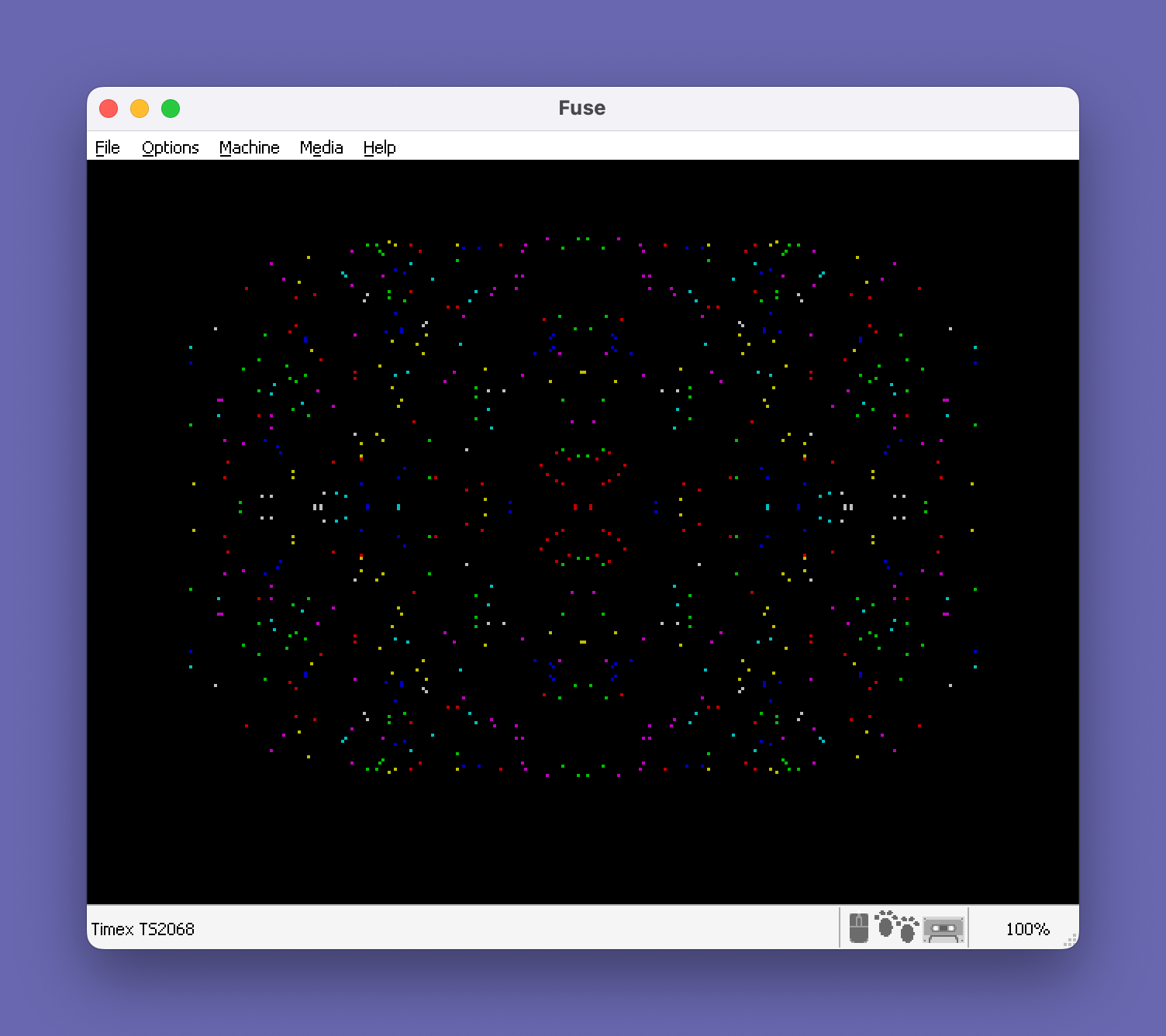
Source Code
    5 RUN 1500
   10 REM Patterns 1
   20 OVER 1: RANDOMIZE
   30 BORDER 0: PAPER 0: CLS
   40 LET x=RND*128
   50 LET y=RND*88
   60 INK RND*7: BRIGHT INT (RND*2)
   70 PLOT x,y: PLOT 255-x,y: PLOT x,175-y: PLOT 255-x,175-y
   80 IF INKEY$="" THEN GO TO 40
   90 OVER 0: INPUT "Press ENTER for Menu "; LINE a$: RUN
  100 REM  Patterns 2
  110 OVER 1: BORDER 0: PAPER 0: INK 2: CLS
  120 GO SUB 150
  130 LET a=2: LET i=INT (RND*7)+1: IF i=a THEN GO TO 130
  140 INK i: LET a=i: GO SUB 160: GO SUB 150: GO SUB 150: GO SUB 160: GO TO 130
  150 FOR x=0 TO 255: PLOT x,0: DRAW 255-x,175: PLOT 255-x,175: DRAW x-255,-175: NEXT x: RETURN
  160 FOR x=0 TO 255: PLOT x,175: DRAW 255-x,-175: PLOT 255-x,0: DRAW x-255,175: NEXT x: RETURN
  300 REM CONVERTED FROM IBM TO  TS-2068 BY TED KNYSZEK
  320 BORDER 0: PAPER 0: INK 7: CLS
  330 DIM X(6): DIM Y(6): DIM T(6): DIM K(6)
  340 LET SU=.12: LET RU=1-SU
  350 FOR I=NOT PI TO 3: FOR J=NOT PI TO 3: IF INT (I-2*INT (I/2))=INT (J-2*INT (J/2)) THEN GO TO 370
  360 LET Y(1)=43: LET Y(2)=0: LET Y(PI)=0: LET Y(4)=43: GO TO 380
  370 LET Y(1)=0: LET Y(2)=43: LET Y(PI)=43: LET Y(4)=0
  380 LET X(1)=1: LET X(2)=1: LET X(PI)=64: LET X(4)=64
  390 FOR N=NOT PI TO 18: LET X1=X(4)+I*63: LET Y1=Y(4)+J*43
  400 FOR M=SGN PI TO 4: LET X2=X(M)+I*63: LET Y2=Y(M)+J*43
  410 PLOT X1,Y1: DRAW (X2-X1),(Y2-Y1): LET X1=X2: LET Y1=Y2: LET NJ=INT (M-4*INT (M/4))+1
  420 LET T(M)=RU*X(M)+SU*X(NJ): LET K(M)=RU*Y(M)+SU*Y(NJ): NEXT M
  430 FOR P=SGN PI TO 4: LET X(P)=T(P): LET Y(P)=K(P): NEXT P: NEXT N: NEXT J: NEXT I
  440 RANDOMIZE USR 50450
  450 PAUSE 300
  460 CLS
  470 LET SU=.1: LET RU=1-SU: LET II=1: LET C=1
  480 FOR J=NOT PI TO 3: LET II=-II: LET JJ=1: FOR I=NOT PI TO 4: LET JJ=-JJ: IF I<J OR I>4-J THEN GO TO 570
  490 IF J<2 OR I>2 THEN LET C=(C-INT (C/3)*3)+1
  500 IF J=3 THEN LET C=(C-INT (C/3)*3)+1
  510 LET X(1)=0: LET X(2)=39: LET X(PI)=78: LET Y(1)=0: LET Y(2)=-48: LET Y(PI)=0: IF II=JJ THEN LET Y(2)=48
  520 FOR N=SGN PI TO 11: LET X1=3+X(PI)+I*39: LET Y1=160-Y(PI)-J*48+II*JJ*24
  530 FOR M=SGN PI TO 3: LET X2=3+X(M)+I*39: LET Y2=160-Y(M)-J*48+II*JJ*24: LET C=(C-INT (C/3)*3)+1
  540 PLOT X1,Y1-39: DRAW (X2-X1),((Y2-30)-(Y1-30)): LET X1=X2: LET Y1=Y2: LET NJ=(M-INT (M/3)*3)+1
  550 LET T(M)=RU*X(M)+SU*X(NJ): LET K(M)=RU*Y(M)+SU*Y(NJ): NEXT M
  560 FOR P=SGN PI TO 3: LET X(P)=T(P): LET Y(P)=K(P): NEXT P: NEXT N
  570 NEXT I: NEXT J
  580 RANDOMIZE USR 50450
  590 PAUSE 300
  600 CLS
  610 LET SU=.2: LET RU=1-SU
  620 FOR J=NOT PI TO 2: FOR I=NOT PI TO 2: IF J=0 AND I<>1 THEN GO TO 710
  630 LET E=0: IF I=1 THEN LET E=31
  640 LET X(1)=0: LET X(2)=25: LET X(PI)=75: LET X(4)=100: LET X(5)=75: LET X(6)=25
  650 LET Y(1)=31: LET Y(2)=0: LET Y(PI)=0: LET Y(4)=31: LET Y(5)=62: LET Y(6)=62
  660 FOR N=NOT PI TO 20: LET X1=25+(X(6)+I*75)*.8: LET Y1=(220-Y(6)-J*62-E)*.9
  670 FOR M=SGN PI TO 6: LET X2=25+(X(M)+I*75)*.8: LET Y2=(220-Y(M)-J*62-E)*.9
  680 PLOT X1,Y1: DRAW X2-X1,Y2-Y1: LET X1=X2: LET Y1=Y2: LET NJ=INT (M-6*INT (M/6))+1
  690 LET T(M)=RU*X(M)+SU*X(NJ): LET K(M)=RU*Y(M)+SU*Y(NJ): NEXT M
  700 FOR P=SGN PI TO 6: LET X(P)=T(P): LET Y(P)=K(P): NEXT P: NEXT N
  710 NEXT I: NEXT J
  720 RANDOMIZE USR 50450
  730 PAUSE 300
  740 GO TO 90
 1000 REM TINY TURTLE
 1010 DEF FN R(X)=X*PI/180
 1020 LET ANGLE=0
 1030 INPUT "NO. OF REPEATS? ";REPEAT
 1040 INPUT "ANGLE TURN TO RIGHT? ";RIGHT
 1050 INPUT "STEPS FORWARD? ";FORWARD
 1060 INPUT "CLEAN BEFORE DRAWING (Y/N)? ";A$
 1070 IF A$="Y" OR A$="y" THEN CLS : PLOT 127,87
 1080 FOR A=1 TO REPEAT
 1090 LET ANGLE=ANGLE+RIGHT
 1100 LET ACROSS=SIN (FN R(ANGLE))*FORWARD
 1110 LET DOWN=COS (FN R(ANGLE))*FORWARD
 1120 DRAW ACROSS,DOWN
 1130 NEXT A: GO TO 1030
 1500 BORDER 6: PAPER 7: INK 9: OVER 0: CLEAR
 1510 PRINT ''TAB 12;"Patterns"
 1520 PRINT '''"      1  Pattern 1"''"      2  Pattern 2"''"      3  Geometric Drawings"''"      4  Basic Turtle Drawing"
 1530 INPUT "Select 1, 2, 3, 4,  ";a: IF (a<1) OR (a>4) THEN RUN
 1540 IF a=1 THEN RUN 10
 1550 IF a=2 THEN RUN 100
 1560 IF a=3 THEN RUN 300
 1570 RUN 1000
 9900 SAVE "4 Patterns" LINE 1
Note: Type-in program listings on this website use ZMAKEBAS notation for graphics characters.