
BBDOS is a disk operating system for the ZX81 and TS1000 with the AERCO FD-ZX floppy disk interface. It replaces AERCO’s BASIC menu program, SADOS, with machine code that installs itself in RAM between 8K and 16K, where NEW and the reset switch leave it alone. The disk is then managed by file name. BBDOS shows the directory, and you load a program by typing its name, or just the start of it. It works out whether a program needs a 16K or a 64K page, splits and rejoins 64K slots as files come and go, and handles one or two drives, single or double sided. Boot it with RAND USR 13303; RAND USR 11000 returns to it from BASIC.
The directory screen takes one-letter commands typed as :x. They write the program in memory to disk with a chosen start line (:W), erase an entry (:E), print the directory (:P) or the BASIC listing (:L), format a disk with the DOS on it (:F), renumber a disk (:N), switch drives (:X), copy a whole disk (:C), move one file to the other drive (:M) or between disks on a single drive (:S), and set a program to load automatically at boot (:J). :H and :Z jump into Hot-Z II and Z-Tools, and six more commands send Prowriter control codes. From BASIC, RAND USR 12000 gives programs 45 functions: the function number goes in Z and a name or data in Z$, and BBDOS returns a status in Z. They cover saving and loading programs and variables files by name, erasing, directory searches, a 30-character keyboard input routine and printer output.
Hardware needed. BBDOS needs a real ZX81 or TS1000 with the AERCO FD-ZX interface, plus RAM enabled at 8K-12K (2000-2FFF hex) and nothing at 12K-14K, where the AERCO board sits. The files in the download are for that system. They will load into an emulator from memory, but BBDOS cannot do anything without the interface.
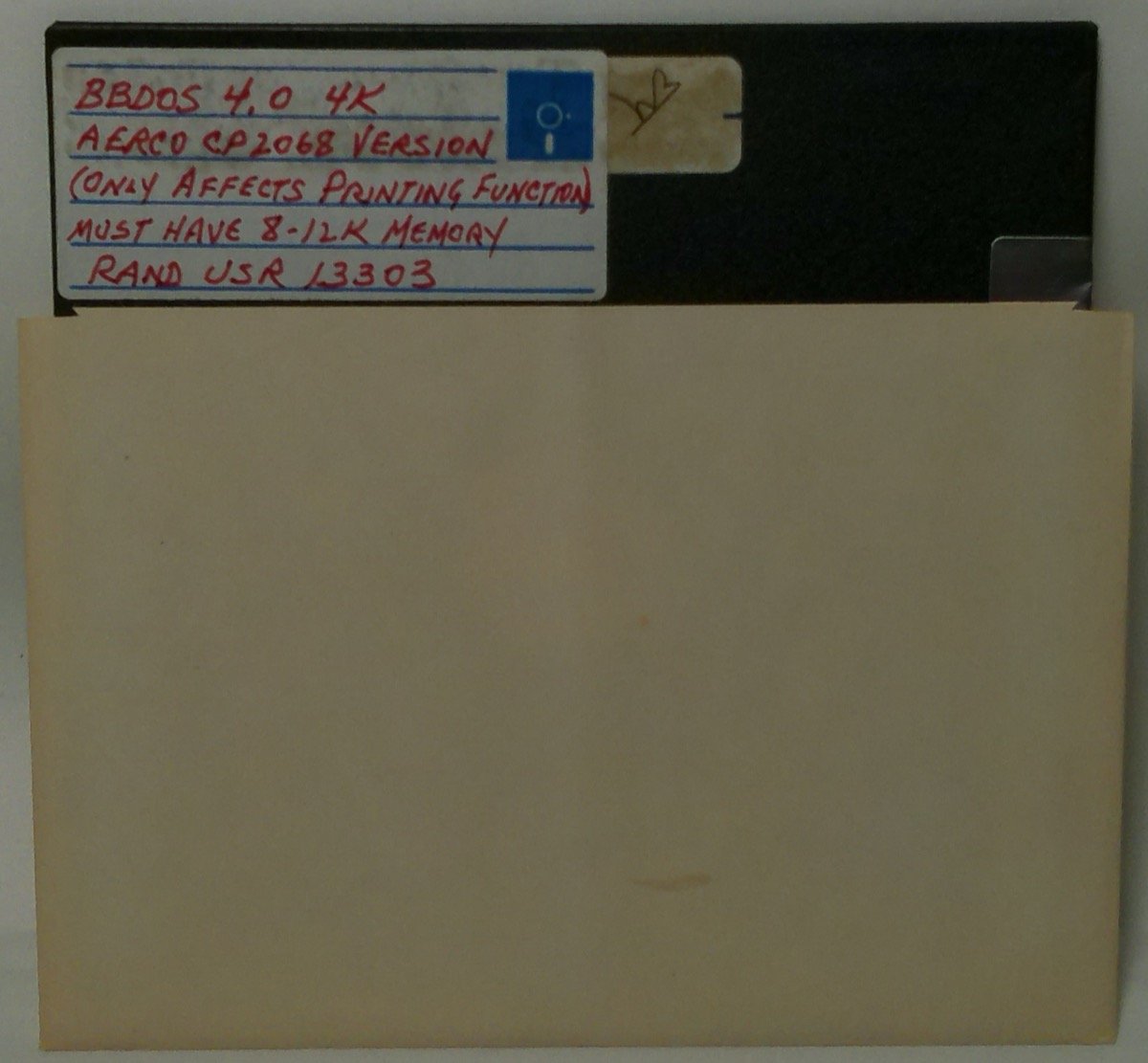
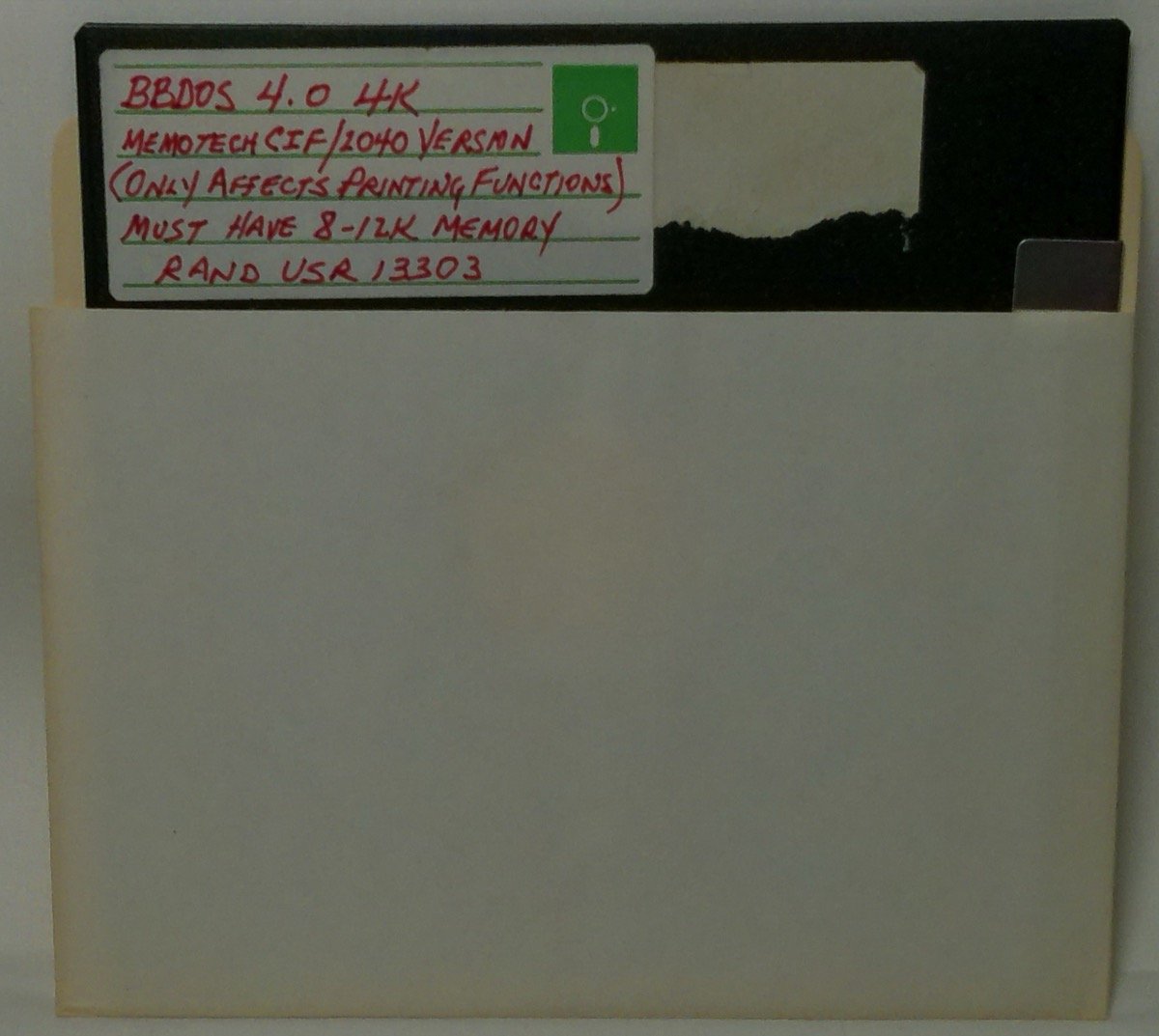
This copy comes from two BBDOS 4.0 “4K” distribution disks. One is labelled “AERCO CP2068 VERSION” (version code A2, DISK NO. 002) and the other “MEMOTECH CIF/2040 VERSION” (M2, DISK NO. 001). Both labels add “ONLY AFFECTS PRINTING FUNCTION / MUST HAVE 8-12K MEMORY / RAND USR 13303”. Line 4 of the loader reads “BBDOS 4.0 AERCO/DS/40/4K COPYRIGHT 1986 BILL BELL” on the first disk and “BBDOS 4.0 MTECH/DS/40/4K” on the second, giving the printer interface, double-sided disks and 40 tracks. The HELP1 file credits Fred Nachbaur for the printer interface driver. Except in the Memotech and Timex 2040 versions, this is a modified copy of his “UPD” from SyncWare News.
What’s in the download
HELP1-BBDOSandHELP2-BBDOS: Bill Bell’s documentation, as BASIC programs that show it on screen or send it to the printer. Part 1 covers the commands, the memory map and the directory format. Part 2 covers theRAND USR 12000functions.HELP3-LO/HI HZ2: notes on the BBDOS builds of Ray Kingsley’s Hot-Z II.HELP4-VF: notes on the BBDOS build of VU-File. The four HELP programs are the same on both disks, and they need BBDOS running to show their text.- One folder per version (A2 AERCO CP2068 and M2 Memotech CIF/Timex 2040). Each holds the BBDOS loader as a
.pfile, the full 20,480-byte page 1 as it is on the disk (page1_full.bin, a memory image that loads at 16393), the LO and HI HZ2 builds of Hot-Z II 64K, and the complete disk image. The HI build needs the M1 NOT modification. In Hot-Z, FUNCTION A and B load and save on disk, and SHIFT Q exits to BBDOS. - A README that explains the FD-ZX disk and page format.
The two disks also held BBDOS builds of Memotext V3, ZX Pro/File 40K and VU-File. These were added to the downloads for MemoText V3C-J, ZX Profile and VU-File. A BBDOS adaptation of the T/S-1500 Biorhythm Monitor is archived on its own. The games on the disks, Mazogs, Flight Simulator, Gulp and Pinball, match copies already on the site and are not included.
Program Analysis
Page format and loading
The FD-ZX stores memory images in numbered pages. A 16K page is four tracks on one side of the disk (20,480 bytes) and holds memory from address 16393 onward, so it begins exactly like a .p file. A 64K page is three 16K pages in a row. Page 1 holds BBDOS. Its BASIC is a line 0 REM holding the DOS code, then RAND USR 16514 and STOP. When the AERCO ROM loads page 1, BBDOS copies its code to 8K, sum-checks it (“DISK ERROR” if the RAM is missing or faulty), sets RAMTOP to 64K and does a NEW. It then reads the directory and the overlay from disk, loads the autoload program if one is set, and otherwise shows the directory. The directory is a 32-byte header and twenty 24-byte entries in side 0, track 3, sector 1, with a backup copy in sector 2. Each entry has flags for 16K or 64K, free or in use, and program or variables.
Versions
The two disks differ only in printer support: the loader code, the Hot-Z builds and the printer-specific application builds. In the A2 version, BBDOS handles printing for every interface. The Memotech and Timex 2040 version leaves printing from BASIC to the old methods, and only the 24-line screen copy (Z=12) goes through BBDOS.
Notable Techniques
- All of the disk functions can be called from BASIC by setting
ZandZ$beforeRAND USR 12000. BBDOS finds the two variables in the program’s variable area itself and writes the results back. - A program saved with
Z=3restarts at the line after the call when it is loaded, just like a BASICSAVEline. HELP2 tells you to test forZ=3as well asZ=0for this reason. - The Hot-Z builds keep their code in the variables area and have no BASIC lines, so BBDOS loads them as data pages.
Potential Issues
- The BBDOS general information sheet warns that older AERCO ROMs hang when formatting at 64K (
PRINT PEEK 13419gives 240 on the old ROM and 244 on the fixed one), and gives another way to format disks. - The disk images also hold leftover data in unused areas: parts of a BBDOS printer-interface selection program and a “4K VERSION MEMORY MAP” text. These are not in the directory.
The files came from two AERCO FD-ZX disks in Joe’s collection, read with a new reader for FD-ZX disk images. BBDOS has not been tested, because it needs the AERCO interface. The listings were checked, and in ZEsarUX the help programs did not get past their first BBDOS call.
Image Gallery
Note: Type-in program listings on this website use ZMAKEBAS notation for graphics characters.