
Tracks a household budget across twelve months in up to 40 categories that you name. You set budget amounts for each category, either one figure for every month, one month at a time, or month by month for each category. Spending is entered as it happens and added to a running total for each category. Reports show budget against spending for a month, only the categories that went over budget (with the total overspend), month and year-to-date totals, and the average monthly spend over any range of months. All figures are kept in BASIC variables, so the data is saved by saving the program to tape, and the program must be restarted with GOTO 10, not RUN.
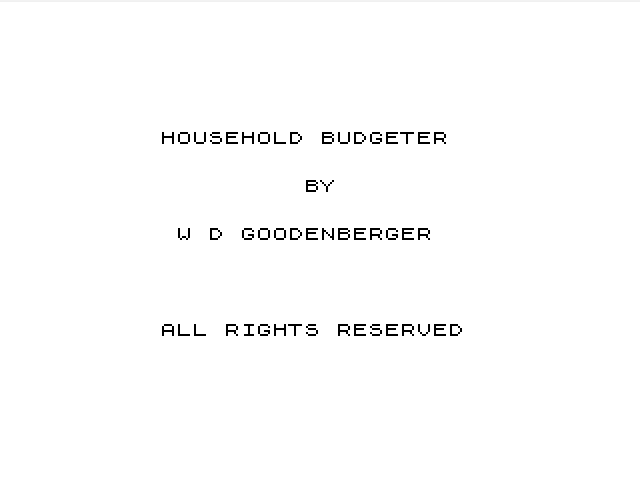
Budget Master 1000 was sold by HES (Human Engineered Software) as product T601, ©1982 HES, with a requirement for a 16K RAM pack. The on-screen title reads "HOUSEHOLD BUDGETER BY W D GOODENBERGER, ALL RIGHTS RESERVED". A scan of the printed instructions is included. They describe the six menu sections, warn against typing RUN, and give optional lines to add that pause the scrolling reports every 18 lines and remove the FAST/SLOW switching in the category display. This copy is on a cassette with a handwritten label and holds three recordings of the same listing.
Program Analysis
Program Structure
- Lines 10–190: the title screen and main menu. A menu choice
Dis sent toGOTO D*1000. - Lines 1000–1150: enter spending, added into
E(month,category). - Lines 2000–2850: monthly totals, or over-budget items only. A category counts as over budget when
C(K,A)+.009<E(K,A). If nothing is over budget the screen shows "CONGRATULATIONS – NO OVERBUDGET ITEMS ****(YOU GET A STAR)". - Lines 3000–3270: the current month’s totals beside year-to-date totals.
- Lines 4000–4310: average monthly spending between two chosen months, rounded to cents.
- Lines 5000–5960: budget entry by category (the same for all months), by month, or one amount at a time, into
C(month,category). - Lines 6000–6220: create a new set of categories (re-dimensioning
C$,CandE, which clears all figures) or rename existing ones. - Line 8000: shows the categories in two columns. Line 9000: month names. Lines 9500 and 9600:
SAVE "BUDGET"entry points that start the program again without clearing data.
Notable Techniques
- Reports print every line at row 20 and then
SCROLL, so lists longer than the screen roll upwards with the column headings at the top. - The
+.009margin in the over-budget test stops floating-point rounding from flagging categories that are exactly on budget. - Restart lines 9510 (
GOTO 50) and 9650 (GOTO 1, which carries on at the first line, 10) keep the arrays, whichRUNwould clear. - Odd and even category numbers are placed in the left and right screen columns by testing
KK/2=INT (KK/2).
Potential Issues
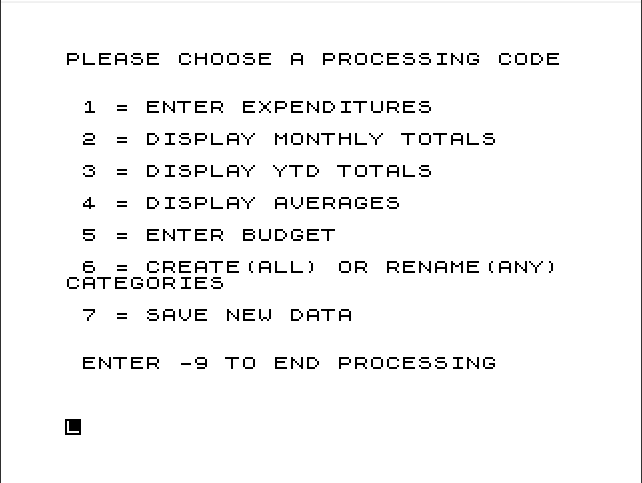
- The menu lists "7 = SAVE NEWDATA", but line 170 rejects any choice above 6 and there is no line 7000, so the option does nothing. Saving has to be done by hand with
GOTO 9500, or bySAVE. The printed manual lists only six sections, so this menu line may have been added to this copy. - After the monthly totals report, answering N jumps to line 2900, which does not exist, so the program carries on into the year-to-date section at 3000.
- The over-budget report and several other prompts only accept Y and loop until it is typed.
- On a first run, choosing anything except section 6 fails because
Hand the arrays have not been set up yet. The manual says to start with section 6.
Image Gallery

Source Code
  10 REM "BUDGET"
  20 PRINT AT 5,6;"HOUSEHOLD BUDGETER",,,,,TAB 15;"BY",,,,,TAB 7;"W D GOODENBERGER",,,,,,,,,,TAB 6;"ALL RIGHTS RESERVED"
  25 PAUSE 250
  30 SLOW
  50 CLS
  60 GOSUB 9000
  70 PRINT "PLEASE CHOOSE A PROCESSING CODE"
  80 PRINT AT 3,1;"1 = ENTER EXPENDITURES"
  90 PRINT AT 5,1;"2 = DISPLAY MONTHLY TOTALS"
 100 PRINT AT 7,1;"3 = DISPLAY YTD TOTALS"
 110 PRINT AT 9,1;"4 = DISPLAY AVERAGES"
 120 PRINT AT 11,1;"5 = ENTER BUDGET"
 130 PRINT AT 13,1;"6 = CREATE(ALL) OR RENAME(ANY) CATEGORIES"
 135 PRINT AT 16,1;"7 = SAVE  NEWDATA"
 140 PRINT AT 19,1;"ENTER -9 TO END PROCESSING"
 150 INPUT D
 160 IF D=-9 THEN GOTO 190
 170 IF D<1 OR D>6 THEN GOTO 150
 180 GOTO D*1000
 190 STOP
1000 CLS
1010 PRINT AT 5,0;"ENTER NUMBER OF MONTH TO UPDATE (JAN=1)"
1020 INPUT F
1030 GOSUB 8000
1040 PRINT AT 20,0;"ENTER CATEGORY NUMBER FOR MONTH OF ";M$(F);". (-9 TO END)             "
1050 INPUT G
1060 IF G=-9 THEN GOTO 30
1070 IF G<1 OR G>H THEN GOTO 1150
1080 PRINT AT 20,0;"ENTER AMOUNT FOR ";M$(F);". ";C$(G);"EXPENDITURE.                    "
1090 INPUT I
1100 LET E(F,G)=E(F,G)+I
1110 PRINT AT 20,0;"                                "
1120 PRINT AT 20,0;C$(G);" EXPENSE IS: $";I
1130 PRINT AT 21,0;"CATEGORY TOTAL IS: $";E(F,G)
1140 PAUSE 200
1150 GOTO 1040
2000 CLS
2010 PRINT AT 3,0;"CHOOSE A DISPLAY PROCESS:"
2020 PRINT AT 8,0;"1 = DISPLAY MONTHLY TOTALS"
2030 PRINT AT 11,0;"2 = DISPLAY OVERBUDGET ITEMS"
2040 PRINT AT 17,0;"ENTER -9 TO END THIS PROCESS"
2050 INPUT J
2060 IF J=-9 THEN GOTO 30
2070 IF J<1 OR J>2 THEN GOTO 2050
2080 CLS
2090 PRINT AT 10,0;"ENTER MONTH TO BE PROCESSED     (JAN = 1)"
2100 INPUT K
2120 IF J=2 THEN GOTO 2500
2130 CLS
2140 PRINT AT 18,14;M$(K)
2150 PRINT AT 20,0;"CATEGORY   BUDGET AMT  AMT SPENT"
2160 LET L=0
2170 LET M=0
2180 FOR A=1 TO H
2190 SCROLL
2200 PRINT AT 20,0;C$(A);TAB 12;"$";C(K,A);TAB 22;"$";E(K,A)
2210 LET L=L+C(K,A)
2220 LET M=M+E(K,A)
2230 NEXT A
2240 SCROLL
2250 SCROLL
2260 PRINT AT 20,0;"TOTALS:";TAB 12;"$";L;TAB 22;"$";M
2270 SCROLL
2280 PRINT AT 21,0;"READY TO CONTINUE? (Y/N)"
2290 INPUT X$
2300 IF X$="Y" THEN GOTO 2000
2310 GOTO 2900
2500 CLS
2510 LET N=0
2520 PRINT AT 20,0;"CATEGORY   BUDGET AMT  AMT SPENT"
2530 PRINT AT 18,15;M$(K)
2550 LET O=0
2560 LET P=0
2570 FOR A=1 TO H
2580 IF C(K,A)+.009<E(K,A) THEN SCROLL
2590 IF C(K,A)+.009<E(K,A) THEN PRINT AT 20,0;C$(A);TAB 12;"$";C(K,A);TAB 22;"$";E(K,A)
2600 IF C(K,A)+.009<E(K,A) THEN LET O=O+C(K,A)
2610 IF C(K,A)+.009<E(K,A) THEN LET P=P+E(K,A)
2620 IF C(K,A)+.009<E(K,A) THEN LET N=N+1
2630 NEXT A
2640 IF N=0 THEN GOTO 2800
2650 SCROLL
2660 SCROLL
2670 LET Q=INT (((P-O)*100)+.5)/100
2690 PRINT AT 20,0;"TOTAL OVERBUDGET IS: $";Q
2700 SCROLL
2710 PRINT AT 21,0;"READY TO CONTINUE? (Y/N)"
2720 INPUT Y$
2730 IF Y$="Y" THEN GOTO 2000
2740 GOTO 2720
2800 CLS
2810 PRINT AT 10,0;"CONGRATULATIONS - NO OVERBUDGET ITEMS ****(YOU GET A STAR)"
2820 PRINT AT 20,0;"        READY TO CONTINUE? (Y/N)"
2830 INPUT A$
2840 IF A$="Y" THEN GOTO 2000
2850 GOTO 2830
3000 CLS
3010 PRINT AT 10,0;"CURRENT MONTH?(JAN=1 -9 TO STOP)"
3020 INPUT R
3030 IF R=-9 THEN GOTO 30
3040 IF R<1 OR R>12 THEN GOTO 3020
3050 CLS
3060 PRINT AT 18,7;"YTD THROUGH ";M$(R);"."
3070 PRINT AT 20,0;"CATEGORY   MNTH TOTAL  YTD TOTAL"
3080 LET S=0
3090 LET T=0
3100 FOR A=1 TO H
3110 LET U=0
3120 FOR B=1 TO R
3130 LET U=U+E(B,A)
3140 NEXT B
3150 SCROLL
3160 PRINT AT 20,0;C$(A);TAB 12;"$";E(R,A);TAB 22;"$";U
3170 LET T=T+U
3180 LET S=S+E(R,A)
3190 NEXT A
3200 SCROLL
3210 SCROLL
3220 PRINT AT 20,0;"TOTALS:";TAB 12;"$";S;TAB 22;"$";T
3230 SCROLL
3240 PRINT AT 21,0;"READY TO CONTINUE? (Y/N)"
3250 INPUT Z$
3260 IF Z$="Y" THEN GOTO 30
3270 GOTO 3250
4000 CLS
4010 PRINT "ENTER NUMBER OF MONTH TO START  AVERAGING(JAN = 1,-9 TO STOP)"
4020 INPUT V
4030 IF V=-9 THEN GOTO 30
4040 IF V<1 OR V>12 THEN GOTO 4020
4050 CLS
4060 PRINT "ENTER NUMBER OF MONTH TO END    AVERAGING (JAN=1)"
4070 INPUT W
4080 IF W<1 OR W>12 THEN GOTO 4070
4090 CLS
4100 PRINT AT 18,3;"AVERAGE FROM ";M$(V);". TO ";M$(W);"."
4110 PRINT AT 20,0;"CATEGORY         AVG MONTHLY EXP"
4120 LET X=0
4130 FOR A=1 TO H
4140 LET Y=0
4150 FOR B=V TO W
4160 LET Y=Y+E(B,A)
4170 NEXT B
4180 SCROLL
4190 PRINT AT 20,0;C$(A)
4200 LET Z=INT (100*((Y/((W+1)-V))+.005))
4210 PRINT AT 20,0;C$(A);TAB 17;"$";Z/100
4220 LET X=X+Z/100
4230 NEXT A
4240 SCROLL
4250 SCROLL
4260 PRINT AT 20,0;"AVG. PER MONTH";TAB 17;"$";X
4270 SCROLL
4280 PRINT AT 21,0;"READY TO CONTINUE? (Y/N)"
4290 INPUT Q$
4300 IF Q$="Y" THEN GOTO 30
4310 GOTO 4290
5000 CLS
5010 PRINT AT 2,0;"PLEASE CHOOSE ONE:"
5020 PRINT AT 5,0;"1 = ENTER BUDGET FOR 1 CATEGORY (ALL MONTHS THE SAME)"
5030 PRINT AT 8,0;"2 = ENTER BUDGET FOR 1 MONTH    (ANY OR ALL CATEGORIES)"
5040 PRINT AT 11,0;"3 = ENTER INDIVIDUAL BUDGET A-  MOUNTS (ANY MONTH OR CATEGORY)"
5050 PRINT AT 17,0;"ENTER -9 TO STOP"
5060 INPUT AA
5070 IF AA=-9 THEN GOTO 30
5080 IF AA<1 OR AA>3 THEN GOTO 5060
5090 IF AA=1 THEN GOTO 5500
5100 IF AA=2 THEN GOTO 5800
5110 GOSUB 8000
5120 PRINT AT 20,0;"ENTER NUMBER OF MONTH TO BE BUD-GETED (JAN =1),(-9 TO STOP)     "
5130 INPUT BB
5140 IF BB=-9 THEN GOTO 30
5150 IF BB>12 THEN GOTO 5130
5160 PRINT AT 20,0;"ENTER CATEGORY NUMBER TO BE BUD-GETED FOR ";M$(BB);".              "
5170 INPUT CC
5180 PRINT AT 20,0;"ENTER THE BUDGET AMOUNT FOR THE ";M$(BB);". ";C$(CC);" CATEGORY     "
5190 INPUT DD
5200 PRINT AT 20,0;"BUDGET AMOUNT FOR THE ";C$(CC);"CATEGORY IN ";M$(BB);". IS $";DD
5210 PAUSE 400
5220 LET C(BB,CC)=DD
5230 GOTO 5120
5500 CLS
5510 GOSUB 8000
5520 PRINT AT 20,0;"ENTER STATIC BUDGET CATEGORY    NUMBER (-9 TO END)"
5530 INPUT EE
5540 IF EE=-9 THEN GOTO 5000
5550 IF EE<1 OR EE>H THEN GOTO 5530
5560 PRINT AT 20,0;"ENTER BUDGET AMOUNT                               "
5570 INPUT FF
5580 FOR A=1 TO 12
5590 LET C(A,EE)=FF
5600 NEXT A
5610 PRINT AT 20,0;"THE BUDGET FOR THE ";C$(EE);"   "
5620 PRINT AT 21,0;"CATEGORY IS $";FF
5630 PAUSE 200
5640 PRINT AT 21,0;"                               "
5650 GOTO 5520
5800 CLS
5810 PRINT AT 1,0;"WHAT MONTH TO BUDGET? (1 = JAN.)"
5820 INPUT GG
5830 CLS
5840 GOSUB 8000
5850 PRINT AT 20,0;" ENTER CATEGORY NO.(-9 TO STOP)"
5860 INPUT HH
5870 IF HH=-9 THEN GOTO 5000
5880 IF HH<1 OR HH>H THEN GOTO 5860
5890 PRINT AT 20,0;" ENTER BUDGET AMOUNT           "
5900 INPUT II
5910 LET C(GG,HH)=II
5920 PRINT AT 20,0;"$";C(GG,HH);" IS THE BUDGET AMOUNT"
5930 PRINT AT 21,0;"FOR ";M$(GG);"*S ";C$(HH);" CATEGORY"
5940 PAUSE 130
5950 PRINT AT 21,0;"                               "
5960 GOTO 5850
6000 CLS
6020 PRINT AT 2,1;"ENTER ONE:",,,," 1. ENTER ALL NEW CATEGORIES AND NAMES"
6030 PRINT AT 7,1;"2. CHANGE CATEGORY NAMES ONLY"
6040 INPUT JJ
6050 IF JJ>2 OR JJ<1 THEN GOTO 6040
6060 IF JJ=2 THEN GOTO 6140
6070 CLS
6080 PRINT AT 2,0;"HOW MANY CATEGORIES DO YOU WANT? (40 MAXIMUM)"
6090 INPUT H
6100 IF H>40 THEN GOTO 6090
6110 DIM C$(H,10)
6120 DIM C(12,H)
6130 DIM E(12,H)
6140 GOSUB 8000
6150 PRINT AT 20,0;"ENTER CATEGORY NO. TO BE NAMED  OR CHANGED (-9 TO END)"
6160 INPUT KK
6170 IF KK=-9 THEN GOTO 30
6180 PRINT AT 20,0;"ENTER CATEGORY NAME (10 OR FEWER DIGITS OR LETTERS)   "
6190 INPUT C$(KK)
6200 IF KK/2<>INT (KK/2) THEN PRINT AT (KK-1)/2,0;KK;" = ";C$(KK)
6210 IF KK/2=INT (KK/2) THEN PRINT AT (KK-2)/2,16;KK;" = ";C$(KK)
6220 GOTO 6150
8000 CLS
8010 FAST
8020 FOR A=0 TO H-1
8030 IF A/2=INT (A/2) THEN PRINT AT A/2,0;A+1;" = ";C$(A+1)
8040 IF A/2<>INT (A/2) THEN PRINT AT (A-1)/2,16;A+1;" = ";C$(A+1)
8050 NEXT A
8060 SLOW
8070 RETURN
9000 DIM M$(12,3)
9010 LET M$(1)="JAN"
9020 LET M$(2)="FEB"
9030 LET M$(3)="MAR"
9040 LET M$(4)="APR"
9050 LET M$(6)="JUN"
9060 LET M$(5)="MAY"
9070 LET M$(7)="JUL"
9080 LET M$(8)="AUG"
9090 LET M$(9)="SEP"
9100 LET M$(10)="OCT"
9110 LET M$(11)="NOV"
9120 LET M$(12)="DEC"
9130 RETURN
9500 SAVE "BUDGE[T]"
9510 GOTO 50
9600 SAVE "BUDGE[T]"
9650 GOTO 1
Note: Type-in program listings on this website use ZMAKEBAS notation for graphics characters.