
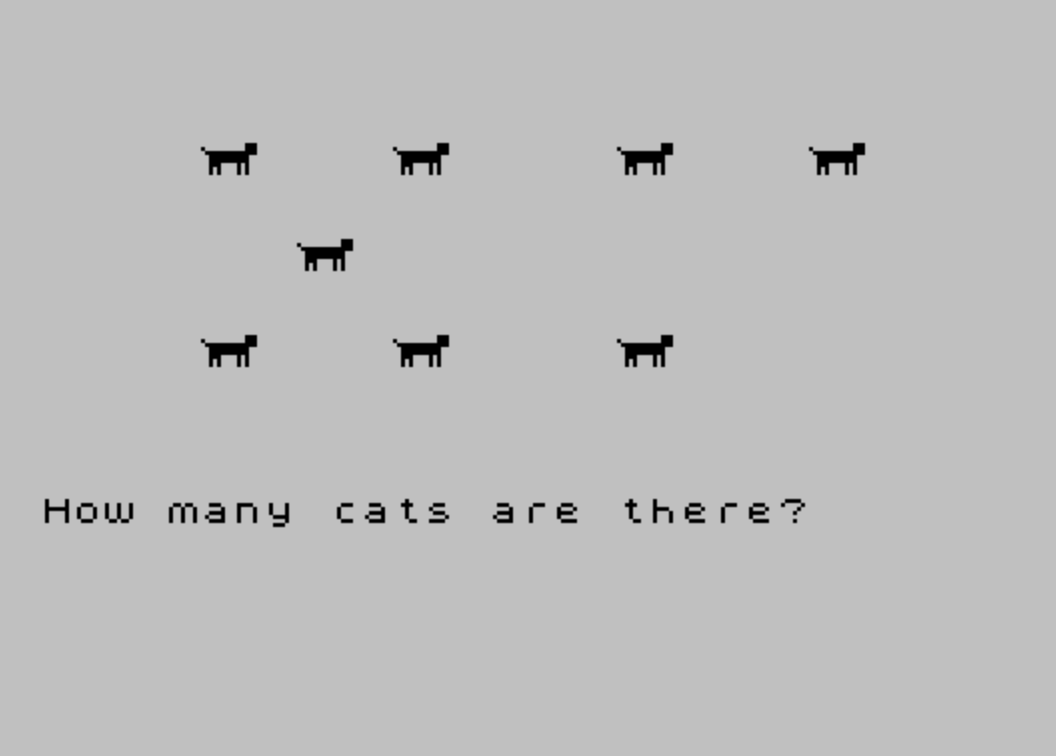
Cats and Trucks is a counting educational game that randomly selects one of three object types — tanks, cats, or trucks — and displays a random quantity (1–9) of that object on screen, then asks the child to count and type the correct number. Each object is rendered using two user-defined graphics characters (UDGs “a” and “b”), whose pixel data is loaded from DATA statements via POKE USR at runtime, giving each object a distinct two-character sprite. If the answer is wrong, a correction sequence replays the objects one by one with a BEEP tone and a printed number beside each, teaching the child to count sequentially. A correct answer triggers a rising-pitch BEEP fanfare using a quadratic frequency sweep.
Program Structure
The program is organized into a clear loop: select and define an object, display a random count of it, accept a single keypress answer, then either praise or correct before cycling back. The main flow runs from line 10 to 310, with a subroutine at 330–350 for single-keypress input and DATA blocks from line 360 onward.
- Lines 10–70: Clear screen, randomly choose one of three object types from DATA, and load two UDG character definitions (UDGs “a” and “b”) via
POKE USR. - Lines 80–130: Pick a random count (1–9), RESTORE to the position/coordinate DATA at line
400, and print that many two-character UDG sprites at predetermined screen positions. - Lines 140–160: Accept a keypress, validate it as a digit (
CODE i$in range 48–57), and branch on correctness. - Lines 170–230: Correction sequence: re-reads positions and prints a PAPER 6 digit beside each object, accompanied by a BEEP of increasing pitch.
- Lines 240–270: Praise branch: prints “Good.”, flashes the correct count with FLASH 1, plays a quadratic-sweep fanfare.
- Lines 280–310: Wait for ENTER keypress, then restart.
UDG Sprite Loading
Lines 30–70 use RESTORE with a computed line number (360 + 10*(1 + INT(RND*3))) to jump directly into one of three DATA records. Each record contains the object name string, then two single-character UDG identifiers ("a" and "b") each followed by 8 bytes of pixel data. The inner loop at line 60 uses POKE USR s$+m,a to write each byte into the UDG table, redefining both characters before any sprites are displayed. This technique keeps the sprite data neatly within DATA statements and makes adding new object types straightforward.
Fixed Sprite Positions
Rather than generating random screen coordinates, the program stores up to nine fixed (row, column) pairs in the DATA block at line 400. The loop at lines 110–120 reads exactly z pairs and prints "\\a\\b" (the two UDG characters side by side) at each position. This guarantees objects never overlap and always appear in a visually sensible arrangement regardless of the randomly chosen count.
Key BASIC Idioms
- Single-keypress subroutine (lines 330–350): Line
330drains any held key, line340waits for a new press, and line350captures it. This is the standard debounced INKEY$ pattern. - Digit validation via CODE:
CODE i$<48 OR CODE i$>57at line150restricts input to numeric digits without needing a numeric array or VAL conversion for the comparison — the answer is compared directly as a string usingSTR$ z. - Computed RESTORE:
RESTORE 360+10*(1+INT(RND*3))evaluates to 370, 380, or 390, one for each object type. This avoids a separate look-up table or IF/THEN chain. - PRINT AT x,y-1 for correction labels: Printing the count digit one column to the left of the sprite’s x-coordinate keeps the label visually adjacent without overwriting the UDG sprite itself.
Audio Design
Two distinct audio effects are used. The correction sequence at line 220 plays BEEP 1,n for each object, producing an ascending note scale that reinforces counting by associating each item with a higher pitch. The praise fanfare at line 260 iterates m from 0 to 4 in steps of 0.1 and plays BEEP 0.02,m*m, generating a rapid quadratic pitch sweep that creates a celebratory rising-trill effect, followed by a sustained final note at semitone 20.
Anomalies and Notes
- Line
130asks “How manyn$are there?” using the object name read from DATA (e.g., “tanks”, “cats”, “trucks”). Since only one of the three names is read at line30and stored inn$, this displays correctly. - The correction branch (line
180) usesPRINT AT 15,0,,— the double comma clears to the end of the line, erasing the question text before the correction animation begins. - Line
410contains aSTOPstatement acting as a DATA guard to prevent the interpreter from falling through into the DATA lines after aGO TO 20restart accidentally re-enters that area — though in normal execution flow this line is never reached. - The SAVE command at line
420contains a typo in the filename (“Cats&Truks” instead of “Cats&Trucks”), which does not affect runtime behavior.
Image Gallery
Source Code
  10 CLS
  20 REM \{20}\{1} CHOOSE AND FORM OBJECT\{20}\{0}
  30 RESTORE 360+10*(1+ INT (RND*3)):READ n$
  40 FOR n=1 TO 2:READ s$
  50 FOR m=0 TO 7
  60 READ a:POKE USR s$+m,a
  70 NEXT m:NEXT n
  80 REM \{20}\{1} PRINT RND # OF OBJECT \{20}\{0}
  90 LET z=1+ INT (RND*9)
 100 RESTORE 400
 110 FOR n=1 TO z
 120 READ x,y:PRINT AT x,y;"\a\b":NEXT n
 130 PRINT AT 15,0;"How many ";n$;" are there?"
 140 GO SUB 330
 150 IF CODE i$<48 OR CODE i$>57 THEN GO TO 140
 160 IF i$= STR$ z THEN GO TO 250
 170 REM \{20}\{1} CORRECTION SEQUENCE \{20}\{0}
 180 PRINT AT 15,0,,:RESTORE 400
 190 FOR n=1 TO z
 200 READ x,y
 210 PRINT AT x,y-1; PAPER 6;n
 220 BEEP 1,n:NEXT n
 230 GO TO 280
 240 REM \{20}\{1} PRAISE \{20}\{0}
 250 PRINT AT 15,0;"Good.",,:PRINT AT 7,0; FLASH 1;z
 260 FOR m=0 TO 4 STEP .1:BEEP 0.02,m*m:NEXT m:BEEP 1,20
 270 PRINT AT 7,0;z
 280 PRINT AT 21,0;"Press ENTER"
 290 GO SUB 330
 300 IF CODE i$ <>13 THEN GO TO 290
 310 CLS :GO TO 20
 320 REM \{20}\{1} SINGLE KEYINPUT \{20}\{0}
 330 IF INKEY$ <>"" THEN GO TO 330
 340 IF INKEY$="" THEN GO TO 340
 350 LET i$= INKEY$:RETURN
 360 REM \{20}\{1} DATA \{20}\{0}
 370 DATA "tanks","a",7,15,7,255,255,127,63,27,"b",192,254,192,255,255,255,254,108
 380 DATA "cats","a",0,128,127,63,63,56,40,40,"b",28,28,252,240,240,80,80,80
 390 DATA "trucks","a",0,0,0,255,255,255,255,48,"b",28,30,30,255,255,255,255,12
 400 DATA 4,5,10,5,4,11,10,11,7,8,4,18,10,18,4,24,10,24
 410 STOP
 420 SAVE "Cats&Truks" LINE 1
Note: Type-in program listings on this website use ZMAKEBAS notation for graphics characters.